# step-flow-wizard
> An intelligent step workflow wizard for React
Latest version **1.0.12** (published 2022-05-11) · MIT license · 0 weekly downloads
> **Deprecated.** This package is deprecated.
## Install
```sh
npm install step-flow-wizard
pnpm add step-flow-wizard
yarn add step-flow-wizard
bun add step-flow-wizard
```
## Health
**Score 10/100 (F)** — status: deprecated.
Negative: deprecated.
## Facts
| | |
|---|---|
| Version | 1.0.12 |
| Published | 2022-05-11 |
| First published | 2022-04-18 |
| Weekly downloads | 0 |
| License | MIT |
| TypeScript types | none |
| Module format | CommonJS |
| Dependencies | 0 |
| Unpacked size | 23.6 KB |
| Known vulnerabilities | 0 |
| Install scripts | no |
| GitHub stars | 3 |
| Author | Anoop Devadiga |
| Maintainers | adevadiga |
| Keywords | react, react-step-wizard, react-multistep-wizard, multistep, wizard, react-wizard, workflow |
## Links
- npm: https://www.npmjs.com/package/step-flow-wizard
- Repository: https://github.com/adevadiga/step-flow-wizard
- Homepage: http://adevadiga.github.io/step-flow-wizard
- Issues: https://github.com/adevadiga/step-flow-wizard/issues
- npm.io page: https://npm.io/package/step-flow-wizard
## Alternatives
- [mobx-react](https://npm.io/package/mobx-react.md) — 2.8M weekly downloads
- [rc-tree](https://npm.io/package/rc-tree.md) — 2.6M weekly downloads
- [@react-oauth/google](https://npm.io/package/@react-oauth/google.md) — 1.3M weekly downloads
- [@wagmi/connectors](https://npm.io/package/@wagmi/connectors.md) — 877.0K weekly downloads
- [vee-validate](https://npm.io/package/vee-validate.md) — 836.4K weekly downloads
## Recent versions
- 1.0.12 (latest) — 2022-05-11
- 1.0.11 — 2022-04-29
- 1.0.10 — 2022-04-29
- 1.0.9 — 2022-04-23
- 1.0.8 — 2022-04-19
- 1.0.7 — 2022-04-19
- 1.0.6 — 2022-04-18
- 1.0.4 — 2022-04-18
- 1.0.3 — 2022-04-18
- 1.0.2 — 2022-04-18
- 1.0.1 — 2022-04-18
- 1.0.0 — 2022-04-18
## README
# step-flow-wizard
An intelligent multistep wizard for React
[](https://badge.fury.io/js/step-flow-wizard)
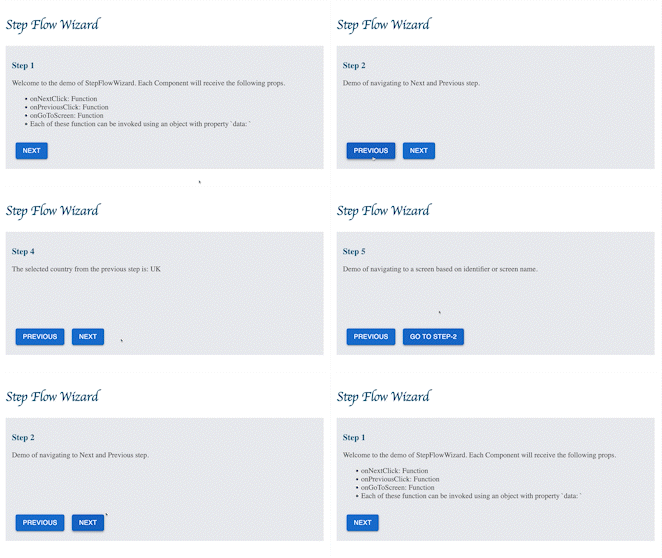
### Demo
[Storybook](http://adevadiga.github.io/step-flow-wizard)
[Try it out](https://codesandbox.io/s/step-flow-wizard-fnr71e?file=/src/App.js)
### Installation
```
npm install step-flow-wizard
yarn add step-flow-wizard
```
### Quick Start
#### Import
```js
import StepFlowWizard from "step-flow-wizard";
```
#### JSX
Create an array elements describing the components that make an individual step in the workflow.
Each component will receive props which help to move forward or backward in the wizard.
See the Props section for more detail on the props.
```jsx
const screens = [
{
identifier: 'step1',
component: (props) => {
const { onNextClick } = props;
return (
<>
// render something
):
},
// Any additional params you want to configure in the config file.
params: {
product: 'xxx',
}
},
{
identifier: 'step2',
component: (props) => {
const { onPreviousClick, onNextClick } = props;
return (
<>
// render something
):
},
shouldRender: ({ region }) => {
// Show this step only for US region
return region !== 'US';
}
},
{
identifier: 'step3',
component: (props) => {
const { onPreviousClick, onNextClick } = props;
return (
<>
// render something
):
},
},
{
identifier: 'step4',
component: (props) => {
const { onPreviousClick, onNextClick } = props;
return (
<>
// render something
):
},
shouldRender: ({ age }) => {
// Do not show this screen for minors.
return age > 18;
}
},
{
identifier: 'step5',
component: (props) => {
const { onPreviousClick } = props;
return (
<>
// render something
):
},
},
];
```
### Highlights
- Each individual component in the workflow will receive following props to manage the navigation in the wizard
- `onPreviousClick` - go to the previous step
- `onNextClick` - go to the next step
- `onGoToScreen` - go to a step using the step identifier
- Wizard also manages a Store where you can PUT things from any Step and GET things from any other Step.
- Wizard Store gets exposed as Props to individual component
- The navigation functions support adding things to the wizard Store
```
onNextClick({ data: {
name: 'Mr X',
age: 42,
address: {}
}})
```
- Dynamic control of skipping Step based on the config.
```
const steps = [
{
identifier: 'step1',
component: View1,
shouldRender: (props) {
const { region } = props;
//Skip this step for non US regions
return region === 'US';
}
}
...
]
```
- Configure additional parameter in the Step definition, which are passed as props to component
```
const steps = [
{
identifier: 'step1',
component: View1,
params: {
// product will be available as props
product: 'Iphone'
}
}
...
]
```
### Props
Each component in the wizard will receive the following props that help perform navigation
#### Props Accessible On Each Step Component
| Prop | Data Type | Description |
| ------------- | ---------- | ---------------------------------------------------------------------------------------- |
| onPreviousClick | `function` | Go to previous step in the workflow, `null` if previous step is not present |
| onNextClick | `function` | Go to next step in the workflow, `null` if next step is not present |
| onGoToScreen | `function` | Navigate to a step using a named identifier |
| props | `object` | StepFlowWizard also acts as a store where you can put and get things. onPreviousClick, onNextClick and onGoToScreen takes an argument of type `{ data: {foo: 'bar'} }`, which results in adding a `foo` attribute to the Store, which can be accessed as a prop from the components. |
### Author
Anoop Devadiga (anoopkundapur@gmail.com)
### Contributing
Contributions, issues and feature requests are welcome!
---
_Source: https://npm.io/package/step-flow-wizard · Machine-readable twin of the npm.io package page. Health data is recomputed on every publish._