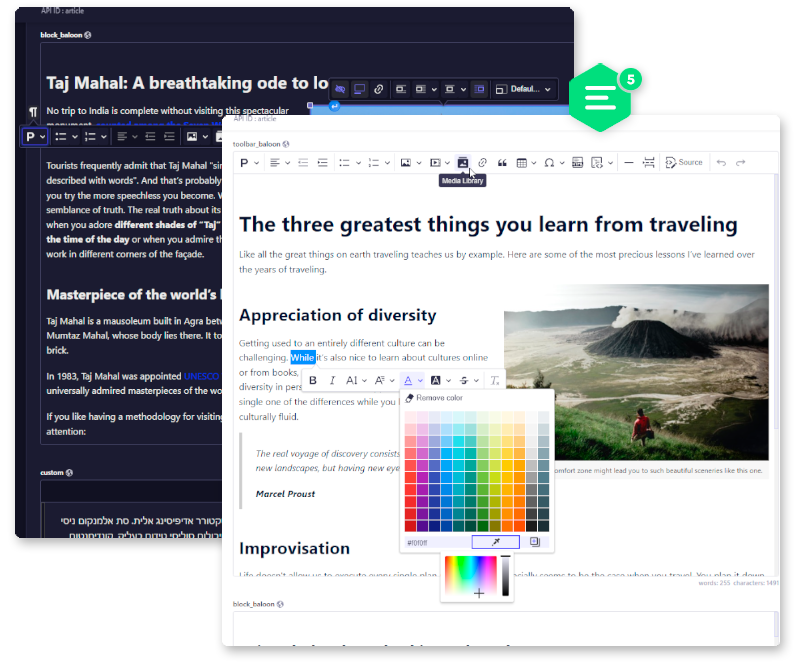
# strapi-plugin-ckeditor-video

> Integrates CKEditor 5 into your Strapi project as a fully customizable custom field. You can also insert video from Media Library. (Unofficial integration)

Latest version **0.0.5** (published 2024-05-20) · MIT license · 0 weekly downloads

## Install

```sh
npm install strapi-plugin-ckeditor-video
pnpm add strapi-plugin-ckeditor-video
yarn add strapi-plugin-ckeditor-video
bun add strapi-plugin-ckeditor-video
```

## Health

**Score 15/100 (F)** — status: abandoned.

Positive: no vulnerabilities.

Warnings: low downloads; no types; no esm support; pre 1.0.

Negative: abandoned; low maintenance score.

## Facts

| | |
|---|---|
| Version | 0.0.5 |
| Published | 2024-05-20 |
| First published | 2023-11-20 |
| Weekly downloads | 0 |
| License | MIT |
| TypeScript types | none |
| Module format | CommonJS |
| Node | >=14.19.1 <=18.x.x |
| Dependencies | 38 |
| Unpacked size | 92.5 KB |
| Known vulnerabilities | 0 (+2 in 2 direct dependencies) |
| Install scripts | no |
| GitHub stars | 2 |
| Author | hrahimi270 |
| Maintainers | hrahimi270 |
| Keywords | strapi, ckeditor, ckeditor5, ckeditor 5, wysiwyg, rich text, editor |

## Links

- npm: https://www.npmjs.com/package/strapi-plugin-ckeditor-video
- Repository: https://github.com/hrahimi270/strapi-plugin-ckeditor-video
- Issues: https://github.com/hrahimi270/strapi-plugin-ckeditor-video/issues
- npm.io page: https://npm.io/package/strapi-plugin-ckeditor-video

## Dependencies (38)

- [ckeditor5](https://npm.io/package/ckeditor5.md) ^36.0.0
- [sanitize-html](https://npm.io/package/sanitize-html.md) ^2.8.1
- [@ckeditor/ckeditor5-link](https://npm.io/package/@ckeditor/ckeditor5-link.md) ^36.0.0
- [@ckeditor/ckeditor5-list](https://npm.io/package/@ckeditor/ckeditor5-list.md) ^36.0.0
- [@ckeditor/ckeditor5-image](https://npm.io/package/@ckeditor/ckeditor5-image.md) ^36.0.0
- [@ckeditor/ckeditor5-react](https://npm.io/package/@ckeditor/ckeditor5-react.md) ^5.0.6
- [@ckeditor/ckeditor5-style](https://npm.io/package/@ckeditor/ckeditor5-style.md) ^36.0.0
- [@ckeditor/ckeditor5-table](https://npm.io/package/@ckeditor/ckeditor5-table.md) ^36.0.0
- [@ckeditor/ckeditor5-indent](https://npm.io/package/@ckeditor/ckeditor5-indent.md) ^36.0.0
- [@ckeditor/ckeditor5-typing](https://npm.io/package/@ckeditor/ckeditor5-typing.md) ^36.0.0
- [@ckeditor/ckeditor5-upload](https://npm.io/package/@ckeditor/ckeditor5-upload.md) ^36.0.0
- [@ckeditor/ckeditor5-heading](https://npm.io/package/@ckeditor/ckeditor5-heading.md) ^36.0.0
- [@ckeditor/ckeditor5-mention](https://npm.io/package/@ckeditor/ckeditor5-mention.md) ^36.0.0
- [@ckeditor/ckeditor5-autosave](https://npm.io/package/@ckeditor/ckeditor5-autosave.md) ^36.0.0
- [@ckeditor/ckeditor5-language](https://npm.io/package/@ckeditor/ckeditor5-language.md) ^36.0.0
- [@ckeditor/ckeditor5-alignment](https://npm.io/package/@ckeditor/ckeditor5-alignment.md) ^36.0.0
- [@ckeditor/ckeditor5-highlight](https://npm.io/package/@ckeditor/ckeditor5-highlight.md) ^36.0.0
- [@ckeditor/ckeditor5-paragraph](https://npm.io/package/@ckeditor/ckeditor5-paragraph.md) ^36.0.0
- [@ckeditor/ckeditor5-autoformat](https://npm.io/package/@ckeditor/ckeditor5-autoformat.md) ^36.0.0
- [@ckeditor/ckeditor5-code-block](https://npm.io/package/@ckeditor/ckeditor5-code-block.md) ^36.0.0
- [@ckeditor/ckeditor5-easy-image](https://npm.io/package/@ckeditor/ckeditor5-easy-image.md) ^36.0.0
- [@ckeditor/ckeditor5-essentials](https://npm.io/package/@ckeditor/ckeditor5-essentials.md) ^36.0.0
- [@ckeditor/ckeditor5-html-embed](https://npm.io/package/@ckeditor/ckeditor5-html-embed.md) ^36.0.0
- [@ckeditor/ckeditor5-page-break](https://npm.io/package/@ckeditor/ckeditor5-page-break.md) ^36.0.0
- [@ckeditor/ckeditor5-theme-lark](https://npm.io/package/@ckeditor/ckeditor5-theme-lark.md) ^36.0.0
- [@ckeditor/ckeditor5-word-count](https://npm.io/package/@ckeditor/ckeditor5-word-count.md) ^36.0.0
- [@_sh/ckeditor5-font-with-picker](https://npm.io/package/@_sh/ckeditor5-font-with-picker.md) ^0.0.1
- [@ckeditor/ckeditor5-block-quote](https://npm.io/package/@ckeditor/ckeditor5-block-quote.md) ^36.0.0
- [@ckeditor/ckeditor5-media-embed](https://npm.io/package/@ckeditor/ckeditor5-media-embed.md) ^36.0.0
- [@ckeditor/ckeditor5-basic-styles](https://npm.io/package/@ckeditor/ckeditor5-basic-styles.md) ^36.0.0
- [@ckeditor/ckeditor5-html-support](https://npm.io/package/@ckeditor/ckeditor5-html-support.md) ^36.0.0
- [@ckeditor/ckeditor5-remove-format](https://npm.io/package/@ckeditor/ckeditor5-remove-format.md) ^36.0.0
- [@ckeditor/ckeditor5-editor-classic](https://npm.io/package/@ckeditor/ckeditor5-editor-classic.md) ^36.0.0
- [@ckeditor/ckeditor5-source-editing](https://npm.io/package/@ckeditor/ckeditor5-source-editing.md) ^36.0.0
- [@ckeditor/ckeditor5-horizontal-line](https://npm.io/package/@ckeditor/ckeditor5-horizontal-line.md) ^36.0.0
- [@ckeditor/ckeditor5-find-and-replace](https://npm.io/package/@ckeditor/ckeditor5-find-and-replace.md) ^36.0.0
- [@ckeditor/ckeditor5-paste-from-office](https://npm.io/package/@ckeditor/ckeditor5-paste-from-office.md) ^36.0.0
- [@ckeditor/ckeditor5-special-characters](https://npm.io/package/@ckeditor/ckeditor5-special-characters.md) ^36.0.0

## Alternatives

- [ext-list](https://npm.io/package/ext-list.md) — 6.3M weekly downloads
- [@lexical/selection](https://npm.io/package/@lexical/selection.md) — 3.8M weekly downloads
- [@lexical/text](https://npm.io/package/@lexical/text.md) — 3.6M weekly downloads
- [@lexical/clipboard](https://npm.io/package/@lexical/clipboard.md) — 3.0M weekly downloads
- [@tiptap/extension-mention](https://npm.io/package/@tiptap/extension-mention.md) — 3.0M weekly downloads

## Recent versions

- 0.0.5 (latest) — 2024-05-20
- 0.0.4 — 2023-12-23
- 0.0.3 — 2023-12-23
- 0.0.2 — 2023-12-23
- 0.0.1 — 2023-11-20

## README

<p align="center">
  <img src="https://raw.githubusercontent.com/nshenderov/strapi-plugin-ckeditor/master/assets/ckeditor5_2_0.png" width="700" />
</p>

<h1 align="center">CKEditor 5 for Strapi</h1>

<p align="center">Integrates CKEditor 5 into your Strapi project as a fully customizable custom field. You can also insert video from Media Library. (Unofficial integration)</p>

## 👋 Get Started

* [Features](#features)
* [Installation](#installation)
* [Configuration](#configuration)
* [Contributing](#contributing)
* [Requirements](#requirements)

## <a id="features"></a>✨ Features

* **Media library integration (image and video)**
* **Supports responsive images**
* **Supports Strapi's theme switching with the possibility to define your own theme**
* **Supports i18n for content and user's preferred language for UI**
* **Few predefined editor configs with the possibility to add your owns**
* **Possible to add new plugins**


## <a id="installation"></a>🔧 Installation
___

* Inside your Strapi app, add the package:

```bash
npm install strapi-plugin-ckeditor-video
```

or

```bash
yarn add strapi-plugin-ckeditor-video
```

* Then run build:
```bash
npm run build
```

or
```bash
yarn build
```


## <a id="configuration"></a>⚙️ Configuration
___
The plugin is based on [**Strapi's custom fields**](https://docs.strapi.io/developer-docs/latest/development/custom-fields.html#registering-a-custom-field-on-the-server) and [**CKEditor dll build**](https://ckeditor.com/docs/ckeditor5/latest/installation/advanced/alternative-setups/dll-builds.html)

Plugin configuration should be defined in the `/config/ckeditor.txt` file.

It's highly recommended to explore [**the official ckeditor documentation**](https://ckeditor.com/docs/ckeditor5/latest/features/index.html)

Content from ckeditor.txt will be passed into a script tag through the initialization process.

> 📂 Default configs: [**admin/src/components/Input/CKEditor/configs**](https://github.com/hrahimi270/strapi-plugin-ckeditor-video/blob/master/admin/src/components/Input/CKEditor/configs)

> 📂 Default theme: [**admin/src/components/Input/CKEditor/theme**](https://github.com/hrahimi270/strapi-plugin-ckeditor-video/blob/master/admin/src/components/Input/CKEditor/theme)

**ckeditor.txt example:**

```js
globalThis.CKEditorConfig = {

    /* By default configs and theme
    objects will be spread with
    default configs and theme
    these two properties specified below
    allow you to redefine
    default objects completely: */

    //configsOverwrite:true,
    //themeOverwrite:true,

    /* Here you can redefine default configs
    or add completely new ones.
    Each config includes: 
    "styles", "field" and "editorConfig" properties.
    Property "field" is required. */

    configs:{
        toolbar:{
            // styles:``,
            // field:{},
            // editorConfig:{}
        },
        custom:{
            
            /* Styles for this specific editor.
            This will be passed into the editor's parent container. */

            styles:`
            //     --ck-focus-ring:3px dashed #5CB176;

            //     .ck.ck-content.ck-editor__editable {
            //       &.ck-focused:not(.ck-editor__nested-editable) {
            //         border: var(--ck-focus-ring) !important;
            //       }
            //     }
            //     .ck.ck-content.ck-editor__editable.ck-rounded-corners.ck-editor__editable_inline.ck-blurred{
            //       min-height: 400px;
            //       max-height: 400px;
            //     }
            //     .ck.ck-content.ck-editor__editable.ck-rounded-corners.ck-editor__editable_inline.ck-focused{
            //       min-height: 400px;
            //       max-height: 1700px;
            //     }
            `,

            /* Custom field option */
            field: {
                key: "custom",
                value: "custom",
                metadatas: {
                  intlLabel: {
                    id: "ckeditor5.preset.custom.label",
                    defaultMessage: "Custom version",
                  },
                },
            },
            /* CKEditor configuration */
            editorConfig:{
                /* All available built-in plugins
                you can find in admin/src/components/Input/CKEditor/configs/base.js */
                plugins: [
                    CKEditor5.autoformat.Autoformat,
                    CKEditor5.basicStyles.Bold,
                    CKEditor5.basicStyles.Italic,
                    CKEditor5.essentials.Essentials,
                    CKEditor5.heading.Heading,
                    CKEditor5.image.Image,
                    CKEditor5.image.ImageCaption,
                    CKEditor5.image.ImageStyle,
                    CKEditor5.image.ImageToolbar,
                    CKEditor5.image.ImageUpload,
                    CKEditor5.indent.Indent,
                    CKEditor5.link.Link,
                    CKEditor5.list.List,
                    CKEditor5.paragraph.Paragraph,
                    CKEditor5.pasteFromOffice.PasteFromOffice,
                    CKEditor5.table.Table,
                    CKEditor5.table.TableToolbar,
                    CKEditor5.table.TableColumnResize,
                    CKEditor5.table.TableCaption,
                    CKEditor5.strapiPlugins.StrapiMediaLib,
                    CKEditor5.strapiPlugins.StrapiUploadAdapter,
                  ],

                  /* By default, for plugin's UI will use
                  the language defined in this file
                  or the preferred language from strapi's user config
                  and 'en' as a fallback.
                  language.ui -> preferred language -> 'en' */

                  /* For content it will use language based on i18n (if! ignorei18n)
                  or language.content defined here
                  and it will use UI language as a fallback.
                  ignorei18n ? language.content : i18n; -> language.ui */

                  language:{
                    // ignorei18n: true,
                    // ui:'he',
                    // content:'he'
                  },
                  toolbar: [
                    'heading',
                    '|',
                    'bold', 'italic', 'link', 'bulletedList', 'numberedList',
                    '|',
                    'strapiMediaLib', 'insertTable',
                    '|',
                    'undo', 'redo'
                  ],
                  heading: {
                    options: [
                      { model: 'paragraph', title: 'Paragraph', class: 'ck-heading_paragraph' },
                      { model: 'heading1', view: 'h1', title: 'Heading 1', class: 'ck-heading_heading1' },
                      { model: 'heading2', view: 'h2', title: 'Heading 2', class: 'ck-heading_heading2' },
                      { model: 'heading3', view: 'h3', title: 'Heading 3', class: 'ck-heading_heading3' },
                      { model: 'heading4', view: 'h4', title: 'Heading 4', class: 'ck-heading_heading4' },
                    ]
                  },
                  image: {
                    toolbar: [
                      'imageStyle:inline',
                      'imageStyle:block',
                      'imageStyle:side',
                      '|',
                      'toggleImageCaption',
                      'imageTextAlternative'
                    ]
                  },
                  table: {
                    contentToolbar: [
                      'tableColumn',
                      'tableRow',
                      'mergeTableCells',
                      '|',
                      'toggleTableCaption'
                    ]
                  }
            }
        }
    },

    /* Here you can customize the plugin's theme.
    This will be passed as "createGlobalStyle". */
    theme:{
        // common:``,
        // light:``,
        // dark:``,
        // additional:``
    }

}
```

> If you use the default (local) upload provider you should specify a `url` property in the `config/server.js` in order to get the full URL on uploaded files eg:
```js
module.exports = ({ env }) => ({
  url: env("PUBLIC_URL", "http://localhost:1337"),
  host: env('HOST', '0.0.0.0'),
  port: env.int('PORT', 1337),
  app: {
    keys: env.array('APP_KEYS'),
  },
});
```

> In order to display some content from an external source on your `admin` side you should configure your middlewares.js [**check the docs about this**](https://docs.strapi.io/developer-docs/latest/setup-deployment-guides/configurations/required/middlewares.html)

## How to add plugins

___
Markdown plugin example

* Inside your app:

```js
yarn add @ckeditor/ckeditor5-markdown-gfm
```
or
```js
npm install @ckeditor/ckeditor5-markdown-gfm
```

* your-app/src/admin/**app.js**

```js
import ckeditor5Dll from "ckeditor5/build/ckeditor5-dll.js";
import ckeditor5MrkdownDll from "@ckeditor/ckeditor5-markdown-gfm/build/markdown-gfm.js";


const config = {};

const bootstrap = (app) => {};

export default {
  config,
  bootstrap,
};

```

* your-app/config/**ckeditor.txt**

```js
globalThis.CKEditorConfig = {
    configs:{
        markdown:{
            field: {
                key: "markdown",
                value: "markdown",
                metadatas: {
                  intlLabel: {
                    id: "ckeditor.preset.markdown.label",
                    defaultMessage: "Markdown version",
                  },
                },
            },
            editorConfig:{
                placeholder: 'Markdown editor',
                plugins: [
                    CKEditor5.essentials.Essentials,
                    CKEditor5.autoformat.Autoformat,
                    CKEditor5.blockQuote.BlockQuote,
                    CKEditor5.basicStyles.Bold,
                    CKEditor5.heading.Heading,
                    CKEditor5.image.Image,
                    CKEditor5.image.ImageCaption,
                    CKEditor5.image.ImageStyle,
                    CKEditor5.image.ImageToolbar,
                    CKEditor5.image.ImageUpload, 
                    CKEditor5.indent.Indent,
                    CKEditor5.basicStyles.Italic,
                    CKEditor5.link.Link,
                    CKEditor5.list.List,
                    CKEditor5.mediaEmbed.MediaEmbed,
                    CKEditor5.paragraph.Paragraph,
                    CKEditor5.table.Table,
                    CKEditor5.table.TableToolbar,
                    CKEditor5.sourceEditing.SourceEditing, 
                    CKEditor5.strapiPlugins.StrapiMediaLib,
                    CKEditor5.strapiPlugins.StrapiUploadAdapter,
                    CKEditor5.markdownGfm.Markdown,
                    CKEditor5.basicStyles.Code, 
                    CKEditor5.codeBlock.CodeBlock,
                    CKEditor5.list.TodoList,
                    CKEditor5.basicStyles.Strikethrough,
                    CKEditor5.horizontalLine.HorizontalLine
                ],
                toolbar: {
                    items: [
                        'heading',
                        '|',
                        'bold',
                        'italic',
                        'strikethrough',
                        'link',
                        '|',
                        'bulletedList',
                        'numberedList',
                        'todoList',
                        '|',
                        'code',
                        'codeBlock',
                        '|',
                        'uploadImage',
                        'strapiMediaLib',
                        'blockQuote',
                        'horizontalLine',
                        '-',
                        'sourceEditing',
                        '|',
                        'outdent',
                        'indent',
                        '|',
                        'undo',
                        'redo'
                    ],
                    shouldNotGroupWhenFull: true
                },
                image: {
                    toolbar: [ 'imageStyle:inline', 'imageStyle:block', 'imageStyle:side', '|', 'toggleImageCaption', 'imageTextAlternative' ]
                },
                codeBlock: {
                    languages: [
                        { language: 'css', label: 'CSS' },
                        { language: 'html', label: 'HTML' },
                        { language: 'javascript', label: 'JavaScript' },
                        { language: 'php', label: 'PHP' }
                    ]
                },
            }
        }
    }
}
```

* Then rebuild your app:
```bash
npm run build
```

or
```bash
yarn build
```

## <a id="contributing"></a>🛠 Contributing
___

This section covers the way how to configure your environment if you want to contribute to this package.
  
### Setting up the environment

In order to start making changes in the plugin you first need to install Strapi infrastructure on top of the plugin repository.

```
npx create-strapi-app --quickstart strapi
cd strapi
```

By default Strapi does not create plugins folder so we need to create it.

```
mkdir -p src/plugins
```

Now we should clone this repository so we can work on it.

```
git clone https://github.com/hrahimi270/strapi-plugin-ckeditor-video.git src/plugins/strapi-plugin-ckeditor
```

Let's add an entry inside `./package.json` file so, we won't need to use `yarn` inside plugin itself.

```
"workspaces": ["./src/plugins/strapi-plugin-ckeditor"]
```

Install dependencies:

```
yarn install
```

Now we need to register plugin so strapi can use it. In order to do that we need
to create (if not already created) `./config/plugins.js` file and add entry to it.

```
module.exports = ({ env }) => ({
  ckeditor5: {
    enabled: true,
    resolve: "./src/plugins/strapi-plugin-ckeditor"
  },
});
```

Rebuild the project and start the server:

```
yarn build
yarn develop
```

## <a id="requirements"></a>⚠️ Requirements
___
Strapi **v4.4.0+**

Node **>=14.19.1 <=18.x.x**

### 👍 This build includes some useful plugins based on these repos so thanks to them:
https://github.com/Roslovets-Inc/strapi-plugin-ckeditor5

https://github.com/leknoppix/ckeditor5-fullscreen

https://github.com/gtomato/ckeditor5-strapi-upload-plugin

https://github.com/pshurygin/ckeditor5-font-color

---
_Source: https://npm.io/package/strapi-plugin-ckeditor-video · Machine-readable twin of the npm.io package page. Health data is recomputed on every publish._
