# svg-dial

> A customizable, responsive SVG dial UI element

Latest version **1.0.8** (published 2015-06-01) · MIT license · 0 weekly downloads

## Install

```sh
npm install svg-dial
pnpm add svg-dial
yarn add svg-dial
bun add svg-dial
```

## Health

**Score 15/100 (F)** — status: abandoned.

Positive: no vulnerabilities.

Warnings: low downloads; no types; no esm support.

Negative: abandoned; low maintenance score.

## Facts

| | |
|---|---|
| Version | 1.0.8 |
| Published | 2015-06-01 |
| First published | 2015-05-19 |
| Weekly downloads | 0 |
| License | MIT |
| TypeScript types | none |
| Module format | CommonJS |
| Dependencies | 1 |
| Known vulnerabilities | 0 |
| Install scripts | no |
| GitHub stars | 10 |
| Author | Michael Phillips |
| Maintainers | createbang |
| Keywords | svg, dial, knob |

## Links

- npm: https://www.npmjs.com/package/svg-dial
- Repository: https://github.com/createbang/svg-dial
- Issues: https://github.com/createbang/svg-dial/issues
- npm.io page: https://npm.io/package/svg-dial

## Dependencies (1)

- [snapsvg](https://npm.io/package/snapsvg.md) 0.4.x

## Recent versions

- 1.0.8 (latest) — 2015-06-01
- 1.0.6 — 2015-05-26
- 1.0.5 — 2015-05-20
- 1.0.4 — 2015-05-20
- 1.0.3 — 2015-05-19
- 1.0.2 — 2015-05-19
- 1.0.1 — 2015-05-19
- 1.0.0 — 2015-05-19

## README

svg-dial
============

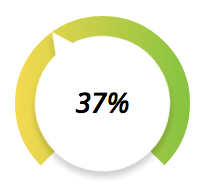
A customizable, responsive SVG dial UI element.
![https://pbs.twimg.com/media/CFaBu2CUIAAQqJP.png](https://pbs.twimg.com/media/CFaBu2CUIAAQqJP.png)

## Introduction

After becoming frustrated with the lack of flexibility and support of [jQuery-knob](http://anthonyterrien.com/knob/), I decided to create my own SVG dial that allowed me to customize the look and feel of the dial.

Though this element is designed to be highly customizable, it doesn't deviate from the design structure of the notch in the bottom section, the dial, etc.  However, colors, font styles, sizes, and some other items are all customizable.

This may fit your needs and asthetics, it may not.

## Installation

This package is available for installation via npm and bower

```sh
$ npm install svg-dial
```

```sh
$ bower install svg-dial
```

## Usage

The only dependency this library has is on [Snap.svg](http://snapsvg.io/).  It assumes this library is available to the module, and is configured to look for it in the AMD, CommonJS (Browserify) and global environments.

### CommonJS (Browserify)

```js
var SVGDial = require('svg-dial');

new SVGDial(document.getElementById('dial-container'), {
  onChange: function(percentage) {}
});
```

### AMD

```js
define(['svg-dial'], function(SVGDial) {
  new SVGDial(document.getElementById('dial-container'), {
    onChange: function(percentage) {}
  });
});
```

### Global

```html
...
<script type="text/javascript" src="https://cdnjs.cloudflare.com/ajax/libs/snap.svg/0.3.0/snap.svg-min.js"></script>
<script type="text/javascript">
  new SVGDial(document.getElementById('dial-container'), {
    onChange: function(percentage) {}
  });
</script>
...
```

## API

### Constructor

```
new SVGDial(el, options);
```

##### `el`  
Required: `true`  
Type: `HTMLElement`, `jQuery`, `String`  
Description: Can either be a DOM element, a jQuery object or a selector string.  
Purpose: Identifies the target block element that the `<svg>` element will be build inside of.  

##### `options`  
Required: `false`  
Type: `Object`  
Description: The configuration options  
Purpose: Defines default overrides and configuration options for the dial.  
  
### Configuration Options  
  
#### Appearance/Functionality  
  
##### `disabled`  
Default: `false`  
Type: `Boolean`  
Purpose: If set to true, disables the manipulation of the dial.  
  
##### `frameBackgroundColor`  
Default: `'white'`  
Type: `String`  
Description: Valid Hex or CSS color, or array of valid Hex or CSS colors to create a linear gradient  
Purpose: Specifies the color of the frame (the rectangular container the dial is nested in)  
  
##### `frameSize`  
Default: `200`  
Type: `Integer`  
Description: Number of pixels for both the width and height of the frame.  
Purpose: Defines the size of the frame that the circular dial will be embedded in  
  
##### `ringBackgroundColor`  
Default: `#888`  
Type: `String`, `Array`  
Description: Valid Hex or CSS color, or array of valid Hex or CSS colors to create a linear gradient  
Purpose: Specifies the color of the dial ring  
  
##### `innerBackgroundColor`  
Default: `white`  
Type: `String`, `Array`  
Description: Valid Hex or CSS color, or array of valid Hex or CSS colors to create a linear gradient  
Purpose: Specifies the color of the inner circle and knob  
  
##### `fontFamily`  
Default: `impact`  
Type: `String`  
Description: Valid and available font family  
Purpose: Uses this font family for the inner text that displays the percentage  
  
##### `fontSize`  
Default: `24`  
Type: `Integer`  
Purpose: Uses this font size for the inner text that displays the percentage  
  
##### `fontStyle`  
Default: `none`  
Type: `String`  
Description: Valid and available font style  
Purpose: Uses this font style for the inner text that displays the percentage  
  
##### `fontWeight`  
Default: `none`  
Type: `String`  
Description: Valid and available font weight  
Purpose: Uses this font weight for the inner text that displays the percentage  
  
#### Methods  
  
##### `onChange`  
Type: `Function`  
Event: Any change in the dial setting during a drag.  
Arguments:  
* `percentage`: percentage between `0` and `1` that the dial is currently set at.  
  
##### `onStart`  
Type: `Function`  
Event: The mouse down event on the dial  
Arguments:  
* `percentage`: percentage between `0` and `1` that the dial is currently set at.  
  
##### `onChange`  
Type: `Function`  
Event: The mouse up event on the dial  
Arguments:  
* `percentage`: percentage between `0` and `1` that the dial is currently set at.  
  
##### `onReady`  
Type: `Function`  
Event: The dial is loaded into the DOM  
Arguments: none  
  
### Public API  
  
##### `config()`  
Type: `Object`  
Description: Same structure as the options object.  
Purpose: Overrides initial settings during runtime.  
  
##### `setValue()`  
Type: `Integer`  
Description: Number between `0` and `1`.  
Purpose: Sets the value and position of the dial.  

## Contributing

---
_Source: https://npm.io/package/svg-dial · Machine-readable twin of the npm.io package page. Health data is recomputed on every publish._
