# testcafe-reporter-html-logger-custom

> HTML TestCafe reporter plugin

Latest version **1.0.4** (published 2020-10-01) · MIT license · 0 weekly downloads

## Install

```sh
npm install testcafe-reporter-html-logger-custom
pnpm add testcafe-reporter-html-logger-custom
yarn add testcafe-reporter-html-logger-custom
bun add testcafe-reporter-html-logger-custom
```

## Health

**Score 30/100 (F)** — status: abandoned.

Positive: no vulnerabilities; high maintenance score.

Warnings: low downloads; no types; no esm support.

Negative: abandoned.

## Facts

| | |
|---|---|
| Version | 1.0.4 |
| Published | 2020-10-01 |
| First published | 2020-10-01 |
| Weekly downloads | 0 |
| License | MIT |
| TypeScript types | none |
| Module format | CommonJS |
| Dependencies | 3 |
| Unpacked size | 115.4 KB |
| Known vulnerabilities | 0 |
| Install scripts | no |
| GitHub stars | 0 |
| Author | Alex Chernik |
| Maintainers | joanesquivel |
| Keywords | testcafe, html, reporter, plugin, logger |

## Links

- npm: https://www.npmjs.com/package/testcafe-reporter-html-logger-custom
- Repository: https://github.com/oromis1508/testcafe-reporter
- Homepage: https://github.com/oromis1508/testcafe-reporter#readme
- Issues: https://github.com/oromis1508/testcafe-reporter/issues
- npm.io page: https://npm.io/package/testcafe-reporter-html-logger-custom

## Dependencies (3)

- [chalk](https://npm.io/package/chalk.md) ^3.0.0
- [copy-dir](https://npm.io/package/copy-dir.md) ^1.2.0
- [@babel/runtime](https://npm.io/package/@babel/runtime.md) ^7.3.4

## Alternatives

- [@tsparticles/shape-image](https://npm.io/package/@tsparticles/shape-image.md) — 303.7K weekly downloads
- [@tsparticles/shape-line](https://npm.io/package/@tsparticles/shape-line.md) — 233.7K weekly downloads
- [stringify-attributes](https://npm.io/package/stringify-attributes.md) — 58.6K weekly downloads
- [mobile-drag-drop](https://npm.io/package/mobile-drag-drop.md) — 46.3K weekly downloads
- [@comunica/actor-rdf-parse-html](https://npm.io/package/@comunica/actor-rdf-parse-html.md) — 29.2K weekly downloads

## Recent versions

- 1.0.4 (latest) — 2020-10-01
- 1.0.3 — 2020-10-01
- 1.0.2 — 2020-10-01
- 1.0.1 — 2020-10-01
- 1.0.0 — 2020-10-01

## README

# testcafe-reporter-acd-html-reporter
[![Build Status](https://travis-ci.org/Arg/testcafe-reporter-acd-html-reporter.svg)](https://github.com/oromis1508/testcafe-reporter)

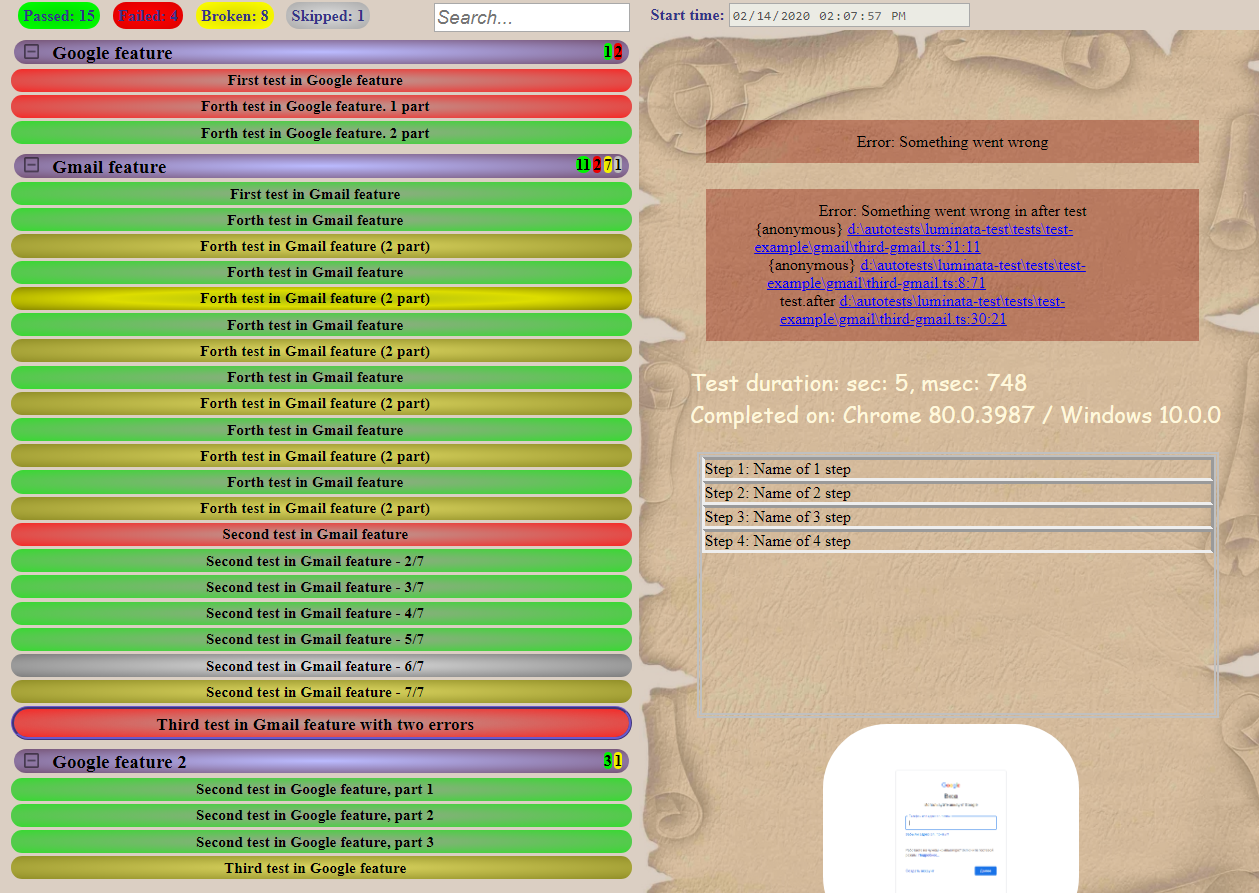
This is the **acd-html-reporter** reporter plugin for [TestCafe](http://devexpress.github.io/testcafe).

<p align="center">
    <img src="https://raw.github.com/oromis1508/testcafe-reporter/master/media/preview.png" alt="Reporter view" />
</p>

## About
Reporter in .html format, for seeing it, you don't need to start any server. Except reporting to file, test run info duplicates in console.

<p id="baseReportDir">
The report generates in base folder: {project}/test-results/report_{current date} as html + js/css/img files.
Also reporter generates json file with test run info, it places in: {report_directory}/report.json.
</p>

If you need to run some times a day, save report, because old version with same date will be rewrited.
You can <a href="#changeDirectory">change the report saving directory</a> or <a href="#saveToFile">save report to single file</a> (without css, js and img files).

For extended test run information you can use Logger, implemented in the reporter.
Method Logger.warn automatically sets status of a test: 'broken'.
```
Logger.warn('Something is strange in this test, may be bug, that 2+2=5 isn't truth');
await t.expect(2 + 2).eql(5);
```

Methods Logger.cleanUp and Logger.preconditions can be used in test hooks (beforeTest, afterTest, etc). It's equivalent of Logger.step, but without step number.
Logger.step can be used with some steps as number, e.g. [1, 2, 3, 4], it will be showed in the report as Step 1-4.
```
Logger.step(1, 'Click the link and do something');
Logger.step([2, 3, 4], 'Doing something else');
```

Logger.info used for adding some information of test actions.
```
Logger.step(1, 'Click the link and do something');
await t.click('link');
Logger.info('Check that page opened');
await t.expect...
```

## Install

```
npm install testcafe-reporter-acd-html-reporter
```

## Usage

When you run tests from the command line, specify the reporter name by using the `--reporter` option:

```
testcafe chrome 'path/to/test/file.js' --reporter acd-html-reporter
```

If you want to have screenshots in report, use `-s` option:

```
testcafe chrome 'path/to/test/file.js' --reporter acd-html-reporter -s takeOnFails=true
```

<p id="changeDirectory">
If you want to save report to another folder, you can use `--reportPath` argument:
</p>

```
testcafe chrome 'path/to/test/file.js' --reporter acd-html-reporter --reportPath path/to/my/report
```

<p id="saveToFile">
If you want to save report as single file, use `--reportFile` argument. If you don't passed argument value, it saved to <a href="#baseReportDir">base report folder</a> as report.html and report.json:
</p>

```
testcafe chrome 'path/to/test/file.js' --reporter acd-html-reporter --reportFile
```

or you can add folder name to report (report will be saved as path/to/html/report.html and path/to/html/report.json):

```
testcafe chrome 'path/to/test/file.js' --reporter acd-html-reporter --reportFile path/to/html
```

or if the path ended with .html, report will be saved to it folder (path/to/my.html and path/to/report.json):

```
testcafe chrome 'path/to/test/file.js' --reporter acd-html-reporter --reportFile path/to/my.html
```

## Author
 Alex Chernik

## Links
https://github.com/chalk/chalk
https://devexpress.github.io/testcafe/documentation/extending-testcafe/reporter-plugin/helpers.html

---
_Source: https://npm.io/package/testcafe-reporter-html-logger-custom · Machine-readable twin of the npm.io package page. Health data is recomputed on every publish._
