# text-different
> 比较代码(文本)的不同,并高亮展示的组件。
Latest version **1.2.1** (published 2018-07-05) · MIT license · 0 weekly downloads
## Install
```sh
npm install text-different
pnpm add text-different
yarn add text-different
bun add text-different
```
## Health
**Score 15/100 (F)** — status: abandoned.
Positive: no vulnerabilities.
Warnings: low downloads; no types; no esm support.
Negative: abandoned; low maintenance score.
## Facts
| | |
|---|---|
| Version | 1.2.1 |
| Published | 2018-07-05 |
| First published | 2018-06-23 |
| Weekly downloads | 0 |
| License | MIT |
| TypeScript types | none |
| Module format | CommonJS |
| Dependencies | 1 |
| Unpacked size | 65.3 KB |
| Known vulnerabilities | 0 |
| Install scripts | no |
| Author | 段昊辰 |
| Maintainers | duan602728596 |
## Links
- npm: https://www.npmjs.com/package/text-different
- Homepage: https://github.com/duan602728596/text-different
- Issues: https://github.com/duan602728596/text-different/issues
- npm.io page: https://npm.io/package/text-different
## Dependencies (1)
- [highlightjs](https://npm.io/package/highlightjs.md) ^9.10.0
## Recent versions
- 1.2.1 (latest) — 2018-07-05
- 1.2.0 — 2018-07-03
- 1.1.0 — 2018-07-03
- 1.0.0 — 2018-07-02
- 0.0.3 — 2018-06-24
- 0.0.2 — 2018-06-24
- 0.0.1 — 2018-06-23
## README
# text-different
[中文文档](https://github.com/duan602728596/text-different/blob/master/README-zhCN.md)
## Effect
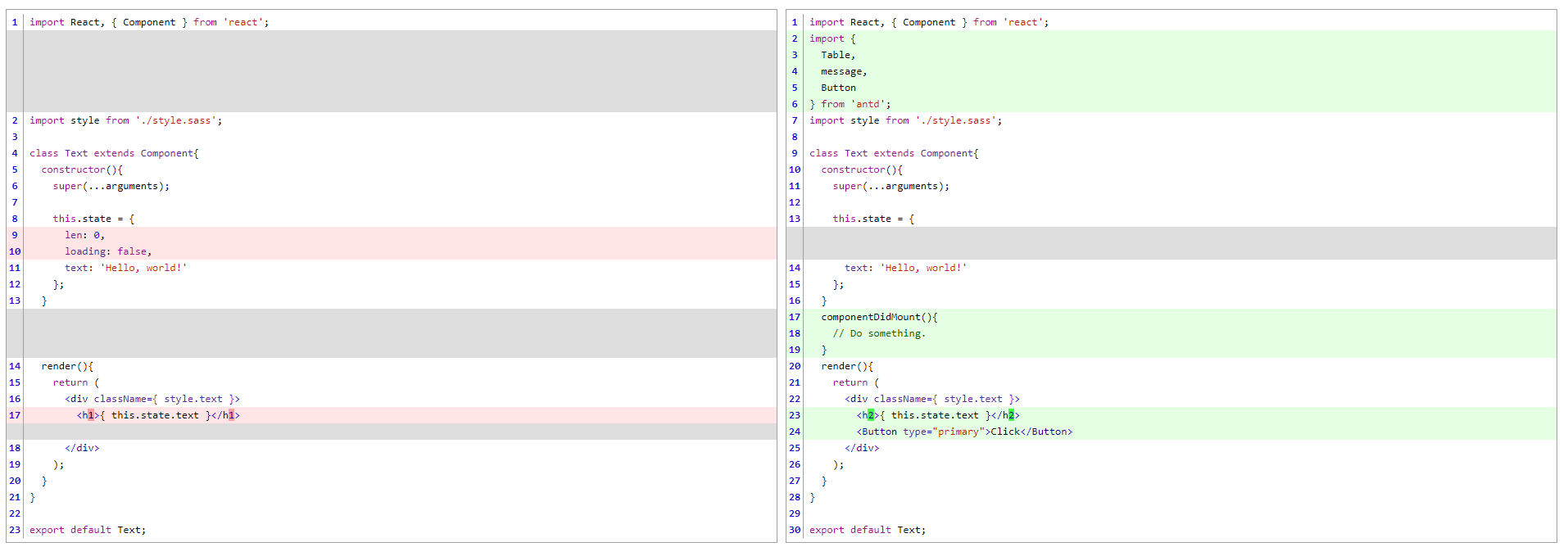
Compare text differences and generate a difference tree.
[text-different-for-html](#text-different-for-html): Provide native methods to display code.
[text-different-for-react](#text-different-for-react): Provide React components to display code.
## How to use
```html
```
or
```javascript
import textDifferent from 'text-different';
const oldText = 'Old text';
const newText = 'New text';
const tree = textDifferent(oldText, newText);
```
## Result
After comparing the texts, a text tree is generated, for example:
```javascript
const tree = [
{
status: 0,
text: 'string'
},
{
status: 1,
text: 'string'
},
{
status: 2,
text: 'string'
},
{
status: 3,
text: [
{
status: 0,
text: 'string'
},
{
status: 1,
text: 'string'
},
{
status: 2,
text: 'string'
},
{
status: 0,
text: 'string'
}
]
},
{
status: 0,
text: 'string'
},
]
```
* When `status` is 0, there is no change in the text of the paragraph
* When `status` is 1, it means that the text is deleted in the old text.
* When `status` is 2, it means that the text is added in the new text.
* When `status` is 3, it means that the text is modified in the text, where the `text` attribute is an array indicating which text in the text is being modified (added, deleted). Each data in the array has the attributes `status` and `text`.
## Output analysis result
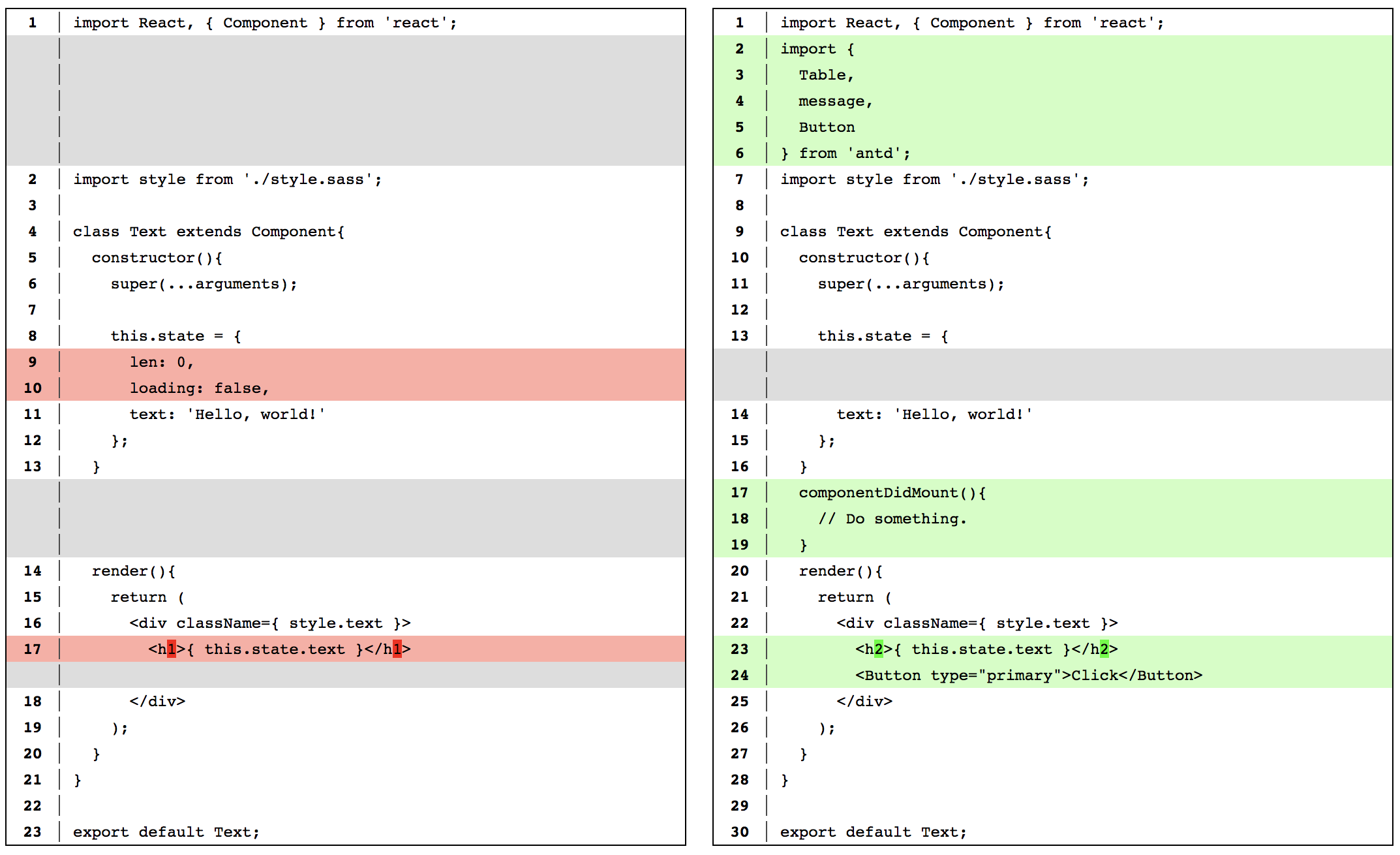
This method only provides a text parsing tree. If you want to output a parsed result, you can view [example](https://github.com/duan602728596/text-different/tree/master/example).
## text-different-for-html
Depends on **highlightjs**, you have to install it.
### Sample code
```html
```
### Methods
* TextDifferentForHtml:Initialization class
parameter:
* element { Element }:The dom used to render the display code
* type { string }:Type of code
* .render { Function }:Rendering code
parameter:
* object:
* oldCode { string }:Old code
* newCode { string }:New code
## text-different-for-react
Rely on **highlightjs**,**react**,**react-dom**,**prop-types**, you must install them.
### Sample code
```javascript
import React, { Component } from 'react';
import ReactDOM from 'react-dom';
import 'highlightjs/styles/xcode.css';
import 'text-different/build/style/text-different.css';
import TextDifferentForReact from 'text-different/lib/dom/react';
ReactDOM.render(
,
document.getElementById('root')
);
```
### Parameter
| parameter | description | type |
| --- | --- | --- |
| type | Type of code | string |
| oldCode | Old code | string |
| newCode | New code | string |
| hasLineNumber | Whether to display the line number | boolean |
---
_Source: https://npm.io/package/text-different · Machine-readable twin of the npm.io package page. Health data is recomputed on every publish._