# timelines-chart
> A parallel (swimlanes) timelines D3 chart for representing state of time-series over time.
Latest version **2.14.4** (published 2026-10-22) · MIT license · 0 weekly downloads
## Install
```sh
npm install timelines-chart
pnpm add timelines-chart
yarn add timelines-chart
bun add timelines-chart
```
## Health
**Score 65/100 (B)** — status: active.
Positive: has types; esm support; no vulnerabilities; recently updated; high maintenance score.
Warnings: low downloads.
## Facts
| | |
|---|---|
| Version | 2.14.4 |
| Published | 2026-10-22 |
| First published | 2016-10-10 |
| Weekly downloads | 0 |
| License | MIT |
| TypeScript types | bundled |
| Module format | ESM + CommonJS |
| Node | >=12 |
| Dependencies | 12 |
| Unpacked size | 1.3 MB |
| Known vulnerabilities | 0 |
| Install scripts | no |
| GitHub stars | 628 |
| Author | Vasco Asturiano |
| Maintainers | vasturiano |
| Keywords | timelines, time-series, d3, swimlanes, stacked, heatmap, lines |
## Links
- npm: https://www.npmjs.com/package/timelines-chart
- Repository: https://github.com/vasturiano/timelines-chart
- Issues: https://github.com/vasturiano/timelines-chart/issues
- npm.io page: https://npm.io/package/timelines-chart
## Dependencies (12)
- [d3-tip](https://npm.io/package/d3-tip.md) ^0.9
- [d3-axis](https://npm.io/package/d3-axis.md) 1 - 3
- [kapsule](https://npm.io/package/kapsule.md) ^1.16
- [d3-array](https://npm.io/package/d3-array.md) 1 - 3
- [d3-brush](https://npm.io/package/d3-brush.md) 2 - 3
- [d3-scale](https://npm.io/package/d3-scale.md) 1 - 4
- [svg-utils](https://npm.io/package/svg-utils.md) ^1.3
- [d3-selection](https://npm.io/package/d3-selection.md) 2 - 3
- [svg-text-fit](https://npm.io/package/svg-text-fit.md) ^1.2
- [d3-time-format](https://npm.io/package/d3-time-format.md) 1 - 4
- [d3-color-legend](https://npm.io/package/d3-color-legend.md) 1
- [d3-scale-chromatic](https://npm.io/package/d3-scale-chromatic.md) 1 - 3
## Alternatives
- [d3-force-3d](https://npm.io/package/d3-force-3d.md) — 1.0M weekly downloads
- [ng2-charts](https://npm.io/package/ng2-charts.md) — 486.8K weekly downloads
- [@arcgis/core](https://npm.io/package/@arcgis/core.md) — 257.8K weekly downloads
- [react-sparklines](https://npm.io/package/react-sparklines.md) — 249.3K weekly downloads
- [react-native-gifted-charts](https://npm.io/package/react-native-gifted-charts.md) — 182.3K weekly downloads
## Recent versions
- 2.14.4 (latest) — 2026-10-22
- 2.14.3 — 2026-04-05
- 2.14.2 — 2025-03-20
- 2.14.1 — 2025-02-25
- 2.14.0 — 2024-12-06
- 2.13.0 — 2024-10-18
- 2.12.2 — 2024-09-25
- 2.12.1 — 2023-02-08
- 2.12.0 — 2023-02-06
- 2.11.8 — 2022-12-11
- 2.11.7 — 2022-11-03
- 2.11.6 — 2022-11-03
- 2.11.5 — 2022-04-26
- 2.11.4 — 2022-02-09
- 2.11.3 — 2022-01-08
- … 36 more at https://npm.io/package/timelines-chart/versions
## README
Timelines Chart
==============
[![NPM package][npm-img]][npm-url]
[![Build Size][build-size-img]][build-size-url]
[![NPM Downloads][npm-downloads-img]][npm-downloads-url]
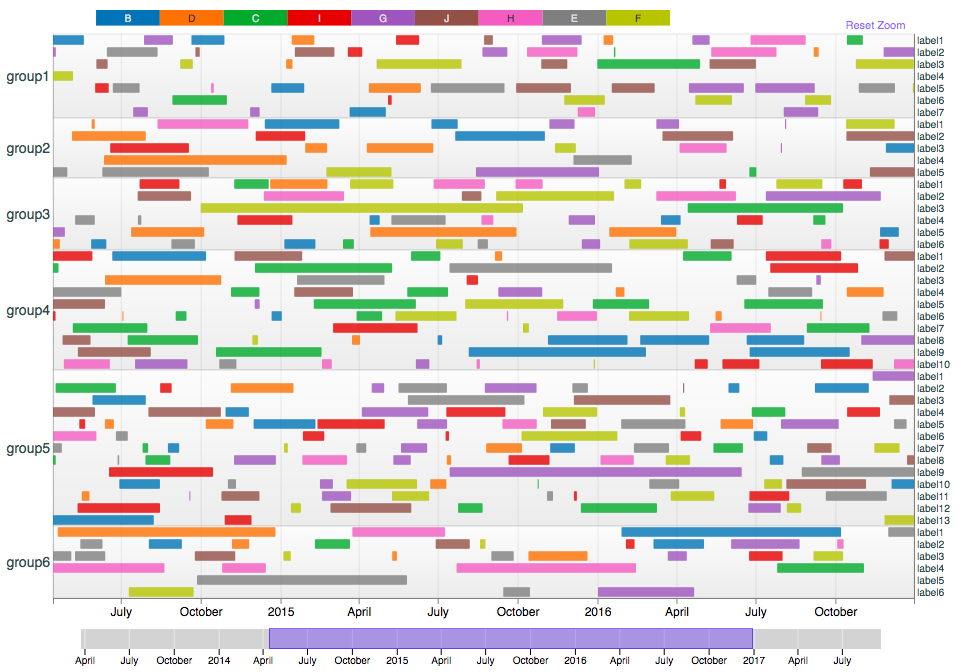
A parallel timelines layout (swimlanes) for representing state of time-series over time.
Each timeline segment can be assigned a value on a color scale, either continuous (heatmap mode) or ordinal (for categorical representation).
Time-series can be grouped into logical groups, represented as distinct sections. Allows for exploration using drag-to-zoom or a timeline brush.
Check out the examples:
* [Categorical](https://vasturiano.github.io/timelines-chart/example/categorical/)
* [Continuous (Heatmap)](https://vasturiano.github.io/timelines-chart/example/heatmap/)
* [Custom Time Format](https://vasturiano.github.io/timelines-chart/example/custom-time-format/)
## Quick start
```js
import TimelinesChart from 'timelines-chart';
```
or using a *script* tag
```html
```
then
```js
const myChart = new TimelinesChart()
.data();
```
## API reference
| Method | Description | Default |
| --- | --- | --- |
| data([array]) | Getter/setter for chart data (see below for syntax details). | `[]` |
| width([number]) | Getter/setter for the chart width in px. | *<window width>* |
| maxHeight([number]) | Getter/setter for the chart's maximum height in px. | 640 |
| maxLineHeight([number]) | Getter/setter for the maximum height of each line, in px. | 12 |
| leftMargin([number]) | Getter/setter for the chart's left margin, which contains the left-side group axis labels. | 90 |
| rightMargin([number]) | Getter/setter for the chart's right margin, which contains the right-side series axis labels. | 100 |
| topMargin([number]) | Getter/setter for the chart's top margin, which contains the color legend. | 26 |
| bottomMargin([number]) | Getter/setter for the chart's bottom margin, which contains the time axis labels. | 30 |
| useUtc([boolean]) | Getter/setter for whether to display time in the local time zone (`false`) or in UTC (`true`). | false |
| timeFormat([string]) | Getter/setter for the time format to use in tooltips. See [d3-time-format](https://github.com/d3/d3-time-format#locale_format) for available options. | `%Y-%m-%d %-I:%M:%S %p` |
| xTickFormat([function]) | X axis tick label formatter function, as pass-through to [d3-axis](https://github.com/d3/d3-axis#axis_tickFormat). By default, it uses a [multi-scale time format](https://bl.ocks.org/mbostock/4149176). | |
| dateMarker([date object]) | Getter/setter for the date marker to show as a vertical line. If a falsy value is used, no marker is shown. | `null` |
| minSegmentDuration([number]) | Getter/setter for the minimum time duration (in msecs) of a segment in order for it to be shown. | 0 |
| minSegmentWidth([number]) | Getter/setter for the minimum displayed px width of a segment. | 1 |
| getNLines() | Returns number of timelines currently visible in the chart. | - |
| getTotalNLines() | Returns total number of timelines in the chart. | - |
| zQualitative([boolean]) | Getter/setter for whether the segment data color values are categorical (true) or quantitative (false). This will affect how the color legend is presented, and changing it will automatically toggle the `zColorScale` between defaults. | false |
| zColorScale([d3 scale object]) | Getter/setter for the color scale to be used for coloring the segments according to their data values. This object should be a D3 color scale object. | qualitative: `d3.scaleOrdinal()`
quantitative: `d3.scaleSequential()` |
| zDataLabel([string]) | Getter/setter for the units of z data. Used in the tooltip descriptions. | |
| zScaleLabel([string]) | Getter/setter for the color scale label. Only applicable to quantitative z scales. | |
| sort([[function, function]]) | Sorts the timelines and groups according to two name comparison functions: `function(labelCmpFn, groupCompFn)`. Each comparison function should follow the signature `function(nameA, nameB)` and return a numeric value. | `(, )` |
| sortAlpha([[boolean]]) | Sorts the timelines and groups in alpha-numeric order. The boolean parameter indicates whether the order should be ascending (`true`) or descending (`false`). | true |
| sortChrono([[boolean]]) | Sorts the timelines and groups in chronological order of their most recent data point. The boolean parameter indicates whether the order should be ascending (`true`) or descending (`false`). | true |
| zoomX([[startDate, endDate]]) | Getter/setter for the chart's time (horizontal) zoom. A null value indicates a zoom reset to full extent. | `null` |
| zoomY([[number, number]]) | Getter/setter for the chart's vertical zoom. The parameter should follow the syntax `[, ]`. A null value indicates a zoom reset to full extent. | `null` |
| zoomYLabels([[number, number]]) | Getter/setter for the chart's vertical zoom in terms of timeline labels. The parameter should follow the syntax `[, ]`. A null value indicates a zoom reset to full extent. | `null` |
| onZoom([function]) | Getter/setter for the callback function for user initiated zoom (incl. zoom resets). Callback will have two parameters: `onZoom([startDate, endDate], [startY, endY])`. | `null` |
| enableOverview([boolean]) | Getter/setter for whether to show an interactive timeline overview below the chart. | true |
| overviewDomain([[startDate, endDate]]) | Getter/setter for the time extent shown in the overview section below the chart. | *<auto-derived from data: `[minTs, maxTs]`>* |
| getVisibleStructure() | Returns data representation of timelines currently visible in the chart. | - |
| getSvg() | Returns graphic (SVG) representation of currently visible chart. | - |
| enableAnimations([boolean]) | Getter/setter for whether to animate transitions. | true |
| onLabelClick([function]) | Getter/setter for the callback function for clicking on the Y axis labels. Callback will include the clicked label (if applicable) and group parameter: `onLabelClick(, )`. | `null` |
| onSegmentClick([function]) | Getter/setter for the callback function for clicking on a segment. Callback will return a segment object: `onSegmentClick(segment)`. | `null` |
| segmentTooltipContent([function]) | Getter/setter for the callback function to populate a custom tooltip for segments. The segment data point is provided as sole argument: `segmentTooltipContent(d)`. Supports plain text or HTML content. | `null` |
| refresh() | Rerenders chart. | - |
## Data syntax
```
[
{
group: "group1name",
data: [
{
label: "label1name",
data: [
{
timeRange: [, ],
val:
},
{
timeRange: [, ],
val:
},
...
]
},
{
label: "label2name",
data: [...]
},
...
],
},
{
group: "group2name",
data: [...]
},
...
]
```
## Giving Back
[](https://www.paypal.com/cgi-bin/webscr?cmd=_donations&business=L398E7PKP47E8¤cy_code=USD&source=url) If this project has helped you and you'd like to contribute back, you can always [buy me a ☕](https://www.paypal.com/cgi-bin/webscr?cmd=_donations&business=L398E7PKP47E8¤cy_code=USD&source=url)!
[npm-img]: https://img.shields.io/npm/v/timelines-chart
[npm-url]: https://npmjs.org/package/timelines-chart
[build-size-img]: https://img.shields.io/bundlephobia/minzip/timelines-chart
[build-size-url]: https://bundlephobia.com/result?p=timelines-chart
[npm-downloads-img]: https://img.shields.io/npm/dt/timelines-chart
[npm-downloads-url]: https://www.npmtrends.com/timelines-chart
---
_Source: https://npm.io/package/timelines-chart · Machine-readable twin of the npm.io package page. Health data is recomputed on every publish._