# tingle-picker
> tingle-picker component for tingle.
Latest version **0.2.0** (published 2015-09-11) · MIT license · 0 weekly downloads
## Install
```sh
npm install tingle-picker
pnpm add tingle-picker
yarn add tingle-picker
bun add tingle-picker
```
## Health
**Score 15/100 (F)** — status: abandoned.
Positive: no vulnerabilities.
Warnings: low downloads; no types; no esm support; pre 1.0.
Negative: abandoned; low maintenance score.
## Facts
| | |
|---|---|
| Version | 0.2.0 |
| Published | 2015-09-11 |
| First published | 2015-08-29 |
| Weekly downloads | 0 |
| License | MIT |
| TypeScript types | none |
| Module format | CommonJS |
| Dependencies | 5 |
| Known vulnerabilities | 0 |
| Install scripts | no |
| GitHub stars | 0 |
| Author | guanghong.wsj |
| Maintainers | gbk, gnosaij, yize |
| Keywords | tingle, picker, react |
## Links
- npm: https://www.npmjs.com/package/tingle-picker
- Repository: https://github.com/tinglejs/tingle-picker
- Homepage: https://github.com/tinglejs/tingle-picker#readme
- Issues: https://github.com/tinglejs/tingle-picker/issues
- npm.io page: https://npm.io/package/tingle-picker
## Dependencies (5)
- [classnames](https://npm.io/package/classnames.md) ^2.1.2
- [tingle-style](https://npm.io/package/tingle-style.md) ~0.2.1
- [tingle-context](https://npm.io/package/tingle-context.md) ~0.1.1
- [tingle-scroller](https://npm.io/package/tingle-scroller.md) ~0.1.1
- [tingle-search-bar](https://npm.io/package/tingle-search-bar.md) ~0.2.0
## Alternatives
- [mobx-react](https://npm.io/package/mobx-react.md) — 2.8M weekly downloads
- [rc-tree](https://npm.io/package/rc-tree.md) — 2.6M weekly downloads
- [@react-oauth/google](https://npm.io/package/@react-oauth/google.md) — 1.3M weekly downloads
- [@wagmi/connectors](https://npm.io/package/@wagmi/connectors.md) — 877.0K weekly downloads
- [vee-validate](https://npm.io/package/vee-validate.md) — 836.4K weekly downloads
## Recent versions
- 0.2.0 (latest) — 2015-09-11
- 0.0.0 — 2015-08-29
## README
## Picker
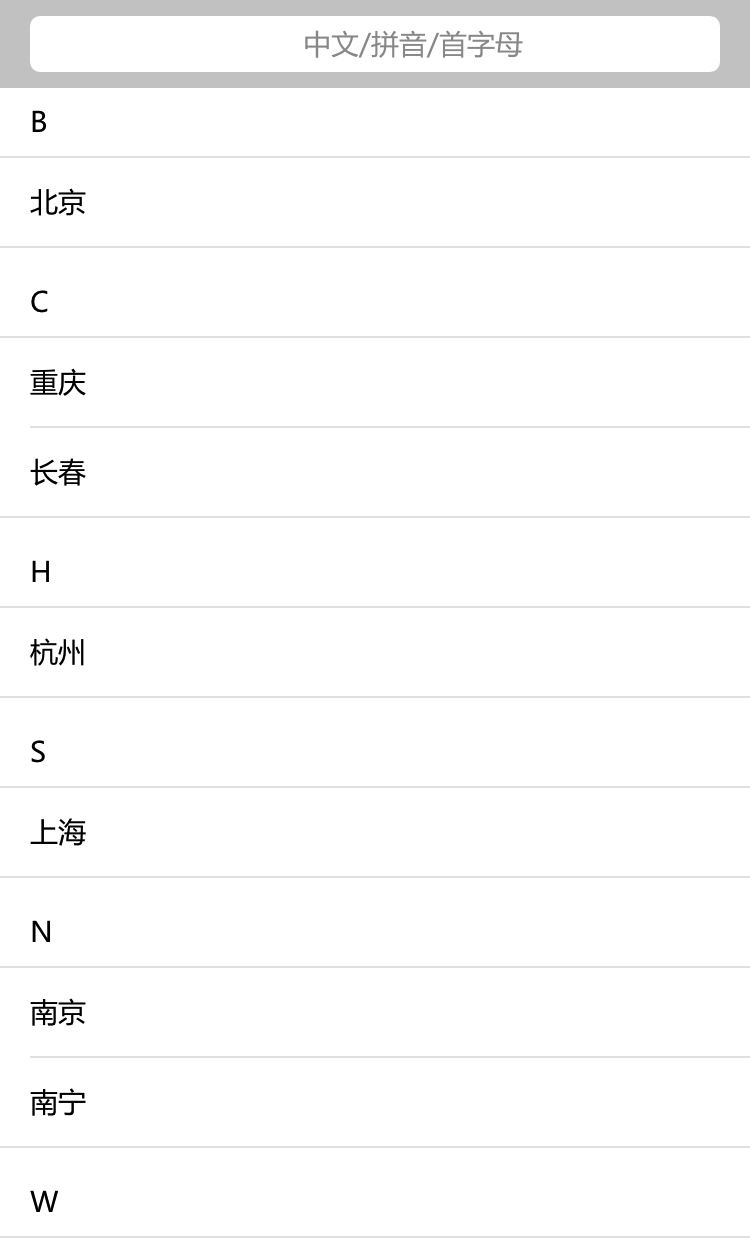
tingle-picker 是 tingle-xxxpicker 的容器控件。提供一个搜索条和一个可以垂直滚动的列表容器。
效果图:
 ## Simple Usage
```javascript
constructor(props) {
super(props);
this.state = {
city: city,
filter: ''
};
}
_renderGroupLists() {
let t = this;
let arr = []
let groups = Object.keys(t.state.city);
groups.forEach(function(group, i) {
arr.push(
{city[group].map(function(city, i) {
return
## Simple Usage
```javascript
constructor(props) {
super(props);
this.state = {
city: city,
filter: ''
};
}
_renderGroupLists() {
let t = this;
let arr = []
let groups = Object.keys(t.state.city);
groups.forEach(function(group, i) {
arr.push(
{city[group].map(function(city, i) {
return {city.name}
})}
)
});
return arr;
}
_handleClick(e) {
let t = this;
let target = e.currentTarget;
let name = target.getAttribute('data-name');
let group = target.getAttribute('data-group');
let data = city[group].filter(function(ele) {return ele.name == name})[0];
alert(data.name);
}
_handleSearch(value) {
let t = this;
t._filterList(value);
t.setState({
filter: value
})
}
/**
* 判断是否是汉字
*/
_isChinese(str) {
return /^[\u4e00-\u9fa5]+$/.test(str);
}
_filterList(value) {
let t = this;
let groups = Object.keys(city);
let newCity = {};
if (t._isChinese(value)) {
groups.forEach(function(group, i) {
let groupCity = city[group].filter(function(ele) {
return ele.name.indexOf(value) != -1
})
if (groupCity.length != 0) {
newCity[group] = groupCity;
}
});
}
else {
groups.forEach(function(group, i) {
let groupCity = city[group].filter(function(ele) {
return ele.abbr.indexOf(value) != -1 || ele.pinyin.indexOf(value) != -1
})
if (groupCity.length != 0) {
newCity[group] = groupCity;
}
});
}
t.setState({
city: newCity
})
}
render() {
let t = this;
return (
{t._renderGroupLists()}
}
```
## Options 可用配置
| 配置项 | 类型 | 必填 | 默认值 | 功能/备注 |
|---|---|---|---|---|
|filter|string|optional|-|开启搜索时的默认搜索值|
|show|boolean|optional|false|是否显示|
|offsetTop|number|optional|0|picker 的主体部分距离顶端的高度,用于在 picker 插入自定义的部分|
|offsetBottom|number|optional|0|picker 的主体部分距离底端的高度,用于在 picker 插入自定义的部分|
|searchPlaceholder|string|optional|中文/拼音/首字母|
|showSearchBar|boolean|optional|false|是否显示搜索条|
|onSearch|function|optional|-|搜索条中的值发生改变时触发,可以在此时通过更改 filter 来改变 searchbar 里的显示
## Links 相关链接
- [Fire a bug/Issues 提Bug](https://github.com/tinglejs/tingle-picker/issues)
- [Tingle项目](https://github.com/tinglejs)
---
_Source: https://npm.io/package/tingle-picker · Machine-readable twin of the npm.io package page. Health data is recomputed on every publish._