# tty-table
> Node cli table
Latest version **5.0.0** (published 2025-11-09) · MIT license · 0 weekly downloads
## Install
```sh
npm install tty-table
pnpm add tty-table
yarn add tty-table
bun add tty-table
```
Provides the command `tty-table`.
## Health
**Score 60/100 (C)** — status: stable.
Positive: has types; no vulnerabilities; high maintenance score; high quality score.
Warnings: low downloads; no esm support.
## Facts
| | |
|---|---|
| Version | 5.0.0 |
| Published | 2025-11-09 |
| First published | 2015-07-07 |
| Weekly downloads | 0 |
| License | MIT |
| TypeScript types | bundled |
| Module format | CommonJS |
| Node | >=8.0.0 |
| Dependencies | 7 |
| Unpacked size | 48.9 KB |
| Known vulnerabilities | 0 |
| Install scripts | no |
| GitHub stars | 308 |
| Author | Tecfu |
| Maintainers | tecfu |
| Keywords | table, table in bash, cli-table, terminal table, console table, cli table, console.table, ascii table |
## Links
- npm: https://www.npmjs.com/package/tty-table
- Repository: https://github.com/tecfu/tty-table
- Issues: https://github.com/tecfu/tty-table/issues
- npm.io page: https://npm.io/package/tty-table
## Dependencies (7)
- [csv](https://npm.io/package/csv.md) ^5.5.3
- [chalk](https://npm.io/package/chalk.md) ^4.1.2
- [kleur](https://npm.io/package/kleur.md) ^4.1.5
- [yargs](https://npm.io/package/yargs.md) ^17.7.1
- [wcwidth](https://npm.io/package/wcwidth.md) ^1.0.1
- [smartwrap](https://npm.io/package/smartwrap.md) ^2.0.2
- [strip-ansi](https://npm.io/package/strip-ansi.md) ^6.0.1
## Alternatives
- [@lexical/table](https://npm.io/package/@lexical/table.md) — 3.0M weekly downloads
- [mantine-datatable](https://npm.io/package/mantine-datatable.md) — 98.2K weekly downloads
- [react-native-collapsible-tab-view](https://npm.io/package/react-native-collapsible-tab-view.md) — 70.6K weekly downloads
- [@handsontable/vue3](https://npm.io/package/@handsontable/vue3.md) — 16.1K weekly downloads
- [vuewordcloud](https://npm.io/package/vuewordcloud.md) — 7.2K weekly downloads
## Recent versions
- 5.0.0 (latest) — 2025-11-09
- 4.2.3 — 2023-10-29
- 4.2.2 — 2023-09-30
- 4.2.1 — 2023-03-19
- 4.2.0 — 2023-03-19
- 4.1.6 — 2022-06-10
- 4.1.5 — 2021-08-28
- 4.1.4 — 2021-08-27
- 4.1.3 — 2020-05-07
- 4.1.2 — 2020-05-06
- 4.1.1 — 2020-03-11
- 4.1.0 — 2020-03-11
- 4.0.0 — 2020-03-09
- 3.3.0 — 2020-03-06
- 3.2.0 — 2020-03-02
- … 75 more at https://npm.io/package/tty-table/versions
## README
# tty-table
[](http://badge.fury.io/js/tty-table) [](https://coveralls.io/github/tecfu/tty-table?branch=master)
---
Display your data in a table using a terminal, browser, or browser console.
---
## [Examples](examples/)
[See here for complete example list](examples/)
To view all example output:
```sh
$ git clone https://github.com/tecfu/tty-table && cd tty-table && npm i
$ npm run view-examples
```
### Terminal (Static)
[examples/styles-and-formatting.js](examples/styles-and-formatting.js)

### Terminal (Streaming)
```
$ node examples/data/fake-stream.js | tty-table --format json --header examples/config/header.js
```
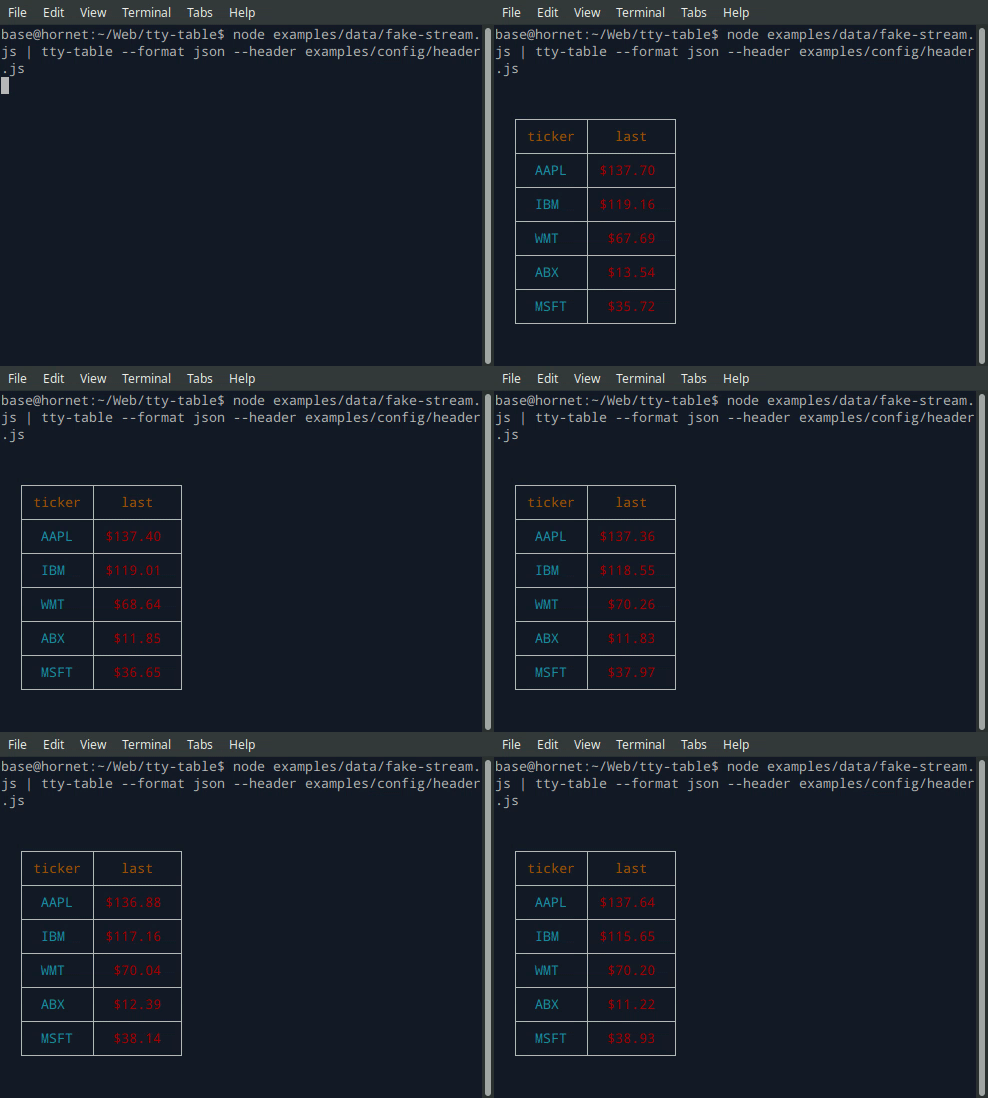
- See the built-in help for the terminal version of tty-table with:
```
$ tty-table -h
```
### Browser & Browser Console
- View in Chrome or Chromium at [http://localhost:8070/examples/browser-example.html](http://localhost:8070/examples/browser-example.html) using a dockerized apache instance:
```sh
git clone https://github.com/tecfu/tty-table
cd tty-table
docker run -dit --name tty-table-in-browser -p 8070:80 -v "$PWD":/usr/local/apache2/htdocs/ httpd:2.4
```
- [live demo (chrome only): jsfiddle](https://jsfiddle.net/nb14eyav/)
- [live demo (chrome only): plnkr](https://plnkr.co/edit/iQn9xn5yCY4NUkXRF87o?p=preview)
- [source: examples/browser-example.html](examples/browser-example.html)

## API Reference
### Table(header ```array```, rows ```array```, options ```object```)
| Param | Type | Description |
| --- | --- | --- |
| [header](#header_options) | array | Per-column configuration. An array of objects, one object for each column. Each object contains properties you can use to configure that particular column. [See available properties](#header_options) |
| [rows](#rows_examples) | array | Your data. An array of arrays or objects. [See examples](#rows_examples) |
| [options](#options_properties) | object | Global table configuration. [See available properties](#options_properties) |
#### header ```array of objects```
| Param | Type | Description |
| --- | --- | --- |
| alias | string | Text to display in column header cell |
| align | string | default: "center" |
| color | string | default: terminal default color |
| footerAlign | string | default: "center" |
| footerColor | string | default: terminal default color |
| formatter | function(cellValue, columnIndex, rowIndex, rowData, inputData | Runs a callback on each cell value in the parent column.
Please note that fat arrow functions `() => {}` don't support scope overrides, and this feature won't work correctly within them. |
| @formatter configure | function(object) | Configure cell properties. For example:
`this.configure({ truncate: false, align: "left" })` [More here](https://github.com/tecfu/tty-table/blob/master/examples/truncated-lines.js#L100-L110). |
| @formatter resetStyle | function(cellValue) | Removes ANSI escape sequences. For example:
`this.resetStyle("�[32m� myText��[39m") // "myText"`
|
| @formatter style | function(cellValue, effect) | Style cell value. For example:
`this.style("mytext", "bold", "green", "underline")`
For a full list of options in the terminal: [chalk](https://github.com/chalk/chalk). For a full list of options in the browser: [kleur](https://github.com/lukeed/kleur)|
| headerAlign | string | default: "center" |
| headerColor | string | default: terminal's default color |
| marginLeft | integer | default: 0 |
| marginTop | integer | default: 0 |
| paddingBottom | integer | default: 0 |
| paddingLeft | integer | default: 1 |
| paddingRight | integer | default: 1 |
| paddingTop | integer | default: 0 |
| value | string | Name of the property to display in each cell when data passed as an array of objects |
| width | string \|\| integer | default: "auto"
Can be a percentage of table width i.e. "20%" or a fixed number of columns i.e. "20".
When set to the default ("auto"), the column widths are made proportionate by the longest value in each column.
Note: Percentage columns and fixed value colums not intended to be mixed in the same table.|
**Example**
```js
let header = [{
value: "item",
headerColor: "cyan",
color: "white",
align: "left",
width: 20
},
{
value: "price",
color: "red",
width: 10,
formatter: function (value) {
let str = `$${value.toFixed(2)}`
return (value > 5) ? this.style(str, "green", "bold") :
this.style(str, "red", "underline")
}
}]
```
#### rows ```array```
**Example**
- each row an array
```js
const rows = [
["hamburger",2.50],
]
```
- each row an object
```js
const rows = [
{
item: "hamburger",
price: 2.50
}
]
```
#### footer ```array```
- Footer is optional
**Example**
```js
const footer = [
"TOTAL",
function (cellValue, columnIndex, rowIndex, rowData) {
let total = rowData.reduce((prev, curr) => {
return prev + curr[1]
}, 0)
.toFixed(2)
return this.style(`$${total}`, "italic")
}
]
```
#### options ```object```
| Param | Type | Description |
| --- | --- | --- |
| borderStyle | string | default: "solid".
options: "solid", "dashed", "none" |
| borderColor | string | default: terminal default color |
| color | string | default: terminal default color |
| compact | boolean | default: false
Removes horizontal borders when true. |
| defaultErrorValue | mixed | default: '�' |
| defaultValue | mixed | default: '""' |
| errorOnNull | boolean | default: false |
| truncate | mixed | default: false
When this property is set to a string, cell contents will be truncated by that string instead of wrapped when they extend beyond of the width of the cell.
For example if:
"truncate":"..."
the cell will be truncated with "..."
Note: tty-table wraps overflowing cell text into multiple lines by default, so you would likely only utilize `truncate` for extremely long values. |
| width | string | default: "100%"
Width of the table. Can be a percentage of i.e. "50%" or a fixed number of columns in the terminal viewport i.e. "100".
Note: When you use a percentage, your table will be "responsive".|
**Example**
```js
const options = {
borderStyle: "solid",
borderColor: "blue",
headerAlign: "center",
align: "left",
color: "white",
truncate: "...",
width: "90%"
}
```
### Table.render() ⇒ String
Add method to render table to a string
**Example**
```js
const out = Table(header,rows,options).render()
console.log(out); //prints output
```
## Installation
- [Terminal](docs/terminal.md):
```sh
$ npm install tty-table -g
```
- Node Module
```sh
$ npm install tty-table
```
- Browser
```js
import Table from 'https://cdn.jsdelivr.net/gh/tecfu/tty-table/dist/tty-table.esm.js'
let Table = require('tty-table') // https://cdn.jsdelivr.net/gh/tecfu/tty-table/dist/tty-table.cjs.js
let Table = TTY_Table; // https://cdn.jsdelivr.net/gh/tecfu/tty-table/dist/tty-table.umd.js
```
## Version Compatibility
| Node Version | tty-table Version |
| -------------- | ------------------|
| 8 | >= 2.0 |
| 0.11 | >= 0.0 |
## Running tests
```sh
$ npm test
```
```sh
$ npm run coverage
```
## Saving the output of new unit tests
```sh
$ npm run save-tests
```
## Dev Tips
- To generate vim tags (make sure [jsctags](https://github.com/ramitos/jsctags) is installed globally)
```sh
$ npm run tags
```
- To generate vim tags on file save
```sh
$ npm run watch-tags
```
## Pull Requests
Pull requests are encouraged!
- Please remember to add a unit test when necessary
- Please format your commit messages according to the ["Conventional Commits"](https://www.conventionalcommits.org/en/v1.0.0/) specification
If you aren't familiar with Conventional Commits, here's a good [article on the topic](https://dev.to/maniflames/how-conventional-commits-improved-my-git-skills-1jfk)
TL/DR:
- feat: a feature that is visible for end users.
- fix: a bugfix that is visible for end users.
- chore: a change that doesn't impact end users (e.g. chances to CI pipeline)
- docs: a change in the README or documentation
- refactor: a change in production code focused on readability, style and/or performance.
## [Packaging as a distributable](packaging.md)
## License
[MIT License](https://opensource.org/licenses/MIT)
Copyright 2015-2020, Tecfu.
---
_Source: https://npm.io/package/tty-table · Machine-readable twin of the npm.io package page. Health data is recomputed on every publish._