# unocss-webpack-uniapp2
> The UnoCSS Webpack plugin for UniApp2
Latest version **0.2.2** (published 2023-08-01) · MIT license · 0 weekly downloads
## Install
```sh
npm install unocss-webpack-uniapp2
pnpm add unocss-webpack-uniapp2
yarn add unocss-webpack-uniapp2
bun add unocss-webpack-uniapp2
```
## Health
**Score 25/100 (F)** — status: abandoned.
Positive: has types; esm support; no vulnerabilities.
Warnings: low downloads; pre 1.0.
Negative: abandoned; low maintenance score.
## Facts
| | |
|---|---|
| Version | 0.2.2 |
| Published | 2023-08-01 |
| First published | 2022-07-24 |
| Weekly downloads | 0 |
| License | MIT |
| TypeScript types | bundled |
| Module format | ESM + CommonJS |
| Dependencies | 7 |
| Unpacked size | 19.8 KB |
| Known vulnerabilities | 0 |
| Install scripts | no |
| GitHub stars | 8 |
| Author | MellowCo |
| Maintainers | meoc |
| Keywords | unocss, webpack-plugin, uniapp |
## Links
- npm: https://www.npmjs.com/package/unocss-webpack-uniapp2
- Repository: https://github.com/MellowCo/unocss-webpack-uniapp2
- Homepage: https://github.com/MellowCo/unocss-webpack-uniapp2#readme
- Issues: https://github.com/MellowCo/unocss-webpack-uniapp2/issues
- npm.io page: https://npm.io/package/unocss-webpack-uniapp2
## Dependencies (7)
- [unplugin](https://npm.io/package/unplugin.md) ^1.3.1
- [@unocss/core](https://npm.io/package/@unocss/core.md) ^0.53.1
- [magic-string](https://npm.io/package/magic-string.md) ^0.30.0
- [@unocss/config](https://npm.io/package/@unocss/config.md) ^0.53.1
- [webpack-sources](https://npm.io/package/webpack-sources.md) ^3.2.3
- [@rollup/pluginutils](https://npm.io/package/@rollup/pluginutils.md) ^5.0.2
- [@ampproject/remapping](https://npm.io/package/@ampproject/remapping.md) ^2.2.1
## Alternatives
- [raw-loader](https://npm.io/package/raw-loader.md) — 4.3M weekly downloads
- [plop](https://npm.io/package/plop.md) — 1.4M weekly downloads
- [webpack-deadcode-plugin](https://npm.io/package/webpack-deadcode-plugin.md) — 80.3K weekly downloads
- [@storybook/preact-vite](https://npm.io/package/@storybook/preact-vite.md) — 54.2K weekly downloads
- [vite-plugin-transform](https://npm.io/package/vite-plugin-transform.md) — 2.4K weekly downloads
## Recent versions
- 0.2.2 (latest) — 2023-08-01
- 0.2.1 — 2023-08-01
- 0.2.0 — 2023-06-18
- 0.1.4 — 2022-08-21
- 0.1.3 — 2022-08-03
- 0.1.2 — 2022-08-03
- 0.1.1 — 2022-07-24
## README
# unocss-webpack-uniapp2
[UnoCSS](https://github.com/unocss/unocss) Webpack plugin for UniApp2, fork form [@unocss/webpack](https://github.com/unocss/unocss/tree/main/packages/webpack)
## 示例app
[unocss-webpack-uniapp2.apk](https://raw.githubusercontent.com/MellowCo/unocss-webpack-uniapp2/main/unocss-webpack-uniapp2.apk)

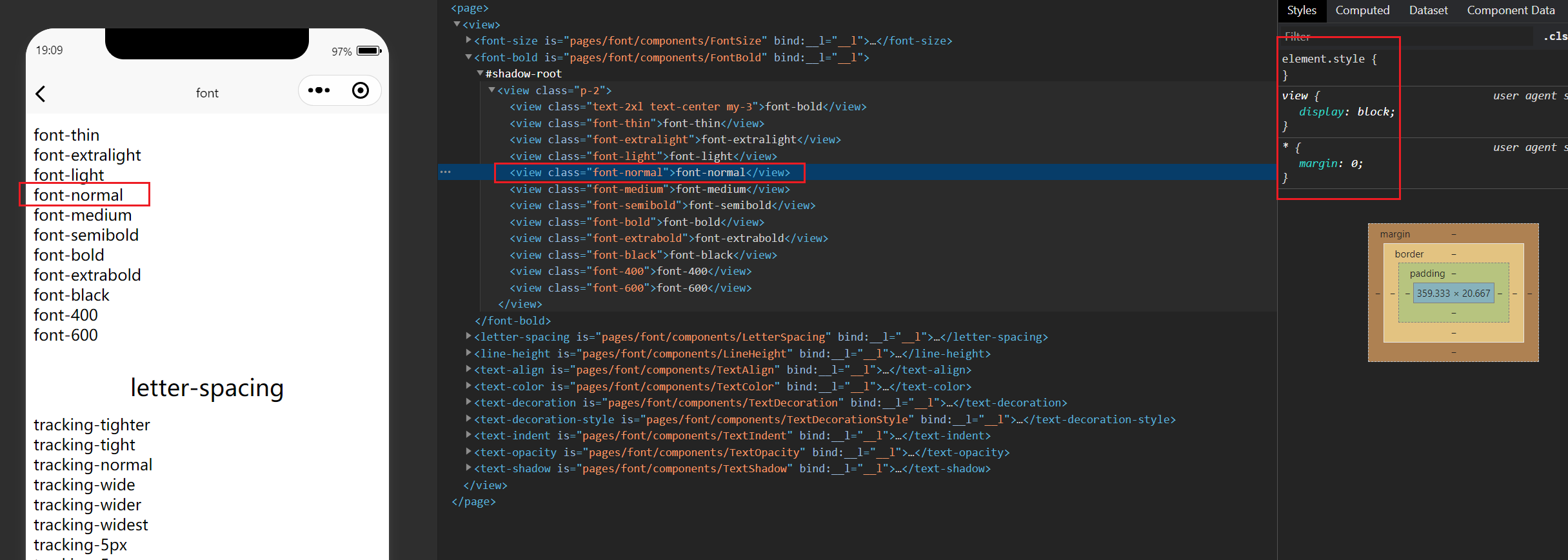
## 解决问题
> 小程序项目启动时 部分class生成失败 需要手动触发
---
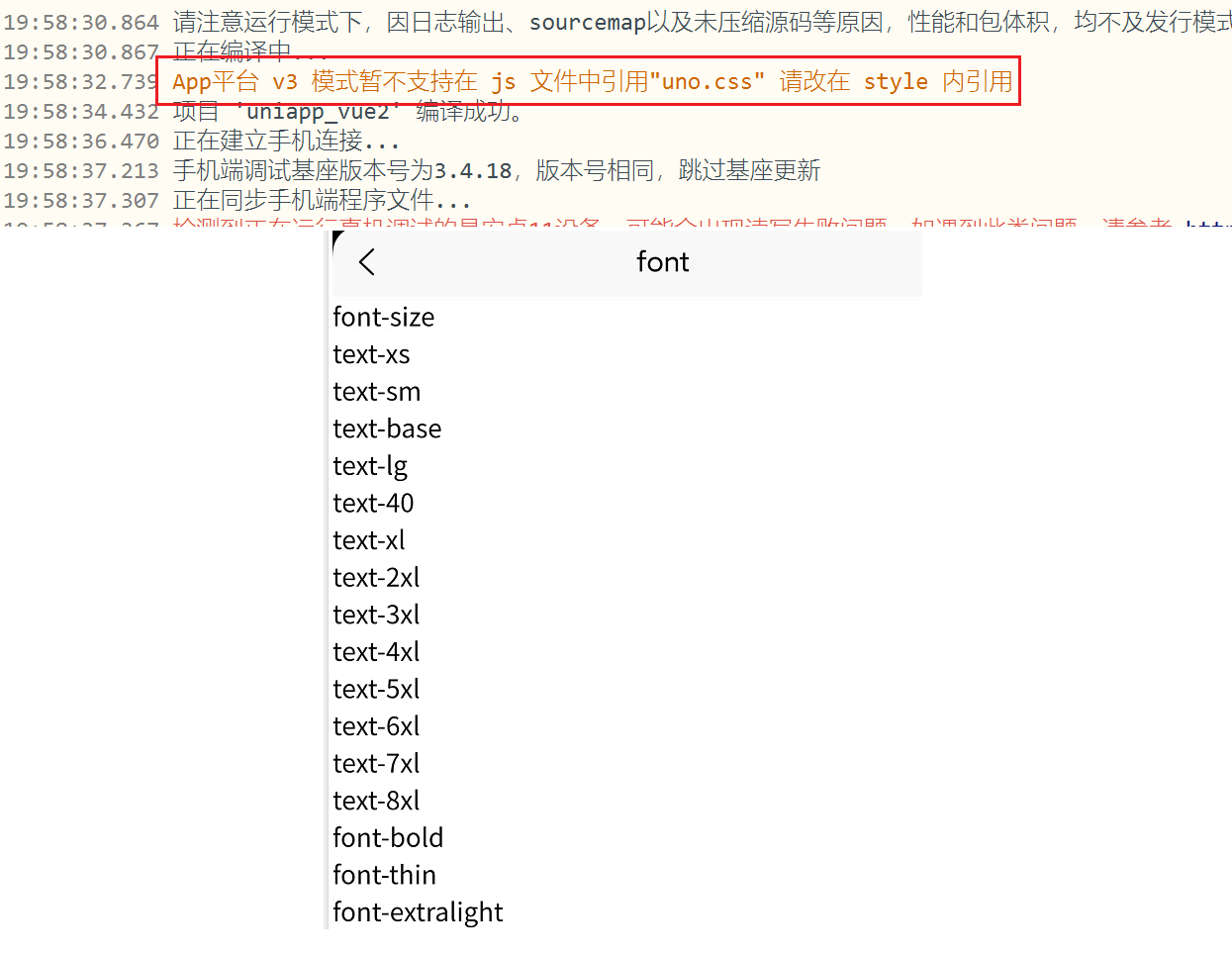
> `uniapp vue2` **app** 无法使用 `import 'uno.css'`
 ## 使用
[具体使用 demo](https://github.com/MellowCo/unocss-preset-weapp#uniapp-vue2)
---
1. vue.config.js
```js
const UnoCSS = require('unocss-webpack-uniapp2').default
module.exports = {
configureWebpack: {
plugins: [
UnoCSS(),
],
},
}
```
2. unocss.config.js
```js
import presetWeapp from 'unocss-preset-weapp'
import { extractorAttributify, transformerClass } from 'unocss-preset-weapp/transformer'
import { defineConfig } from 'unocss'
const { transformerAttributify, presetWeappAttributify } = extractorAttributify()
export default defineConfig({
presets: [
// https://github.com/MellowCo/unocss-preset-weapp
presetWeapp({
// h5兼容
platform: 'uniapp',
isH5: process.env.UNI_PLATFORM === 'h5',
}),
presetWeappAttributify(),
],
shortcuts: [
{
'border-base': 'border border-gray-500_10',
'center': 'flex justify-center items-center',
},
],
transformers: [
transformerAttributify(),
transformerClass(),
],
})
```
3. App.vue
> 使用`uno-start`和`uno-end`,作为占位符,内容随意
```html
```
4. main.js
```js
// 不在需要导入 uno.css
// import 'uno.css'
```
---
_Source: https://npm.io/package/unocss-webpack-uniapp2 · Machine-readable twin of the npm.io package page. Health data is recomputed on every publish._
## 使用
[具体使用 demo](https://github.com/MellowCo/unocss-preset-weapp#uniapp-vue2)
---
1. vue.config.js
```js
const UnoCSS = require('unocss-webpack-uniapp2').default
module.exports = {
configureWebpack: {
plugins: [
UnoCSS(),
],
},
}
```
2. unocss.config.js
```js
import presetWeapp from 'unocss-preset-weapp'
import { extractorAttributify, transformerClass } from 'unocss-preset-weapp/transformer'
import { defineConfig } from 'unocss'
const { transformerAttributify, presetWeappAttributify } = extractorAttributify()
export default defineConfig({
presets: [
// https://github.com/MellowCo/unocss-preset-weapp
presetWeapp({
// h5兼容
platform: 'uniapp',
isH5: process.env.UNI_PLATFORM === 'h5',
}),
presetWeappAttributify(),
],
shortcuts: [
{
'border-base': 'border border-gray-500_10',
'center': 'flex justify-center items-center',
},
],
transformers: [
transformerAttributify(),
transformerClass(),
],
})
```
3. App.vue
> 使用`uno-start`和`uno-end`,作为占位符,内容随意
```html
```
4. main.js
```js
// 不在需要导入 uno.css
// import 'uno.css'
```
---
_Source: https://npm.io/package/unocss-webpack-uniapp2 · Machine-readable twin of the npm.io package page. Health data is recomputed on every publish._