## Installation
Install via NPM:
```shell
npm install uploader
```
Or via YARN:
```shell
yarn add uploader
```
Or via a `
```
## Usage
### Initialize
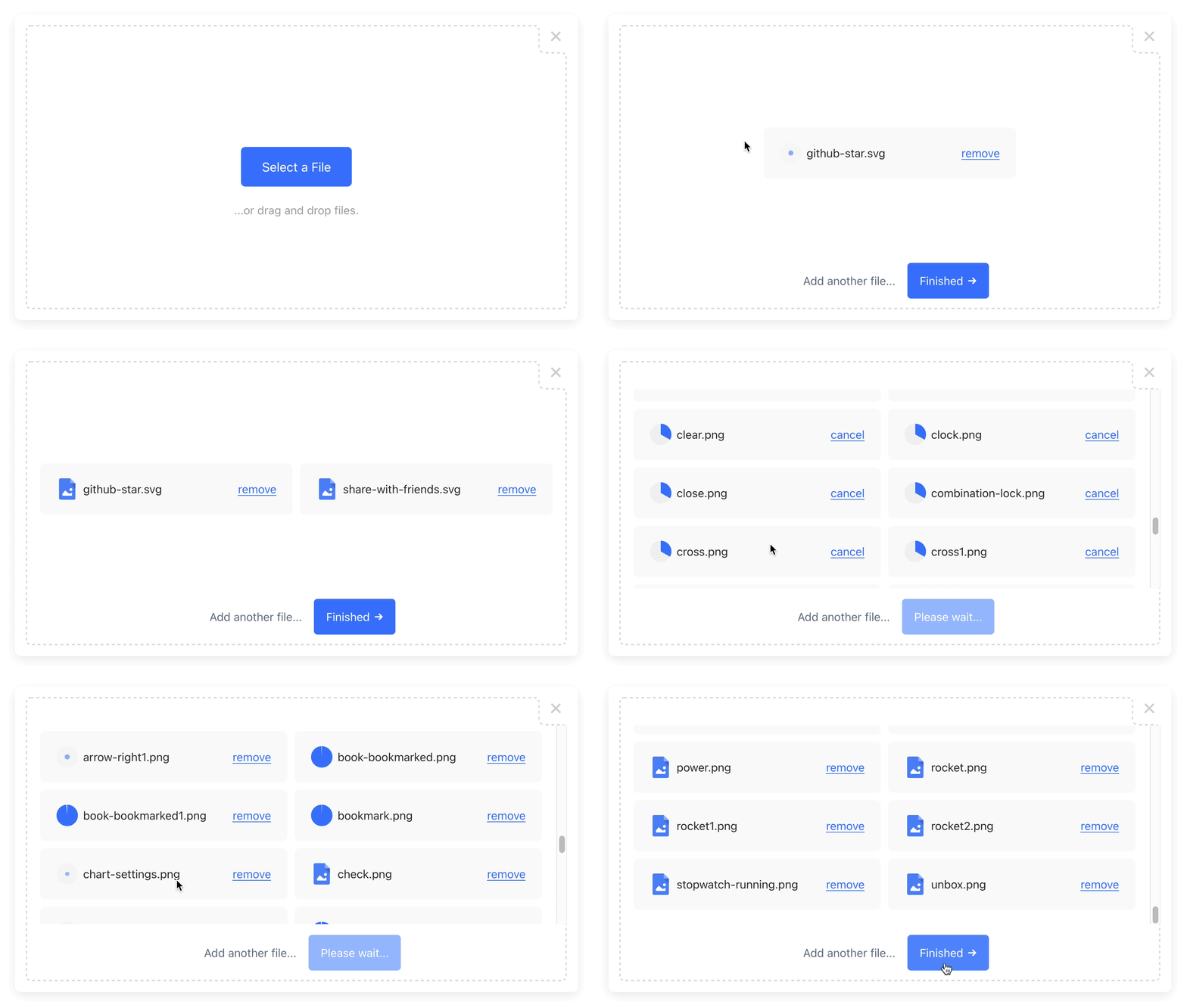
Initialize once at the start of your application:
```javascript
// Ignore if installed via a script tag.
const { Uploader } = require("uploader");
// Get production API keys from Bytescale
const uploader = Uploader({
apiKey: "free"
});
```
### Open the Modal — [Try on CodePen](https://codepen.io/bytescale/pen/oNoRmJW?editors=1010):
```javascript
uploader.open({ multi: true }).then(files => {
if (files.length === 0) {
console.log('No files selected.')
} else {
console.log('Files uploaded:');
console.log(files.map(f => f.fileUrl));
}
}).catch(err => {
console.error(err);
});
```
### Get the Result
`.open()` returns `Promise>`:
```javascript
{
fileUrl: "https://upcdn.io/FW25...", // URL to use when serving this file.
filePath: "/uploads/example.jpg", // File path (we recommend saving this to your database).
editedFile: undefined, // Edited file (for image crops). Same structure as below.
originalFile: {
fileUrl: "https://upcdn.io/FW25...", // Uploaded file URL.
filePath: "/uploads/example.jpg", // Uploaded file path (relative to your raw file directory).
accountId: "FW251aX", // Bytescale account the file was uploaded to.
originalFileName: "example.jpg", // Original file name from the user's machine.
file: { ... }, // Original DOM file object from the element.
size: 12345, // File size in bytes.
lastModified: 1663410542397, // Epoch timestamp of when the file was uploaded or updated.
mime: "image/jpeg", // File MIME type.
metadata: {
... // User-provided JSON object.
},
tags: [
"tag1", // User-provided & auto-generated tags.
"tag2",
...
]
}
}
```
## 👀 More Examples
### Creating an Image Uploader — [Try on CodePen](https://codepen.io/bytescale/pen/gOXEWWB?editors=1010):
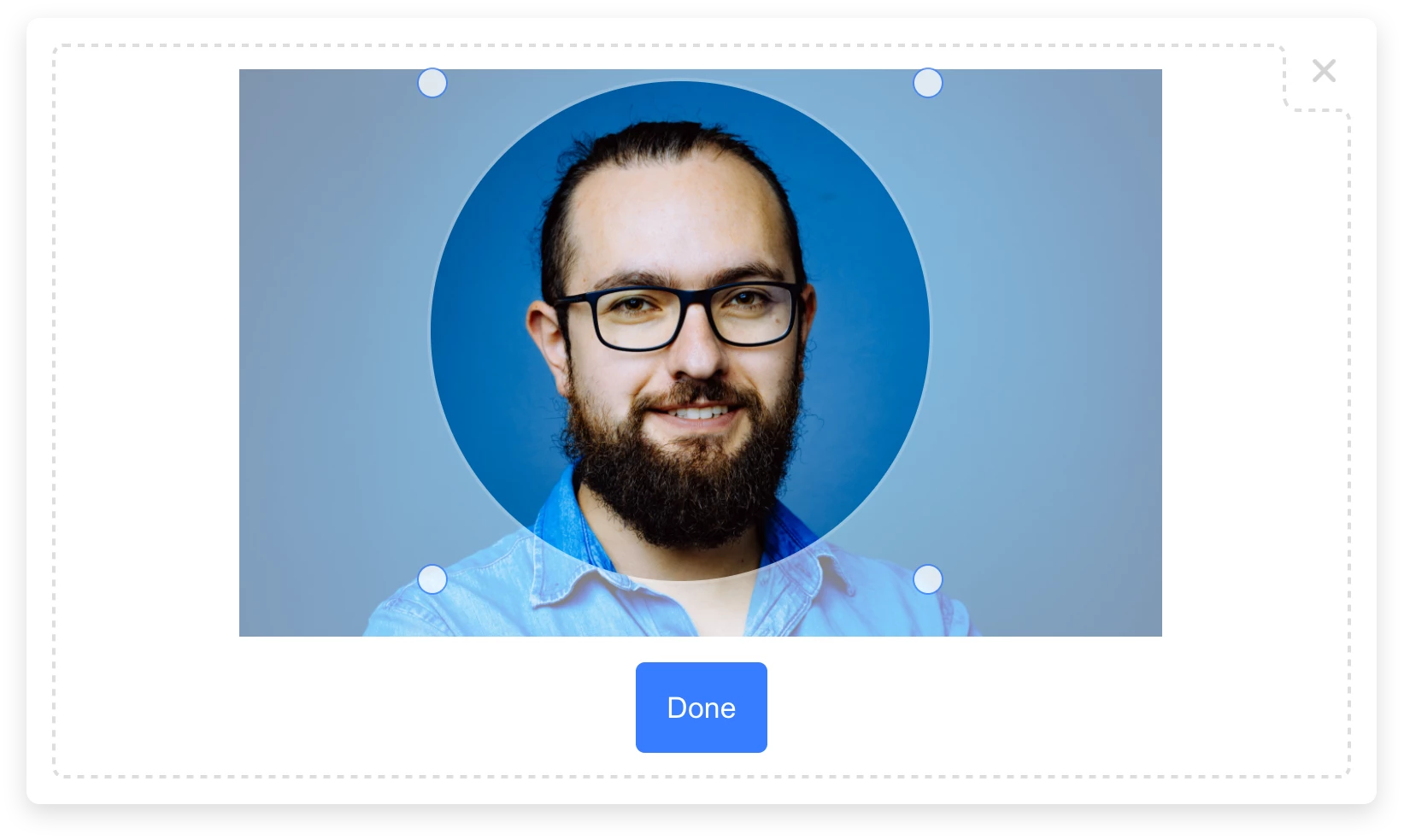
Uploader contains a built-in image cropper:
The cropper appears by default, but can be disabled with `crop: false` (see examples below):
```javascript
uploader
.open({
multi: false,
mimeTypes: ["image/*"],
editor: {
images: {
crop: true,
cropShape: "circ", // "rect" also supported.
cropRatio: 1 / 1 // "1" is enforced for "circ".
}
}
})
.then(files => alert(JSON.stringify(files)));
```
#### How does image cropping work?
The image cropper uses server-side image cropping, and works like so:
1. First, the original image is uploaded, with no cropping applied.
1. If the user-provided crop geometry matches the original image geometry, then no further action is taken.
- The `filePath` in the result will reference the original image.
1. Else a **2nd file is uploaded** containing JSON that describes the crop geometry and includes a reference to the original image's `filePath`.
- The `filePath` in the result will reference the JSON file.
1. When a JSON file is requested via the [Image Processing API](https://www.bytescale.com/docs/image-processing-api), then the crop described by the JSON file will be applied first, followed by any additional transformations you have specified via the URL.
### Creating a "Single File" Upload Button — [Try on CodePen](https://codepen.io/bytescale/pen/WNXmjjq?editors=1010):
```javascript
uploader.open().then(files => alert(JSON.stringify(files)));
```
### Creating a "Multi File" Upload Button — [Try on CodePen](https://codepen.io/bytescale/pen/RwjdVxY?editors=1010):
```javascript
uploader.open({ multi: true }).then(files => alert(JSON.stringify(files)));
```
### Creating a Dropzone — [Try on CodePen](https://codepen.io/bytescale/pen/PoOLmeL?editors=1010):
You can use Uploader as a dropzone — rather than a modal — by specifying `layout: "inline"` and a container:
```javascript
uploader.open({
multi: true,
layout: "inline",
container: "#example_div_id", // Replace with the ID of an existing DOM element.
onUpdate: (files) => console.log(files)
})
```
Note:
- You must set `position: relative`, `width` and `height` on the container `div`.
- The `Finish` button is hidden by default in this mode (override with `"showFinishButton": true`).
## ⚙️ Configuration
All configuration is optional.
```javascript
uploader
.open({
container: "body", // "body" by default.
layout: "modal", // "modal" by default. "inline" also supported.
locale: myCustomLocale, // EN_US by default. (See "Localization" section below.)
maxFileCount: 5, // Unlimited by default (or 1 if multi: false).
maxFileSizeBytes: 1024 ** 2, // Unlimited by default.
mimeTypes: ["image/*"], // Unrestricted by default. Supports * wildcard suffix.
multi: false, // False by default.
onInit: ({ // Exposes lifecycle methods for the component.
close, // Closes the widget when called.
reset, // Resets the widget when called.
updateConfig // Updates the widget's config by passing a new config
}) => {}, // object to the method's first parameter.
onUpdate: files => {}, // Called each time the list of uploaded files change.
onPreUpload: async file => ({
errorMessage: "Uh oh!", // Displays this error message to the user (if set).
transformedFile: file // Uploads 'transformedFile' instead of 'file' (if set).
}),
showFinishButton: true, // Show/hide the "finish" button in the widget.
showRemoveButton: true, // Show/hide the "remove" button next to each file.
styles: {
colors: {
primary: "#377dff", // Primary buttons & links
active: "#528fff", // Primary buttons & links (hover). Inferred if undefined.
error: "#d23f4d", // Error messages
shade100: "#333", // Standard text
shade200: "#7a7a7a", // Secondary button text
shade300: "#999", // Secondary button text (hover)
shade400: "#a5a6a8", // Welcome text
shade500: "#d3d3d3", // Modal close button
shade600: "#dddddd", // Border
shade700: "#f0f0f0", // Progress indicator background
shade800: "#f8f8f8", // File item background
shade900: "#fff" // Various (draggable crop buttons, etc.)
},
fontFamilies: {
base: "arial, sans-serif" // Base font family (comma-delimited).
},
fontSizes: {
base: 16 // Base font size (px).
}
},
path: { // Optional: a string (full file path) or object like so:
fileName: "Example.jpg", // Supports path variables (e.g. {ORIGINAL_FILE_EXT}).
folderPath: "/uploads" // Please refer to docs for all path variables.
},
metadata: {
hello: "world" // Arbitrary JSON metadata (saved against the file).
},
tags: ["profile_picture"], // Requires a Bytescale account.
editor: {
images: {
preview: true, // True by default if cropping is enabled. Previews PDFs and videos too.
crop: true, // True by default.
cropFilePath: image => { // Choose the file path used for JSON image crop files.
const {filePath} = image // In: https://www.bytescale.com/docs/upload-api/types/FileDetails
return `${filePath}.crop` // Out: https://www.bytescale.com/docs/upload-api/types/FilePathDefinition
},
cropRatio: 4 / 3, // Width / Height. Undefined enables freeform (default).
cropShape: "rect" // "rect" (default) or "circ".
}
},
})
.then(files => alert(files))
```
### 🏳️ Localization
Default is [EN_US](https://github.com/bytescale/uploader/blob/main/lib/src/modules/locales/EN_US.ts):
```javascript
const myCustomLocale = {
"error!": "Error!",
"done": "Done",
"addAnotherFile": "Add another file...",
"addAnotherImage": "Add another image...",
"cancel": "cancel",
"cancelInPreviewWindow": "Cancel",
"cancelled!": "cancelled",
"continue": "Continue",
"customValidationFailed": "Failed to validate file.",
"crop": "Crop",
"finish": "Finished",
"finishIcon": true,
"image": "Image",
"maxFilesReached": "Maximum number of files:",
"maxImagesReached": "Maximum number of images:",
"maxSize": "File size limit:",
"next": "Next",
"of": "of",
"orDragDropFile": "...or drag and drop a file.",
"orDragDropFiles": "...or drag and drop files.",
"orDragDropImage": "...or drag and drop an image.",
"orDragDropImages": "...or drag and drop images.",
"pleaseWait": "Please wait...",
"removed!": "removed",
"remove": "remove",
"skip": "Skip",
"unsupportedFileType": "File type not supported.",
"uploadFile": "Upload a File",
"uploadFiles": "Upload Files",
"uploadImage": "Upload an Image",
"uploadImages": "Upload Images",
"validatingFile": "Validating file..."
}
```
# 🌐 API Support
## 🌐 File Management API
Bytescale provides an [Upload API](https://www.bytescale.com/docs/upload-api), which supports the following:
- File uploading.
- File listing.
- File deleting.
- And more...
Uploading a `"Hello World"` text file is as simple as:
```shell
curl --data "Hello World" \
-u apikey:free \
-X POST "https://api.bytescale.com/v1/files/basic"
```
_Note: Remember to set `-H "Content-Type: mime/type"` when uploading other file types!_
[Read the Upload API docs »](https://www.bytescale.com/docs/upload-api)
## 🌐 Image Processing API (Resize, Crop, etc.)
Bytescale also provides an [Image Processing API](https://www.bytescale.com/docs/image-processing-api), which supports the following:
- [Image Resizing](https://www.bytescale.com/docs/image-processing-api#image-resizing-api)
- [Image Cropping](https://www.bytescale.com/docs/image-processing-api#image-cropping-api)
- [Image Compression](https://www.bytescale.com/docs/image-processing-api#image-compression-api)
- [Image Conversion](https://www.bytescale.com/docs/image-processing-api#f)
- [Image Manipulation (blur, sharpen, brightness, etc.)](https://www.bytescale.com/docs/image-processing-api#image-manipulation-api)
- [Layering (e.g for text & image watermarks)](https://www.bytescale.com/docs/image-processing-api#image)
- and more...
[Read the Image Processing API docs »](https://www.bytescale.com/docs/image-processing-api)
### Original Image
Here's an example using [a photo of Chicago](https://upcdn.io/W142hJk/raw/example/city-landscape.jpg):
```
https://upcdn.io/W142hJk/raw/example/city-landscape.jpg
```
### Processed Image
Using the [Image Processing API](https://www.bytescale.com/docs/image-processing-api), you can produce [this image](https://upcdn.io/W142hJk/image/example/city-landscape.jpg?w=900&h=600&fit=crop&f=webp&q=80&blur=4&text=WATERMARK&layer-opacity=80&blend=overlay&layer-rotate=315&font-size=100&padding=10&font-weight=900&color=ffffff&repeat=true&text=Chicago&gravity=bottom&padding-x=50&padding-bottom=20&font=/example/fonts/Lobster.ttf&color=ffe400):
```
https://upcdn.io/W142hJk/image/example/city-landscape.jpg
?w=900
&h=600
&fit=crop
&f=webp
&q=80
&blur=4
&text=WATERMARK
&layer-opacity=80
&blend=overlay
&layer-rotate=315
&font-size=100
&padding=10
&font-weight=900
&color=ffffff
&repeat=true
&text=Chicago
&gravity=bottom
&padding-x=50
&padding-bottom=20
&font=/example/fonts/Lobster.ttf
&color=ffe400
```
## Full Documentation
[Uploader Documentation »](https://www.bytescale.com/docs/upload-widget)
## Need a Headless (no UI) File Upload Library?
[Try Upload.js »](https://www.bytescale.com/upload-js)
## Can I use my own storage?
**Yes:** Bytescale supports AWS S3, Cloudflare R2, Google Storage, and DigitalOcean Spaces.
To configure a custom storage backend, please see:
[https://www.bytescale.com/docs/storage/sources](https://www.bytescale.com/docs/storage/sources)
## 👋 Create your Bytescale Account
Uploader is the Upload Widget for Bytescale: the best way to serve images, videos, and audio for web apps.
**[Create a Bytescale account »](https://www.bytescale.com/)**
## Building From Source
[BUILD.md](BUILD.md)
## License
[MIT](LICENSE)
---
_Source: https://npm.io/package/uploader · Machine-readable twin of the npm.io package page. Health data is recomputed on every publish._


 ```
https://upcdn.io/W142hJk/raw/example/city-landscape.jpg
```
### Processed Image
Using the [Image Processing API](https://www.bytescale.com/docs/image-processing-api), you can produce [this image](https://upcdn.io/W142hJk/image/example/city-landscape.jpg?w=900&h=600&fit=crop&f=webp&q=80&blur=4&text=WATERMARK&layer-opacity=80&blend=overlay&layer-rotate=315&font-size=100&padding=10&font-weight=900&color=ffffff&repeat=true&text=Chicago&gravity=bottom&padding-x=50&padding-bottom=20&font=/example/fonts/Lobster.ttf&color=ffe400):
 ```
https://upcdn.io/W142hJk/image/example/city-landscape.jpg
?w=900
&h=600
&fit=crop
&f=webp
&q=80
&blur=4
&text=WATERMARK
&layer-opacity=80
&blend=overlay
&layer-rotate=315
&font-size=100
&padding=10
&font-weight=900
&color=ffffff
&repeat=true
&text=Chicago
&gravity=bottom
&padding-x=50
&padding-bottom=20
&font=/example/fonts/Lobster.ttf
&color=ffe400
```
## Full Documentation
[Uploader Documentation »](https://www.bytescale.com/docs/upload-widget)
## Need a Headless (no UI) File Upload Library?
[Try Upload.js »](https://www.bytescale.com/upload-js)
## Can I use my own storage?
**Yes:** Bytescale supports AWS S3, Cloudflare R2, Google Storage, and DigitalOcean Spaces.
To configure a custom storage backend, please see:
[https://www.bytescale.com/docs/storage/sources](https://www.bytescale.com/docs/storage/sources)
## 👋 Create your Bytescale Account
Uploader is the Upload Widget for Bytescale: the best way to serve images, videos, and audio for web apps.
**[Create a Bytescale account »](https://www.bytescale.com/)**
## Building From Source
[BUILD.md](BUILD.md)
## License
[MIT](LICENSE)
---
_Source: https://npm.io/package/uploader · Machine-readable twin of the npm.io package page. Health data is recomputed on every publish._