# v3-dragblock
> v3-dragblock Component based in Vue3
Latest version **1.0.9-alpha.0.1** (published 2023-04-18) · MIT license · 0 weekly downloads
## Install
```sh
npm install v3-dragblock
pnpm add v3-dragblock
yarn add v3-dragblock
bun add v3-dragblock
```
## Health
**Score 25/100 (F)** — status: abandoned.
Positive: has types; esm support; no vulnerabilities.
Warnings: low downloads.
Negative: abandoned; low maintenance score.
## Facts
| | |
|---|---|
| Version | 1.0.9-alpha.0.1 |
| Published | 2023-04-18 |
| First published | 2023-02-24 |
| Weekly downloads | 0 |
| License | MIT |
| TypeScript types | bundled |
| Module format | ESM + CommonJS |
| Dependencies | 0 |
| Unpacked size | 130.2 KB |
| Known vulnerabilities | 0 |
| Install scripts | no |
| Author | pinky-pig |
| Maintainers | pinky-pig |
| Keywords | vue3-dragblock, vue3-drag-resize-component, drag, resize, adsrob |
## Links
- npm: https://www.npmjs.com/package/v3-dragblock
- Repository: https://github.com/pinky-pig/v3-dragblock
- Homepage: https://what-is-v3-dragblock.vercel.app/
- Issues: https://github.com/pinky-pig/v3-dragblock/issues
- npm.io page: https://npm.io/package/v3-dragblock
## Alternatives
- [exif-parser](https://npm.io/package/exif-parser.md) — 3.8M weekly downloads
- [vite-plugin-compression](https://npm.io/package/vite-plugin-compression.md) — 569.5K weekly downloads
- [pica](https://npm.io/package/pica.md) — 442.4K weekly downloads
- [@reportportal/client-javascript](https://npm.io/package/@reportportal/client-javascript.md) — 408.8K weekly downloads
- [@tldraw/state](https://npm.io/package/@tldraw/state.md) — 316.0K weekly downloads
## Recent versions
- 1.0.9-alpha.0.1 (latest) — 2023-04-18
- 1.0.9 — 2023-03-06
- 1.0.8 — 2023-03-02
- 1.0.7 — 2023-03-02
- 1.0.6 — 2023-03-01
- 1.0.5 — 2023-02-28
- 1.0.4 — 2023-02-27
- 1.0.3 — 2023-02-24
- 1.0.2 — 2023-02-24
- 1.0.1 — 2023-02-24
- 1.0.0 — 2023-02-24
## README
v3-dragblock
Component based in Vue3
# 🌸 Get Started
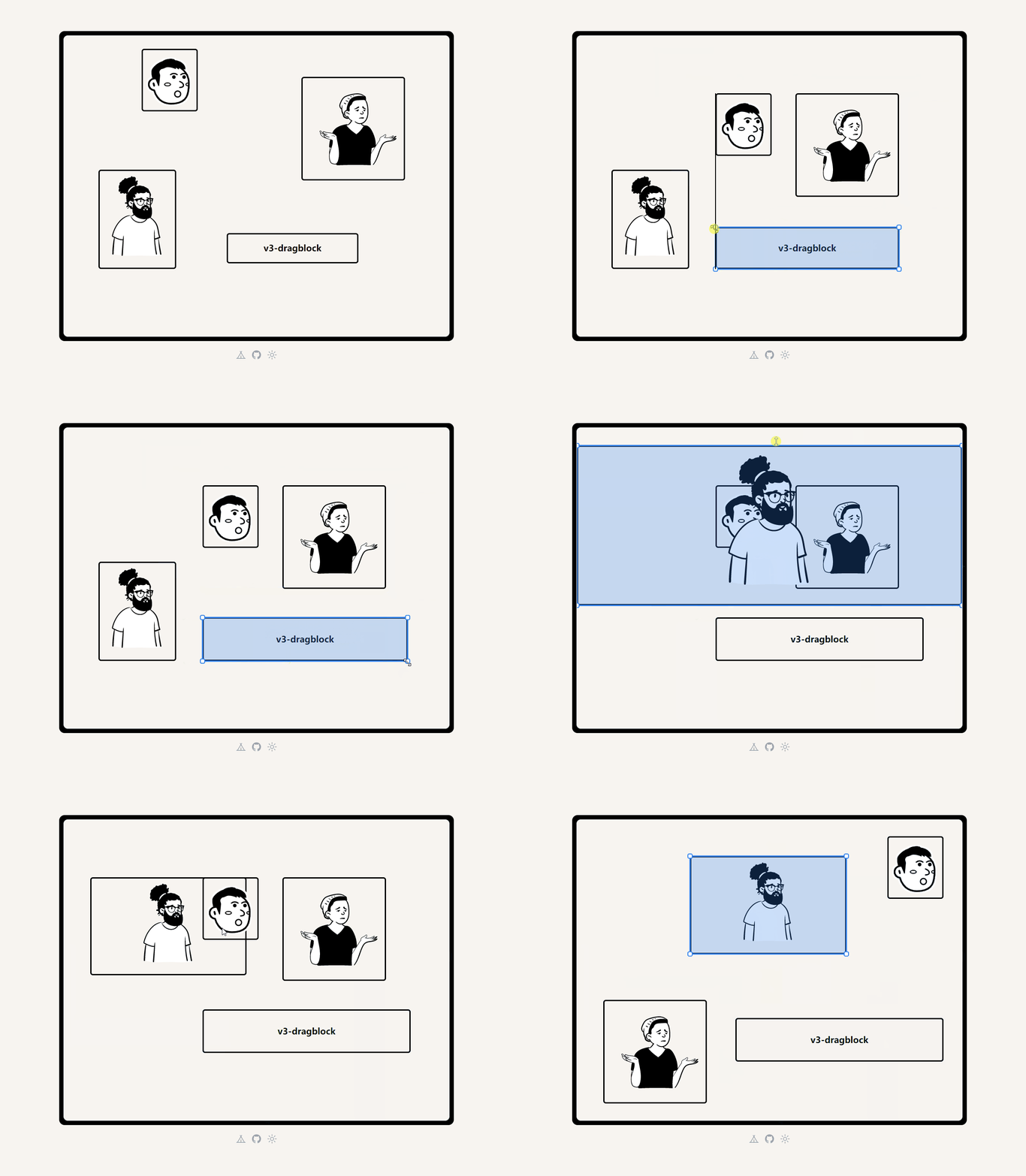
使用 v3-dragblock 开发的示例。
使用文档地址:[Document](https://what-is-v3-dragblock.vercel.app/)
Versel 演示地址: [Demo - Vercel](https://v3-dragblock-demo.vercel.app/)
Github 代码地址: [Demo -Github](https://github.com/pinky-pig/what-is-drag-resize-attached-card)
## 🎉 Introduce
V3-dragblock 是一个基于 Vue3 的拖拽组件,支持拖拽移动、缩放、吸附功能。目前初始版本暂时只支持 Vue3 版本,而且具有很多优化空间。
## 🏄♂️ Feature
- 可配置 draggable 、 resizable 、 adsorbable
- 可传入 draggable 和 resizable 的 start 和 end 事件
- 可配置吸附线 adsorbline 的样式, 及吸附误差范围
## 👊 Todo
- [ ] 简化组织代码
- [ ] 按需打包 VueUse 的依赖
- [ ] 适配 Vue2
- [ ] 适配 React
## 🍄 Usage Steps
```bash
npm i v3-dragblock
```
如果已经经过 `npm i v3-dragblock`,那么下面就开始使用。
仅仅只需要,在需要的组件中 `import V3Dragblock from 'v3-dragblock'` 后,定义子项组件传入 `V3Dragblock` 后就可以使用。
当然需要通过 `CSS` 设置拖拽画布的大小。如果有不太理解的可以参考上面的 [Demo Github](https://github.com/pinky-pig/what-is-drag-resize-attached-card)
```vue
```
## ⚡ Configurations
这里展示一些组件的配置,包括设置 拖拽、缩放、吸附功能是否开启,以及一些事件方法。
```vue
```
### 🍔 `class="V3Dragblock"`
盒子的类名,用于比如设置拖拽盒子的尺寸或是一些其他 style 样式。子元素位置是在这个盒子内部的,不能超过这个尺寸。
### 🍔 `:activated="true"`
是否激活功能,这里其实就是监听 `activated` 添加或删除鼠标监听事件。
### 🍕 `:grid-cells="gridCells"`
> 需要用 `ref` 包着,具有响应性。
传入要拖拽的组件数组,要具有以下格式:
```js
import V3Dragblock from 'v3-dragblock'
import GridCellOne from '../components/GridCellOne.vue'
import GridCellTwo from '../components/GridCellTwo.vue'
import GridCellThree from '../components/GridCellThree.vue'
import GridCellFour from '../components/GridCellFour.vue'
const gridCells = ref([
{ id: '0', index: 0, x: 80, y: 310, width: 180, height: 230, component: markRaw(GridCellOne) },
{ id: '1', index: 0, x: 550, y: 95, width: 240, height: 240, component: markRaw(GridCellTwo) },
{ id: '2', index: 0, x: 377, y: 457, width: 305, height: 70, component: markRaw(GridCellThree) },
{ id: '3', index: 0, x: 180, y: 30, width: 130, height: 145, component: markRaw(GridCellFour) },
])
```
| 字段 | 作用 |
| :---: | :--: |
| id | 唯一标识 |
| index | 层级,两个元素重叠的层级 |
| x | 离盒子的左边距离 |
| y | 离盒子的上边距离 |
| width | 元素的宽度 |
| height | 元素的高度 |
| component | 自定义的组件 |
### 🍟 `:draggable="true" | :resizable="true" | :adsorbable="true"`
| Props | 作用 | 默认|
| :---: | :--: |:--: |
| draggable | 拖拽 |true ( 启用 ) |
| resizable | 缩放 |true ( 启用 ) |
| adsorbable | 吸附 |true ( 启用 ) |
### 🍿 `:adsorb-line-style="adsorbLineStyle"`
开启吸附功能的时候,吸附线的样式
```js
const adsorbLineStyle = {
stroke: 'black',
fill: 'black',
strokeWidth: 2,
}
```
### 🍳 `@dragging | @resizing | @drag-start | @resize-start| @drag-end|@resize-end`
| handles | 作用 | 返回值|
| :---: | :--: |:--: |
| @dragging | 正在拖拽 | 当前对象 |
| @resizing | 正在缩放 | 当前对象 |
| @drag-start | 拖拽开始 | 当前对象 |
| @resize-start | 缩放开始 | 当前对象 |
| @drag-end | 拖拽结束 | 所有对象的信息 |
| @resize-end | 缩放结束 | 所有对象的信息 |
---
_Source: https://npm.io/package/v3-dragblock · Machine-readable twin of the npm.io package page. Health data is recomputed on every publish._