# ve-calendar

> this easy calendar by vue

Latest version **0.3.2** (published 2018-07-10) · MIT license · 0 weekly downloads

## Install

```sh
npm install ve-calendar
pnpm add ve-calendar
yarn add ve-calendar
bun add ve-calendar
```

## Health

**Score 15/100 (F)** — status: abandoned.

Positive: no vulnerabilities.

Warnings: low downloads; no types; no esm support; pre 1.0.

Negative: abandoned; low maintenance score.

## Facts

| | |
|---|---|
| Version | 0.3.2 |
| Published | 2018-07-10 |
| First published | 2018-06-15 |
| Weekly downloads | 0 |
| License | MIT |
| TypeScript types | none |
| Module format | CommonJS |
| Node | >= 4.0.0 |
| Dependencies | 1 |
| Unpacked size | 184.3 KB |
| Known vulnerabilities | 0 |
| Install scripts | no |
| GitHub stars | 47 |
| Author | pcloth |
| Maintainers | pcloth |
| Keywords | vue, easy, calendar, ve calendar, vue-easy-ui |

## Links

- npm: https://www.npmjs.com/package/ve-calendar
- Repository: https://github.com/pcloth/ve-calendar
- Homepage: https://github.com/pcloth
- Issues: https://github.com/pcloth/ve-calendar/issues
- npm.io page: https://npm.io/package/ve-calendar

## Dependencies (1)

- [vue-resize-directive](https://npm.io/package/vue-resize-directive.md) ^1.0.0

## Recent versions

- 0.3.2 (latest) — 2018-07-10
- 0.3.1 — 2018-07-04
- 0.3.0 — 2018-07-02
- 0.2.0 — 2018-06-26
- 0.1.9 — 2018-06-26
- 0.1.8 — 2018-06-26
- 0.1.7 — 2018-06-26
- 0.1.6 — 2018-06-25
- 0.1.5 — 2018-06-25
- 0.1.4 — 2018-06-25
- 0.1.3 — 2018-06-22
- 0.1.2 — 2018-06-22
- 0.1.1 — 2018-06-22
- 0.1.0 — 2018-06-22
- 0.0.9 — 2018-06-21
- … 8 more at https://npm.io/package/ve-calendar/versions

## README

# ve-calendar

> 这是一个基于vue 2.X的日历组件
> 
<p align="center">
   <a href="https://www.npmjs.com/package/ve-calendar"><img src="https://img.shields.io/npm/v/ve-calendar.svg?style=flat" alt="npm"></a>
   <a href="https://www.npmjs.com/package/ve-calendar"><img src="https://img.shields.io/npm/dm/ve-calendar.svg?style=flat" alt="npm"></a>
 </p>
 
## [English document by machine translation](./README.EN.MD)
 
## 预览
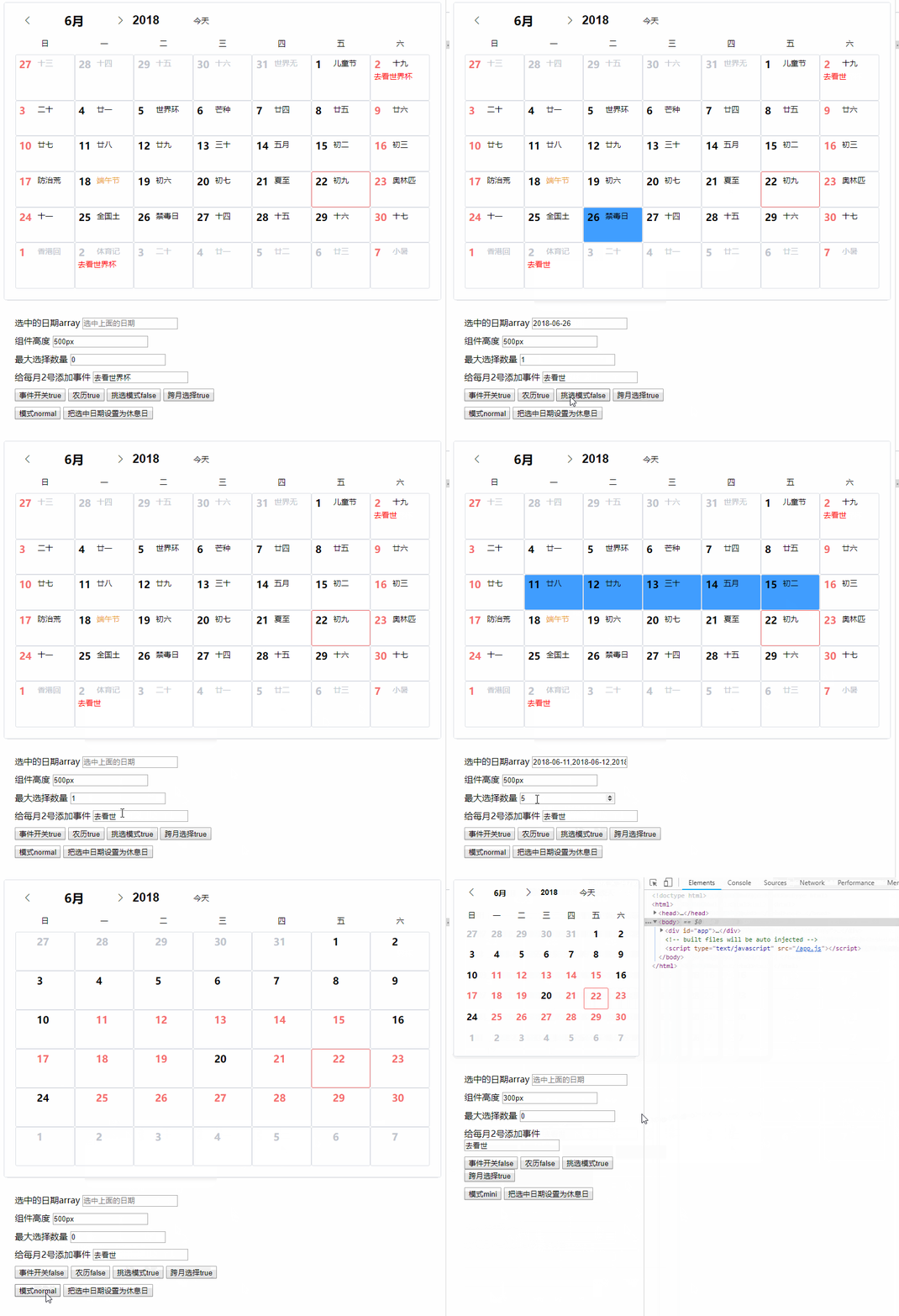
![Alt text](https://raw.githubusercontent.com/pcloth/ve-calendar/master/images/demo.gif)


## <a href="https://jsfiddle.net/pcloth/Lma8qonh/">查看在线demo</a>

## <a href="https://jsfiddle.net/pcloth/7vq6bfLr/">年视图demo</a>


# 目前功能:
>1、显示2100年以前的农历、节气、节日
>
>2、可指定最大选中日期数量
>
>3、可用插槽自定义日期数字、农历、事件区域
>
>4、可用插槽定义左右键菜单（右键菜单有默认项目）
>
>5、多语言支持，默认中文
>
>6、两种尺寸显示模式
>
>7、添加年视图组件(ver 0.3.0+)


## 快速开始

### 第一步:
``` sh
npm install ve-calendar --save
```
### 第二步，在你的vue页面里
``` js
import veCalendar from "ve-calendar";

// in your vue <script>
export default {
    components: {
        veCalendar
    }
}
```

### 第三步，加载模板:
``` html
<!-- 日历组件 -->
<ve-calendar v-model="selectDateList"></ve-calendar>

<!-- 年视图组件 -->
<ve-year v-model="selectDateList"></ve-year>

```


## props参数

| 参数名称            | 类型    | 默认值              | 说明                                                                                                                                  |
| ------------------- | ------- | ------------------- | ------------------------------------------------------------------------------------------------------------------------------------- |
| value               | array   | 无                  | v-model绑定值，是当前选中日期列表                                                                                                     |
| activate-date       | object  | 今天的年月          | 包含两个值year当前年份，month当前月份                                                                                                 |
| off-days            | array   | 无                  | 包含了休息日数据，如果没有这个参数，默认休息日是周六周日和节假日                                                                      |
| most-choice         | number  | 0                   | 最多选择日期数量,0无限,负数表示禁止选择                                                                                               |
| cross-month         | boolean | false               | 是否允许跨月选择日期                                                                                                                  |
| pick-mode           | boolean | true                | 挑选模式：为true时新选中的日期数量如果超过most-choice设定的数量，将把最早的一个日期丢弃。为false时，超过most-choice设定值将不能再选中 |
| right-menu          | boolean | true                | 是否显示鼠标右键菜单                                                                                                                  |
| day-event-menu      | string  | day-event-menu      | 弹出菜单的class name                                                                                                                  |
| day-event-menu-item | string  | day-event-menu-item | 弹出菜单项目的class name                                                                                                              |
| lang                | string  | zh-cn               | 多语言支持，默认简体中文。en模式下农历和假日不显示，只能使用slot自定义                                                                |
| mode                | string  | normal              | normal/mini/auto 三个显示模式，auto是根据宽度自动切换。                                                                               |  |
| lunar               | boolean | true                | 是否显示农历区域，如果禁止，相应的插槽也无法使用。                                                                                    |
| event               | boolean | true                | 是否显示事件区域，如果禁止，相应的插槽也无法使用。                                                                                    |
| height              | string  | auto                | 组件渲染的高度。                                                                                                                      |
| enabled-list        | array   | []                  | 只允许列表中的日期被选中                                                                                                              |
| disabled-list       | array   | []                  | 列表中的日期不能被选中，和enabled-list最好不要同时用                                                                                  |
| cancel-click        | boolean | true                | 是否允许点击取消选中                                                                                                                  |
| over-hide           | boolean | false               | 超出本月部分是否隐藏                                                                                                                  |
| select-mode | string | list | 选择模式，list模式表示选中项每一个都需要用户点击或者拖动；range表示用户只需要点击开始日期和结束日期，中间日期会被选中，value值会只输出开始日期和结束日期(most-choice失效) |
| min | string | null | 如果有min值'2018-07-05'，表示只允许选中从2018-07-05日期之后的日子。 |
| max | string | null | 如果有min值'2018-07-05'，表示只允许选中从2018-07-05日期之前的日子。 |

## 事件
| 名字             | 参数                   | 说明                                                                                                            |
| ---------------- | ---------------------- | --------------------------------------------------------------------------------------------------------------- |
| refresh-calendar | {year,month},monthData | 当切换日历时触发/改变激活年月,当前视图中的全部日历数据。                                                        |
| change           | selectedDate/array     | 选中日期发生改变时触发，参数是当前选中的日期列表（字符串）                                                      |
| append-event     | day                    | 默认的右键菜单点击后传出的事件，day是鼠标点击的当天对象。如果使用了right-menu插槽，这个事件失效，需要你自己写。 |


## 插槽
| 名字                 | 参数                                           | 说明                                                                                                                                                                                                  |
| -------------------- | ---------------------------------------------- | ----------------------------------------------------------------------------------------------------------------------------------------------------------------------------------------------------- |
| header               | slot-scope="{year,month}"                      | 用来替换头部区域                                                                                                                                                                                      |
| day-number           | slot-scope="{day}"                             | 用来替换默认的左上角数字，day就是当天的数据对象                                                                                                                                                       |
| day-lunar            | slot-scope="{day}"                             | 用来替换右上角的农历、节日、节气，day就是当天的数据对象                                                                                                                                               |
| day-event            | slot-scope="{day,popMenu}"                     | 用来显示待办事项之类的功能，day就是当天的数据对象，popMenu是组件传出来的弹出左键菜单的方法，你调用必须如下：@click="popMenu($event,{day,item}) 参数中只有item是需要传递进去的数据。其他都是必要格式。 |
| day-event-left-menu  | slot-scope="{currentEvent,eventMenuShow}"      | 当有待办事项时，点击左键弹出的菜单插槽;currentEvent就是上面一条popMenu传递进来的{day,item}参数                                                                                                        |
| day-event-right-menu | slot-scope="{currentEvent,eventRightMenuShow}" | 当鼠标右键点击空白事件区域时弹出的菜单插槽                                                                                                                                                            |


## day 数据内容
``` js
isToday = false;
//阳历
sYear = sYear;   //公元年4位数字
sMonth = sMonth;  //公元月数字
sDay = sDay;    //公元日数字
week = week;    //星期, 1个中文
    
//农历
lYear = lYear;   //公元年4位数字
lMonth = lMonth;  //农历月数字
lMonthChinese = monthChinese[lMonth-1]
lDay = lDay;    //农历日数字
isLeap = isLeap;  //是否为农历闰月?
lDayChinese = '初一'

//八字
cYear = cYear;   //年柱, 2个中文
cMonth = cMonth;  //月柱, 2个中文
cDay = cDay;    //日柱, 2个中文

color = ''; // 节日显示的颜色

lunarFestival = ''; //农历节日
solarFestival = ''; //公历节日
solarTerms = ''; //节气

if (`${sMonth}`.length == 1) sMonth = `0${sMonth}`;
if (`${sDay}`.length == 1) sDay = `0${sDay}`;
sDate = `${sYear}-${sMonth}-${sDay}` // 字符串年月日
```
## demo
``` html
<template>
    <div id="app" >
        <ve-calendar  v-model="selected" :height="height" :lunar="lunar" :event="event" :pick-mode="pickMode" :offDays="offDays" :mode="mode" :most-choice="mostChoice" @refresh-calendar="refreshC"   :cross-month="crossMonth" @append-event="appendEvent"  @click-event="clickEvent" >
            <!--<div slot="day-number" slot-scope="{day}">-->
                <!--<span :style="day.sMonth===month&&test.indexOf(day.sDay)>=0?'color:red;':''">{{day.sDay}}</span>-->
            <!--</div>-->
            <div slot="day-event" slot-scope="{day,popMenu}">
                <div v-if="test.indexOf(day.sDay)>=0">
                    <div @click="popMenu($event,{day,item})" style="color:red;">{{item}}</div>
                </div>
            </div>
            <div slot="day-event-left-menu" slot-scope="{currentEvent,eventMenuShow}">
                <!-- 这里如果需要调用多重包装的数据，请放到v-if里面 -->
                <div v-if="currentEvent.day">{{currentEvent.day.sDate}}</div>
                <div @click="deleteEvent(currentEvent.item)" class="day-event-menu-item">使用插槽控制菜单</div>
            </div>

            <div slot="day-event-right-menu" slot-scope="{currentEvent,eventRightMenuShow}" >
                <div v-if="currentEvent.day">{{currentEvent.day.sDate}}</div>
                <div class="day-event-menu-item">右键插槽控制菜单</div>
            </div>

        </ve-calendar>
        <div class="demo-div" >
            <div>
                <label for="selected">选中的日期array</label>
                <input id="selected" type="text" :value="selected" placeholder="选中上面的日期">
            </div>
            <div>
                <label for="height">组件高度</label>
                <input id="height" type="text" v-model="height">
            </div>

            <div>
                <label for="mostChoice">最大选择数量</label>
                <input id="mostChoice" type="number" v-model="mostChoice" title="0是无限，-1是禁止">
            </div>

            <div>
                <label for="item">给每月2号添加事件</label>
                <input id="item" type="text" v-model="item">
            </div>

            <div>
                <button @click="event=!event">事件开关{{event}}</button>
                <button @click="lunar=!lunar">农历{{lunar}}</button>
                <button @click="pickMode=!pickMode">挑选模式{{pickMode}}</button>
                <button @click="crossMonth=!crossMonth">跨月选择{{crossMonth}}</button>
            </div>
            <div>
                <button @click="changeMode">模式{{mode}}</button>
                <button @click="setOffDays">把选中日期设置为休息日</button>
            </div>

        </div>
        
    </div>
</template>

<script>
import veCalendar from "ve-calendar";

export default {
    name: "App",
    data() {
        return {
            modeList: ["mini", "normal", "auto"],
            modeIndex: 0,
            mode: "",
            item:"去看世界杯",
            lunar:true,
            offDays:[],
            pickMode:false,
            mostChoice:0,
            crossMonth:true,
            event:true,
            activateDate: {
                year: 2017,
                month: 6
            },
            height:'500px',
            month: 6,
            test: [2],
            selected: []
        };
    },
    methods: {
        changeMode() {
            this.modeIndex++;
            this.mode = this.modeList[this.modeIndex % 3];
        },
        setOffDays(){


            this.offDays = JSON.parse(JSON.stringify(this.selected))
            this.selected = []
        },
        refreshC(yearmonth, data) {
            console.log(yearmonth, data);
        },
        clickEvent(e, data) {
            console.log(e, data);
        },
        deleteEvent(item) {
            console.log(`你打算删除事情${item}`);
        },
        appendEvent(day) {
            console.log("appendEvent", day);
        }
    },
    mounted() {
        this.changeMode();
    },
    components: {
        veCalendar
    }
};
</script>

<style>
    .demo-div {
        padding: 20px;
        height: 200px;
    }

    .demo-div div {
        margin-top: 10px;
    }
</style>


```


## License

[MIT]

---
_Source: https://npm.io/package/ve-calendar · Machine-readable twin of the npm.io package page. Health data is recomputed on every publish._
