# vscode-html-languageservice
> Language service for HTML
Latest version **5.6.2** (published 2026-02-23) · MIT license · 0 weekly downloads
## Install
```sh
npm install vscode-html-languageservice
pnpm add vscode-html-languageservice
yarn add vscode-html-languageservice
bun add vscode-html-languageservice
```
## Health
**Score 65/100 (B)** — status: stable.
Positive: has types; esm support; no vulnerabilities; high maintenance score; high quality score.
Warnings: low downloads.
## Facts
| | |
|---|---|
| Version | 5.6.2 |
| Published | 2026-02-23 |
| First published | 2016-09-14 |
| Weekly downloads | 0 |
| License | MIT |
| TypeScript types | bundled |
| Module format | ESM + CommonJS |
| Dependencies | 4 |
| Unpacked size | 1.9 MB |
| Known vulnerabilities | 0 |
| Install scripts | no |
| GitHub stars | 283 |
| Author | Microsoft Corporation |
| Maintainers | microsoft1es, microsoft-oss-releases, alexandrudima, joaomoreno.ms, kaimaetzel, sbatten, lszomoru, vscode-bot |
## Links
- npm: https://www.npmjs.com/package/vscode-html-languageservice
- Repository: https://github.com/Microsoft/vscode-html-languageservice
- Homepage: https://github.com/Microsoft/vscode-html-languageservice#readme
- Issues: https://github.com/Microsoft/vscode-html-languageservice
- npm.io page: https://npm.io/package/vscode-html-languageservice
## Dependencies (4)
- [vscode-uri](https://npm.io/package/vscode-uri.md) ^3.1.0
- [@vscode/l10n](https://npm.io/package/@vscode/l10n.md) ^0.0.18
- [vscode-languageserver-types](https://npm.io/package/vscode-languageserver-types.md) ^3.17.5
- [vscode-languageserver-textdocument](https://npm.io/package/vscode-languageserver-textdocument.md) ^1.0.12
## Recent versions
- 5.6.2 (latest) — 2026-02-23
- 6.0.0-next.2 (next) — 2026-09-10
- 6.0.0-next.1 — 2026-04-10
- 5.6.1 — 2025-12-01
- 5.6.0 — 2025-10-17
- 5.5.2 — 2025-09-29
- 5.5.1 — 2025-06-30
- 5.5.0 — 2025-06-02
- 5.4.1-next.0 — 2025-04-25
- 5.4.0 — 2025-04-25
- 5.3.3 — 2025-03-24
- 5.3.4-next.0 — 2025-03-24
- 5.3.2 — 2024-12-02
- 5.3.1 — 2024-08-26
- 5.3.0 — 2024-06-24
- … 138 more at https://npm.io/package/vscode-html-languageservice/versions
## README
# vscode-html-languageservice
HTML language service extracted from VSCode to be reused, e.g in the Monaco editor.
[](https://www.npmjs.org/package/vscode-html-languageservice)
[](https://npmjs.org/package/vscode-html-languageservice)
[](https://github.com/microsoft/vscode-html-languageservice/actions)
[](https://opensource.org/licenses/MIT)
Why?
----
The _vscode-html-languageservice_ contains the language smarts behind the HTML editing experience of Visual Studio Code
and the Monaco editor.
- *doComplete* / *doComplete2* (async) provide completion proposals for a given location.
- *setCompletionParticipants* allows participant to provide suggestions for specific tokens.
- *doHover* provides hover information at a given location.
- *format* formats the code at the given range.
- *findDocumentLinks* finds all links in the document.
- *findDocumentSymbols* finds all the symbols in the document.
- *getFoldingRanges* return folding ranges for the given document.
- *getSelectionRanges* return the selection ranges for the given document.
...
For the complete API see [htmlLanguageService.ts](./src/htmlLanguageService.ts) and [htmlLanguageTypes.ts](./src/htmlLanguageTypes.ts)
The _vscode-html-languageservice_ does not cover syntax highlighting. VS Code uses TextMate grammars for that, with a grammar that is maintained in https://github.com/textmate/html.tmbundle.
All HTML entities (elements, properties, etc) are sourced from https://github.com/microsoft/vscode-custom-data/tree/master/web-data and transpiled here. For adding or fixing existing properties' completion/hover description, please open PR there.
Installation
------------
npm install --save vscode-html-languageservice
Development
-----------
- clone this repo, run `npm i`
- `npm test` to compile and run tests
How can I run and debug the service?
- open the folder in VSCode.
- set breakpoints, e.g. in `htmlCompletion.ts`
- run the Unit tests from the run viewlet and wait until a breakpoint is hit:

How can I run and debug the service inside an instance of VSCode?
- run VSCode out of sources setup as described here: https://github.com/Microsoft/vscode/wiki/How-to-Contribute
- link the folder of the `vscode-html-languageservice` repo to `vscode/extensions/html-language-features/server` to run VSCode with the latest changes from that folder:
- cd `vscode-html-languageservice`, `npm link`
- cd `vscode/extensions/html-language-features/server`, `npm link vscode-html-languageservice`
- run VSCode out of source (`vscode/scripts/code.sh|bat`) and open a `.html` file
- in VSCode window that is open on the `vscode-html-languageservice` sources, run command `Debug: Attach to Node process` and pick the `code-oss` process with the `html-language-features` path
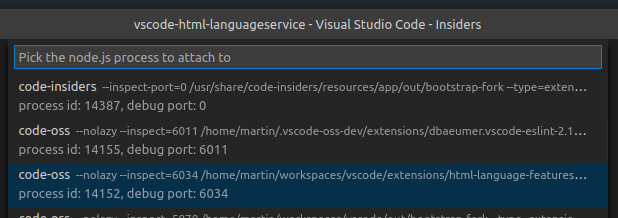
- set breakpoints, e.g. in `htmlCompletion.ts`
- in the instance run from sources, invoke code completion in the `.html` file
License
-------
(MIT License)
Copyright 2016-2023, Microsoft
`src/languageFacts/data/webCustomData.ts` (shipped as `lib/esm/languageFacts/data/webCustomData.ts` and `lib/umd/languageFacts/data/webCustomData.ts`)
are built upon content from [Mozilla Developer Network](https://developer.mozilla.org/en-US/docs/Web) and distributed under CC BY-SA 2.5.
---
_Source: https://npm.io/package/vscode-html-languageservice · Machine-readable twin of the npm.io package page. Health data is recomputed on every publish._