# vue-async-cache
> `vue-async-cache` is a library to cache asynchrone function call between different component. It was initially build to improve cache of api call with VueJs. This library can be especially useful to cache some fetch query, for example using axios. The con
Latest version **1.1.0** (published 2020-02-14) · MIT license · 0 weekly downloads
## Install
```sh
npm install vue-async-cache
pnpm add vue-async-cache
yarn add vue-async-cache
bun add vue-async-cache
```
## Health
**Score 20/100 (F)** — status: abandoned.
Positive: has types; no vulnerabilities.
Warnings: low downloads; no esm support.
Negative: abandoned; low maintenance score.
## Facts
| | |
|---|---|
| Version | 1.1.0 |
| Published | 2020-02-14 |
| First published | 2019-05-02 |
| Weekly downloads | 0 |
| License | MIT |
| TypeScript types | bundled |
| Module format | CommonJS |
| Dependencies | 4 |
| Unpacked size | 13.9 KB |
| Known vulnerabilities | 0 (+1 in 1 direct dependencies) |
| Install scripts | no |
| GitHub stars | 1 |
| Author | Alexandre Piel |
| Maintainers | apiel |
## Links
- npm: https://www.npmjs.com/package/vue-async-cache
- Repository: https://github.com/apiel/async-cache
- Homepage: https://github.com/apiel/async-cache#readme
- Issues: https://github.com/apiel/async-cache/issues
- npm.io page: https://npm.io/package/vue-async-cache
## Dependencies (4)
- [md5](https://npm.io/package/md5.md) ^2.2.1
- [vue](https://npm.io/package/vue.md) ^2.6.10
- [typescript](https://npm.io/package/typescript.md) ^3.4.1
- [core-async-cache](https://npm.io/package/core-async-cache.md) ^1.1.0
## Recent versions
- 1.1.0 (latest) — 2020-02-14
- 1.0.0 — 2020-02-14
- 1.0.0-alpha.1 — 2020-02-13
- 0.7.0 — 2019-05-04
- 0.6.0 — 2019-05-03
- 0.5.1 — 2019-05-03
- 0.5.0 — 2019-05-03
- 0.4.3 — 2019-05-02
- 0.4.2 — 2019-05-02
- 0.4.1 — 2019-05-02
## README
# vue-async-cache
`vue-async-cache` is a library to cache asynchrone function call between different component.
It was initially build to improve cache of api call with VueJs. This library can be especially useful to cache some fetch query, for example using axios. The concept was inspired from Apollo cache, even if it is far from being comparable.
The library take care to save the response of the async function and share it between components using context api. It will also avoid unnecessary call made simultaneously to the same async function. It will identify the cache id base on the name of the function and the parameters passed. So if you call multiple times the same function with different parameters, it will not use the same cache. Example:
api is an async function
```js
export api = async (param1, param2) => ...
```
```js
call(api, '/counter');
call(api, '/timer');
```
This 2 call to `api` function will have different cache because they don't share the same parameters.
```js
call(api, '/counter');
call(api, '/counter');
```
This 2 call to `api` function will have the same cache and `api` will be called only once.
## Example
See full example at [here](https://github.com/apiel/vue-async-cache/tree/master/example).
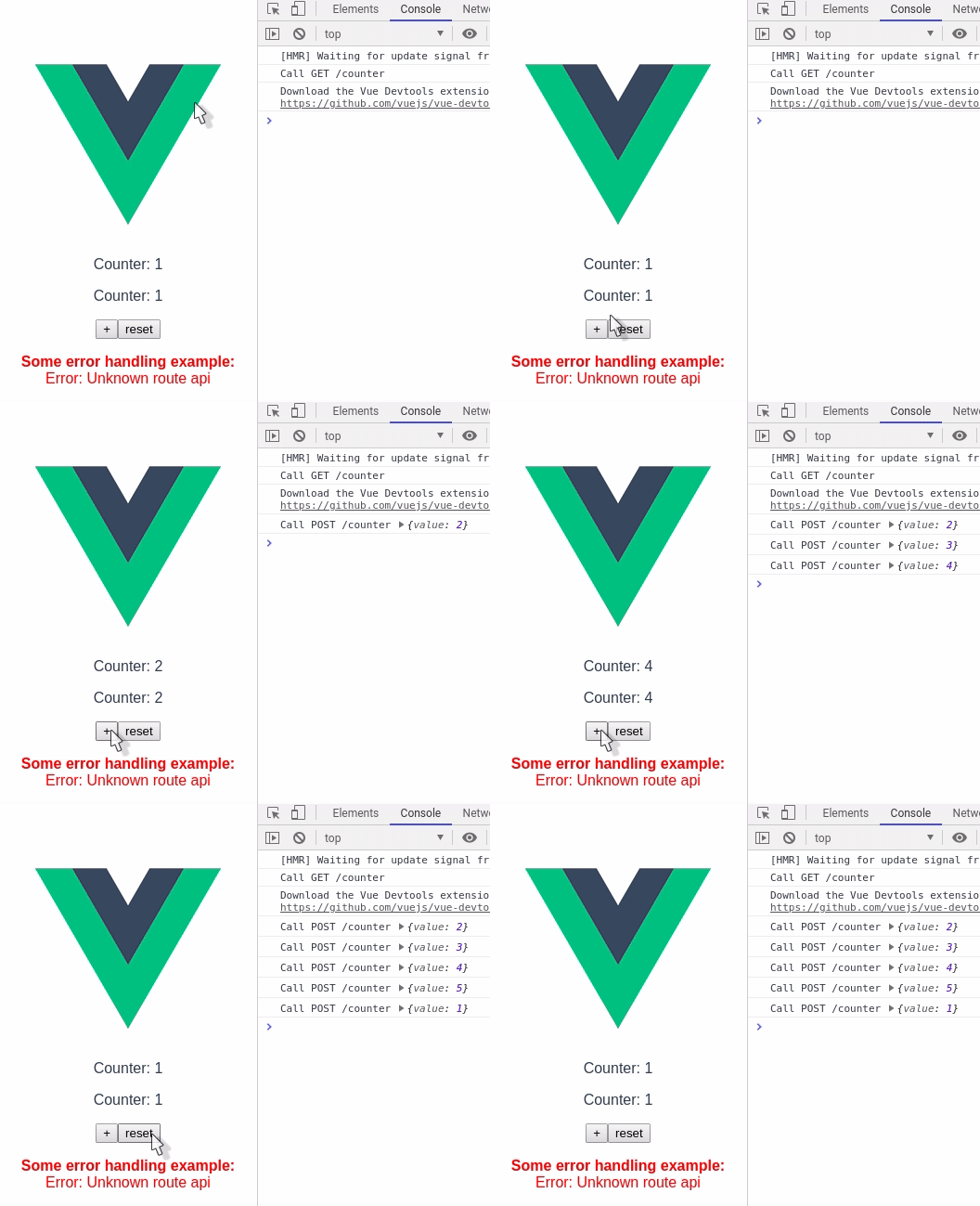
Counter.vue
```html
Counter: {{count}}
```
app.vue
```html
```
In this example, without cache there would have been 2 calls to the api, but using `vue-async-cache` there is only 1 call. The library will take care to populate the response to all the components.
## update cache
`vue-async-cache` provide as well different way to interact with the cache:
```html
```
## How to use it
`vue-async-cache` is using the store pattern to share the state between component. So the only thing you have to do is to import the store in the component:
```tsx
import { asyncCache } from "vue-async-cache";
```
### asyncCache
`asyncCache` store provide methods and properties to interact with the cache: `call`, `update`, `cache` and `responses`.
`asyncCache.call` is a method that allow to cache the original function call. The first given parameter to `call` is the function you want to cache. The next parameters are the parameters you would have providen to the function you want to cache. `call` will return the `id` of the corresponding response in the cache.
```tsx
async asyncCache.call(fn: (...args: any) => Promise, ...args: any) => Promise
```
eg.:
```tsx
await asyncCache.call(getItems);
const id = await asyncCache.call(getItem, 'id-20', { withComment: true });
```
> **Note:** in most of the case it is not necessary to use `call` and instead prefer using `load` from `useAsyncCacheWatch` that will take care to observe changes on the response.
`asyncCache.cache` is a asyncCache to access the cache. It work the same way as the `call` method, but it will retrieve the `response` from the cache, instead to call the async function.
`update` is a asyncCache that allow to update the cache without to make a call to the server. The first parameter is the new response you want to set. The second parameter is the cached function. The next parameter are the parameters you would have providen to the cached function.
eg.:
```tsx
await asyncCache.update([
{id:'id-1', title: 'hello'},
{id:'id-2', title: 'hello2'},
], getItems);
await asyncCache.update({
id:'id-1',
title: 'hello',
content: 'Lorem ipsum dolor sit amet, ac augue malesuada, tellus amet',
comments: [],
}, getItem, 'id-20', { withComment: true });
```
`asyncCache.responses` property is the actual cache representing all the asynchrone call, error and response. To access the cache prefer using the `cache` function instead.
### useAsyncCacheWatch
`useAsyncCacheWatch` helper is used for watching a specific response, allowing to automatically update the state of a component. This helper return the same attributes as `asyncCache` plus 3 extra attributes, `getResponse` and `getError`.
To use `useAsyncCacheWatch`, you need to provide some parameters, the first given parameter is the function you want to cache. The next parameters are the parameters you would have providen to the function you want to cache. It is actually exactly the same parameters as for `asyncCache.call` method.
```tsx
import { useAsyncCacheWatch } from "vue-async-cache";
@Component
export default class Counter extends Vue {
private cacheWatch = useAsyncCacheWatch(api, "/counter");
get count() {
return this.cacheWatch.getResponse();
}
async mounted() {
this.cacheWatch.call();
}
}
```
`call` does the same as `asyncCache.call` but you don't need to provide anymore the parameters.
`cache` does the same as `asyncCache.cache` but you don't need to provide anymore the parameters.
`update` does the same as `asyncCache.update` but you need to provide only the first parameter.
`getResponse` retrieve the response received after the function has been called.
`getError` retrieve the error received if the function called failed.
---
_Source: https://npm.io/package/vue-async-cache · Machine-readable twin of the npm.io package page. Health data is recomputed on every publish._
