# vue-avatar-cropper

> A simple and elegant component to crop and upload avatars

Latest version **6.1.1** (published 2024-03-12) · MIT license · 0 weekly downloads

## Install

```sh
npm install vue-avatar-cropper
pnpm add vue-avatar-cropper
yarn add vue-avatar-cropper
bun add vue-avatar-cropper
```

## Health

**Score 20/100 (F)** — status: abandoned.

Positive: esm support; no vulnerabilities.

Warnings: low downloads; no types.

Negative: abandoned; low maintenance score.

## Facts

| | |
|---|---|
| Version | 6.1.1 |
| Published | 2024-03-12 |
| First published | 2017-07-19 |
| Weekly downloads | 0 |
| License | MIT |
| TypeScript types | none |
| Module format | ESM + CommonJS |
| Node | >=10 |
| Dependencies | 2 |
| Unpacked size | 43.3 KB |
| Known vulnerabilities | 0 |
| Install scripts | no |
| GitHub stars | 523 |
| Author | overtrue |
| Maintainers | anzhengchao |
| Keywords | vue, cropper, vue-cropper, vue-avatar, avatar-cropper, vue-avatar-cropper |

## Links

- npm: https://www.npmjs.com/package/vue-avatar-cropper
- Repository: https://github.com/overtrue/vue-avatar-cropper
- Homepage: https://github.com/overtrue/vue-avatar-cropper#readme
- Issues: https://github.com/overtrue/vue-avatar-cropper/issues
- npm.io page: https://npm.io/package/vue-avatar-cropper

## Dependencies (2)

- [mime](https://npm.io/package/mime.md) ^4.0.0
- [cropperjs](https://npm.io/package/cropperjs.md) ^1.5.12

## Alternatives

- [lodash.startswith](https://npm.io/package/lodash.startswith.md) — 769.7K weekly downloads
- [@tarojs/service](https://npm.io/package/@tarojs/service.md) — 33.9K weekly downloads
- [io.extendreality.tilia.indicators.spatialtargets.unity](https://npm.io/package/io.extendreality.tilia.indicators.spatialtargets.unity.md) — 131 weekly downloads
- [@rtarojs/taro](https://npm.io/package/@rtarojs/taro.md) — 90 weekly downloads
- [node-branch-io](https://npm.io/package/node-branch-io.md) — 50 weekly downloads

## Recent versions

- 6.1.1 (latest) — 2024-03-12
- 6.1.0 — 2024-03-01
- 6.0.10 — 2023-10-19
- 6.0.9 — 2022-02-03
- 6.0.8 — 2022-02-03
- 6.0.7 — 2022-02-03
- 6.0.6 — 2022-02-03
- 6.0.5 — 2022-02-03
- 6.0.4 — 2022-02-03
- 6.0.3 — 2022-02-03
- 6.0.2 — 2022-02-03
- 6.0.1 — 2022-02-03
- 6.0.0 — 2022-01-18
- 5.0.2 — 2021-11-06
- 5.0.1 — 2021-10-11
- … 48 more at https://npm.io/package/vue-avatar-cropper/versions

## README

<h1><a href="https://github.com/overtrue/vue-avatar-cropper">Vue Avatar Cropper</a></h1>

:girl: A simple and elegant component to crop and upload avatars.

![image](https://user-images.githubusercontent.com/1472352/28398207-b32907b0-6d38-11e7-998a-32d34362b341.png)

[![Edit Demo](https://codesandbox.io/static/img/play-codesandbox.svg)](https://codesandbox.io/s/vue-avatar-cropper-for-vue3-i3c8v)

## Basic usage

```html
<button @click="showCropper = true">Select an image</button>

<avatar-cropper
  v-model="showCropper"
  upload-url="/files/upload"
  @uploaded="handleUploaded"
/>

<script>
  export default {
    data() {
      return {
        showCropper: false,
      }
    },
    methods: {
      handleUploaded({ form, request, response }) {
        // update user avatar attribute
      },
    },
  }
</script>
```

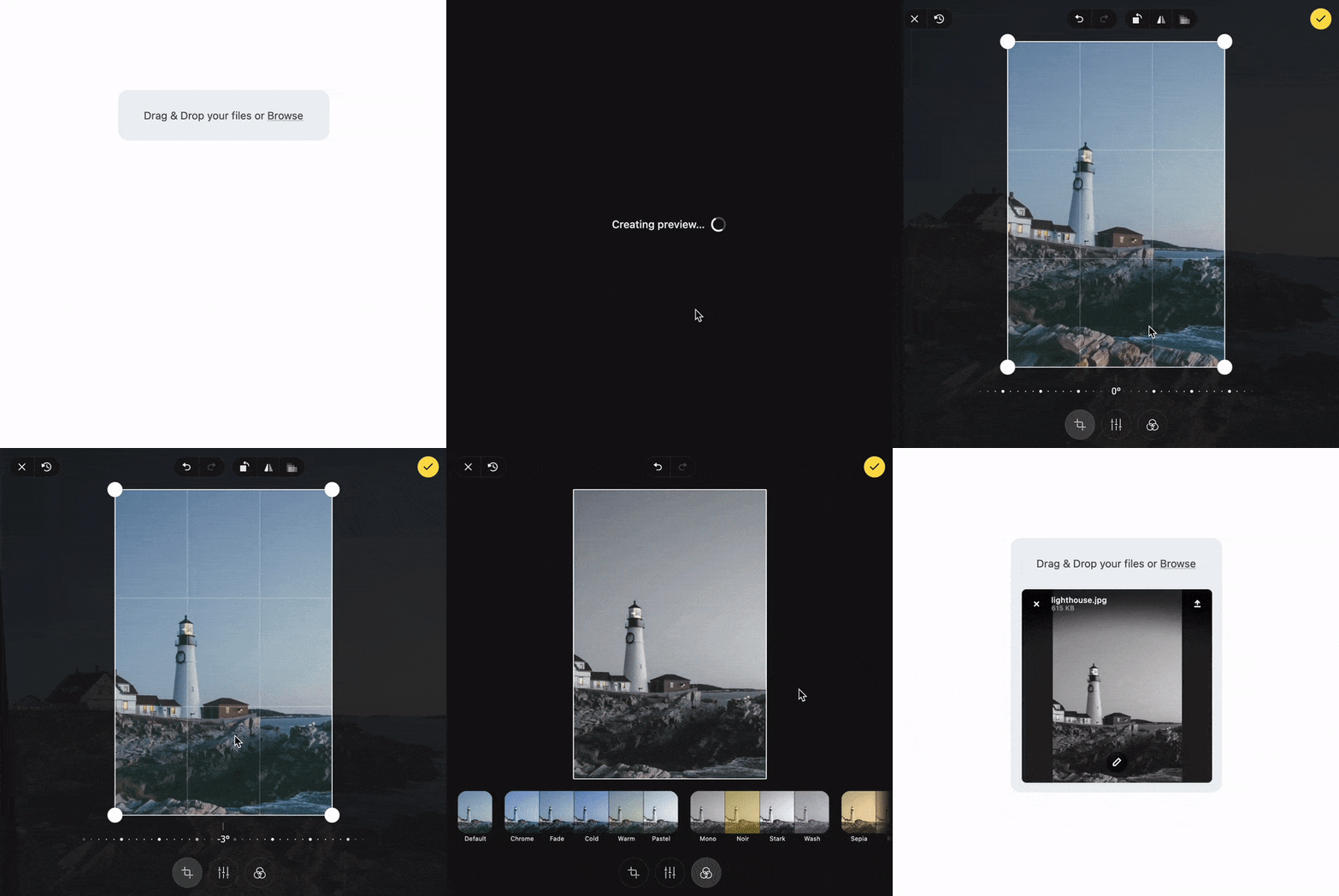
## Need more editing features?

Pintura the modern JavaScript Image Editor is what you're looking for. 

Pintura supports setting crop aspect ratios, resizing, rotating, cropping, flipping images, and more.

[Learn more about Pintura](https://pqina.nl/pintura/?ref=vue-avatar-cropper)

[<img src="https://github.com/pqina/filepond-github-assets/blob/master/filepond_pintura.gif?raw=true" width="600" alt=""/>](https://pqina.nl/pintura/?ref=vue-avatar-cropper)

## Installing

### Browsers

1. Include the link to AvatarCropper in `<head>` alongside [Vue.js](https://www.npmjs.com/package/vue), [Cropper.js](https://www.npmjs.com/package/cropperjs) and [Mime](https://www.npmjs.com/package/mime):

   ```html
   <link
     rel="stylesheet"
     href="https://unpkg.com/cropperjs@1.5.12/dist/cropper.min.css"
   />
   <script src="https://unpkg.com/cropperjs@1.5.12/dist/cropper.js"></script>
   <script src="https://unpkg.com/vue@3/dist/vue.global.js"></script>
   <script src="https://unpkg.com/vue-avatar-cropper/dist/avatar-cropper.umd.js"></script>
   <script src="https://wzrd.in/standalone/mime%2flite@latest"></script>
   ```

2. Add a trigger button and `<avatar-cropper>` to mount the component:

```html
<button @click="showCropper = true">Select an image</button>

<avatar-cropper
  v-model="showCropper"
  upload-url="/files/upload"
  @uploaded="handleUploaded"
/>
```

3. Create Vue instance and register `AvatarCropper` component:

```html
<script>
  Vue.createApp({
    el: '#app',

    data() {
      return {
        showCropper: false,
      }
    },

    methods: {
      handleUploaded(event) {
        console.log('avatar uploaded', event)
      },
    },
  })
    .use(AvatarCropper)
    .mount('#app')
</script>
```

### Node environment

1. Install the AvatarCropper package:

   ```sh
   npm install vue-avatar-cropper

   # or
   yarn add vue-avatar-cropper
   ```

2. Register it as you usually would:

   ```js
   import AvatarCropper from 'vue-avatar-cropper'

   // or
   const AvatarCropper = require('vue-avatar-cropper')

   Vue.component('AvatarCropper', AvatarCropper)

   // or
   Vue.use(AvatarCropper)

   // or
   new Vue({
     components: { AvatarCropper },
     // ...
   })
   ```

### Props

| Property Name       | Type            | Description                                                                                                                                                                                                                                                                                                                                                 |
| ------------------- | --------------- | ----------------------------------------------------------------------------------------------------------------------------------------------------------------------------------------------------------------------------------------------------------------------------------------------------------------------------------------------------------- |
| `modelValue`        | Boolean         | Set to true to show the avatar cropper, this prop is used for `v-model`. Default: `false`                                                                                                                                                                                                                                                                   |
| `file`              | File            | [`File`](https://developer.mozilla.org/en-US/docs/Web/API/File) to use instead of prompting the user to upload one                                                                                                                                                                                                                                          |
| `upload-url`        | String          | URL to upload the file to                                                                                                                                                                                                                                                                                                                                   |
| `upload-file-field` | String          | [`FormData`](https://developer.mozilla.org/en-US/docs/Web/API/FormData) field to use for the file. Default: `'file'`                                                                                                                                                                                                                                        |
| `upload-file-name`  | String/Function | File name to use for the [`FormData`](https://developer.mozilla.org/en-US/docs/Web/API/FormData) field. Can be `String` or `Function({ filename, mime, extension }) => String`. Default: Automatically determined from the uploaded [`File`](https://developer.mozilla.org/en-US/docs/Web/API/File)'s `name` property and the extension of the output MIME. |
| `upload-form-data`  | FormData        | Additional [`FormData`](https://developer.mozilla.org/en-US/docs/Web/API/FormData). Default: `new FormData()`                                                                                                                                                                                                                                               |
| `upload-handler`    | Function        | Handler to replace default upload handler, the argument is [cropperJS](https://github.com/fengyuanchen/cropperjs) instance.                                                                                                                                                                                                                                 |
| `request-options`   | Object          | Options passed to the `init` parameter of the [Request()](https://developer.mozilla.org/en-US/docs/Web/API/Request/Request) constructor. Use this to set the method, headers, etc. Default: `{ method: 'POST' }`                                                                                                                                            |
| `cropper-options`   | Object          | Options passed to the [cropperJS](https://github.com/fengyuanchen/cropperjs#options) instance. <br>Default: `{`                                                                                                                                                                                                                                             |
|                     |                 | &nbsp;&nbsp;&nbsp;&nbsp;`aspectRatio: 1,`                                                                                                                                                                                                                                                                                                                   |
|                     |                 | &nbsp;&nbsp;&nbsp;&nbsp;`autoCropArea: 1,`                                                                                                                                                                                                                                                                                                                  |
|                     |                 | &nbsp;&nbsp;&nbsp;&nbsp;`viewMode: 1,`                                                                                                                                                                                                                                                                                                                      |
|                     |                 | &nbsp;&nbsp;&nbsp;&nbsp;`movable: false,`                                                                                                                                                                                                                                                                                                                   |
|                     |                 | &nbsp;&nbsp;&nbsp;&nbsp;`zoomable: false`                                                                                                                                                                                                                                                                                                                   |
|                     |                 | `}`                                                                                                                                                                                                                                                                                                                                                         |
| `output-options`    | Object          | Options passed to the [cropper.getCroppedCanvas()](https://github.com/fengyuanchen/cropperjs#getcroppedcanvasoptions) method. <br>Default: `{}`. Recommended use-case is specifying an output size, for instance: `{ width: 512, height: 512 }`                                                                                                             |
| `output-mime`       | String          | The resulting avatar image MIME type, if invalid `image/png` will be used. Default: `null`                                                                                                                                                                                                                                                                  |
| `output-quality`    | Number          | The resulting avatar image quality [0 - 1]. Default: `0.9`<br>(if the output-mime property is `'image/jpeg'` or `'image/webp'`)                                                                                                                                                                                                                             |
| `mimes`             | String          | Allowed image formats. Default: <br>`'image/png, image/gif, image/jpeg, image/bmp, image/x-icon'`                                                                                                                                                                                                                                                           |
| `capture`           | String          | Capture attribute for the file input. Forces mobile users to take a new picture with the back(Use value `'environment'`) or front(Use value `'user'`) camera                                                                                                                                                                                                |
| `labels`            | Object          | Label for buttons. Default: `{ submit: 'Ok', cancel: 'Cancel' }`                                                                                                                                                                                                                                                                                            |
| `inline`            | Boolean         | If true component will be displayed as inline elemenet. Default: `false`                                                                                                                                                                                                                                                                                    |

### Events

- **update:modelValue** `modelValue` prop changed, used for `v-model`, parameter:

  - `value` boolean.

- **changed** user picked a file, parameter is an object containing:

  - `file` object, [File](https://developer.mozilla.org/zh-CN/docs/Web/API/File) object.
  - `reader` object, [FileReader](https://developer.mozilla.org/zh-CN/docs/Web/API/FileReader)

- **submit** right after a click on the submit button

- **cancel** when user decides to cancel the upload

- **uploading** before submit upload request, parameter is an object containing:

  - `form` object, [FormData](https://developer.mozilla.org/en-US/docs/Web/API/FormData) instance.
  - `request` object, [Request](https://developer.mozilla.org/en-US/docs/Web/API/Request) instance.
  - `response` object, [Promise](https://developer.mozilla.org/en-US/docs/Web/API/Promise) which resolves to a [Response](https://developer.mozilla.org/en-US/docs/Web/API/Response) instance.

- **uploaded** after request is successful, parameter is an object containing:

  - `form` object, [FormData](https://developer.mozilla.org/en-US/docs/Web/API/FormData) instance.
  - `request` object, [Request](https://developer.mozilla.org/en-US/docs/Web/API/Request) instance.
  - `response` object, [Response](https://developer.mozilla.org/en-US/docs/Web/API/Response) instance.

- **completed** after request has completed, parameter is an object containing:

  - `form` object, [FormData](https://developer.mozilla.org/en-US/docs/Web/API/FormData) instance.
  - `request` object, [Request](https://developer.mozilla.org/en-US/docs/Web/API/Request) instance.
  - `response` object, [Response](https://developer.mozilla.org/en-US/docs/Web/API/Response) instance.

- **error** something went wrong, parameter is an object containing:
  - `message` error message.
  - `type` error type, example: `'load'`/`'upload'`/`'user'`.
  - `context` context data.

You can listen for these events like this:

```html
<avatar-cropper
  v-model="showCropper"
  upload-url="/files/upload"
  @uploading="handleUploading"
  @uploaded="handleUploaded"
  @completed="handleCompleted"
  @error="handleError"
/>
```

```js
export default {
  //...
  methods: {
    ...
    handleUploading({ form, request, response }) {
      // show a loader
    },

    handleUploaded({ form, request, response }) {
      // update user avatar attribute
    },

    handleCompleted({ form, request, response }) {
      // close the loader
    },

    handleError({ message, type, context}) {
      if (type === 'upload') {
        const { request, response } = context
      }
    }
  },
}
```

:rocket: There is an online demo:

[![Edit test-project](https://codesandbox.io/static/img/play-codesandbox.svg)](https://codesandbox.io/s/vue-avatar-cropper-for-vue3-i3c8v)

## :heart: Sponsor me

[![Sponsor me](https://github.com/overtrue/overtrue/blob/master/sponsor-me.svg?raw=true)](https://github.com/sponsors/overtrue)

如果你喜欢我的项目并想支持它，[点击这里 :heart:](https://github.com/sponsors/overtrue)

## Project supported by JetBrains

Many thanks to Jetbrains for kindly providing a license for me to work on this and other open-source projects.

[![](https://resources.jetbrains.com/storage/products/company/brand/logos/jb_beam.svg)](https://www.jetbrains.com/?from=https://github.com/overtrue)

## License

MIT

---
_Source: https://npm.io/package/vue-avatar-cropper · Machine-readable twin of the npm.io package page. Health data is recomputed on every publish._