# vue-card-payment
> Awesome credit card payment form
Latest version **0.2.1** (published 2019-01-30) · MIT license · 0 weekly downloads
## Install
```sh
npm install vue-card-payment
pnpm add vue-card-payment
yarn add vue-card-payment
bun add vue-card-payment
```
## Health
**Score 20/100 (F)** — status: abandoned.
Positive: esm support; no vulnerabilities.
Warnings: low downloads; no types; pre 1.0.
Negative: abandoned; low maintenance score.
## Facts
| | |
|---|---|
| Version | 0.2.1 |
| Published | 2019-01-30 |
| First published | 2018-07-18 |
| Weekly downloads | 0 |
| License | MIT |
| TypeScript types | none |
| Module format | ESM + CommonJS |
| Dependencies | 2 |
| Unpacked size | 472.4 KB |
| Known vulnerabilities | 0 |
| Install scripts | no |
| GitHub stars | 3 |
| Author | Vladimir Pavlov |
| Maintainers | vovavc |
| Keywords | Vue, Card, Plugin, Credit, Payment, Form, Credit card, Checkout |
## Links
- npm: https://www.npmjs.com/package/vue-card-payment
- Repository: https://github.com/VoVaVc/vue-card-payment
- Homepage: https://github.com/VoVaVc/vue-card-payment#readme
- Issues: https://github.com/VoVaVc/vue-card-payment/issues
- npm.io page: https://npm.io/package/vue-card-payment
## Dependencies (2)
- [card-info](https://npm.io/package/card-info.md) ^1.2.4
- [card-validator](https://npm.io/package/card-validator.md) ^5.0.0
## Alternatives
- [mobx-react](https://npm.io/package/mobx-react.md) — 2.8M weekly downloads
- [rc-tree](https://npm.io/package/rc-tree.md) — 2.6M weekly downloads
- [@react-oauth/google](https://npm.io/package/@react-oauth/google.md) — 1.3M weekly downloads
- [@wagmi/connectors](https://npm.io/package/@wagmi/connectors.md) — 877.0K weekly downloads
- [vee-validate](https://npm.io/package/vee-validate.md) — 836.4K weekly downloads
## Recent versions
- 0.2.1 (latest) — 2019-01-30
- 0.2.0 — 2018-07-25
- 0.1.8 — 2018-07-25
- 0.1.7 — 2018-07-25
- 0.1.6 — 2018-07-20
- 0.1.5 — 2018-07-20
- 0.1.4 — 2018-07-20
- 0.1.3 — 2018-07-20
- 0.1.2 — 2018-07-20
- 0.1.1 — 2018-07-20
- 0.1.0 — 2018-07-20
- 0.0.0 — 2018-07-18
## README
# VueCardPayment
[](https://www.npmjs.com/package/vue-card-payment) [](https://vuejs.org/)
> Awesome credit card payment form
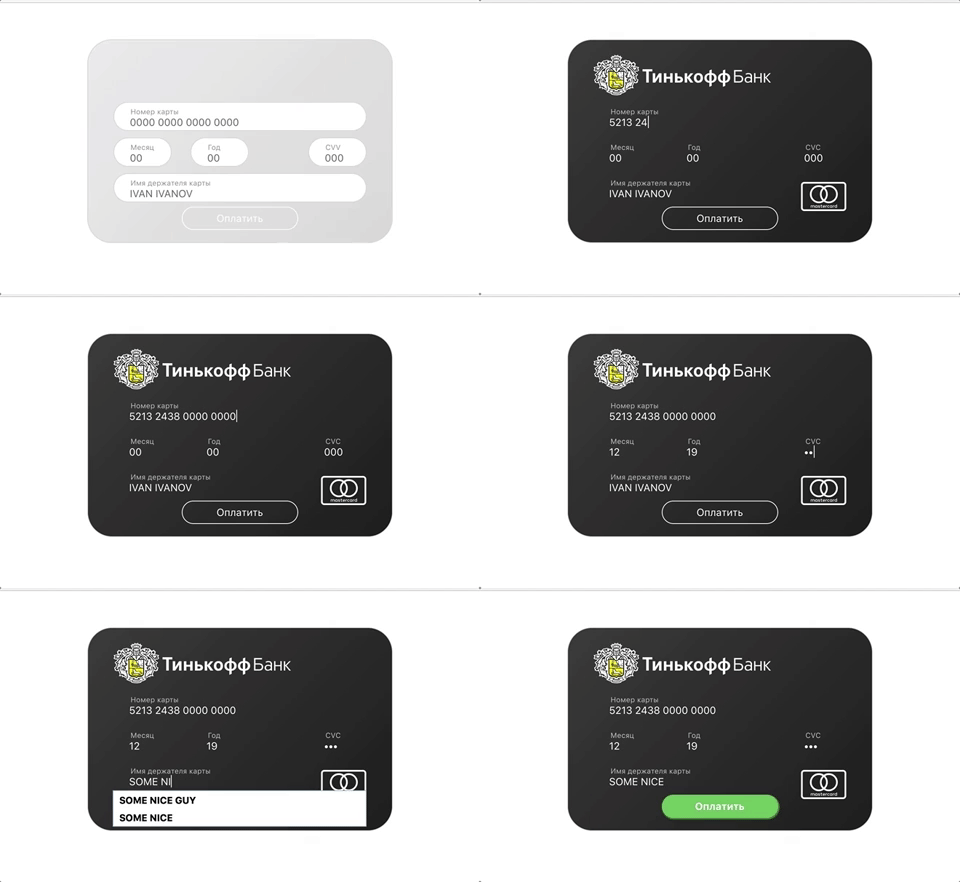
[React version](https://www.npmjs.com/package/react-card-payment)
## Installation
```bash
npm install --save vue-card-payment
```
## Usage
### with Webpack or Rollup
```js
import Vue from 'vue'
import VueCardPayment from 'vue-card-payment'
// You need a specific loader for CSS files like https://github.com/webpack/css-loader
import 'vue-card-payment/dist/vue-card-payment.css'
Vue.use(VueCardPayment)
```
then, place this one in a place you want payment form to appear
```html
```
## Properties
### Settings
| Prop | Data type | Default | Description |
| ------------- |:-------------:| -----| -----|
| showBank | bool | true | if false, card form will not be themed with bank logo and corporate styles
| showPaymentSystem | bool | true | if false, payment system logo will not be showed
### Labels
| Prop | Data type | Default |
| ------------- |:-------------| -----|
| labels.cardnumber | string | Card number |
| labels.month | string | Month |
| labels.year | string | Year |
| labels.cardHolder | string | Cardholder name |
| labels.button | string | Pay |
### Placeholders
| Prop | Data type | Default |
| ------------- |:-------------| -----|
| placeholders.cardnumber | string | 0000 0000 0000 0000 |
| placeholders.month | string | 00 |
| placeholders.year | string | 00 |
| placeholders.cardHolder | string | JOHN DOE |
| placeholders.cvv | string | 000 |
### Events
| Event | Description
| ------------- |:-------------:|
| card-submit | fires when button is pressed |
## Example with settings
```html
```
### Browser
```html
```
## Thanks
[iserdmi](https://www.npmjs.com/~iserdmi) for [card-info](https://www.npmjs.com/package/card-info) plugin, this plugin is primary-based on it
[braintree](https://www.npmjs.com/~braintree) for [card-validator](https://www.npmjs.com/package/card-validator) plugin, this one used here for validation needs
## License
[MIT](http://opensource.org/licenses/MIT)
---
_Source: https://npm.io/package/vue-card-payment · Machine-readable twin of the npm.io package page. Health data is recomputed on every publish._