# vue-custom-keyboard
> A Vue.js component for keyboard
Latest version **1.0.1** (published 2017-08-06) · MIT license · 0 weekly downloads
## Install
```sh
npm install vue-custom-keyboard
pnpm add vue-custom-keyboard
yarn add vue-custom-keyboard
bun add vue-custom-keyboard
```
## Health
**Score 15/100 (F)** — status: abandoned.
Positive: no vulnerabilities.
Warnings: low downloads; no types; no esm support.
Negative: abandoned; low maintenance score.
## Facts
| | |
|---|---|
| Version | 1.0.1 |
| Published | 2017-08-06 |
| First published | 2017-08-06 |
| Weekly downloads | 0 |
| License | MIT |
| TypeScript types | none |
| Module format | CommonJS |
| Node | >= 4.0.0 |
| Dependencies | 1 |
| Known vulnerabilities | 0 (+1 in 1 direct dependencies) |
| Install scripts | no |
| Author | Shawn Zhang |
| Maintainers | ttzshawn |
## Links
- npm: https://www.npmjs.com/package/vue-custom-keyboard
- npm.io page: https://npm.io/package/vue-custom-keyboard
## Dependencies (1)
- [vue](https://npm.io/package/vue.md) ^2.3.3
## Recent versions
- 1.0.1 (latest) — 2017-08-06
## README
# vue-custom-keyboard
> A Vue.js component for keyboard
## Installation
``` bash
npm i vue-custom-keyboard --save
```
## Usage
Impoart and use it in a single file component.
```vue
```
## Props config
``` javascript
props: {
/**
* Visibility for keyboard.
* @default false
* @type {Boolean}
*/
isOpen: {
type: Boolean,
default: true
},
level1: {
type: String,
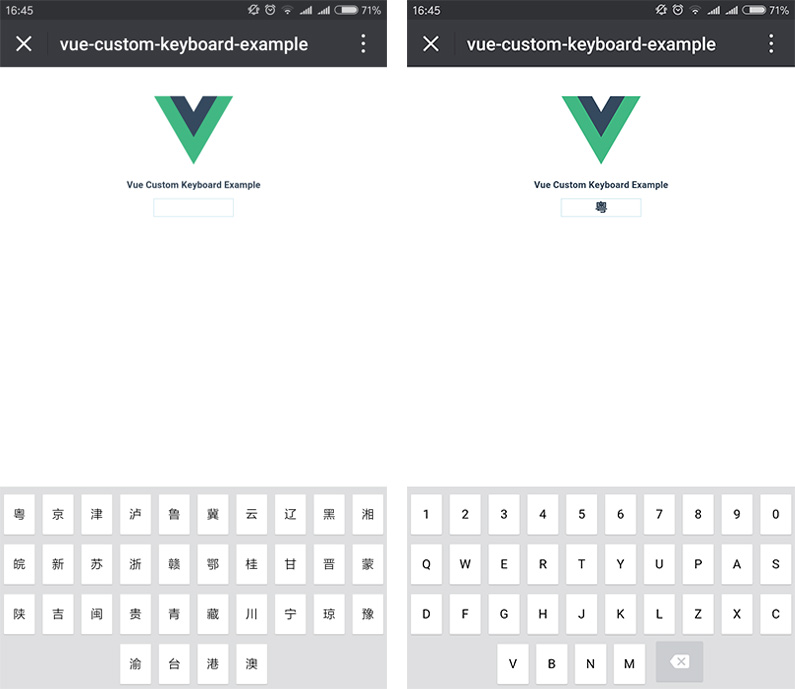
default: '粤京津泸鲁冀云辽黑湘皖新苏浙赣鄂桂甘晋蒙陕吉闽贵青藏川宁琼豫渝台港澳'
},
level2: {
type: String,
default: '1234567890QWERTYUPASDFGHJKLZXCVBNM'
},
maxLength: {
type: Number,
default: 7
},
onChange: {
type: Function
},
onBlur: {
type: Function
},
onDone: {
type: Function
},
/**
* For remembering previous value.
* @default ''
* @type {String}
*/
defaultValue: {
type: String,
default: ''
}
}
```
## Demo
Check [vue-custom-keyboard-demo](https://github.com/ttzshawn/vue-custom-keyboard-demo) and show case below.
---
_Source: https://npm.io/package/vue-custom-keyboard · Machine-readable twin of the npm.io package page. Health data is recomputed on every publish._