# vue-ele-form-dynamic

> vue-ele-form 动态表单组件

Latest version **0.4.3** (published 2020-12-06) · MIT license · 0 weekly downloads

## Install

```sh
npm install vue-ele-form-dynamic
pnpm add vue-ele-form-dynamic
yarn add vue-ele-form-dynamic
bun add vue-ele-form-dynamic
```

## Health

**Score 15/100 (F)** — status: abandoned.

Positive: no vulnerabilities.

Warnings: low downloads; no types; no esm support; pre 1.0.

Negative: abandoned; low maintenance score.

## Facts

| | |
|---|---|
| Version | 0.4.3 |
| Published | 2020-12-06 |
| First published | 2019-11-03 |
| Weekly downloads | 0 |
| License | MIT |
| TypeScript types | none |
| Module format | CommonJS |
| Dependencies | 2 |
| Unpacked size | 28.5 KB |
| Known vulnerabilities | 0 |
| Install scripts | no |
| Maintainers | zhangchaojie |
| Keywords | vue-ele-form-dynamic, form-dynamic, element-ui-dynamic |

## Links

- npm: https://www.npmjs.com/package/vue-ele-form-dynamic
- npm.io page: https://npm.io/package/vue-ele-form-dynamic

## Dependencies (2)

- [async-validator](https://npm.io/package/async-validator.md) ^3.2.0
- [fast-deep-equal](https://npm.io/package/fast-deep-equal.md) ^3.1.1

## Alternatives

- [mobx-react](https://npm.io/package/mobx-react.md) — 2.8M weekly downloads
- [rc-tree](https://npm.io/package/rc-tree.md) — 2.6M weekly downloads
- [@react-oauth/google](https://npm.io/package/@react-oauth/google.md) — 1.3M weekly downloads
- [@wagmi/connectors](https://npm.io/package/@wagmi/connectors.md) — 877.0K weekly downloads
- [vee-validate](https://npm.io/package/vee-validate.md) — 836.4K weekly downloads

## Recent versions

- 0.4.3 (latest) — 2020-12-06
- 0.4.2 — 2020-08-25
- 0.4.1 — 2020-08-25
- 0.4.0 — 2020-02-06
- 0.3.0 — 2020-01-26
- 0.2.0 — 2020-01-20
- 0.1.1 — 2019-11-03

## README

# vue-ele-form-dynamic | vue-ele-form 的动态表单组件

[![MIT Licence](https://img.shields.io/npm/l/vue-ele-form-dynamic.svg)](https://img.shields.io/apm/l/vue-ele-form-dynamic.svg)
[![npm](https://img.shields.io/npm/v/vue-ele-form-dynamic.svg)](https://www.npmjs.com/package/vue-ele-form-dynamic)
[![download](https://img.shields.io/npm/dw/vue-ele-form-dynamic.svg)](https://npmcharts.com/compare/vue-ele-form-dynamic?minimal=true)

## 介绍

[vue-ele-form-dynamic](https://github.com/dream2023/vue-ele-form-dynamic) 做为 vue-ele-form 的第三方扩展, 实现了动态表单的功能
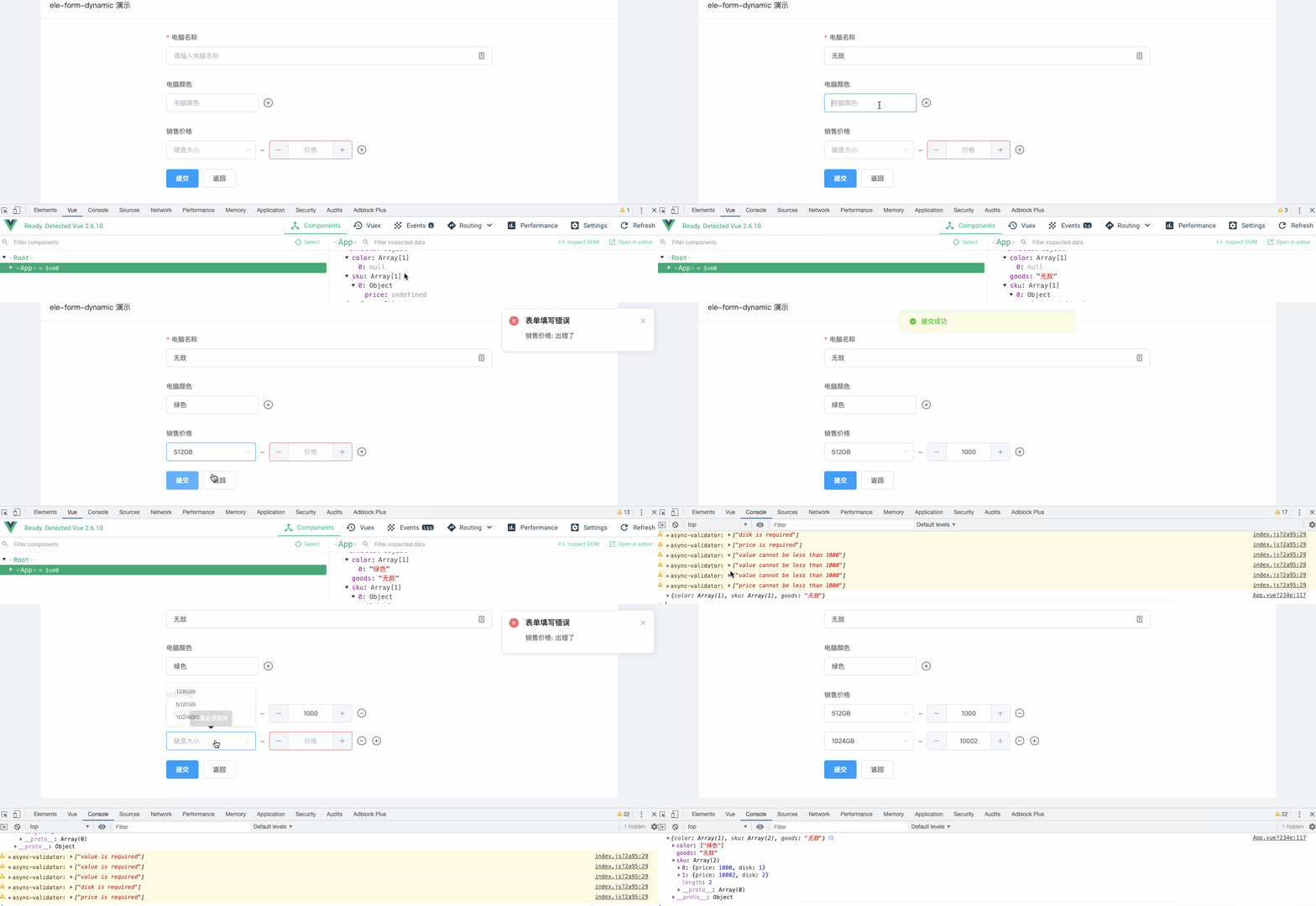
![image](https://cdn.nlark.com/yuque/0/2019/gif/364322/1572772286785-2f200088-dcfc-4321-a8a6-ed4e9ada7a1d.gif)

## 安装

```bash
yarn add vue-ele-form-dynamic
```

或者

```bash
npm install vue-ele-form-dynamic --save
```

## 注册和使用

### 全局注册

```js
import EleForm from 'vue-ele-form'
import EleFormDynamic from 'vue-ele-form-dynamic'

// 注册 dynamic 组件
Vue.component('dynamic', EleFormDynamic)

// 注册 ele-form
Vue.use(EleForm, {
  // 专门设置全局的 dynamic 属性
  // 属性参考: https://github.com/dream2023/ele-dynamic 或者 下面的属性说明
  dynamic: {
    delimiter: '/' // 所有的 dynamic 都会有 delimiter = '/' 的属性值
  }
})
```

### 局部注册

局部注册和使用请参考: [https://www.yuque.com/chaojie-vjiel/vbwzgu/inlpxy#I5kdQ](https://www.yuque.com/chaojie-vjiel/vbwzgu/inlpxy#I5kdQ)

## 示例

```html
<template>
  <el-card
    header="ele-form-dynamic 演示"
    shadow="never"
    style="max-width: 1250px;margin: 20px auto;"
  >
    <ele-form
      :request-fn="handleRequest"
      :formData="formData"
      @request-success="handleSuccess"
      :formDesc="formDesc"
    />
  </el-card>
</template>

<script>
  export default {
    name: 'App',
    components: {},
    data() {
      return {
        formData: {
          color: []
        },
        formDesc: {
          goods: {
            type: 'input',
            label: '电脑名称',
            rules: { required: true, message: '请输入电脑名称' }
          },
          color: {
            // 指定类型为 dynamic
            type: 'dynamic',
            label: '电脑颜色',
            // dynamic 相关的配置写在 attrs 中
            attrs: {
              // columns 可以为对象(单个) / 数组(多个)
              // 这里只有1个, 就是对象
              columns: {
                // type: 'el-input', // 默认类型为input, 可以省略
                // 这里的书写同 https://cn.vuejs.org/v2/guide/render-function.html#%E6%B7%B1%E5%85%A5%E6%95%B0%E6%8D%AE%E5%AF%B9%E8%B1%A1
                attrs: {
                  placeholder: '电脑颜色'
                },
                style: {
                  width: '200px'
                }
                // class: {}, slots: {}, scopedSlots:{}, on: {}
              },
              // 注意这里的rules, 和外面的rules不同, 是对里面各个组件的校检
              rules: {
                required: true,
                message: '颜色必填'
              }
            }
          },
          sku: {
            label: '销售价格',
            type: 'dynamic',
            attrs: {
              // 这里是数组
              columns: [
                {
                  // 这里制定了类型
                  type: 'el-select',
                  // 必须指定 valueKey
                  valueKey: 'disk',
                  attrs: {
                    type: 'number',
                    clearable: true,
                    placeholder: '硬盘大小'
                  },
                  // 这里使用了插槽
                  slots: {
                    default(h) {
                      return [
                        h('el-option', { attrs: { label: '128GB', value: 0 } }),
                        h('el-option', { attrs: { label: '512GB', value: 1 } }),
                        h('el-option', { attrs: { label: '1024GB', value: 2 } })
                      ]
                    }
                  }
                },
                {
                  type: 'el-input-number',
                  // 必须指定 valueKey
                  valueKey: 'price',
                  attrs: {
                    min: 0,
                    type: 'number',
                    placeholder: '价格'
                  }
                }
              ]
            },
            // 校检规则, 同样是写在 attrs 里面
            rules: {
              // 当 columns为数组时, 这里需要指定 valueKey 为的校检规则
              disk: {
                required: true,
                message: '硬盘必须选择'
              },
              price: [
                {
                  required: true,
                  message: '电脑价格必填'
                },
                {
                  type: 'number',
                  min: 1000,
                  message: '价格必须大于1000元'
                }
              ]
            }
          }
        }
      }
    },
    methods: {
      handleRequest(data) {
        console.log(data)
        return Promise.resolve(data)
      },
      handleSuccess() {
        this.$message.success('提交成功')
      }
    }
  }
</script>

<style>
  body {
    background-color: #f0f2f5;
  }
</style>
```

### attrs

```js
attrs: {
  // 值, 必须是数组
  value: {
    type: Array,
    required: true,
    default: () => []
  },
  // 校检对象
  rules: [Object, Array],
  // 列
  columns: {
    type: [Object, Array],
    validator (columns) {
      if (Array.isArray(columns)) {
        const isError = columns.some((item) => !item.valueKey)
        if (isError) {
          // eslint-disable-next-line
          console.error('[ele-form-dynamic warn]: columns当为数组时, 必须包含valueKey属性')
          return false
        }
      }
      return true
    }
  },
  // 分割符
  delimiter: {
    type: String,
    default: '-'
  },
  // 是否过滤空
  isFilterEmpty: {
    type: Boolean,
    default: true
  },
  // 占位符
  placeholder: {
    type: String
  }
}
```

## 相关链接

- [vue-ele-form](https://github.com/dream2023/vue-ele-form)
- [element-ui](http://element-cn.eleme.io)

---
_Source: https://npm.io/package/vue-ele-form-dynamic · Machine-readable twin of the npm.io package page. Health data is recomputed on every publish._
