# vue-filepond-vite-laravel
> A handy FilePond adapter component for Vue
Latest version **6.0.4** (published 2022-08-10) · MIT license · 0 weekly downloads
## Install
```sh
npm install vue-filepond-vite-laravel
pnpm add vue-filepond-vite-laravel
yarn add vue-filepond-vite-laravel
bun add vue-filepond-vite-laravel
```
## Health
**Score 25/100 (F)** — status: abandoned.
Positive: has types; esm support; no vulnerabilities.
Warnings: low downloads.
Negative: abandoned; low maintenance score.
## Facts
| | |
|---|---|
| Version | 6.0.4 |
| Published | 2022-08-10 |
| First published | 2022-08-09 |
| Weekly downloads | 0 |
| License | MIT |
| TypeScript types | bundled |
| Module format | ESM + CommonJS |
| Dependencies | 0 |
| Unpacked size | 24.7 KB |
| Known vulnerabilities | 0 |
| Install scripts | no |
| Author | fatimamazhit |
| Maintainers | fatimamazhit |
| Keywords | vue, vuejs, filepond, file, upload, drag, drop, browse, image, preview |
## Links
- npm: https://www.npmjs.com/package/vue-filepond-vite-laravel
- Homepage: https://pqina.nl/filepond
- npm.io page: https://npm.io/package/vue-filepond-vite-laravel
## Alternatives
- [unionfs](https://npm.io/package/unionfs.md) — 2.2M weekly downloads
- [path-starts-with](https://npm.io/package/path-starts-with.md) — 35.9K weekly downloads
- [redzip](https://npm.io/package/redzip.md) — 1.2K weekly downloads
- [vscode-anymatch](https://npm.io/package/vscode-anymatch.md) — 848 weekly downloads
- [@ledgerhq/coin-filecoin](https://npm.io/package/@ledgerhq/coin-filecoin.md) — 793 weekly downloads
## Recent versions
- 6.0.4 (latest) — 2022-08-10
- 6.0.3 — 2022-08-09
## README
# Vue FilePond
Just a copy of vue-filepond 6.0.3 without importing vue from 'vue/dist/vue.esm.js'. Because Vue 2, Laravel and Vite already have
```js
resolve: {
alias: {
vue: 'vue/dist/vue.esm.js',
},
},
```
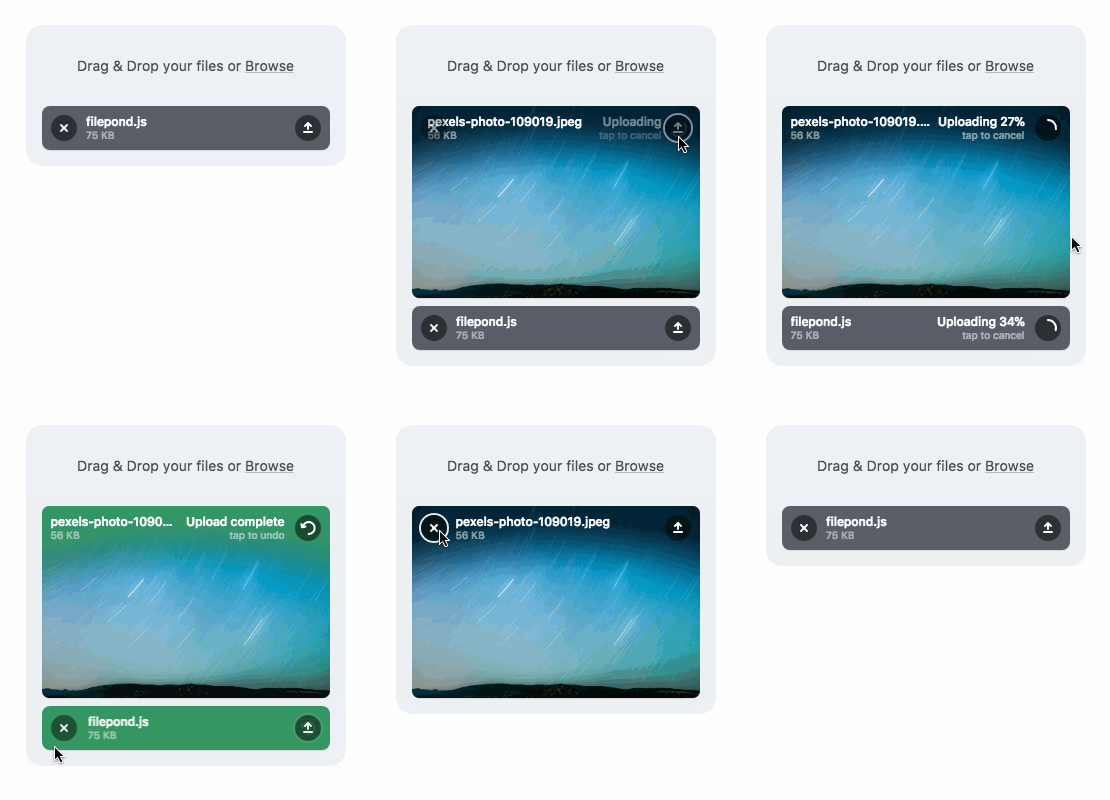
Vue FilePond is a handy adapter component for [FilePond](https://github.com/pqina/filepond), a JavaScript library that can upload anything you throw at it, optimizes images for faster uploads, and offers a great, accessible, silky smooth user experience.
[](https://github.com/pqina/vue-filepond/blob/master/LICENSE)
[](https://www.npmjs.com/package/vue-filepond)
### Core Features
* Accepts **directories**, **files**, blobs, local URLs, **remote URLs** and Data URIs.
* **Drop files**, select on filesystem, **copy and paste files**, or add files using the API.
* **Async uploading** with AJAX, or encode files as base64 data and send along form post.
* **Accessible**, tested with AT software like VoiceOver and JAWS, **navigable by Keyboard**.
* **Image optimization**, automatic image resizing, **cropping**, and **fixes EXIF orientation**.
* **Responsive**, automatically scales to available space, is functional on both **mobile and desktop devices**.
[Learn more about FilePond](https://pqina.nl/filepond/)
---
### Also need Image Editing?
**Doka.js** might be just what you're looking for. It's a Modern JavaScript Image Editor, Doka supports setting **crop aspect ratios**, **resizing**, **rotating**, **cropping**, and **flipping** images. Above all, it integrates beautifully with FilePond.
[Learn more about Doka](https://pqina.nl/doka/)
---
Installation:
```bash
npm install vue-filepond filepond
```
Usage:
```vue
```
When using FilePond with an SSR configuration like Nuxt.js it's best to wrap it in `` tags.
```vue
```
Usage in the browser:
```html
Vue in Browser
```
[Read the docs for more information](https://pqina.nl/filepond/docs/patterns/frameworks/vue/)
[Live Demo with Code Sandbox](https://codesandbox.io/s/p3v8zoprp7)
---
_Source: https://npm.io/package/vue-filepond-vite-laravel · Machine-readable twin of the npm.io package page. Health data is recomputed on every publish._
 ### Core Features
* Accepts **directories**, **files**, blobs, local URLs, **remote URLs** and Data URIs.
* **Drop files**, select on filesystem, **copy and paste files**, or add files using the API.
* **Async uploading** with AJAX, or encode files as base64 data and send along form post.
* **Accessible**, tested with AT software like VoiceOver and JAWS, **navigable by Keyboard**.
* **Image optimization**, automatic image resizing, **cropping**, and **fixes EXIF orientation**.
* **Responsive**, automatically scales to available space, is functional on both **mobile and desktop devices**.
[Learn more about FilePond](https://pqina.nl/filepond/)
---
### Also need Image Editing?
**Doka.js** might be just what you're looking for. It's a Modern JavaScript Image Editor, Doka supports setting **crop aspect ratios**, **resizing**, **rotating**, **cropping**, and **flipping** images. Above all, it integrates beautifully with FilePond.
[Learn more about Doka](https://pqina.nl/doka/)
### Core Features
* Accepts **directories**, **files**, blobs, local URLs, **remote URLs** and Data URIs.
* **Drop files**, select on filesystem, **copy and paste files**, or add files using the API.
* **Async uploading** with AJAX, or encode files as base64 data and send along form post.
* **Accessible**, tested with AT software like VoiceOver and JAWS, **navigable by Keyboard**.
* **Image optimization**, automatic image resizing, **cropping**, and **fixes EXIF orientation**.
* **Responsive**, automatically scales to available space, is functional on both **mobile and desktop devices**.
[Learn more about FilePond](https://pqina.nl/filepond/)
---
### Also need Image Editing?
**Doka.js** might be just what you're looking for. It's a Modern JavaScript Image Editor, Doka supports setting **crop aspect ratios**, **resizing**, **rotating**, **cropping**, and **flipping** images. Above all, it integrates beautifully with FilePond.
[Learn more about Doka](https://pqina.nl/doka/)
 ---
Installation:
```bash
npm install vue-filepond filepond
```
Usage:
```vue
---
Installation:
```bash
npm install vue-filepond filepond
```
Usage:
```vue