# vue-glsl
> A simple WebGL components for fragment shader. Can be used with Shadertoys codes
Latest version **1.1.27** (published 2022-04-01) · ISC license · 0 weekly downloads
## Install
```sh
npm install vue-glsl
pnpm add vue-glsl
yarn add vue-glsl
bun add vue-glsl
```
## Health
**Score 20/100 (F)** — status: abandoned.
Positive: esm support; no vulnerabilities.
Warnings: low downloads; no types.
Negative: abandoned; low maintenance score.
## Facts
| | |
|---|---|
| Version | 1.1.27 |
| Published | 2022-04-01 |
| First published | 2020-02-19 |
| Weekly downloads | 0 |
| License | ISC |
| TypeScript types | none |
| Module format | ESM + CommonJS |
| Dependencies | 2 |
| Unpacked size | 172.8 KB |
| Known vulnerabilities | 0 |
| Install scripts | no |
| GitHub stars | 20 |
| Author | kongxiaojian123@live.com |
| Maintainers | kongxiaojian123 |
| Keywords | typescript, vue3, glsl, webgl, shader, fragment, opengl |
## Links
- npm: https://www.npmjs.com/package/vue-glsl
- Repository: https://github.com/kongxiaojian123/vue-glsl
- Homepage: https://github.com/kongxiaojian123/vue-glsl#readme
- Issues: https://github.com/kongxiaojian123/vue-glsl/issues
- npm.io page: https://npm.io/package/vue-glsl
## Dependencies (2)
- [vue](https://npm.io/package/vue.md) ^3.0.0
- [core-js](https://npm.io/package/core-js.md) ^3.6.5
## Alternatives
- [@openai/codex-sdk](https://npm.io/package/@openai/codex-sdk.md) — 731.4K weekly downloads
- [babel-plugin-transform-react-jsx](https://npm.io/package/babel-plugin-transform-react-jsx.md) — 565.0K weekly downloads
- [babel-helper-remove-or-void](https://npm.io/package/babel-helper-remove-or-void.md) — 508.5K weekly downloads
- [@pnpm/store-controller-types](https://npm.io/package/@pnpm/store-controller-types.md) — 186.9K weekly downloads
- [react-native-signature-canvas](https://npm.io/package/react-native-signature-canvas.md) — 155.6K weekly downloads
## Recent versions
- 1.1.27 (latest) — 2022-04-01
- 1.1.26 — 2022-04-01
- 1.1.25 — 2021-12-28
- 1.1.24 — 2021-12-28
- 1.1.23 — 2021-12-28
- 1.1.22 — 2021-12-28
- 1.1.21 — 2021-12-28
- 1.1.20 — 2021-12-28
- 1.1.19 — 2021-12-28
- 1.1.18 — 2021-12-27
- 1.1.17 — 2021-12-27
- 1.1.16 — 2021-12-27
- 1.1.15 — 2021-01-29
- 1.1.14 — 2021-01-29
- 1.1.13 — 2021-01-29
- … 13 more at https://npm.io/package/vue-glsl/versions
## README
# vue-glsl
vue-glsl 是一个基于vue3的片段着色器组件,使用的是webGL 1.0(移动端webGL 2.0不支持),并支持多webGLProgram项目。
组件支持[shadertoyCode](https://www.shadertoy.com/);
## Screenshots
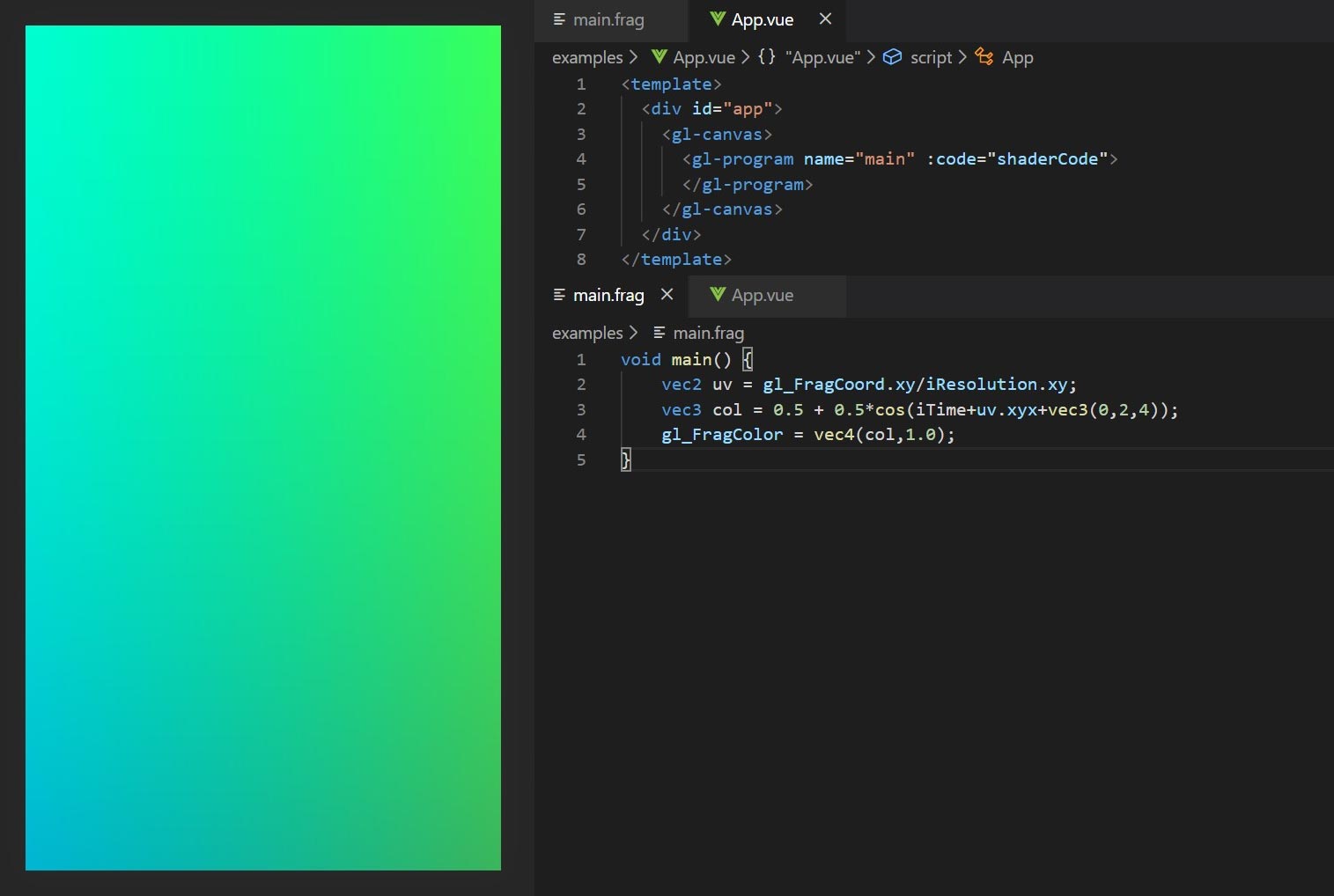
## Install and Usage
```bash
# install dependices
`npm install`
# examples
`npm run serve`
# build component
`npm run build-lib`
```
## Quickstart
First, install vue-glsl using either npm.
```bash
npm i vue-glsl --save
```
Instanciate and tell Vue about the plugin
```javascript
import {createApp} from 'vue'
import glsl from 'vue-glsl'
import App from './App.vue'
createApp(App).use(glsl).mount('#app');
```
Then use the components !
```vue
```
## API
gl-canvas
包含了`canvas`创建,以及webGL环境配置,当`gl-canvas`被销毁时,`requestAnimationFrame`也将被销毁。
---------------------------------
| Props | default | describe |
| :-------- | :-----: | :------------------------------------------------------ |
| `width` | `null` | 用于设置`canvas`的宽度,不设置宽高会自动读取父级的宽高。 |
| `height` | `null` | 用于设置`canvas`的高度,不设置宽高会自动读取父级的宽高。 |
| `paused` | `false` | 用于控制监听器的运行,设置`true`可以暂停运行,防止后台渲染,避免不必要的性能损耗。 |
| `code` | `''` | 公共片段着色器代码,多`webGLProgram`时会自动拼接在每个`webGLProgram`的`fragmentShader`中。 |
| `style` | `''` | `clearColor`设置为透明的,如果想给`canvas`加一个背景的话,设置其样式就好了 |
---------------------------------
#### 监听方法
`update`:
在每一次绘制时会触发该方法供vue做js操作,返回数据为当前帧的一些内置变量。
##### 用法:
```html
```
gl-program
webGLProgram的创建操作,必须是 `gl-canvas` 的子组件。
---------------------------------
| Props | default | describe |
| :-------- | :-----: | :------------------------------------------------------ |
| `name` | `'main'` | 当有多个program时,此属性必须设置,用来区分`webGLProgram`和当作`frameBuffer`的`id`使用。 |
| `code` | `''` | 当前`webGLProgram`的片段着色器代码,会自动拼接`gl-canvas`中的公共`code` |
#### 用法:
```html
```
gl-int
`WebGLUniform`组件,当有`int`类型的`uniform`传入时,用此组件,必须是 `gl-program` 的子组件。
---------------------------------
| Props | Type | describe |
| :-------- | :-----: | :----------- |
| `name` | `string` | `WebGLUniform`名字 |
| `value` | `number` | `int`类型的`WebGLUniform`数据 |
#### 用法:
```html
```
gl-float
`WebGLUniform`组件,当有`float`类型的`uniform`传入时,用此组件,必须是 `gl-program` 的子组件。
---------------------------------
| Props | Type | describe |
| :-------- | :-----: | :----------- |
| `name` | `string` | `WebGLUniform`名字 |
| `value` | `number` | `float`类型的`WebGLUniform`数据 |
#### 用法:
```html
```
gl-vec2
`WebGLUniform`组件,当有`vec2`类型的`uniform`传入时,用此组件,必须是 `gl-program` 的子组件。
---------------------------------
| Props | Type | describe |
| :-------- | :-----: | :----------- |
| `name` | `string` | `WebGLUniform`名字 |
| `value` | `number[2]` | `vec2`类型的`WebGLUniform`数据 |
#### 用法同上,类型为`vec2`数据;
gl-vec3
`WebGLUniform`组件,当有`vec3`类型的`uniform`传入时,用此组件,必须是 `gl-program` 的子组件。
---------------------------------
| Props | Type | describe |
| :-------- | :-----: | :----------- |
| `name` | `string` | `WebGLUniform`名字 |
| `value` | `number[3]` | `vec3`类型的`WebGLUniform`数据 |
#### 用法同上,类型为`vec3`数据;
gl-vec4
`WebGLUniform`组件,当有`vec4`类型的`uniform`传入时,用此组件,必须是 `gl-program` 的子组件。
---------------------------------
| Props | Type | describe |
| :-------- | :-----: | :----------- |
| `name` | `string` | `WebGLUniform`名字 |
| `value` | `number[4]` | `vec4`类型的`WebGLUniform`数据 |
#### 用法同上,类型为`vec4`数据;
gl-mat2
`WebGLUniform`组件,当有`mat2`类型的`uniform`传入时,用此组件,必须是 `gl-program` 的子组件。
---------------------------------
| Props | Type | describe |
| :-------- | :-----: | :----------- |
| `name` | `string` | `WebGLUniform`名字 |
| `value` | `number[4]` | `mat2`类型的`WebGLUniform`数据 |
#### 用法同上,类型为`mat2`数据;
gl-mat3
`WebGLUniform`组件,当有`mat3`类型的`uniform`传入时,用此组件,必须是 `gl-program` 的子组件。
---------------------------------
| Props | Type | describe |
| :-------- | :-----: | :----------- |
| `name` | `string` | `WebGLUniform`名字 |
| `value` | `number[9]` | `mat3`类型的`WebGLUniform`数据 |
#### 用法同上,类型为`mat3`数据;
gl-mat4
`WebGLUniform`组件,当有`mat4`类型的`uniform`传入时,用此组件,必须是 `gl-program` 的子组件。
---------------------------------
| Props | Type | describe |
| :-------- | :-----: | :----------- |
| `name` | `string` | `WebGLUniform`名字 |
| `value` | `number[16]` | `mat4`类型的`WebGLUniform`数据 |
#### 用法同上,类型为`mat4`数据;
gl-image
`WebGLUniform`组件,当用到纹理时,用此组件,必须是 `gl-program` 的子组件。
---------------------------------
| Props | Type | describe |
| :-------- | :-----: | :----------- |
| `name` | `string` | `WebGLUniform`名字 |
| `value` | `imageURL\|imageObj\|videoObj\|canvasObj\|webGLProgramName\|textureCubeData` | 用于传入当前`WebGLProgram`纹理的数据 |
| `repeat` | `0\|1\|2` | 可以省略,2d纹理有效,0(默认):`gl.CLAMP_TO_EDGE` 1:`gl.REPEAT` 2:`gl.MIRRORED_REPEAT` |
| `repeatX` | `0\|1\|2` | 同上,但是若有`repeat`会被其覆盖 |
| `repeatY` | `0\|1\|2` | 同上,但是若有`repeat`会被其覆盖 |
#### `value` 取值;
`imageURL`:本地图片链接地址。
`imageObj|videoObj|canvasObj`:可以传入`Image\|Video\|Canvas`对象(`video`对象没测,但是理论上可以的),比如展示跨域`image`时,自行传入`image`对象,效果同`imageURL`;
`webGLProgramName`:当项目为多`WebGLProgram`时,`value`值可设置为`gl-program`的`name`值,可以把该`frameBuffer`引入纹理(除main`webGLProgram`外,其他`webGLProgram`均可当作纹理对象,原因是main`webGLProgram`要作为主`frameBuffer`渲染出来);
`uniform内置变量
内支持变量(glsl中自动追加下列数据,供片段着色器直接使用)
| type | name | describe |
| :-------- | :----- | :----------- |
| uniform vec3 | iResolution; | // viewport resolution (in pixels) |
| uniform float | iTime; | // shader playback time (in seconds) |
| uniform float | iTimeDelta; | // render time (in seconds) |
| uniform int | iFrame; | // shader playback frame |
| uniform vec4 | iMouse; | // mouse pixel coords. xy: current (if MLB down), zw: click |
| uniform vec4 | iDate; | // (year, month, day, time in seconds) |
#### 用法:
在`gl-image`示例中已经用到了`iResolution`;