# vue-scratch-crd
> 仿阿里云登录刮刮验证
Latest version **1.0.5** (published 2020-09-30) · MIT license · 0 weekly downloads
## Install
```sh
npm install vue-scratch-crd
pnpm add vue-scratch-crd
yarn add vue-scratch-crd
bun add vue-scratch-crd
```
## Health
**Score 15/100 (F)** — status: abandoned.
Positive: no vulnerabilities.
Warnings: low downloads; no types; no esm support.
Negative: abandoned; low maintenance score.
## Facts
| | |
|---|---|
| Version | 1.0.5 |
| Published | 2020-09-30 |
| First published | 2020-09-28 |
| Weekly downloads | 0 |
| License | MIT |
| TypeScript types | none |
| Module format | CommonJS |
| Dependencies | 2 |
| Unpacked size | 34.4 KB |
| Known vulnerabilities | 0 (+1 in 1 direct dependencies) |
| Install scripts | no |
| GitHub stars | 0 |
| Author | ybr54323 |
| Maintainers | ybr54323 |
## Links
- npm: https://www.npmjs.com/package/vue-scratch-crd
- Repository: https://github.com/ybr54323/vue-scratch-crd
- Homepage: https://github.com/ybr54323/vue-scratch-crd#readme
- Issues: https://github.com/ybr54323/vue-scratch-crd/issues
- npm.io page: https://npm.io/package/vue-scratch-crd
## Dependencies (2)
- [vue](https://npm.io/package/vue.md) ^2.6.11
- [core-js](https://npm.io/package/core-js.md) ^3.6.5
## Recent versions
- 1.0.5 (latest) — 2020-09-30
- 1.0.4 — 2020-09-30
- 1.0.3 — 2020-09-29
- 1.0.2 — 2020-09-29
- 1.0.1 — 2020-09-28
- 1.0.0 — 2020-09-28
## README
# vue-scratch-crd
### 介绍
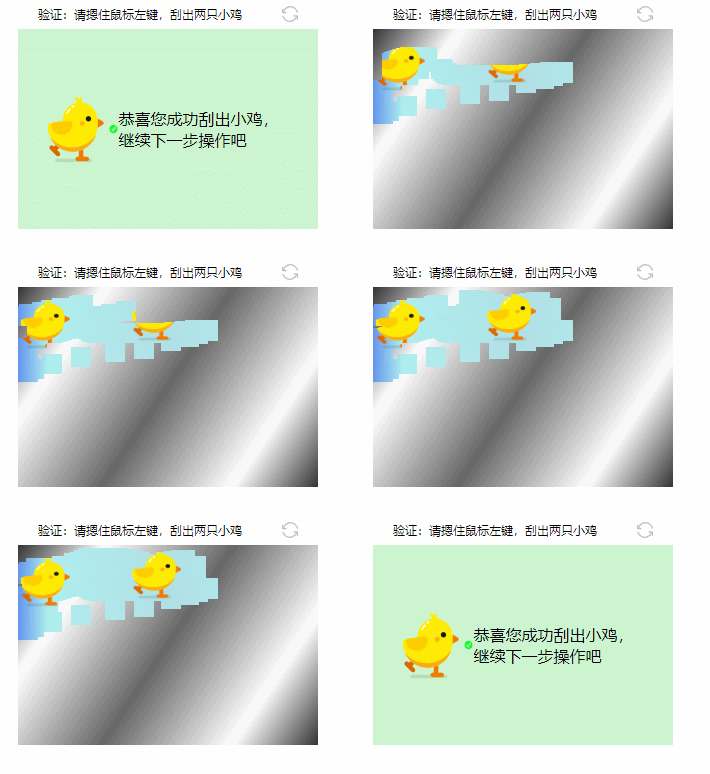
一个基于vue的人机验证组件,模仿阿里云登录页面的“划出小鸡”人机验证模块
用法:在组件上监听`on-ok`事件,事件回调执行时代表用户将小鸡划出。
### 安装
```
npm install vue-scratch-crd --save
```
### 引入
```js
import Vue from 'vue'
import Scratch from "vue-scratch-crd";
Vue.use(Scratch)
```
```vue
```
# API
| 属性 | 说明 |
| ---- | ---- |
| width | 刮刮卡的宽 |
| height | 刮刮卡的高 |
| id | canvas的id,如果要自定义,则传,建议不传 |
| layerBgColor | 刮面的样式(默认金属色),可传入样式string,或者canvas的渐变样式,具体参考canvas的渐变 |
| bottomBgColor | 卡片底的样式(默认天蓝色渐变),可传入样式string,或者canvas的渐变样式,具体参考canvas的渐变 |
| targetWidth | 鸡的宽度 |
| targetHeight | 鸡的高度 |
| tapRadius | 刮出的面积,是个正方形 |
| duration | 限时多久之内划出,超时即触发on-timeout钩子,单位是秒 |
| on-ok | 用户刮完的钩子 |
| on-timeout | 用户超时的钩子,返回字段为当前`Scratch`组件的实例指针,可以调用`onReload`方法使其刷新,可以重新配置参数 |
| on-reload | 用户触发了刷新的钩子 |
---
_Source: https://npm.io/package/vue-scratch-crd · Machine-readable twin of the npm.io package page. Health data is recomputed on every publish._