# vue-tabs-with-active-line
> Simple tabs with active bottom line
Latest version **1.2.6** (published 2020-05-04) · MIT license · 0 weekly downloads
## Install
```sh
npm install vue-tabs-with-active-line
pnpm add vue-tabs-with-active-line
yarn add vue-tabs-with-active-line
bun add vue-tabs-with-active-line
```
## Health
**Score 20/100 (F)** — status: abandoned.
Positive: esm support; no vulnerabilities.
Warnings: low downloads; no types.
Negative: abandoned; low maintenance score.
## Facts
| | |
|---|---|
| Version | 1.2.6 |
| Published | 2020-05-04 |
| First published | 2018-10-15 |
| Weekly downloads | 0 |
| License | MIT |
| TypeScript types | none |
| Module format | ESM + CommonJS |
| Dependencies | 0 |
| Unpacked size | 30.4 KB |
| Known vulnerabilities | 0 |
| Install scripts | no |
| GitHub stars | 99 |
| Maintainers | karambafe |
## Links
- npm: https://www.npmjs.com/package/vue-tabs-with-active-line
- Repository: https://github.com/karambafe/vue-tabs-with-active-line
- Issues: https://github.com/karambafe/vue-tabs-with-active-line/issues
- npm.io page: https://npm.io/package/vue-tabs-with-active-line
## Recent versions
- 1.2.6 (latest) — 2020-05-04
- 1.2.5 — 2019-09-19
- 1.2.4 — 2019-06-10
- 1.2.3 — 2019-06-10
- 1.2.2 — 2019-06-10
- 1.2.1 — 2019-05-18
- 1.2.0 — 2019-04-16
- 1.1.4 — 2018-11-16
- 1.1.3 — 2018-10-24
- 1.1.2 — 2018-10-24
- 1.1.1 — 2018-10-23
- 1.1.0 — 2018-10-20
- 1.0.5 — 2018-10-18
- 1.0.4 — 2018-10-18
- 1.0.3 — 2018-10-18
- … 3 more at https://npm.io/package/vue-tabs-with-active-line/versions
## README
# Vue-tabs-with-active-line
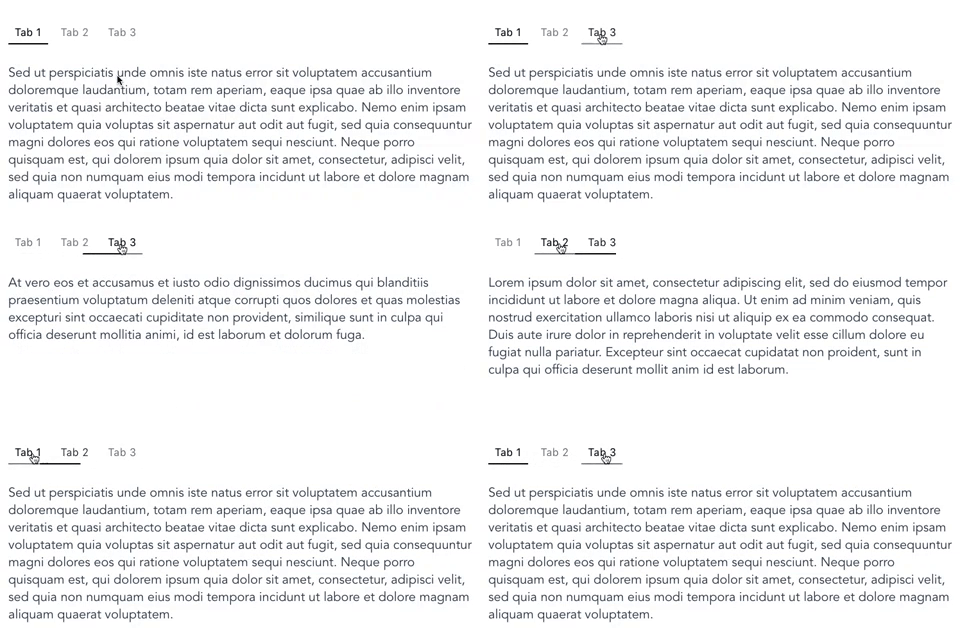
Simple Vue 2 component, that allows you to make tabs with moving bottom line
[](https://travis-ci.org/karambafe/vue-tabs-with-active-line)
[](https://coveralls.io/github/karambafe/vue-tabs-with-active-line?branch=master)
[](https://www.npmjs.com/package/vue-tabs-with-active-line)
[](https://www.npmjs.com/package/vue-tabs-with-active-line)
[](https://www.npmjs.com/package/vue-tabs-with-active-line)
[](https://david-dm.org/karambafe/vue-tabs-with-active-line)
## Demo and example
Live demo to play with: [Demo-link](https://karambafe.github.io/vue-tabs-with-active-line/)
Code from the demo: [Default-example](https://github.com/karambafe/vue-tabs-with-active-line/blob/master/examples/Default.vue) [Disabled-example](https://github.com/karambafe/vue-tabs-with-active-line/blob/master/examples/Disabled.vue)
## Install
via NPM
```bash
npm install vue-tabs-with-active-line --save
```
## Usage
Import the component
```javascript
import Tabs from 'vue-tabs-with-active-line';
```
Define the data for props `tabs`, `currentTab`, and method for `onClick` callback
```javascript
export default {
components: {
Tabs,
},
data: () => ({
tabs: [
{ title: 'Tab 1', value: 'tab1' },
{ title: 'Tab 2', value: 'tab2' },
{ title: 'Tab 3', value: 'tab3', }
],
currentTab: 'tab1',
}),
methods: {
handleClick(newTab) {
this.currentTab = newTab;
},
},
}
```
here's the HTML structure generated from the data entered:
```html
```
Finally, add some styles for component elements:
* `.tabs` - component wrapper
* `.tabs__item` - button
* `.tabs__item_active` - active button
* `.tabs__active-line` - bottom line
Be sure to add `position: relative;` for `.tabs` class
and `position: absolute;` with `bottom, left, height, background-color` properties for `.tabs__active-line` class
##### Below you'll find basic style in CSS and SCSS
CSS EXAMPLE
```css
.tabs {
position: relative;
margin: 0 auto;
}
.tabs__item {
display: inline-block;
margin: 0 5px;
padding: 10px;
padding-bottom: 8px;
font-size: 16px;
letter-spacing: 0.8px;
color: gray;
text-decoration: none;
border: none;
background-color: transparent;
border-bottom: 2px solid transparent;
cursor: pointer;
transition: all 0.25s;
}
.tabs__item_active {
color: black;
}
.tabs__item:hover {
border-bottom: 2px solid gray;
color: black;
}
.tabs__item:focus {
outline: none;
border-bottom: 2px solid gray;
color: black;
}
.tabs__item:first-child {
margin-left: 0;
}
.tabs__item:last-child {
margin-right: 0;
}
.tabs__active-line {
position: absolute;
bottom: 0;
left: 0;
height: 2px;
background-color: black;
transition: transform 0.4s ease, width 0.4s ease;
}
```
SCSS Example
```scss
.tabs {
position: relative;
margin: 0 auto;
&__active-line {
position: absolute;
bottom: 0;
left: 0;
height: 2px;
background-color: black;
transition: transform 0.4s ease, width 0.4s ease;
}
&__item {
display: inline-block;
margin: 0 5px;
padding: 10px;
padding-bottom: 8px;
font-size: 16px;
letter-spacing: 0.8px;
color: gray;
text-decoration: none;
border: none;
background-color: transparent;
border-bottom: 2px solid transparent;
cursor: pointer;
transition: all 0.25s;
&_active {
color: black;
}
&:hover {
border-bottom: 2px solid gray;
color: black;
}
&:focus {
outline: none;
border-bottom: 2px solid gray;
color: black;
}
&:first-child {
margin-left: 0;
}
&:last-child {
margin-right: 0;
}
}
}
```