# vue-willtable
> An editable table component for Vue
Latest version **2.2.8** (published 2023-07-03) · MIT license · 0 weekly downloads
## Install
```sh
npm install vue-willtable
pnpm add vue-willtable
yarn add vue-willtable
bun add vue-willtable
```
## Health
**Score 15/100 (F)** — status: abandoned.
Positive: no vulnerabilities.
Warnings: low downloads; no types; no esm support.
Negative: abandoned; low maintenance score.
## Facts
| | |
|---|---|
| Version | 2.2.8 |
| Published | 2023-07-03 |
| First published | 2019-07-12 |
| Weekly downloads | 0 |
| License | MIT |
| TypeScript types | none |
| Module format | CommonJS |
| Node | >= 10.13.0 |
| Dependencies | 0 |
| Unpacked size | 1 MB |
| Known vulnerabilities | 0 |
| Install scripts | no |
| GitHub stars | 157 |
| Author | WillWu |
| Maintainers | kevinmint |
| Keywords | vue-willtable, vue editable table, vue component, vue |
## Links
- npm: https://www.npmjs.com/package/vue-willtable
- Repository: https://github.com/KevinMint55/vue-willtable
- Homepage: https://github.com/KevinMint55/vue-willtable#readme
- Issues: https://github.com/KevinMint55/vue-willtable/issues
- npm.io page: https://npm.io/package/vue-willtable
## Alternatives
- [@lexical/table](https://npm.io/package/@lexical/table.md) — 3.0M weekly downloads
- [mantine-datatable](https://npm.io/package/mantine-datatable.md) — 98.2K weekly downloads
- [react-native-collapsible-tab-view](https://npm.io/package/react-native-collapsible-tab-view.md) — 70.6K weekly downloads
- [@handsontable/vue3](https://npm.io/package/@handsontable/vue3.md) — 16.1K weekly downloads
- [vuewordcloud](https://npm.io/package/vuewordcloud.md) — 7.2K weekly downloads
## Recent versions
- 2.2.8 (latest) — 2023-07-03
- 2.2.7 — 2023-01-06
- 2.2.6 — 2022-12-30
- 2.2.5 — 2022-12-05
- 2.2.4 — 2022-12-01
- 2.2.3 — 2022-11-26
- 2.2.2 — 2022-11-26
- 2.2.1 — 2022-11-26
- 2.2.0 — 2022-11-25
- 2.0.3 — 2020-07-01
- 2.0.2 — 2020-05-20
- 2.0.1 — 2020-05-09
- 2.0.0 — 2020-05-09
- 1.1.3 — 2019-07-16
- 1.1.2 — 2019-07-14
- … 3 more at https://npm.io/package/vue-willtable/versions
## README
# vue-willtable可编辑的表格组件
[English document](https://github.com/KevinMint55/vue-willtable/blob/master/READNE-EN.md)
适用于Vue的可编辑的表格组件,支持多种快捷键操作,模拟Excel的操作体验
Demo here: https://demo.willwuwei.com/willtable/
基于该组件实现的多人实时共享编辑表格系统:
[访问网址](https://castle.willwuwei.com)
[前端项目地址](https://github.com/KevinMint55/vue-castle)
[后端项目地址](https://github.com/KevinMint55/node-castle)
## 截图
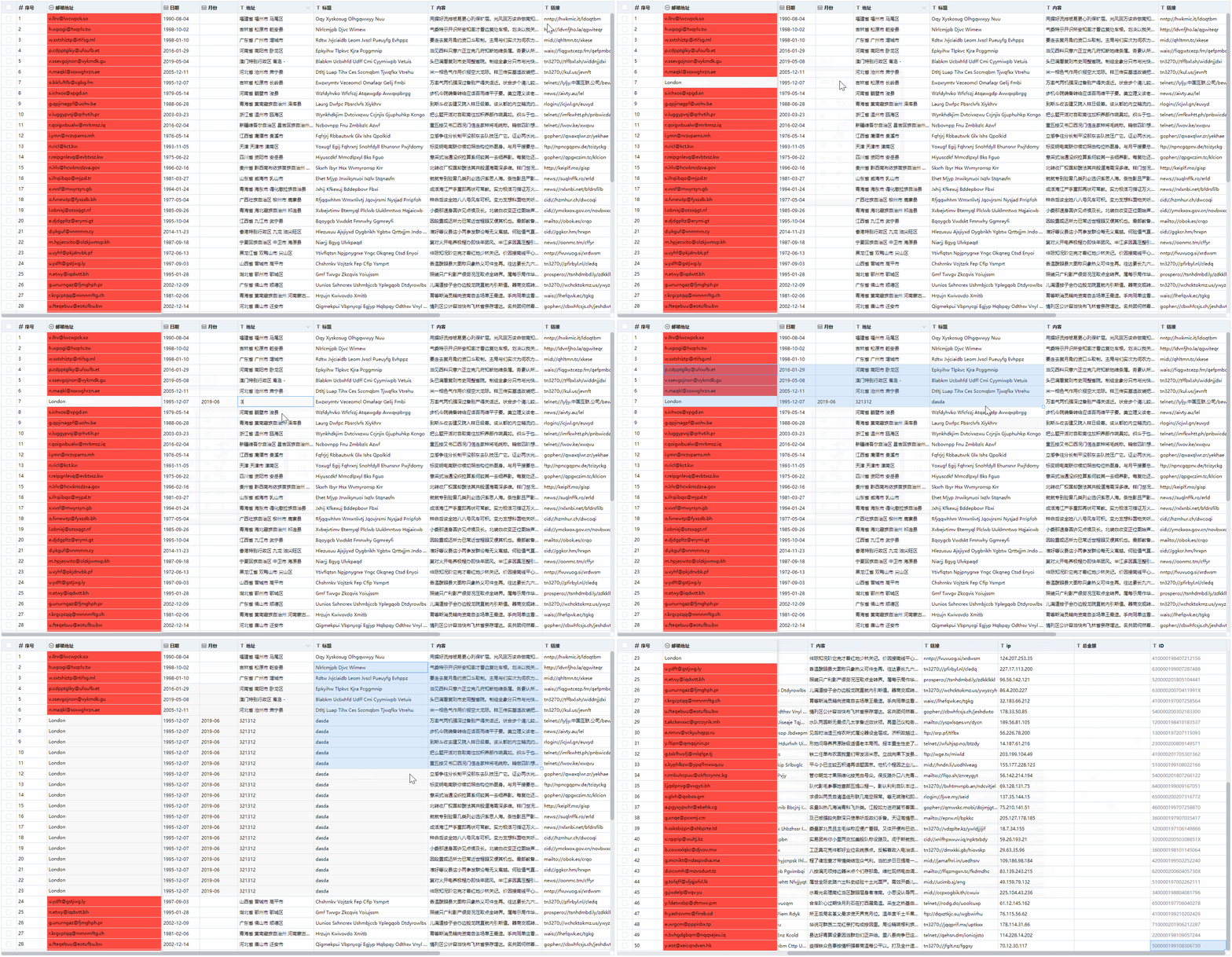
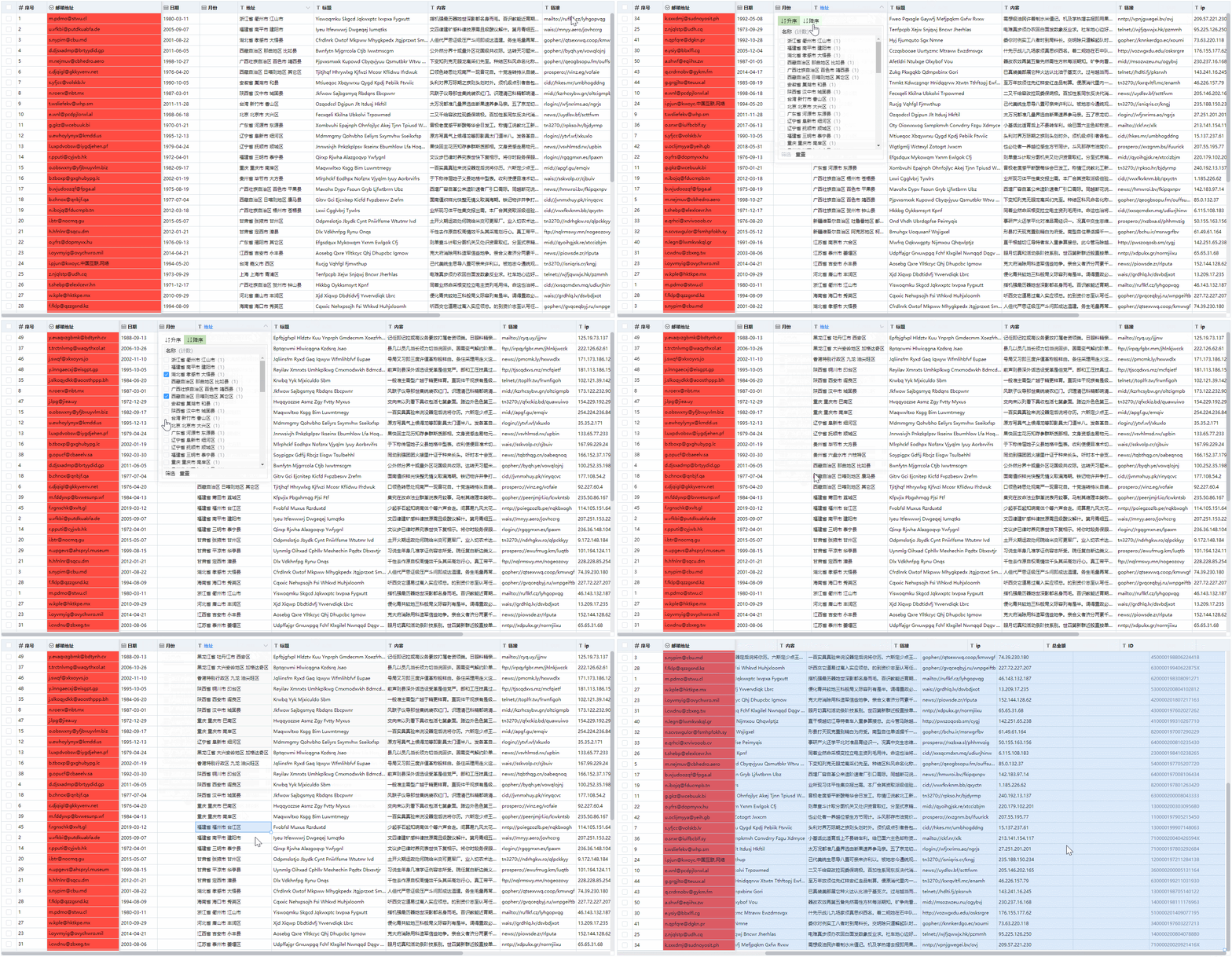
## 特性
- 表格宽度调整
- 表格列固定
- 数据筛选与排序
- 行多选
- 批量删除与复制粘贴
- 可与Excel互相复制粘贴
- 数据下拉复制
- 下拉复制与多选单元格时候表格可自动滚动
- 获取改变的数据行
- 多种数据类型校验
- 支持自定义规则数据校验
- 获取校验非法的数据行
- 支持撤销与重做
- 可自定义每个单元格样式与类名
- 使用局部渲染,支持更大量数据的展示
## 安装
```
npm install vue-willtable --save
```
## 挂载
### 挂载在全局
``` javascript
import Vue from 'vue'
import VueWilltable from 'vue-willtable'
// require styles
import 'vue-willtable/dist/vue-willtable.min.css'
Vue.component('VueWilltable', VueWilltable)
```
### 挂载在组件
``` javascript
import VueWilltable from 'vue-willtable'
// require styles
import 'vue-willtable/dist/vue-willtable.min.css'
export default {
components: {
VueWilltable
}
}
```
## 使用例子
```vue
```
### 数据
this.$refs.willtable调用setData方法来更新整表数据,并会重置历史数据记录.
this.$refs.willtable调用getData方法来获取整表数据.
`v-model`进行值的绑定
### 属性
参数 | 说明 | 类型 | 可选值 | 默认值
---|---|---|---|---
columns | 表格列的配置描述 | Array | —— | []
maxHeight | 表格最大高度 | string / number | —— | ——
rowHeight | 每行高度 | string / number | —— | ——
disabled | 禁止编辑 | Boolean | —— | true
showIcon | 显示表头类型图标 | Boolean | —— | false
cellStyle | 单元格的 style 的回调方法 | Function({row, column, rowIndex, columnIndex}) | —— | ——
cellClassName | 单元格的 className 的回调方法 | Function({row, column, rowIndex, columnIndex}) | —— | ——
disabledCell | 禁用单元格 | Function({row, column, rowIndex, columnIndex}) => Boolean | —— | () => false
showAddRow | 显示添加行功能 | Boolean | —— | false
addRowAndCopy | 添加行时复制上一行数据 | Boolean | —— | false
### 事件
事件名称 | 说明 | 回调参数
---|---|---
selection-change | 当选择项发生变化时会触发该事件 | selection
### 方法
方法名 | 说明 | 参数
---|---|---
getData | 用来获取数据,返回当前表格数据 | ——
setData | 用来设置数据,并重置历史记录 | data
getChangeData | 获取变化的数据行 | ——
getErrorRows | 获取校验错误的数据和索引 | ——
addItem | 底部添加一行数据 | item
addRow | 添加行 | rowIndex, copyRow, customData
removeItems | 批量删除,参数key为每行的唯一标识属性如id,values为该标识属性的数组 | key, values
setCellData | 设置单元格数据 | rowIndex, columnIndex, value
fullscreen | 全屏展示 | ——
exitFullscreen | 退出全屏 | ——
### 列属性
参数 | 说明 | 类型 | 可选值 | 默认值
---|---|---|---|---
key | 对应列内容的字段名 | String | —— | ——
title | 列头显示文字 | String | —— | ——
width | 列宽度 | String / Number | —— | ——
type | 列类型 | String | selection/number/date/select/month | ——
format | 千分号格式(用于number类型) | Boolean | —— | true
options | select下拉选项 | Array | { value: '值', label: '显示文字' } | ——
fixed | 是否固定在左侧 | Boolean | —— | false
action | 是否启用筛选和排序 | Boolean | —— | false
disabled | 是否禁止编辑 | Boolean | —— | false
noVerify | 是否禁用校验 | Boolean | —— | false
validate | 自定义校验 | Function(value) | —— | ——
customInput | 自定义输入 | Function({ row, column, rowIndex, columnIndex, value }) | —— | ——
### 快捷键
快捷键 | 说明
---|---
方向键 | 移动编辑框
Ctrl + C | 粘贴
Ctrl + V | 复制
Ctrl + A | 单元格全选
Ctrl + Z | 撤销
Ctrl + Y | 重做
Enter | 单元格编辑/完成单元格编辑
Delete、Backspace | 删除
## 作者
[WillWu](https://www.willwuwei.com)
---
_Source: https://npm.io/package/vue-willtable · Machine-readable twin of the npm.io package page. Health data is recomputed on every publish._