# vuejs-form-creator
> vue json form 生成器, 适配element iview
Latest version **0.14.0** (published 2019-10-18) · 0 weekly downloads
## Install
```sh
npm install vuejs-form-creator
pnpm add vuejs-form-creator
yarn add vuejs-form-creator
bun add vuejs-form-creator
```
## Health
**Score 10/100 (F)** — status: abandoned.
Positive: no vulnerabilities.
Warnings: low downloads; no types; no esm support; low quality score; pre 1.0.
Negative: abandoned; low maintenance score.
## Facts
| | |
|---|---|
| Version | 0.14.0 |
| Published | 2019-10-18 |
| First published | 2019-06-25 |
| Weekly downloads | 0 |
| TypeScript types | none |
| Module format | CommonJS |
| Dependencies | 4 |
| Unpacked size | 85.2 KB |
| Known vulnerabilities | 0 (+1 in 1 direct dependencies) |
| Install scripts | no |
| Maintainers | venus_jin |
| Keywords | vue, formCreator, element, iview |
## Links
- npm: https://www.npmjs.com/package/vuejs-form-creator
- npm.io page: https://npm.io/package/vuejs-form-creator
## Dependencies (4)
- [vue](https://npm.io/package/vue.md) ^2.6.10
- [iview](https://npm.io/package/iview.md) ^3.4.2
- [core-js](https://npm.io/package/core-js.md) ^2.6.5
- [jsonview-vue](https://npm.io/package/jsonview-vue.md) ^2.0.1
## Alternatives
- [mobx-react](https://npm.io/package/mobx-react.md) — 2.8M weekly downloads
- [rc-tree](https://npm.io/package/rc-tree.md) — 2.6M weekly downloads
- [@react-oauth/google](https://npm.io/package/@react-oauth/google.md) — 1.3M weekly downloads
- [@wagmi/connectors](https://npm.io/package/@wagmi/connectors.md) — 877.0K weekly downloads
- [vee-validate](https://npm.io/package/vee-validate.md) — 836.4K weekly downloads
## Recent versions
- 0.14.0 (latest) — 2019-10-18
- 0.13.1 — 2019-09-27
- 0.12.0 — 2019-09-27
- 0.11.0 — 2019-08-06
- 0.9.0 — 2019-07-31
- 0.8.0 — 2019-07-29
- 0.7.0 — 2019-07-29
- 0.6.0 — 2019-07-18
- 0.5.0 — 2019-07-18
- 0.4.0 — 2019-07-12
- 0.2.0 — 2019-06-25
## README
# vue-form-creator (element ui/ iview适配版本)
- el-form 在复杂表单上代码量较大
- 动态校验表单项比较麻烦
- 表单多字段联动在tempalte 与 js中穿插 代码混乱
解决方案 使用json方案描述表单,对表单数据自动更新,对elment表单控件只做适配(采用jsx透传ui控件属性)
#### vue-cli 3.0引入jsx写法编译
*vue 版本要求 > 2.6.0*
```
npm install @vue/babel-preset-jsx @vue/babel-helper-vue-jsx-merge-props -D
```
修改 babel.config.js/.babelrc
```
module.exports = {
presets: [
['@vue/app', {
useBuiltIns: 'entry'
}],
['@vue/babel-preset-jsx',
{
"injectH": false
}]
]
}
```
> 注意:@vue/babel-preset-jsx默认会注入一个h语法糖,会与vue本身冲突,这个配置要设置false,否则项目启动会报错
#### form-creator api
参数 | 说明 | 类型
---|--- | ---
v-model | 表单值(对应el-form model)| object
option | el-form 配置透传,除了disabled以外,详见 option| object
fields | 表单域数组 | Array( item 可以是object 或 array )
@submit | options.buttonGroup 为true时,提交点击| function(form)
@cancel | options.buttonGroup 为true时,取消点击 |
> form-creator 对外暴露一个 getFormRef() 来返回el-form的ref
#### option api
参数 | 说明 | 类型 | 可选值 | 默认值
---|--- |--- |--- |---
status | 代替disabled(boolean)| string |edit、disabled、 preview| edit
debug | boolean, 快捷调试入口 | boolean | - | false
autoAuffix(后续会使用colon替代) | el-form-item label 后缀自动补齐(如: '姓名' -> '姓名:') | boolean | - | false
colon | 是否自动补齐label冒号 | boolean | - | false
itemSpan | formItem span全局参数,优先级itemSpan < formItem.span | number | 0~24 | 24
itemGutter | el-row gutter参数 | number | 0~24 | 0
buttonGroup | 表单 submit、cancel按钮组合| boolean/function| true/false,function 返回按钮数组| false
#### fields item api
参数 | 说明 | 类型 | 可选值 | 默认值
---|--- |--- |--- |---
tag | 标签, 与component不同时使用| string | - | el-input
component | 组件,适用于自定义表单控件值 | function | - | -
formItemComponent(0.12.0) | 组件,适用纯ui展示 | function | - | -
label | label展示值,同下item(label),优先级 label < item.label
name | 表单对应字段 | string | - | -
options| select checkbox-group时使用 | {label: '', value: ''}[] |
formItemStatus (0.12.0) | 优先级高于 option.status,便于表单部分字段特殊状态处理 | string | edit、preview | edit
previewFormItemValue| 可选参数,当option.status 为preview时生效,展示文字自定义 | - | (value, h) => value| form[name]
scopedSlots | 可选参数,动态slot,必须使用h函数 | jsx component[]
on | 控件事件透传,在需要做字段联动时使用| object
rules | 该字段校验规则,与el-form一致
gutter | 可选参数,布局 对应el-row, 只在config item 为Array时配置在Array[0]上
span | 可选参数,布局 对应el-col
item| 对应el-form-item 属性透传,(prop 对应 name, 不需要再声明prop)| object| | {label: ''}
##### 在component/scopedSlots中 组件书写方式(0.10.0之前版本)
- component: import 过来以.vue结尾的,以jsx functional component 实现的,直接写变量;
- scopedSlots: 要以jsx形式书写 `h => jsx component`
> 0.10.0以后的版本不需要再写 h 函数了(可选)
##### example
- 全局引入
```
import VueFormCreator from '@yowant/vue-form-creator'
Vue.use(VueFormCreator, {
// 默认使用element-ui,可不填写,可选element、iview
ui: 'element',
// 默认在开发模式开启表单debug, 可不填写
debug: process.env.NODE_ENV === 'development', 可不填写
// 组件名默认 form-creator, 可不填
name: 'form-creator',
})
```
```
```
> 注意 表单fields 不要放在data里, computed 里可以自动关联this、依赖更新响应
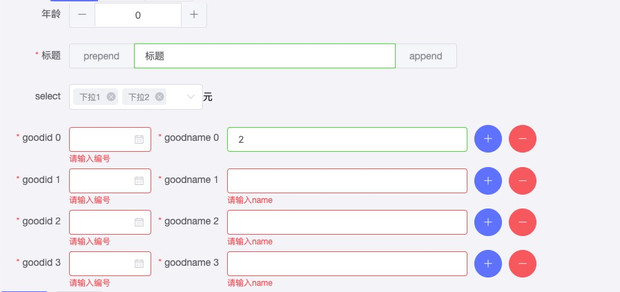
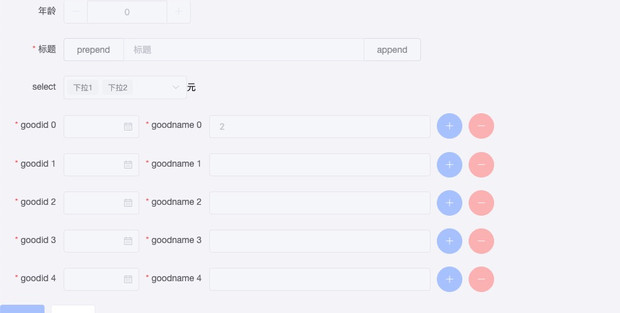
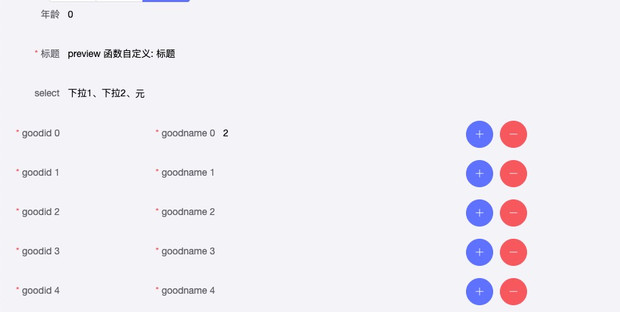
一个带有校验、布局配置的复杂form实现了
- 编辑状态(edit)
- 禁用状态(disabled)
- 预览状态(preview)
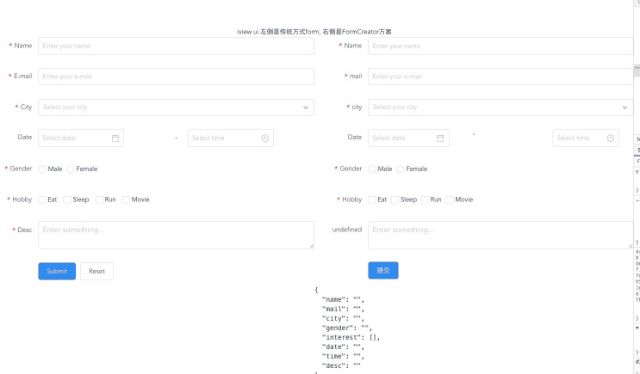
- iview 版本demo
项目代码示例
element
```
http://gitlab.ywwl.com/H5/xiaoy-zhibo-saas/blob/formcreate/src/views/Demo/FormBuild.vue
```
iview
```
http://gitlab.ywwl.com/yfe/vue-form-creator/blob/master/src/components/FormDemo.vue
```
项目内网git地址`http://gitlab.ywwl.com/yfe/vue-form-creator`
## 工具链tools
### rules
为了便于开发,内置了常见校验规则库,使用示例
```
import {
validatorFunc,
decimal0To100, integer, ...
} from 'vuejs-form-creator/lib/rules.js'
fields() {
return [
{
label: '名称',
name: 'name',
placeholder: 'Enter your name',
// formItemStatus: 'edit',
rules: [
'required', limitLength(6),
],
},
{
label: '价格',
name: 'fee',
placeholder: '请输入价格',
// formItemStatus: 'edit',
rules: [
'required', decimal0To100,
],
},
{
label: '年龄',
name: 'age',
rules: 'required'
}
]
}
```
已内置规则示例
```
limitLength(max, min = 0) // 长度限制 0 ~ max
export const regs = {
// 1 ~ 100之间的整数
integer1To100: [/^(([1-9]\d?)|100)$/, '请输入非零正整数且不大于100'],
// 非负整数
positiveInteger: [/^[0-9]*$/, '请输入整数'],
// 整数 包含: 正 负 0
integer: [/^-?[0-9]*$/, '请输入非负整数'],
// 最多保留2位小数
maxDecimal2: [
/^-?[0-9]+(.[0-9]{1,2})?$/,
'请输入数字,最多保留2位小数',
],
// 0 ~ 100 最多2位小数 包含0
decimal0To100: [
/^([0-9]\d?(\.\d{1,2})?|0.\d{1,2}|100|100.0|100.00)$/,
'100之间数字,最多保留2位小数'
],
email: [
/^([0-9]\d?(\.\d{1,2})?|0.\d{1,2}|100|100.0|100.00)$/,
'邮箱格式有误',
],
phone: [
/^1[0-9]{10}$/,
'手机号格式有误'
],
url: [
/^(ht|f)tps?:\/\//i,
'网址格式有误'
],
}
```
> validatorFunc 是对校验写法做一个封装,只需要传入 元祖[reg, message]即为一个校验,内部实现如下
```
/**
* 校验 高阶函数
* @param {*} regRule [reg, message]
*/
export const validatorFunc = (regRule) => {
const [reg, message] = regRule
return (rule, val, callback) => {
// 有输入值 并且输入值不合法
if (val && !reg.test(val)) {
callback(new Error(message))
}
callback()
}
}
```
---
_Source: https://npm.io/package/vuejs-form-creator · Machine-readable twin of the npm.io package page. Health data is recomputed on every publish._