# wasser
> Mixins for fluid CSS properties in SASS or LESS
Latest version **2.6.0** (published 2024-03-02) · MIT license · 0 weekly downloads
## Install
```sh
npm install wasser
pnpm add wasser
yarn add wasser
bun add wasser
```
## Health
**Score 35/100 (D)** — status: abandoned.
Positive: has types; esm support; no vulnerabilities; has provenance; high quality score.
Warnings: low downloads.
Negative: abandoned; low maintenance score.
## Facts
| | |
|---|---|
| Version | 2.6.0 |
| Published | 2024-03-02 |
| First published | 2018-02-12 |
| Weekly downloads | 0 |
| License | MIT |
| TypeScript types | bundled |
| Module format | ESM + CommonJS |
| Node | >= 18 |
| Dependencies | 0 |
| Unpacked size | 18.3 KB |
| Known vulnerabilities | 0 |
| Install scripts | no |
| Provenance | attested (GitHub Actions) |
| GitHub stars | 1 |
| Author | Matthias Giger |
| Maintainers | naminho, tobua |
| Keywords | responsive, css, fluid, scaling, frontend |
## Links
- npm: https://www.npmjs.com/package/wasser
- Repository: https://github.com/tobua/wasser
- Homepage: https://tobua.github.io/wasser
- Issues: https://github.com/tobua/wasser/issues
- npm.io page: https://npm.io/package/wasser
## Alternatives
- [style-dictionary](https://npm.io/package/style-dictionary.md) — 2.0M weekly downloads
- [postcss-merge-idents](https://npm.io/package/postcss-merge-idents.md) — 1.7M weekly downloads
- [@fontsource/noto-sans](https://npm.io/package/@fontsource/noto-sans.md) — 93.0K weekly downloads
- [uglifycss](https://npm.io/package/uglifycss.md) — 71.6K weekly downloads
- [mat4-interpolate](https://npm.io/package/mat4-interpolate.md) — 23.3K weekly downloads
## Recent versions
- 2.6.0 (latest) — 2024-03-02
- 2.5.0 — 2024-01-14
- 2.4.0 — 2023-07-01
- 2.3.0 — 2023-02-09
- 2.2.1 — 2022-03-06
- 2.2.0 — 2021-11-12
- 2.1.1 — 2021-11-10
- 2.1.0 — 2021-09-09
- 2.0.1 — 2021-02-13
- 2.0.0 — 2020-10-11
- 1.1.5 — 2020-07-19
- 1.1.4 — 2020-01-11
- 1.1.3 — 2019-07-24
- 1.1.2 — 2018-08-06
- 1.1.1 — 2018-08-05
- … 4 more at https://npm.io/package/wasser/versions
## README
# wasser
[](https://tobua.github.io/wasser)
[](https://npmjs.com/wasser)
> Fluid CSS properties
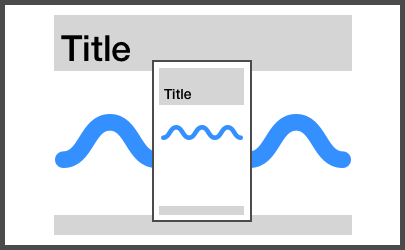
Create highly responsive and still pixel-perfect websites.
> [!TIP]
> A successor JavaScript-only library called [optica](https://github.com/tobua/optica) has been released. It requires the [`clamp()`](https://caniuse.com/css-math-functions) CSS math function but no longer needs any breakpoints.
## Use Cases
Best suited when you have a desktop and a mobile design of the site. Wasser will
allow you to implement the design pixel perfect on both of these viewports. In
between you get a linearly scaling design without any effort. If you only have
a design of the desktop version you get the mobile version for free.
## CSS-in-JS, SASS or LESS?
Below the CSS-in-JS version is documented. Please refer to the following documentations if you prefer SASS or LESS:
- [SASS Documentation](docs/sass.md)
- [LESS Documentation](docs/less.md)
The CSS-in-JS version is newer and requires CSS Variables (no IE11). Both the SASS and LESS version also work with older browsers.
## Installation and Usage
```
npm i wasser
```
```jsx
import React from 'react'
import { render } from 'react-dom'
import { styled, globalCss } from '@stitches/react'
import { wasser, globalVariables, fontObject } from 'wasser'
globalCss(globalVariables())()
const Wrapper = styled('div', {
padding: wasser(50),
})
const Heading = styled('h1', {
...fontObject(50),
})
render(
Scalable Properties
,
document.body,
)
```
### Usage with `@emotion`
Click to show usage with @emotion!
```jsx
import React from 'react'
import { render } from 'react-dom'
import { Global, css } from '@emotion/core'
import styled from '@emotion/styled'
import { wasser, font, head } from 'wasser'
const Wrapper: any = styled.div`
padding: ${wasser(50)};
`
const Heading: any = styled('h1')`
${font(50)}
`
render(
Scalable Properties
,
document.body
)
```
## How it works
## Interface
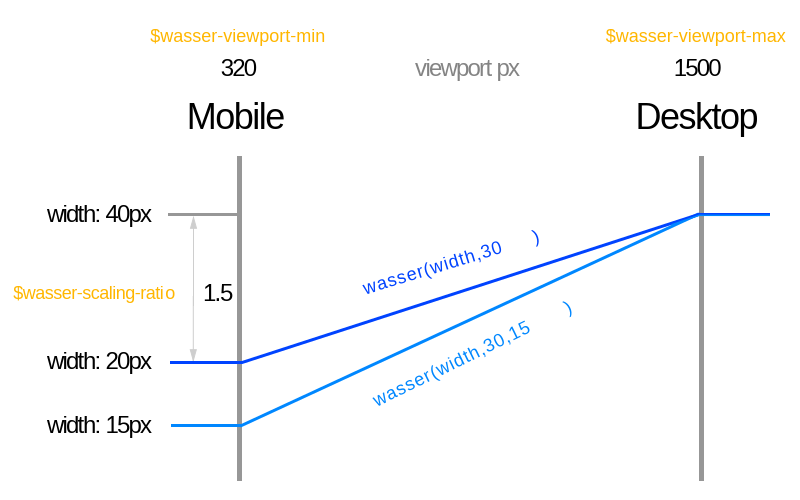
`wasser(max: number, [min]: number)`
`max` will be the value at the upper breakpoint, while `min` will be the value
at the lower breakpoint.
If `min` is missing, `max` divided by the scaling factor will be used.
```css
.some-element {
padding: ${wasser(20)};
}
```
```js
const SomeElement = styled('div', {
padding: wasser(20),
})
```
### Fonts
`font(max: number, [min]: number, [line-height-ratio]: number)`
This call does not require a property as it will set both the `font-size` and
the associated `line-height`. The `line-height` does not require a separate value
since it is stretched by the configurable `fontSizeToLineHeightRatio`.
```css
.some-text {
${font(16)}
}
// =>
.some-text {
font-size: ...;
line-height: ...;
}
```
```js
const Heading = styled('h3', {
...fontObject(18),
})
// =>
const Heading = styled('h3', {
fontSize: ...,
lineHeight: ...,
})
```
## Configuration
Call the `configure` function before rendering to change the default settings.
```jsx
import { configure } from 'wasser'
configure({
scalingRatio: 2,
})
```
The following variables are available and can be configured.
| Variable | Default | Description |
| ------------------------- | ------- | --------------------------------------------------------------------- |
| viewportMin | 320 | Minimum breakpoint |
| viewportMax | 1500 | Maximum breakpoint |
| scalingRatio | 1.5 | Ratio to calculate `min` from `max` when `min` is not explicitly set. |
| scalingRatioFont | 1.2 | Scaling ratio for font properties. |
| fontSizeToLineHeightRatio | 1.5 | Ratio to get line-height from font-size. |
---
_Source: https://npm.io/package/wasser · Machine-readable twin of the npm.io package page. Health data is recomputed on every publish._