# xhinobi
Latest version **0.0.17** (published 2023-12-10) · 0 weekly downloads
## Install
```sh
npm install xhinobi
pnpm add xhinobi
yarn add xhinobi
bun add xhinobi
```
Provides the command `xhinobi`.
## Health
**Score 20/100 (F)** — status: abandoned.
Positive: esm support; no vulnerabilities.
Warnings: low downloads; no types; pre 1.0.
Negative: abandoned; low maintenance score.
## Facts
| | |
|---|---|
| Version | 0.0.17 |
| Published | 2023-12-10 |
| First published | 2023-12-08 |
| Weekly downloads | 0 |
| TypeScript types | none |
| Module format | ESM + CommonJS |
| Dependencies | 4 |
| Unpacked size | 4.1 MB |
| Known vulnerabilities | 0 |
| Install scripts | no |
| Author | oggnimodd |
| Maintainers | dominggo1999 |
## Links
- npm: https://www.npmjs.com/package/xhinobi
- npm.io page: https://npm.io/package/xhinobi
## Dependencies (4)
- [yargs](https://npm.io/package/yargs.md) ^17.7.2
- [clipboardy](https://npm.io/package/clipboardy.md) ^4.0.0
- [@types/yargs](https://npm.io/package/@types/yargs.md) ^17.0.32
- [text-extensions](https://npm.io/package/text-extensions.md) ^2.4.0
## Recent versions
- 0.0.17 (latest) — 2023-12-10
- 0.0.16 — 2023-12-10
- 0.0.15 — 2023-12-10
- 0.0.14 — 2023-12-10
- 0.0.12 — 2023-12-08
## README

# xhinobi
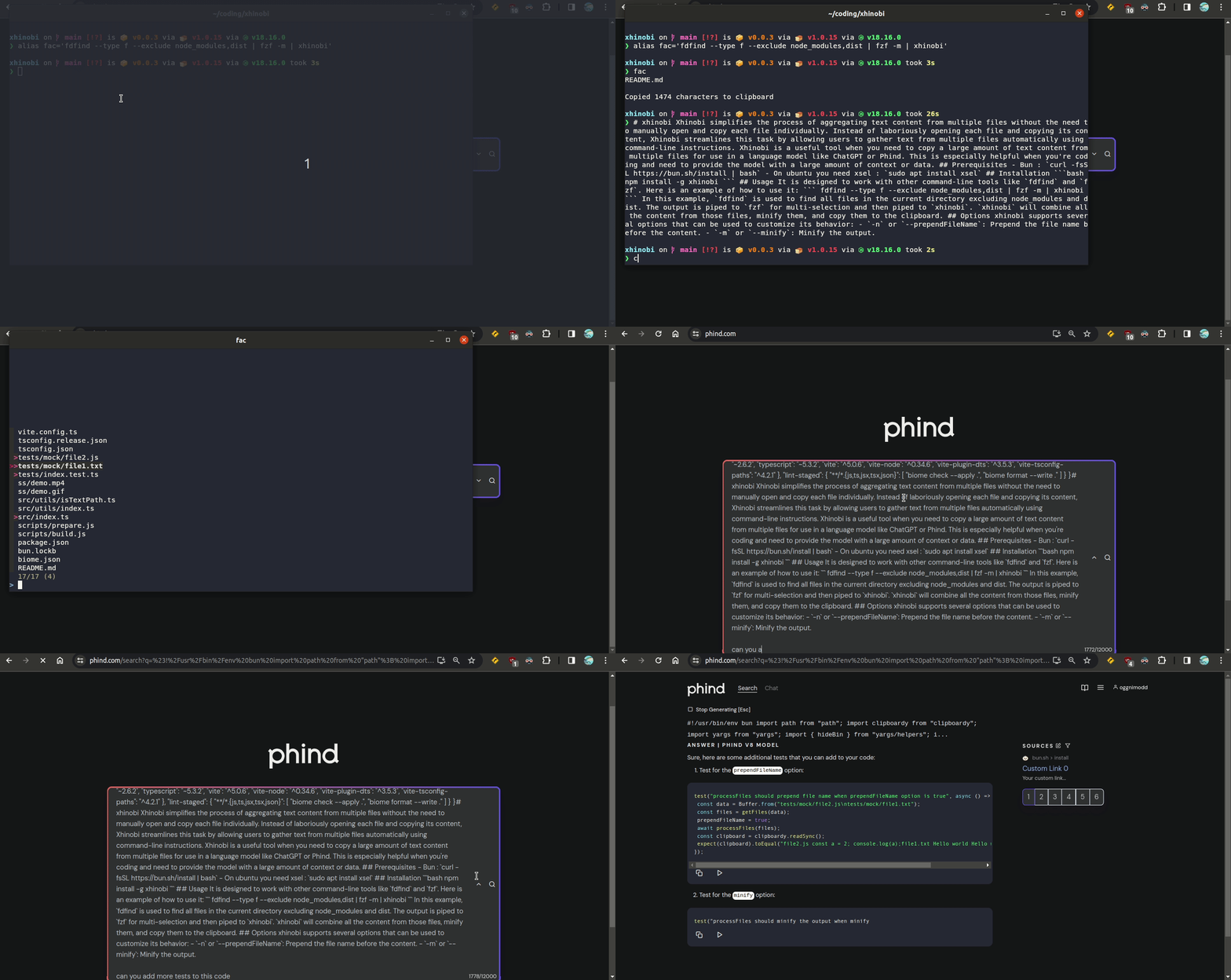
xhinobi simplifies the process of aggregating text content from multiple files without the need to manually open and copy each file individually. Instead of laboriously opening each file and copying its content, Xhinobi streamlines this task by allowing users to gather text from multiple files automatically using command-line instructions. Xhinobi is a useful tool when you need to copy a large amount of text content from multiple files for use in a language model like ChatGPT or Phind. This is especially helpful when you're coding and need to provide the model with a large amount of context or data.
 ## Prerequisites
- Bun : `curl -fsSL https://bun.sh/install | bash`
- On ubuntu you need xsel : `sudo apt install xsel`
## Installation
```bash
npm install -g xhinobi
```
## Usage
It is designed to work with other command-line tools like `fdfind` and `fzf`. Here is an example of how to use it:
```
fdfind --type f --exclude node_modules,dist | fzf -m | xhinobi
```
In this example, `fdfind` is used to find all files in the current directory excluding node_modules and dist. The output is piped to `fzf` for multi-selection and then piped to `xhinobi`. `xhinobi` will combine all the content from those files, minify them, and copy them to the clipboard.
## Options
xhinobi supports several options that can be used to customize its behavior:
- `-n` or `--prependFileName`: Prepend the file name before the content.
- `-m` or `--minify`: Minify the output.
---
_Source: https://npm.io/package/xhinobi · Machine-readable twin of the npm.io package page. Health data is recomputed on every publish._