# xkcd-passwords
> Generate easy to remember passwords in many languages following an idea published on xkcd.com.
Latest version **1.0.1** (published 2020-03-03) · ISC license · 0 weekly downloads
## Install
```sh
npm install xkcd-passwords
pnpm add xkcd-passwords
yarn add xkcd-passwords
bun add xkcd-passwords
```
## Health
**Score 15/100 (F)** — status: abandoned.
Positive: no vulnerabilities.
Warnings: low downloads; no types; no esm support.
Negative: abandoned; low maintenance score.
## Facts
| | |
|---|---|
| Version | 1.0.1 |
| Published | 2020-03-03 |
| First published | 2020-03-03 |
| Weekly downloads | 0 |
| License | ISC |
| TypeScript types | none |
| Module format | CommonJS |
| Dependencies | 1 |
| Unpacked size | 61.6 KB |
| Known vulnerabilities | 0 |
| Install scripts | no |
| Author | Johannes Endres |
| Maintainers | joendres |
| Keywords | xkcd, password, security |
## Links
- npm: https://www.npmjs.com/package/xkcd-passwords
- Repository: https://gitlab.com/joendres/xkcd-passwords
- Homepage: https://gitlab.com/joendres/xkcd-passwords#readme
- Issues: https://gitlab.com/joendres/xkcd-passwords/issues
- npm.io page: https://npm.io/package/xkcd-passwords
## Dependencies (1)
- [node-fetch](https://npm.io/package/node-fetch.md) ^2.6.0
## Recent versions
- 1.0.1 (latest) — 2020-03-03
- 1.0.0 — 2020-03-03
## README
# xkcd-passwords
Generate easy to remember passwords in several languages following an idea published on xkcd.com.
The basic concept is to randomly combine four common words, eg.
> correct horse battery staple
xkcd-passwords generates passwords like this from lists of the most frequent words in several languages.
## Setup
### Browser
In a web page:
```html
```
### Node.js
Install the package:
```shell
npm install xkcd-passwords
```
Then import it into your script:
```javascript
const xkcdpasswords = require('xkcd-passwords');
```
## Generate Passwords
The `generate()` method of `xkcdpasswords` does just that, it generates a password.
### Simple passwords
Calling `xkcdpasswords.generate()` with no parameters will give you a password as suggested by xkcd.com: 4 random english words concatenated.
```javascript
const newPassword = xkcdpasswords.generate();
// newPassword is a string like 'correcthorsebatterystaple'
```
*Note:* The password might contain the same word multiple times. But this is quite improbable and does not make the password less secure.
### Customizing passwords
`generate()` has several options to customize the generated password, explained below.
```javascript
generate(words, joinchar, camel, morechars, wordlist) {...}
```
### Number of words in password
The parameter `words` sets the number of words to combine in the password.
```javascript
const newPassword = xkcdpasswords.generate(3);
// newPassword is a string like 'correcthorsebattery' (3 words)
```
*Default:* 4 words
### Separate words with a character
The parameter `joinchar` may contain a character (or more) that will be placed between the words in the password.
```javascript
const newPassword = xkcdpasswords.generate(4, '-');
// newPassword is a string like 'correct-horse-battery-staple'
```
*Default:* `''`, no character between the words.
### Use camelCase
If the parameter `camel` is `true` the first character of every word will be uppercase.
```javascript
const newPassword = xkcdpasswords.generate(4, '', true);
// newPassword is a string like 'CorrectHorseBatteryStaple'
```
*Default:* `false`, all characters lowercase
### Add extra characters
Sometimes a password has to contain certain characters, eg numbers or punctuation. If you pass an array of strings as parameter `morechars`, one character from every string is appended to the password.
```javascript
const newPassword = xkcdpasswords.generate(4, '', false, ["0123456789", "+-.!?",]);
// newPassword is a string like 'correcthorsebatterystaple8?'
```
*Default:* `[]`, no extra characters
### Wordlist
If the last parameter is an array of strings, `generate()` randomly selects words from that list:
```javascript
const newPassword = xkcdpasswords.generate(4,'',false,[],["apple","window","pear","steal","swear",]);
// newPassword is a string like 'windowpearapplewindow'
```
*Note*: Using short word lists makes the password less secure.
If the `wordlist` parameter is `null` the english wordlist is used. This is useful for setting any of the other parameters for english passwords.
If `wordlist` is an empty array `generate()` will return an empty string as the password.
## Getting word lists
The english word list is part of the package. There are ready to use [wordlists for several languages](https://joendres.gitlab.io/xkcd-passwords/) available in JSON and Javascript format. Like the english word list these are generated from word frequency lists (see "Acknowledgments" below).
### Fetching a wordlist as JSON
The method `fetch_wordlist` of `xkcdpasswords` fetches the JSON file for a given language code and returns it as an array.
*Note:* `fetch_wordlist` is an asynchronous function, so you have to make sure it's done before you use the word list.
```javascript
// In an async function
const wordlist_de = await xkcdpasswords.fetch_wordlist("de");
const newPassword = xkcdpasswords.generate(4, '', false, [], wordlist_de);
// newPassword is a string like 'richtigpferdakkumulatorklammer'
```
or
```javascript
xkcdpasswords.fetch_wordlist("de")
.then((wordlist) => {
document.querySelector("#pwd").textContent =
xkcdpasswords.generate(4, '', false, [], wordlist);
});
```
If fetching the word list fails (eg if there is no word list for the language code or if the network is down), `fetch_wordlist` returns an empty word list and `generate()` in turn returns an empty password. So you might want to use the english list as a fallback:
```javascript
const wordlist_de = await xkcdpasswords.fetch_wordlist("de");
if (wordlist_de) {
var newPassword = xkcdpasswords.generate(4, '', false, [], wordlist_de);
} else {
var newPassword = xkcdpasswords.generate();
}
```
### Including a wordlist via script tag
You can load a word list in a script tag in HTML before using it in your script.
```html
```
There is one script for every word list. It exports a global array variable with a name like `xkcdpasswords_wordlist_lc` where the `lc` at the and is the the same language code as in the script's name, eg `xkcdpasswords_wordlist_de` is defined in `wordlist_de.js`.
In `yourscript.js` you can now use the word list.
```javascript
var newPassword = xkcdpasswords.generate(4, '', false, [], xkcdpasswords_wordlist_de);
```
## Acknowledgments
* Based on [Visual, multi-language XKCD-style password generator](password.optionfactory.net/)
* Word frequency lists by @hermitdave, see his blog post on [Frequency Word Lists](https://invokeit.wordpress.com/frequency-word-lists/).
* [xkcd.com](https://xkcd.com) suggested the method 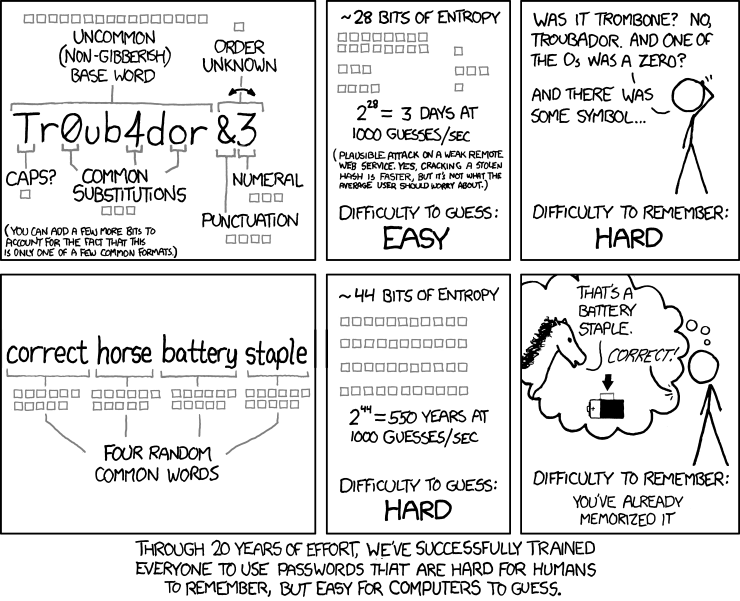
---
_Source: https://npm.io/package/xkcd-passwords · Machine-readable twin of the npm.io package page. Health data is recomputed on every publish._