# xkeditor
> An Editor Supporting Rich Text and Markdown
Latest version **1.5.5** (published 2020-03-10) · Apache-2.0 license · 0 weekly downloads
## Install
```sh
npm install xkeditor
pnpm add xkeditor
yarn add xkeditor
bun add xkeditor
```
## Health
**Score 15/100 (F)** — status: abandoned.
Positive: no vulnerabilities.
Warnings: low downloads; no types; no esm support.
Negative: abandoned; low maintenance score.
## Facts
| | |
|---|---|
| Version | 1.5.5 |
| Published | 2020-03-10 |
| First published | 2019-05-01 |
| Weekly downloads | 0 |
| License | Apache-2.0 |
| TypeScript types | none |
| Module format | CommonJS |
| Node | >= 6.0.0 |
| Dependencies | 6 |
| Unpacked size | 1.7 MB |
| Known vulnerabilities | 0 (+25 in 2 direct dependencies) |
| Install scripts | no |
| GitHub stars | 58 |
| Author | syfxlin |
| Maintainers | syfxlin |
| Keywords | markdown, markdown-editor, editor, md, vue |
## Links
- npm: https://www.npmjs.com/package/xkeditor
- Repository: https://github.com/syfxlin/xkeditor
- Homepage: https://github.com/syfxlin/xkeditor#readme
- Issues: https://github.com/syfxlin/xkeditor/issues
- npm.io page: https://npm.io/package/xkeditor
## Dependencies (6)
- [vue](https://npm.io/package/vue.md) ^2.6.11
- [axios](https://npm.io/package/axios.md) ^0.18.0
- [core-js](https://npm.io/package/core-js.md) ^3.6.4
- [@fortawesome/vue-fontawesome](https://npm.io/package/@fortawesome/vue-fontawesome.md) ^0.1.8
- [@fortawesome/fontawesome-svg-core](https://npm.io/package/@fortawesome/fontawesome-svg-core.md) ^1.2.25
- [@fortawesome/free-solid-svg-icons](https://npm.io/package/@fortawesome/free-solid-svg-icons.md) ^5.11.2
## Alternatives
- [@mdxeditor/editor](https://npm.io/package/@mdxeditor/editor.md) — 962.4K weekly downloads
- [mmdb-lib](https://npm.io/package/mmdb-lib.md) — 680.9K weekly downloads
- [playcanvas](https://npm.io/package/playcanvas.md) — 36.2K weekly downloads
- [@glw907/cairn-cms](https://npm.io/package/@glw907/cairn-cms.md) — 967 weekly downloads
- [markdown-to-confluence](https://npm.io/package/markdown-to-confluence.md) — 103 weekly downloads
## Recent versions
- 1.5.5 (latest) — 2020-03-10
- 1.5.4 — 2020-03-08
- 1.5.3 — 2020-03-02
- 1.5.2 — 2020-03-02
- 1.5.1 — 2020-03-01
- 1.5.0 — 2020-02-25
- 1.4.8 — 2019-12-15
- 1.4.7 — 2019-12-15
- 1.4.6 — 2019-12-08
- 1.4.5 — 2019-12-06
- 1.4.4 — 2019-12-05
- 1.4.3 — 2019-11-26
- 1.4.2 — 2019-11-26
- 1.4.1 — 2019-11-24
- 1.4.0 — 2019-11-23
- … 15 more at https://npm.io/package/xkeditor/versions
## README
# XK-Editor
> 一个支持富文本和 Markdown 的编辑器
    
## 目录 Contents
- [XK-Editor](#xk-editor)
- [目录 Contents](#%e7%9b%ae%e5%bd%95-contents)
- [简介 Introduction](#%e7%ae%80%e4%bb%8b-introduction)
- [特性 Feature](#%e7%89%b9%e6%80%a7-feature)
- [演示 Demo](#%e6%bc%94%e7%a4%ba-demo)
- [安装 Install](#%e5%ae%89%e8%a3%85-install)
- [注意事项](#%e6%b3%a8%e6%84%8f%e4%ba%8b%e9%a1%b9)
- [从 NPM 安装](#%e4%bb%8e-npm-%e5%ae%89%e8%a3%85)
- [所需依赖](#%e6%89%80%e9%9c%80%e4%be%9d%e8%b5%96)
- [config && data](#config--data)
- [运行代码块](#%e8%bf%90%e8%a1%8c%e4%bb%a3%e7%a0%81%e5%9d%97)
- [文档 Doc](#%e6%96%87%e6%a1%a3-doc)
- [维护者 Maintainer](#%e7%bb%b4%e6%8a%a4%e8%80%85-maintainer)
- [许可证 License](#%e8%ae%b8%e5%8f%af%e8%af%81-license)
- [渲染 Render](#%e6%b8%b2%e6%9f%93-render)
## 简介 Introduction
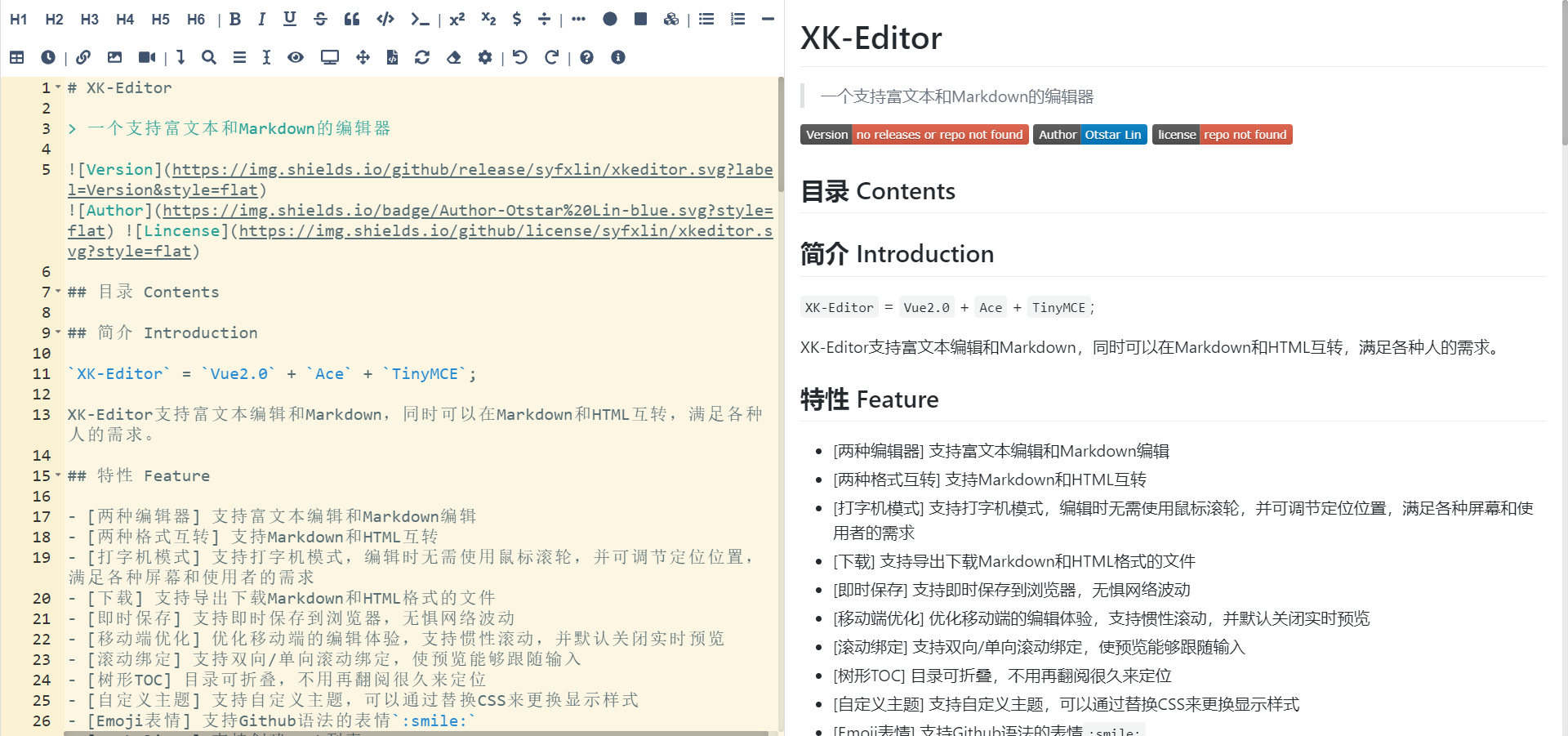
`XK-Editor` = `Vue2.0` + `Ace` + `TinyMCE`;
XK-Editor 支持富文本编辑和 Markdown ,同时可以在 Markdown 和 HTML 互转,满足各种人的需求。
## 特性 Feature
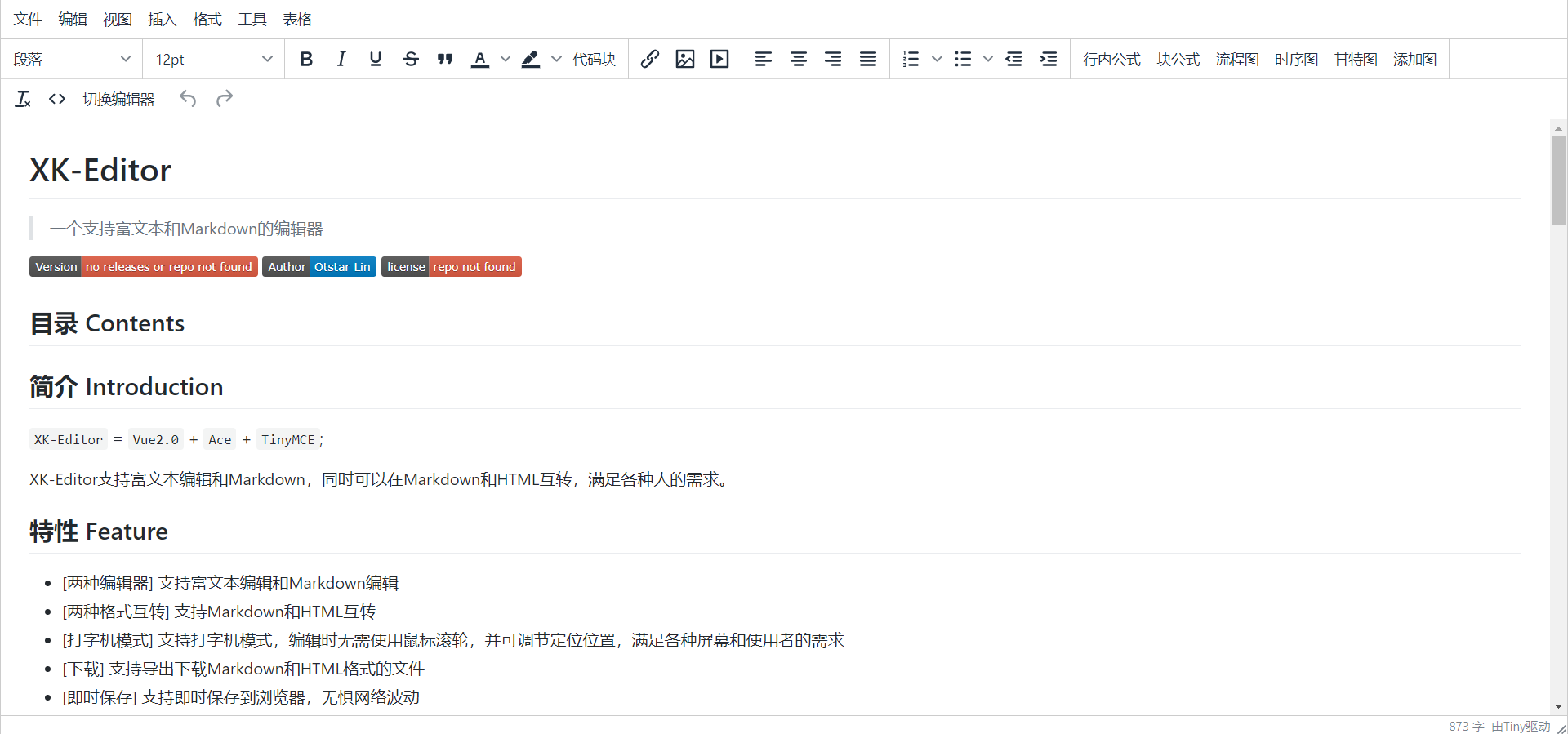
- [两种编辑器] 支持富文本编辑和 Markdown 编辑
- [两种格式互转] 支持 Markdown 和 HTML 互转
- [打字机模式] 支持打字机模式,编辑时无需使用鼠标滚轮,并可调节定位位置,满足各种屏幕和使用者的需求
- [粘贴自动格式化] 支持在粘贴 HTML 时自动将 HTML 格式化为 Markdown
- [图片粘贴自动上传] 支持粘贴图片自动上传,并自动填充链接
- [嵌入运行块] 支持嵌入可运行的代码块,通过与后端交互可以支持多种语言
- [下载] 支持导出下载 Markdown 和 HTML 格式的文件
- [即时保存] 支持即时保存到浏览器,无惧网络波动
- [移动端优化] 优化移动端的编辑体验,支持惯性滚动,并默认关闭实时预览
- [滚动绑定] 支持双向/单向滚动绑定,使预览能够跟随输入
- [树形 TOC] 目录可折叠,不用再翻阅很久来定位
- [自定义主题] 支持自定义主题,可以通过替换 CSS 来更换显示样式
- [Emoji 表情] 支持 Github 语法的表情 `:smile:`
- [Task lists] 支持创建 Task 列表
- [TeX 公式] 支持插入 KaTex 公式
- [流程图/时序图/甘特图] 支持 mermaid 语法编写各种图
- [解析 HTML] 支持解析各种 HTML 标签,并支持过滤标签
- [独有的扩展语法] 拥有一些扩展语法
- [自动补全] 支持语法自动补全
- [图片上传] 支持图片上传
- 还有多种神奇的功能等待你的发掘。
## 演示 Demo
[XK-Editor](https://xkeditor.ixk.me/)
## 安装 Install
### 注意事项
**XK-Editor 还在不断的改进中 API 可能会更改**
从 Version 1.0.8 开始,为了减小 Vendor 体积,防止加载时间过长,XK-Editor 默认使用 `jsDelivr CDN` 加载部分 `node_modules`
需要在 index.html 中添加以下 script 标签,若您不打算使用该方式加载,请将 `node_modules/xkeditor/components` 下的文件中所有的 `import` 注释取消。
从 Version 1.4.6 开始,模块默认通过 `webpack externals` 方式导入,所以您需要修改 `webpack` 的配置文件,添加对应的配置,如下
```html
```
```javascript
module.exports = {
externals: {
"ace-builds": "ace",
marked: "marked",
turndown: "TurndownService",
"turndown-plugin-gfm": "turndownPluginGfm",
prismjs: "Prism",
"emoji-js": "EmojiConvertor",
"tinymce/tinymce": "tinyMCE",
mermaid: "mermaid",
katex: "katex",
"katex/dist/contrib/auto-render": "renderMathInElement"
}
};
```
### 从 NPM 安装
你可以轻松将 XK-Editor 引入你现有的项目
1. 安装 XK-Editor
```bash
npm i --save xkeditor
```
2. 将 XK-Editor static 文件复制到项目根目录
```bash
cp -r ./node_modules/xkeditor/public/static ./
```
3. 导入 XK-Editor 组件
```javascript
import XK_Editor from "xkeditor";
export default {
components: {
"xk-editor": XK_Editor
}
};
```
4. 使用 XK-Editor 组件
```html
```
### 所需依赖
```text
ace-builds
@fortawesome/fontawesome-svg-core
@fortawesome/free-solid-svg-icons
@fortawesome/vue-fontawesome
@tinymce/tinymce-vue
axios
emoji-js
katex
marked
mermaid
prismjs
tinymce
turndown
turndown-plugin-gfm
```
### config && data
```javascript
var config = {
// 该设置为 TinyMCE 的设置,详情见 TinyMCE 编辑器的文档
tinymceSetting: {
language_url: "/static/tinymce/langs/zh_CN.js",
language: "zh_CN",
skin_url: "/static/tinymce/skins/ui/oxide",
body_class: "markdown-body",
content_css: "/static/github-markdown.css",
plugins:
"print preview fullpage searchreplace autolink directionality code visualblocks visualchars fullscreen image link media template codesample table charmap hr pagebreak nonbreaking anchor toc insertdatetime advlist lists wordcount imagetools textpattern",
toolbar:
"formatselect | fontsizeselect | bold italic underline strikethrough blockquote forecolor backcolor prismjs | link image media pageembed | alignleft aligncenter alignright alignjustify | numlist bullist outdent indent | tex-$ tex-math flow seq gantt mermaid | removeformat code toMarkdownEditor | undo redo",
image_advtab: true,
importcss_append: true,
height: "100%",
template_cdate_format: "[CDATE: %m/%d/%Y : %H:%M:%S]",
template_mdate_format: "[MDATE: %m/%d/%Y : %H:%M:%S]",
image_caption: true,
spellchecker_dialog: true,
spellchecker_whitelist: ["Ephox", "Moxiecode"]
},
// 该设置为 ACE 编辑器的设置,详情见 ACE 编辑器文档
aceSetting: {
// toolbar 为 XK-Editor 扩展的字段,语法和 tinymce 的 toolbar 字段一致
toolbar:
"h1 h2 h3 h4 h5 h6 | bold italic underline strikethrough quote mark code | sup sub tex-$ tex-math | flow seq gantt mermaid | ul ol minus table time | link image video graff | toLine search toc typewriter switchPreview fullPreview fullScreen toHtmlEditor toTinyMCE format empty setting | undo redo | setLocalStorage getLocalStorage removeLocalStorage | help info | pasteFormat",
minLines: 10,
fontSize: "17px",
theme: "ace/theme/solarized_light",
mode: "ace/mode/markdown",
tabSize: 4,
wrap: true,
enableSnippets: true,
enableLiveAutocompletion: true,
enableBasicAutocompletion: true,
value: "# XK-Editor"
},
// XK-Editor 相关设置
xkSetting: {
// 暂时无用
apiBaseUrl: "",
// 预览的 CSS 文件,类似于主题
previewCss: "/static/github-markdown.css",
// 预览的 class
previewClass: "markdown-body",
// 延迟渲染时间 (ms),由于性能因素 XK-Editor 限制该选项不能低于 500ms
delayToHtml: 500,
// 滚动绑定,(left,right,both)
scrollBind: "both",
// 图片上传的地址
imgUpload: "http://example.com/upload.php",
// 滚动模式,默认使用 JavaScript 的方式来滚动,防止与 Hash Router 冲突
scrollMode: "javascript",
// 粘贴格式化
pasteFormat: true,
// 粘贴自动上传(仅对复制图像时有效,混合内容无效,需要设置图片上传地址)
pasteImageUpload: true,
// 是否开启 TinyMCE 编辑器
enableTinyMCE: true,
// run-code 的地址
judge0API: "https://example.com",
// run-code 语言列表
runCodeLangList: {
c: 1,
cpp: 2,
bash: 3,
csharp: 4,
go: 5,
java: 6,
node: 7,
php: 8,
python: 9,
python2: 10,
ruby: 11,
rust: 12,
scala: 13,
typescript: 14
}
}
};
var data = {
graff: {
// SVG Hash
"6b3117":
// viewBox|SVG innerHTML
'8.399999618530273 9 423.9984436035156 154|'
}
}
```
## 运行代码块
运行代码块除 javascript 不需要使用后端,其他语言都需要有后端负责执行代码。
后端执行器基于 [judge0/api](https://github.com/judge0/api) 重新 build 而来,支持的语言详见 [run-code](https://github.com/syfxlin/run-code) ,若您有其他语言的需求,您可以自行参照教程重新 build
[run-code](https://github.com/syfxlin/run-code)
## 文档 Doc
[Wiki](https://github.com/syfxlin/xkeditor/wiki/)
## 维护者 Maintainer
XK-Editor 由 [Otstar Lin](https://ixk.me/) 和下列 [贡献者](https://github.com/syfxlin/xkeditor/graphs/contributors) 的帮助下撰写和维护。
> Otstar Lin - [Personal Website](https://ixk.me/) · [Blog](https://blog.ixk.me/) · [Github](https://github.com/syfxlin)
## 许可证 License

根据 Apache License 2.0 许可证开源。
## 渲染 Render
---
_Source: https://npm.io/package/xkeditor · Machine-readable twin of the npm.io package page. Health data is recomputed on every publish._