# xshell

> xshell is a shell designed to provide a brand new human-computer interaction experience.

Latest version **1.4.62** (published 2026-10-12) · 0 weekly downloads

## Install

```sh
npm install xshell
pnpm add xshell
yarn add xshell
bun add xshell
```

Provides the command `i18n-scan`.

## Health

**Score 65/100 (B)** — status: active.

Positive: has types; esm support; no vulnerabilities; recently updated; high maintenance score.

Warnings: low downloads.

## Facts

| | |
|---|---|
| Version | 1.4.62 |
| Published | 2026-10-12 |
| First published | 2021-04-11 |
| Weekly downloads | 0 |
| TypeScript types | bundled |
| Module format | ESM + CommonJS |
| Dependencies | 15 |
| Unpacked size | 8.6 MB |
| Known vulnerabilities | 0 |
| Install scripts | no |
| Maintainers | shenhongfei |
| Keywords | shell, node, i18n |

## Links

- npm: https://www.npmjs.com/package/xshell
- Homepage: https://www.npmjs.com/package/xshell
- npm.io page: https://npm.io/package/xshell

## Dependencies (15)

- [ws](https://npm.io/package/ws.md) ^8.22.0
- [sass](https://npm.io/package/sass.md) ^1.105.1
- [chalk](https://npm.io/package/chalk.md) ^6.0.1
- [p-map](https://npm.io/package/p-map.md) ^7.1.1
- [react](https://npm.io/package/react.md) ^19.3.0
- [mrmime](https://npm.io/package/mrmime.md) ^2.0.1
- [undici](https://npm.io/package/undici.md) ^8.11.2
- [i18next](https://npm.io/package/i18next.md) 25.8.1
- [rolldown](https://npm.io/package/rolldown.md) ^1.2.13
- [@svgr/core](https://npm.io/package/@svgr/core.md) ^8.1.0
- [strip-ansi](https://npm.io/package/strip-ansi.md) ^7.2.0
- [emoji-regex](https://npm.io/package/emoji-regex.md) ^11.0.0
- [@svgr/plugin-jsx](https://npm.io/package/@svgr/plugin-jsx.md) ^8.1.0
- [@svgr/plugin-svgo](https://npm.io/package/@svgr/plugin-svgo.md) ^8.1.0
- [rollup-plugin-visualizer](https://npm.io/package/rollup-plugin-visualizer.md) ^7.1.1

## Alternatives

- [@expo/fingerprint](https://npm.io/package/@expo/fingerprint.md) — 6.2M weekly downloads
- [@azure/monitor-opentelemetry-exporter](https://npm.io/package/@azure/monitor-opentelemetry-exporter.md) — 850.0K weekly downloads
- [@azure/monitor-opentelemetry](https://npm.io/package/@azure/monitor-opentelemetry.md) — 624.0K weekly downloads
- [@posthog/ai](https://npm.io/package/@posthog/ai.md) — 423.3K weekly downloads
- [fakefilter](https://npm.io/package/fakefilter.md) — 63.9K weekly downloads

## Recent versions

- 1.4.62 (latest) — 2026-10-12
- 1.4.61 — 2026-09-24
- 1.4.60 — 2026-09-23
- 1.4.59 — 2026-09-23
- 1.4.58 — 2026-09-18
- 1.4.57 — 2026-09-17
- 1.4.56 — 2026-09-17
- 1.4.55 — 2026-09-17
- 1.4.54 — 2026-09-17
- 1.4.53 — 2026-09-17
- 1.4.52 — 2026-09-17
- 1.4.51 — 2026-09-17
- 1.4.50 — 2026-09-16
- 1.4.49 — 2026-09-16
- 1.4.48 — 2026-09-16
- … 504 more at https://npm.io/package/xshell/versions

## README

# xshell

<p align='center'>
    <img src='./xshell.png' alt='xshell' width='64'>
</p>

<h2 align='center'>
    xshell
</h2>

<p align='center'>
    <a href='https://www.npmjs.com/package/xshell' target='_blank'>
        <img alt='npm version' src='https://img.shields.io/npm/v/xshell.svg?style=flat-square&color=brightgreen' />
    </a>
    <a href='https://www.npmjs.com/package/xshell' target='_blank'>
        <img alt='npm downloads' src='https://img.shields.io/npm/dt/xshell?style=flat-square&color=brightgreen' />
    </a>
    <a href='https://marketplace.visualstudio.com/items?itemName=ShenHongFei.xshell' target='_blank'>
        <img alt='vscode extension version' src='https://vsmarketplacebadges.dev/version/ShenHongFei.xshell.svg?style=flat-square&color=4c98cf' />
    </a>
    <a href='https://marketplace.visualstudio.com/items?itemName=ShenHongFei.xshell' target='_blank'>
        <img alt='vscode extension installs' src='https://vsmarketplacebadges.dev/installs/ShenHongFei.xshell.svg?style=flat-square&color=4c98cf' />
    </a>
</p>

### xshell is a shell designed to provide a brand new human-computer interaction experience.
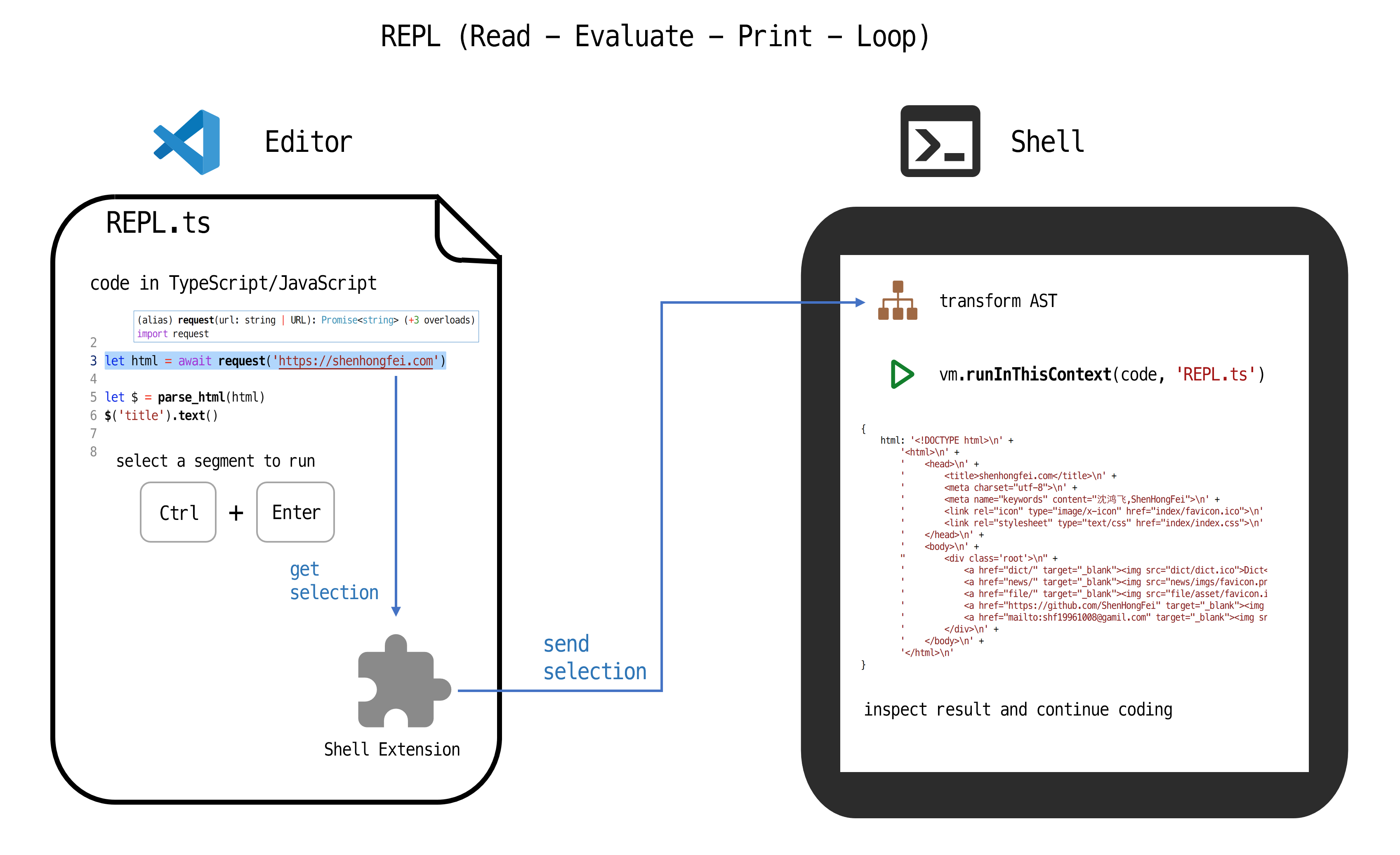
![REPL.png](https://cdn.shenhongfei.com/assets/xshell-repl.png)

## Getting Started
1. Install the latest version of NodeJS
https://nodejs.org/en/

2. Enter a project directory that has a package.json file.
```shell
cd example/
```

or create a new project
```shell
mkdir example/
cd example/
npm init -y
```

3. Install the npm package `xshell` and you will get a `xshell` command
```shell
npm install xshell
```

4. Run `xshell` to start the shell at http://127.0.0.1:8421
```shell
npx xshell

# or call xshell directly
node ./node_modules/.bin/xshell

# or add `"xshell": "xshell",` in package.json scripts field, and
npm run xshell
```

5. Install the VSCode extenstion `shenhongfei.xshell`
```shell
code --install-extension shenhongfei.xshell
```
- or: search `xshell` in vscode extension sidebar and click install
- or: goto https://marketplace.visualstudio.com/items?itemName=ShenHongFei.xshell

6. Open or create a .ts file and import necessary type definations, then enjoy!
```ts
import { request } from 'xshell'

// start REPL
await request('https://shenhongfei.com')

// select the above line and press Ctrl + Enter, then you can inspect the result in xshell.
```

## Development
Change "main" field in package.json to `extension.js` before release extension.

---
_Source: https://npm.io/package/xshell · Machine-readable twin of the npm.io package page. Health data is recomputed on every publish._