# yamlify-object
> Stringify object/array with yaml syntax
Latest version **3.0.0** (published 2026-01-05) · MIT license · 0 weekly downloads
## Install
```sh
npm install yamlify-object
pnpm add yamlify-object
yarn add yamlify-object
bun add yamlify-object
```
## Health
**Score 60/100 (C)** — status: stable.
Positive: has types; esm support; no vulnerabilities; high quality score.
Warnings: low downloads.
## Facts
| | |
|---|---|
| Version | 3.0.0 |
| Published | 2026-01-05 |
| First published | 2017-05-06 |
| Weekly downloads | 0 |
| License | MIT |
| TypeScript types | bundled |
| Module format | ESM + CommonJS |
| Node | >=4.0.0 |
| Dependencies | 0 |
| Unpacked size | 53.5 KB |
| Known vulnerabilities | 0 |
| Install scripts | no |
| GitHub stars | 22 |
| Author | Eugeny Dementev |
| Maintainers | eugeny-dementev |
| Keywords | formatter, console, log, yaml, beauty, stringify, yamlify |
## Links
- npm: https://www.npmjs.com/package/yamlify-object
- Repository: https://github.com/eugeny-dementev/yamlify-object
- Issues: https://github.com/eugeny-dementev/yamlify-object/issues
- npm.io page: https://npm.io/package/yamlify-object
## Alternatives
- [monaco-yaml](https://npm.io/package/monaco-yaml.md) — 420.1K weekly downloads
- [@crewx/workflow](https://npm.io/package/@crewx/workflow.md) — 3.1K weekly downloads
- [yaml-cat](https://npm.io/package/yaml-cat.md) — 38 weekly downloads
- [nunjucks-in-yaml](https://npm.io/package/nunjucks-in-yaml.md) — 9 weekly downloads
- [shopify-symlinks](https://npm.io/package/shopify-symlinks.md) — 3 weekly downloads
## Recent versions
- 3.0.0 (latest) — 2026-01-05
- 3.0.0-beta (beta) — 2026-01-03
- 2.0.0 — 2024-02-18
- 1.0.0 — 2022-08-28
- 1.0.0-beta.3 — 2022-08-28
- 0.6.1 — 2022-08-28
- 1.0.0-beta.2 — 2022-08-28
- 1.0.0-beta.1 — 2022-08-28
- 0.6.0 — 2021-03-02
- 0.5.1 — 2018-03-04
- 0.5.0 — 2018-03-04
- 0.4.5 — 2017-07-18
- 0.4.4 — 2017-06-03
- 0.4.3 — 2017-06-03
- 0.4.2 — 2017-06-02
- … 10 more at https://npm.io/package/yamlify-object/versions
## README
# yamlify-object
Stringify object/array with yaml syntax
## Install
```
npm install yamlify-object
```
## Usage
```ts
import yamlifyObject from 'yamlify-object';
const obj = {
array: [
2,
'two',
{
emptyArray: [],
},
],
error: new Error('message'),
date: new Date(0),
object: {
number: 200,
bool: false,
null: null,
undefined: undefined,
emptyObject: {},
},
};
obj.circular = obj;
const formattedString = yamlifyObject(obj, {
indent: ' ',
prefix: '\n',
postfix: '\n',
});
console.log(formattedString);
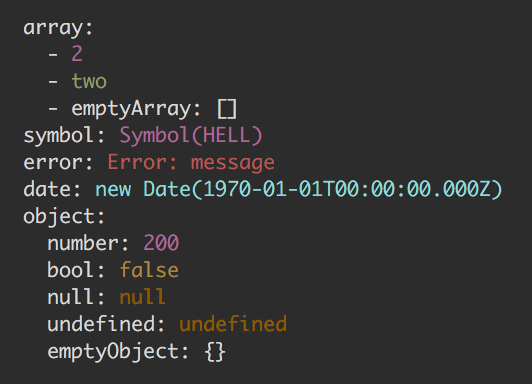
/*
array:
- 2
- two
- emptyArray: []
error: Error: message
date: new Date(1970-01-01T00:00:00.000Z)
object:
number: 200
bool: false
null: null
undefined: undefined
emptyObject: {}
circular: [Circular]
*/
```
## API
### yamlifyObject(input, [options])
#### input
Type: `Object` `Array`
#### options
##### indent
Type: `string`
Default: `' '` - single space
##### prefix
Type: `string`
Default: `'\n'`
##### postfix
Type: `string`
Default: `''`
##### dateToString(date: Date)
Type: `Function`
Expected to return a `string` that stringified version of Date instance.
##### errorToString(error: Error)
Type: `Function`
Expected to return a `string` that stringified version of Error instance.
##### colors
Type: `object`
Default:
``` ts
{
date: function (s: string): string,
error: function (s: string): string,
symbol: function (s: string): string,
string: function (s: string): string,
number: function (s: string): string,
boolean: function (s: string): string,
null: function (s: string): string,
undefined: function (s: string): string,
}
```
Each property of colors object expected to be a `function` that
expected to return somehow colorified version of passed `string` argument.
You can specify colors only for types you need and, if have the need, the base text color.
The rest will stay colorless strings:
``` js
const obj = {
number: 1
string: 'str',
bool: true,
};
const formattedString = yamlifyObject(obj, {
colors: {
base: (text) => `COLOR_CODE${text}COLOR_CODE`,
number: (value) => `COLOR_CODE${value}COLOR_CODE`,
boolean: (value) => `COLOR_CODE${value}COLOR_CODE`,
},
});
console.log(formattedString);
/*
number: COLOR_CODE1COLOR_CODE
string: str
bool: COLOR_CODEtrueCOLOR_CODE
*/
```
`base` color is the text that is not related to the values (names of the properties, dashes, brackets, etc)
For terminal can be used [yamlify-object-colors](https://github.com/eugeny-dementev/yamlify-object-colors) preset:
[travis-img]: https://travis-ci.org/eugeny-dementev/yamlify-object.svg?branch=master
[travis-url]: https://travis-ci.org/eugeny-dementev/yamlify-object
[codecov-img]: https://codecov.io/github/eugeny-dementev/yamlify-object/coverage.svg?branch=master
[codecov-url]: https://codecov.io/github/eugeny-dementev/yamlify-object?branch=master
---
_Source: https://npm.io/package/yamlify-object · Machine-readable twin of the npm.io package page. Health data is recomputed on every publish._