@ahmed757/ngx-treant-js v1.0.7




NgxTreantJS :deciduous_tree:
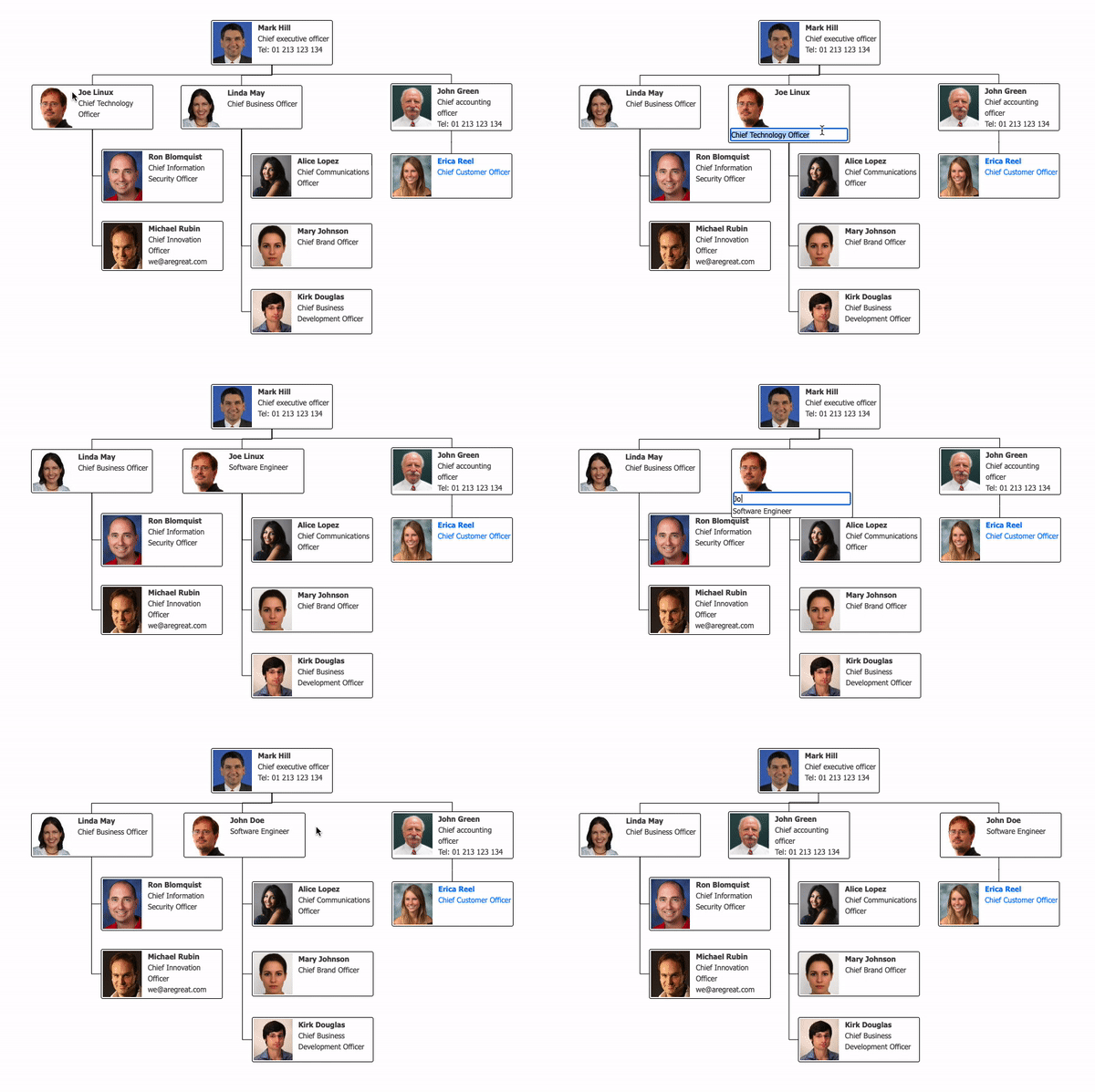
A simple Angular2+ component used as a wrapper for TreantJS library for visualization of tree (chart) diagrams, with additional functionality. :fire::fire::fire:
Demo :movie_camera:
:arrow_down: Installation
npm install @ahmed757/ngx-treant-js --save:wrench: Configuration
Add required dependencies to angular.json as follows:
...

"styles": [
    "node_modules/treant-js/Treant.css",
    "node_modules/treant-js/vendor/perfect-scrollbar/perfect-scrollbar.css",
    "src/styles.css"
],
"scripts": [
    "node_modules/jquery/dist/jquery.min.js",
    "node_modules/popper.js/dist/umd/popper.js",
    "node_modules/treant-js/vendor/jquery.easing.js",
    "node_modules/treant-js/vendor/jquery.mousewheel.js",
    "node_modules/treant-js/vendor/perfect-scrollbar/perfect-scrollbar.js",
    "node_modules/treant-js/vendor/raphael.js",
    "node_modules/treant-js/Treant.js"
]
...
See full example here.
:pencil2: Key Goals
- Easy to integrate and use in any
Angularapplications - Provide
callbackfunctions to react to user's actions, e.g. single-click, double-click, drag-drop, hover, etc - provide
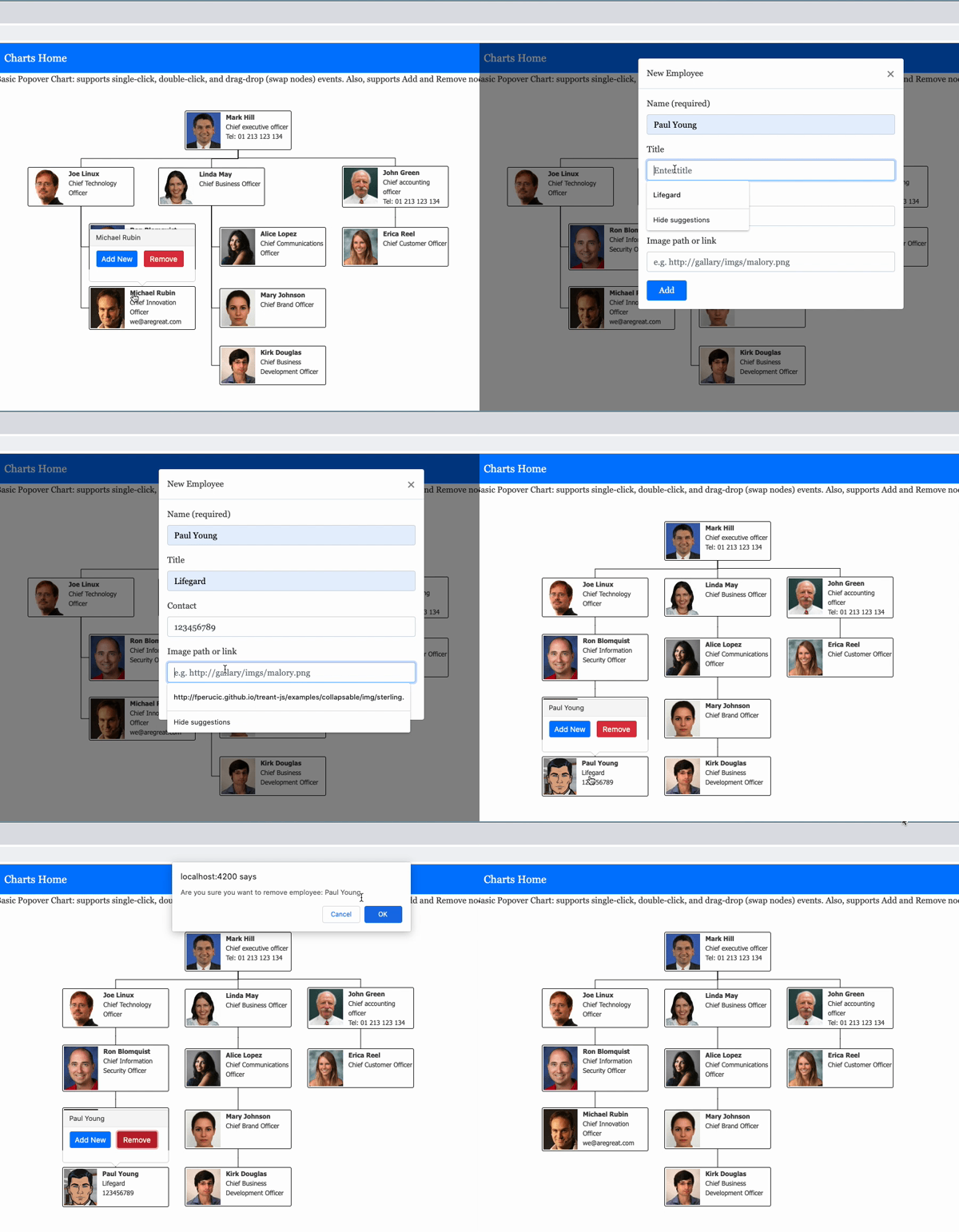
drag-dropfeature for swapping (re-positioning)Treenodes - Support adding & removing
Treenodes - Support editting
Node's content, e.g.name,title, etc
Quick start :rocket:
employess-chart.component.html
<ngx-treant-chart
    [chartId]="employeesChartId"
    [chartClass]="employeesChartClass"
    [data]="employeesData">
</ngx-treant-chart>
employess-chart.component.ts
export class EmployeesChartComponent {
    employeesChartId = 'employessChart-commpany';
    employeesChartClass = 'employess-chart';

    employeesData = {
        chart: {
            container: "#employessChart-commpany",

            connectors: {
                type: 'step'
            },
            node: {
                HTMLclass: 'employessNode'
            }
        },
        nodeStructure: {
            text: {
                name: "Paul Young",
                title: "Chief executive officer",
                contact: "Cel: 01 213 123 134",
            },
            image: "assets/images/img1.jpg",
            children: [
                {
                    text:{
                        name: "John Doe",
                        title: "Chief Technology Officer",
                    },
                    stackChildren: true,
                    image: "assets/images/img2.jpg",
                    children: [ ... ]
                }
            ]
        }
    }
}
styles.css
...
.employess-chart {
  height: 600px;
  margin: 5px;
  width: 900px;
}

.Treant> p {
  font-family: "HelveticaNeue-Light", "Helvetica Neue Light", "Helvetica Neue", Helvetica, Arial, "Lucida Grande", sans-serif;
  font-weight: bold;
  font-size: 12px;
}

.node-name {
  font-weight: bold;
}

.employessNode {
  padding: 2px;
  -webkit-border-radius: 3px;
  -moz-border-radius: 3px;
  border-radius: 3px;
  background-color: #ffffff;
  border: 1px solid #000;
  width: 200px;
  font-family: Tahoma;
  font-size: 12px;
}
...
See full example here.
Note: :bulb: In a real world application, the data would most likely come from a server or remote place, which means that we would need to initialize NgxTreantChart only when data arrives. Therefore, *ngIf can be used as a workaround as follows:
<ngx-treant-chart
    ...

    *ngIf="isDataLoaded">
</ngx-treant-chart>
Bootstrap Popover Example
:page_facing_up: NgxTreantChart component API
| Attributes | Description |
|---|---|
[chartId] | The chart uniqe ID (required) |
[chartClass] | The chart CSS class uniqe name (optional) |
[data] | The data used for visualization of chart diagrams (required) |
[popoverSettings] | The settings used for customizing a popover (optional - see example) |
[mouseleaveMilliseconds] | The mouseleaveMilliseconds delay used prior to a popover being hidden (optional) |
[isDraggable] | A boolean flag used to enable drag & drop support (optional) |
(clicked) | A callback function invoked when a TreeNode is clicked |
(hovered) | A callback function invoked when a TreeNode is mouse hovered |
(dragged) | A callback function invoked when a TreeNode is dragged |
(dropped) | A callback function invoked when a TreeNode is dropped |
(updated) | A callback function invoked when TreeNode's content is updated on dblclick event |
(loadedNodes) | A callback function invoked when TreeNodes are loaded |
(loadedTree) | A callback function invoked when the Tree is loaded |
(loadedTreant) | A callback function invoked when the Treant is loaded |
Notes: :bulb:
- The callback functions:
clicked,hovered, andupdatedreturn a value ofObjecttype, which consists of two properties:
Node: instance ofTreeNodetype for the node that was modified$:jQueryinstance, which can be used to perform any additional desired functionality that requiresjQuery
Example :pushpin:
<ngx-treant-chart
    ...

    (clicked)="onClick($event)">
</ngx-treant-chart>
onClick(event: any): void {
/*
event: {
node: {
X: 106
Y: 259.5
children: (3) [1, 4, 19]
collapsable: undefined
collapsed: undefined
connStyle: {type: "step", style: {…},
stackIndent: 15}
drawLineThrough: undefined
height: 30
id: 0
image: undefined,
...
},
$: ƒ (e,t)
}
*/
}- The callback function
draggedreturns an object which contains an instance ofTreeNodetype as well asjQueryas follows:
{
    draggedNode: {
        X: 106
        Y: 259.5
        children: (3) [1, 4, 19]
        collapsable: undefined,
        ...
    },

    $: ƒ (e,t)
}- The callback function
droppedreturns the following:
draggedNode: the dragged node ofTreeNodetypedroppedNode: the dropped node ofTreeNodetype$:jQueryinstance
The callback function
loadedNodesreturns allTree(chart) nodes.The callback function
loadedTreereturns an instance ofTree(chart) type. The instance provides useful properties and functions, such asnodeDBandpositionTree(), which can be used to update tree (chart) nodes:
...

onLoadTree(tree: any): void {
    const nodes = tree.nodeDB;

    // do something with nodes

    tree.positionTree(); // apply changes
}- The callback function
loadedTreantreturns an instance ofTreanttype. The instance consists ofcontainer_idandtree_id:
...

onLoadTreant(treant: any): void {
    console.log(treant);
    /* example
      {
        container_id: "employessChart-commpany",
        tree_id: 0
      }
    */

    treant.destroy(); // destroy tree
}