@brightscript/create-design-system v1.0.6
Create Design System
This is a design system starter from scratch using TypeScript, TurboRepo, StoryBook, Stitches, Changeset, Eslint, Github Actions, Workflows. It has all that you need to create your own design system, with release, CI/CD ready.
Quick Overview
npm i -g @brightpack/create-design-system
npx create-design-system my-design-system
cd my-design-system
npm install
npm run dev
It will create a directory called my-design-system inside the current folder.
Inside that directory, it will generate the initial project structure and install the transitive dependencies:
Structure
my-design-system
├───.changeset
├───.github
│   └───workflows
└───packages
    ├───docs
    │   ├───.storybook
    │   ├───node_modules
    │   │   ├───.cache
    │   │   │   ├───.vite-storybook
    │   │   │   │   └───deps
    │   │   │   ├───sb-manager
    │   │   │   │   ├───a11y-9
    │   │   │   │   ├───essentials-actions-2
    │   │   │   │   ├───essentials-backgrounds-3
    │   │   │   │   ├───essentials-controls-1
    │   │   │   │   ├───essentials-measure-6
    │   │   │   │   ├───essentials-outline-7
    │   │   │   │   ├───essentials-toolbars-5
    │   │   │   │   ├───essentials-viewport-4
    │   │   │   │   ├───interactions-8
    │   │   │   │   ├───links-0
    │   │   │   │   └───storybook-10
    │   │   │   ├───storybook
    │   │   │   │   ├───dev-server
    │   │   │   │   └───public
    │   │   │   │       └───sb-addons
    │   │   │   │           ├───a11y-9
    │   │   │   │           ├───essentials-actions-2
    │   │   │   │           ├───essentials-backgrounds-3
    │   │   │   │           ├───essentials-controls-1
    │   │   │   │           ├───essentials-measure-6
    │   │   │   │           ├───essentials-outline-7
    │   │   │   │           ├───essentials-toolbars-5
    │   │   │   │           ├───essentials-viewport-4
    │   │   │   │           ├───interactions-8
    │   │   │   │           ├───links-0
    │   │   │   │           └───storybook-10
    │   │   │   └───vite-plugin-externals
    │   │   │       └───@storybook
    │   │   └───@vitejs
    │   │       └───plugin-react
    │   │           └───dist
    │   └───src
    │       ├───components
    │       ├───pages
    │       │   └───tokens
    │       ├───stories
    │       └───styles
    ├───eslint-config
    ├───react
    │   ├───dist
    │   └───src
    │       ├───components
    │       │   ├───Avatar
    │       │   ├───Checkbox
    │       │   ├───MultiStep
    │       │   └───TextInput
    │       └───styles
    ├───tokens
    │   ├───dist
    │   └───src
    └───ts-config
Configuring your Github Pages
- On
packages/docs/.storybook/main.jschange theconfig.baseto the name of your project as you created:
  viteFinal: (config, { configType }) => {
    if (configType === 'PRODUCTION') {
      config.base = '/create-design-system/'
    }

    return config
}- On your repository, go to
Settings - Actions - General - Workflow permissionsand markRead and write permissions
Setup env keys to publish
You will need to have this keys on your github project:
VERCEL_TOKENandNPM_TOKENTo create a
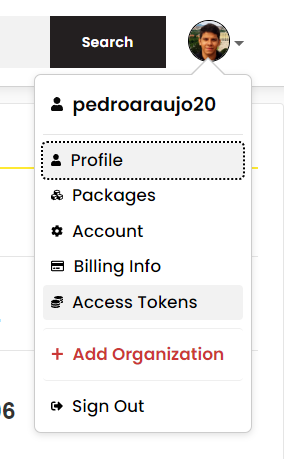
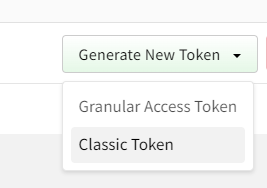
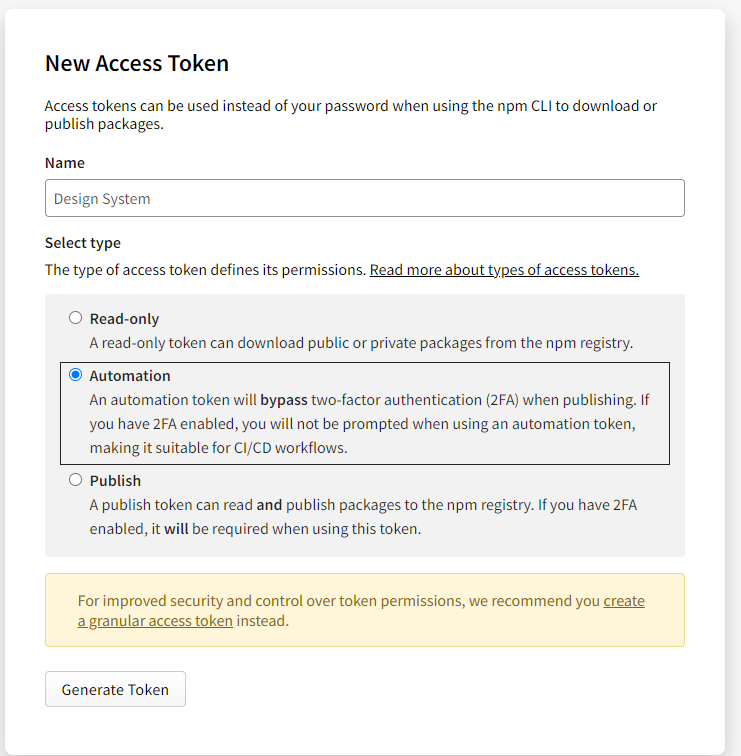
NPM_TOKEN, go toAccess Tokens - Generate New Token - Classic Token- Add a name and selectAutomation
To create a
VERCEL_TOKEN, see the doc of Vercel https://vercel.com/docs/rest-api#introduction/api-basics/authenticationDon't forget to create your
TURBO_TEAMand add into the.github/workflows/deploy-docs.ymland.github/workflows/release.yml.With all in hands, go to your project on github,
Settings - Security - Secrets and variables - Actions - New repository secretand add each one that you created. Now everything should be ready.
Publish
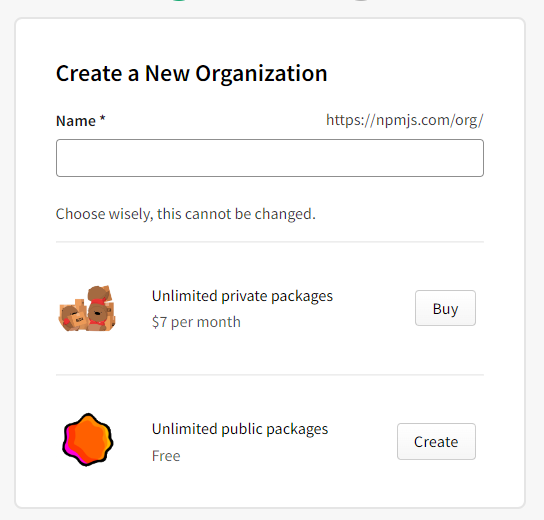
- To publish, you'll have to create a organization on
NPM. Click onCreate New Organizationand choose a name for the org and click onUnlimited public packages. Remember that the name of the org will be used on your package.json.
Example:
- Organization name: brightpack
- package.json:
- "name": "@brightpack/name-of-your-package"

Example
This is a example of StoryBook created: