@brngdsn/swarm-js v0.2.0
SwarmJS
Swarm JS is an experimental framework for orchestrating multiple AI "agents" that can transfer control to each other and call functions (or "tools") in a chat-based workflow. It uses the OpenAI Node.js library, along with a few utilities, to facilitate multi-step reasoning and delegation across different agents with specialized instructions.
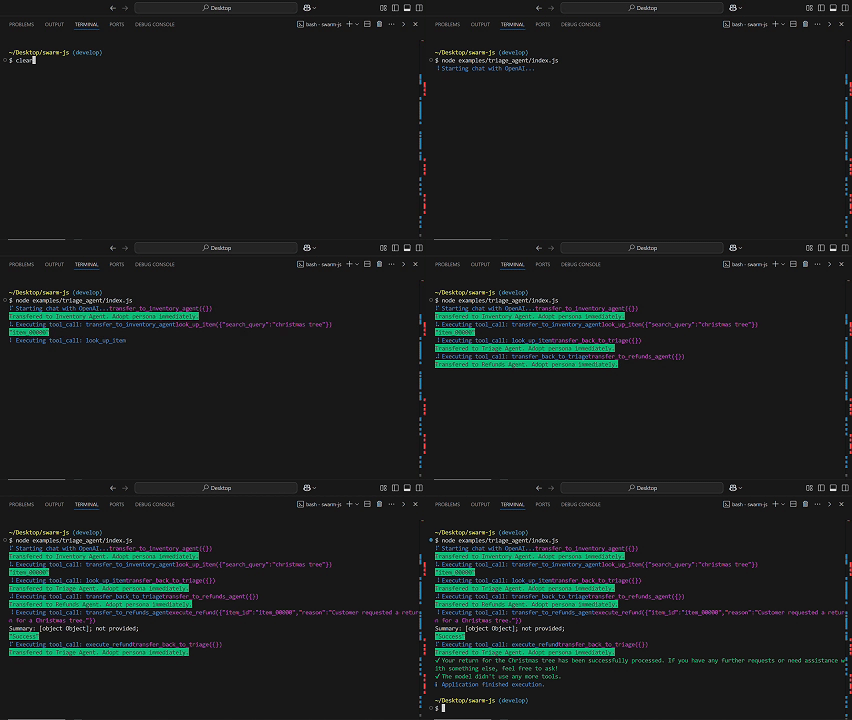
Table of Contents
Features
- Multi-agent orchestration: Define multiple agents, each with its own role, instructions, and tools.
- Tool calling: Agents can call functions you provide ("tools") to perform specific tasks such as database lookups, refunds, or any custom logic.
- Agent transfer: Agents can return another agent to "transfer control" of the conversation.
- Automatic parameter extraction: Tools can be annotated for their parameters, which helps create function calling schemas automatically.
- Interactive spinner and logs: Uses ora and chalk to display helpful CLI feedback.
Installation
npm install swarm-jsNote: Swarm JS depends on the OpenAI Node.js library, which is installed as a dependency. Make sure to have a valid OpenAI API key to use its features.
Usage
Below is a quick overview of how to set up and use Swarm JS in your Node.js or TypeScript project.
1. Creating Agents
An Agent represents an AI persona or "role" in your application. You can create as many agents as you like, each with its own name, model, instructions, and tools.
import { Agent } from 'swarm-js';

const triage_agent = new Agent({
  name: 'Triage Agent',
  model: 'gpt-4o-mini',
  instructions: `
    Analyze the user's request and determine the appropriate course of action.
    - If the request involves a refund, first obtain the item ID from the Inventory Agent.
    - After obtaining the item ID, transfer to the Refunds Agent to process the refund.
    - Ensure that all necessary information is gathered before processing.
  `,
  tools: [] // will add tools later
});
2. Defining Tools
"Tools" are just JavaScript functions, but you can annotate them with a .doc property to describe what they do. Swarm JS automatically converts each tool into a JSON schema for function calling in the OpenAI API.
A tool can optionally transfer conversation control by returning another Agent instance.
function look_up_item(search_query) {
  // Use search_query to find an item
  return "item_00000";
}
look_up_item.doc = `Use to find an item ID. Search query can be a description or keywords.`;

function execute_refund(item_id, reason = "not provided") {
  // Issue refund logic
  console.log(`Refunding ${item_id}. Reason: ${reason}`);
  return "Success";
}
execute_refund.doc = `Use to issue a refund by item ID.`;

function transfer_back_to_triage() {
  // Returns an Agent instance to transfer control back to the triage agent
  return triage_agent;
}
transfer_back_to_triage.doc = `
  Call this function if a user is asking about a topic
  that is not handled by the current agent.
`;

// Attach these tools to agents
triage_agent.tools = [ /* ...some tools... */ ];
3. Running the Swarm
SwarmJS manages the conversation loop with OpenAI. It:
1. Sends messages to OpenAI.
2. Receives potential function calls from the model (i.e., "tool calls").
3. Executes those calls (if applicable).
4. Allows agents to transfer to different agents.
import { SwarmJS } from 'swarm-js';

const swarm = new SwarmJS();

async function runChatFlow() {
  const messages = [{ role: 'user', content: 'I would like to return a Christmas tree.' }];
  const response = await swarm.run(
    triage_agent, // the initial agent
    messages     // the conversation so far
  );
  console.log(response);
}

runChatFlow();
4. Example Usage
Below is a more complete example with three agents (Triage Agent, Inventory Agent, and Refunds Agent) and the relevant tools:
import { Agent, SwarmJS } from 'swarm-js';

// Define your agents
const triage_agent = new Agent({
  name: 'Triage Agent',
  model: 'gpt-4o-mini',
  instructions: `
    Analyze the user's request and determine the appropriate course of action.
    - If the request involves a refund, first obtain the item ID from the Inventory Agent.
    - After obtaining the item ID, transfer to the Refunds Agent to process the refund.
    - Ensure that all necessary information is gathered before processing.
  `,
  tools: [] // we'll populate this later
});

const inventory_agent = new Agent({
  name: 'Inventory Agent',
  model: 'gpt-4o-mini',
  instructions: `
    Assist with finding item IDs for refunding items, then transfer back to triage.
  `,
  tools: []
});

const refunds_agent = new Agent({
  name: 'Refunds Agent',
  model: 'gpt-4o-mini',
  instructions: `
    Assist with issuing refunds using an item ID, then transfer back to triage.
  `,
  tools: []
});

// Define your tools
function look_up_item(search_query) {
  return "item_00000";
}
look_up_item.doc = `Use to find an item ID. Search query can be a description or keywords.`;

function execute_refund(item_id, reason = "not provided") {
  console.log(`Refunding ${item_id}. Reason: ${reason}`);
  return "Success";
}
execute_refund.doc = `Use to issue a refund by item ID.`;

// Transfers
function transfer_back_to_triage() {
  return triage_agent;
}
transfer_back_to_triage.doc = `Transfers the conversation back to Triage Agent.`;

function transfer_to_inventory_agent() {
  return inventory_agent;
}
transfer_to_inventory_agent.doc = `Transfers the conversation to Inventory Agent.`;

function transfer_to_refunds_agent() {
  return refunds_agent;
}
transfer_to_refunds_agent.doc = `Transfers the conversation to Refunds Agent.`;

// Attach the tools
triage_agent.tools = [ transfer_to_inventory_agent, transfer_to_refunds_agent ];
inventory_agent.tools = [ look_up_item, transfer_back_to_triage ];
refunds_agent.tools = [ execute_refund, transfer_back_to_triage ];

// Run the swarm
(async () => {
  const swarm = new SwarmJS();
  const initial_messages = [
    {
      role: 'user',
      content: 'I would like to return a Christmas tree.'
    }
  ];

  const response = await swarm.run(triage_agent, initial_messages);
  console.log(response.messages);
})();
API Reference
SwarmJS Class
constructor({ openai }?: { openai?: OpenAI });- Creates a new instance of the SwarmJS orchestrator.
- Optionally accepts an
OpenAIclient instance. If not provided, it defaults to using theOPENAI_API_KEYenvironment variable.
run(agent: Agent, messages: ChatCompletionMessage[]): Promise<Response>
- Begins a conversation loop with the provided
agentand list ofmessages. - In each step, it sends the conversation to OpenAI, checks for any tool calls, executes them, and updates the conversation accordingly.
- Returns a
Responseobject upon completion.
Agent Class
class Agent {
  constructor({
    name?: string;
    model?: string;
    instructions?: string;
    tools?: Function[];
  });
}- Represents an AI persona, with:
- name: A friendly identifier for this agent.
- model: The name of the LLM to use (e.g.,
"gpt-4o-mini"). - instructions: System instructions or a "persona" description for the agent.
- tools: An array of functions that can be called by the agent.
Agent.is_agent(obj: any): boolean
- Returns
trueifobjis an instance ofAgent.
Response Class
class Response {
  agent: Agent;
  messages: ChatCompletionMessage[];
  constructor({ agent, messages }?: { agent?: Agent; messages?: ChatCompletionMessage[] });
}- A simple response wrapper that includes:
- agent: The final agent context after all transfers.
- messages: The entire chat history.
run_demo_loop Function
async function run_demo_loop(initial_agent: Agent): Promise<void>;- An example/demo function that initializes a
SwarmJSinstance, runs a short conversation (with a single user request), and writes the resulting messages to a file (eg-run.md). - This demonstrates how to use SwarmJS in a simple loop.
Environment Variables
OPENAI_API_KEY: If you do not provide a custom OpenAI client to theSwarmJSconstructor, it will look for this environment variable to authenticate with the OpenAI API.
How It Works
Agent & Tools: You define one or more agents (via the
Agentclass), each containing:- A unique name
- Custom instructions
- A list of "tool" functions, each annotated with
.docfor usage hints
Parameter Extraction: Swarm JS automatically converts these tools into JSON schemas that the OpenAI function-calling API can understand.
- It does this by analyzing the function signature and any default parameter values or docstrings.
Conversation Loop:
- The user messages (along with system instructions) are sent to OpenAI.
- OpenAI may request to call a tool function by name, with arguments derived from the conversation.
- Swarm JS executes the tool function and appends the result to the conversation.
- The conversation continues until no more tool calls are requested.
Agent Transfer: If a tool returns another
Agentinstance, the conversation "transfers" to that agent. Subsequent steps in the conversation use the new agent's instructions and tools.
Contributing
Contributions, suggestions, and feedback are welcome! You can:
- Fork the repository
- Create a feature branch
- Submit a pull request
License
MIT License. See LICENSE for details.
1 year ago