1.0.9 • Published 1 year ago
@cinc101/electron-capture v1.0.9
Electron Screen Capture
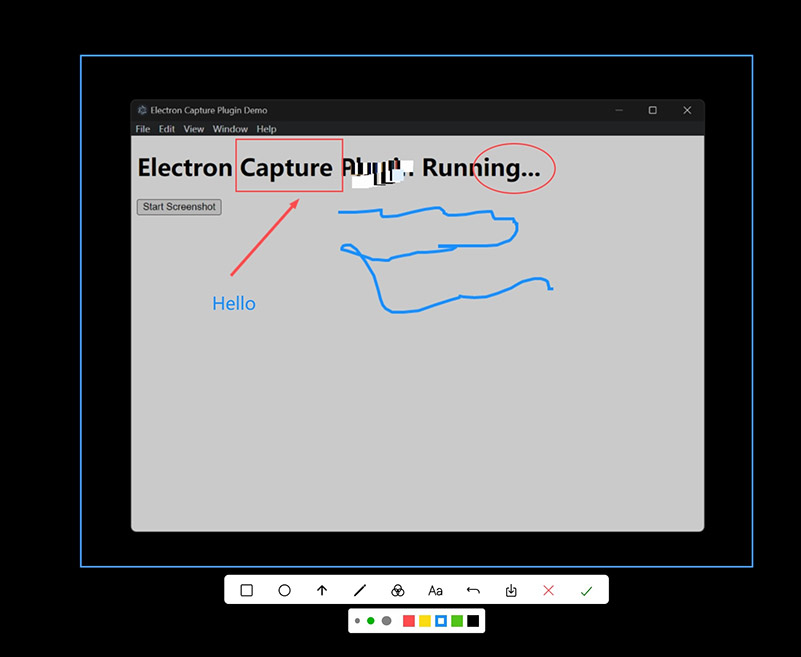
Electron Screen Capture is a lightweight Electron plugin that supports multi-display screenshot capturing, annotations, Chinese/English interface switching, and is easy to integrate into your desktop applications.
Electron Screen Capture 是一个轻量级的 Electron 插件,支持多屏幕截图、标注工具和中英文切换,方便集成到桌面应用。
📢 Notice / 注意
- Currently supports Windows 7 to Windows 11.
macOS support is under development.
目前支持 Windows 7 - Windows 11。
- macOS 支持正在开发中。
✨ Features / 特性
- 📸 Multi-display screenshot capturing / 多屏幕截图
- ✏️ Built-in annotation tools / 内置标注工具:矩形、椭圆、箭头、画笔、马赛克、文字
- 🖌️ Configurable theme color / 支持自定义主色调
- 🌐 Multi-language support (Chinese / English) / 支持中英文切换
- 🛠️ Easy integration with Electron apps / 易于集成
📦 Installation / 安装
npm install @cinc101/electron-capture🔥 Quick Start / 快速开始
1. Initialize in Main Process
1. 在主进程初始化
import { app, ipcMain, BrowserWindow, screen, desktopCapturer, dialog } from 'electron';
import { onLoad } from 'electron-screen-capture';

let mainWindow: BrowserWindow | null = null;

const pluginContext = {
  electron: { ipcMain, screen, BrowserWindow, desktopCapturer, dialog },
  ipc: {
    registerCommand: (channel, handler) => {
      ipcMain.handle(channel, async (_, args) => await handler(args));
    },
  },
  logger: (msg) => {
    console.log(`[plugin log] ${msg}`);
  },
  config: {
    lang: 'zh', // Optional: 'zh' | 'en'
    color: '#409EFF', // Optional: customize main theme color
  },
};

app.whenReady().then(async () => {
  mainWindow = new BrowserWindow({
    width: 800,
    height: 600,
    webPreferences: {
      nodeIntegration: true,
      contextIsolation: false,
    },
  });

  await mainWindow.loadURL('your app entry point');

  await onLoad(pluginContext);

  if (pluginContext.exports) {
    const exports = pluginContext.exports;
    exports.onCaptureDone = (finalImageDataURL) => {
      console.log('Capture completed:', finalImageDataURL);
      mainWindow?.webContents.send('your-custom-capture-done-event', { image: finalImageDataURL });
    };
    exports.prepareCaptureWindow();
  }
});
2. Request Screenshot from Renderer
2. 从浏览器端请求截图
const { ipcRenderer } = require('electron');

function requestCapture() {
  ipcRenderer.send('screenshot-plugin/request-capture');
}

// Example: Bind to a button click
// 示例:按钮点击请求

document.getElementById('captureButton').addEventListener('click', requestCapture);
🔍 Explanation / 详细说明
prepareCaptureWindowis used to create and prepare capture windows. /prepareCaptureWindow用于创建和准备截图窗口onCaptureDoneis called when screenshot is completed, returning the final image data URL. /onCaptureDone在截图完成时被调用,返回截图图片数据URL
📄 License / 许可协议
MIT License.