@coooookies/windows-smtc-monitor v1.0.12
Node-Windows-SMTC-Monitor
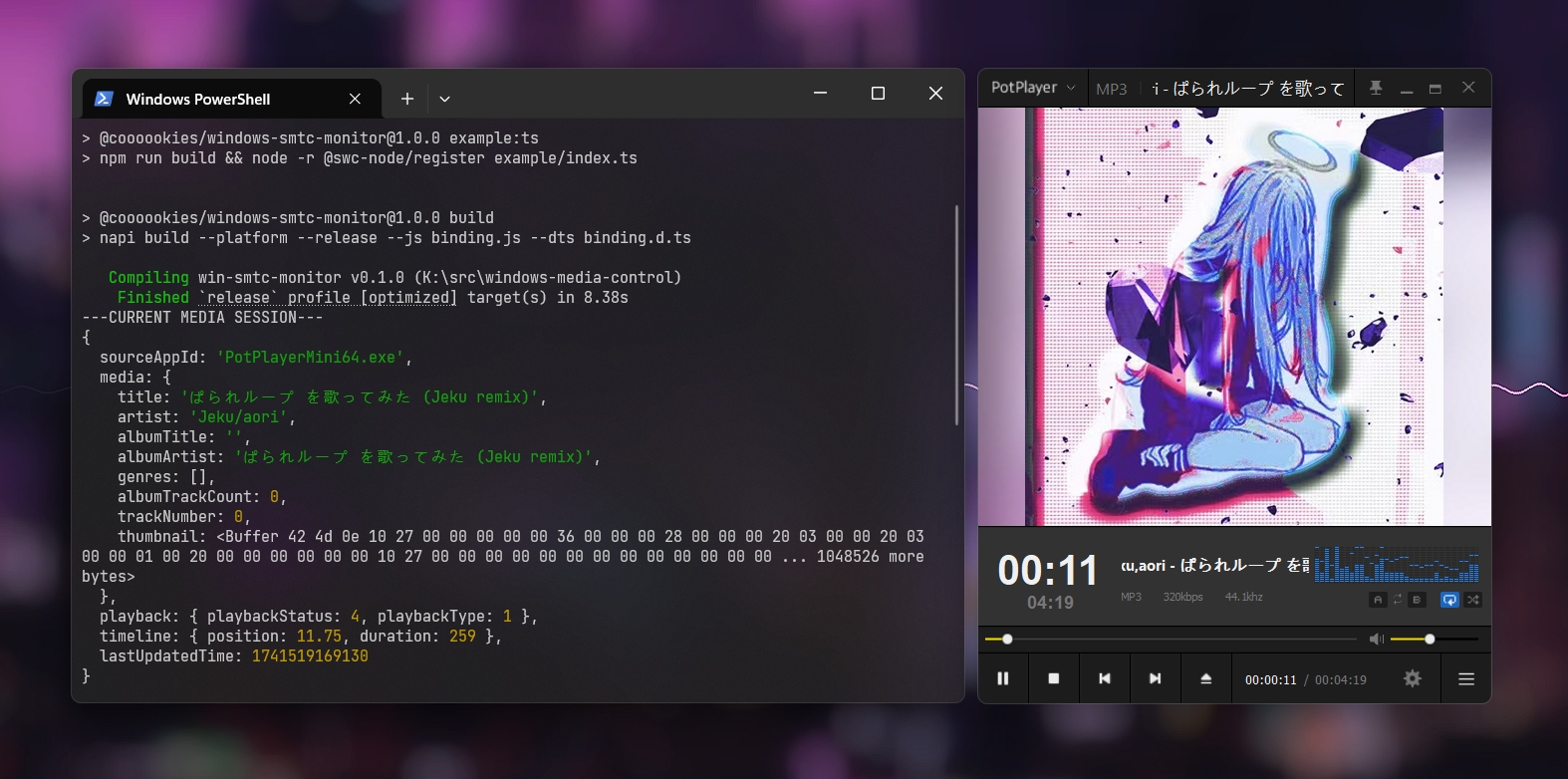
This is a Node.js toolkit for listening to SMTC (System Media Transport Controls) media events in Windows. It is written in Rust and utilizes napi-rs to implement bindings with Node.js.
⚠️ Warning
node-windows-smtc-monitor only supports Windows 10 1809 and later versions (>= 10.0.17763)
🚀 Features
- Listen to media events such as play, pause, next track, previous track.
- Get the current playback state and track information.
- Support for both JavaScript and TypeScript.
- Easy to use and integrate into existing Node.js applications.
Installation
npm i @coooookies/windows-smtc-monitor🍊 Example
CommonJS Example ESModule Example TypeScript Example
Usage
Importing the library
// Typescript & ESModule
import { SMTCMonitor } from '@coooookies/windows-smtc-monitor';

// CommonJS
const { SMTCMonitor } = require('@coooookies/windows-smtc-monitor');
Gets all media sessions
Gets all of the available sessions.
const sessions = SMTCMonitor.getMediaSessions(); // MediaInfo[]
// [
//   {
//     sourceAppId: 'PotPlayerMini64.exe',
//     media: {
//       title: 'ぱられループ を歌ってみた (Jeku remix)',
//       artist: 'Jeku/aori',
//       albumTitle: '',
//       albumArtist: 'ぱられループ を歌ってみた (Jeku remix)',
//       genres: [],
//       albumTrackCount: 0,
//       trackNumber: 0,
//       thumbnail: <Buffer 42 4d 0e ... 1048526 more bytes> // The Album Cover/Thumbnail in Buffer
//     },
//     playback: { playbackStatus: 4, playbackType: 1 },
//     timeline: { position: 217.228, duration: 259 },
//     lastUpdatedTime: 1740000000000
//   },
//   {
//     sourceAppId: 'player.exe',
//     media: { ... },
//     playback: { ... },
//     timeline: { ... },
//     lastUpdatedTime: 1740000000000
//   }
// ]
Gets the current media session
Gets the current session. This is the session the system believes the user would most likely want to control.
const session = SMTCMonitor.getCurrentMediaSession(); // MediaInfo | null
// {
//   sourceAppId: 'PotPlayerMini64.exe',
//   media: { ... },
//   playback: { ... },
//   timeline: { ... },
//   lastUpdatedTime: 1740000000000
// }
Gets the specified media session
Gets the specified session by the sourceAppId.
const session = SMTCMonitor.getMediaSessionByAppId('player.exe'); // MediaInfo | null
// {
//   sourceAppId: 'player.exe',
//   media: { ... },
//   playback: { ... },
//   timeline: { ... },
//   lastUpdatedTime: 1740000000000
// }
Using Listeners
If you need to continuously listen for media events, you might consider using the getMediaSessions method for polling. However, this approach can be resource-intensive. Instead, node-windows-smtc-monitor provides a listener class that allows you to listen for events such as
GlobalSystemMediaTransportControlsSessionManager.CurrentSessionChanged
GlobalSystemMediaTransportControlsSessionManager.SessionsChanged
and other related events to monitor media sessions efficiently.
// Register the monitor
const monitor = new SMTCMonitor();

// Normal use
monitor.on('session-media-changed', (appId, mediaProps) => {
  console.log(`Media info changed for ${appId}`, mediaProps);
});

// Using a listener defined outside
const listener = (appId, playbackInfo) => {
  console.log(`Playback state changed for ${appId}`, playbackInfo);
};

monitor.on('session-playback-changed', listener); // Register the listener
monitor.off('session-playback-changed', listener); // Unregister the listener

console.log(monitor.sessions)
// Shows all the sessions

// Destroy monitoring when done
// monitor.destroy();
Here is a list of available events:
| Event Name | Description | Parameters |
|---|---|---|
| session-media-changed | Triggered when media info changes | (appId: string, mediaProps: MediaProps) |
| session-timeline-changed | Triggered when position or duration changes | (appId: string, timelineProps: TimelineProps) |
| session-playback-changed | Triggered when playback state changes | (appId: string, playbackInfo: PlaybackInfo) |
| session-added | Triggered when a new media session is added | (appId: string, mediaInfo: MediaInfo) |
| session-removed | Triggered when a media session is removed | (appId: string) |
| current-session-changed | Triggered when the current session changes | (appId: string) |
Using in Electron
To use node-windows-smtc-monitor in Electron, you need to run it in a Worker thread. Running it in the main process will cause the main thread to lock up, which will freeze the renderer process. An example of how to use it in a Worker is provided in example/worker.js.
License
This project is licensed under the MIT License.