@dschz/solid-lightweight-charts v0.2.5
@dschz/solid-lightweight-charts






A fully typed SolidJS wrapper around TradingView's Lightweight Charts, providing declarative, reactive charting with support for time series, price, and yield curve data.
✨ Features
- ⚡ SolidJS-native reactivity for all chart options and data updates
- 🔀 Multiple chart types with specialized APIs:
TimeChartfor time-based financial data (createChart)PriceChartfor numeric-based price data (createOptionsChart)YieldCurveChartfor rate curves and duration-based data (createYieldCurveChart)
- 📈 Complete series support: Line, Area, Candlestick, Bar, Histogram, Baseline
- 🎨 Custom series with full TypeScript integration across all chart types
- 🖼️ Series primitives for interactive drawings (trend lines, alerts, annotations)
- 🎯 Pane primitives for chart-wide decorations (watermarks, grids, badges)
- 📍 Series markers with declarative prop support and reactive updates
- 📆 Namespaced APIs (e.g.
<TimeChart.Series />,<PriceChart.Series />) - 📊 Multiple panes for advanced multi-series visualization
- 🔄 Lifecycle hooks for primitives and markers management
- 🔖 Core API compatibility - access underlying
lightweight-chartsAPIs when needed - 🧹 Automatic cleanup and proper lifecycle management
🛣️ What's New in v0.2.0
✅ Custom Series - Create fully custom visualizations with your own rendering logic
✅ Series Primitives - Interactive drawings attached to specific series
✅ Pane Primitives - Chart-wide decorations and backgrounds
✅ Enhanced Markers - Declarative markers prop with reactive updates
✅ New Lifecycle Hooks - onAttachPrimitives, onDetachPrimitives, onSetMarkers
✅ Comprehensive Examples - Interactive playground showcasing all features
📆 Installation
Install via your favorite package manager:
npm install solid-js lightweight-charts @dschz/solid-lightweight-charts
pnpm install solid-js lightweight-charts @dschz/solid-lightweight-charts
yarn install solid-js lightweight-charts @dschz/solid-lightweight-charts
bun install solid-js lightweight-charts @dschz/solid-lightweight-charts
These are peer dependencies, so they must be installed manually:
solid-jslightweight-charts
🚀 Quick Usage
TimeChart (Time-based Data)
import { TimeChart } from "@dschz/solid-lightweight-charts";

<TimeChart>
  <TimeChart.Series
    type="Line"
    data={[
      { time: "2023-01-01", value: 100 },
      { time: "2023-01-02", value: 105 },
    ]}
    lineWidth={2}
    color="#2962FF"
  />
</TimeChart>;
PriceChart (Numeric X-axis)
import { PriceChart } from "@dschz/solid-lightweight-charts";

<PriceChart>
  <PriceChart.Series
    type="Line"
    data={[
      { time: 0, value: 100 },
      { time: 1, value: 105 },
    ]}
    lineWidth={2}
    color="#2962FF"
  />
</PriceChart>;
YieldCurveChart (Duration-based)
import { YieldCurveChart } from "@dschz/solid-lightweight-charts";

<YieldCurveChart>
  <YieldCurveChart.Series
    type="Line"
    data={[
      { time: 0, value: 3.5 }, // 0M
      { time: 12, value: 3.8 }, // 12M
      { time: 60, value: 4.2 }, // 5Y
    ]}
    lineWidth={2}
    color="#2962FF"
  />
</YieldCurveChart>;
Multiple Panes and Markers
import { TimeChart } from "@dschz/solid-lightweight-charts";

<TimeChart>
  {/* Main pane with price data and declarative markers */}
  <TimeChart.Series
    type="Candlestick"
    data={candleData}
    markers={(data) => [
      {
        time: data[10].time,
        position: "aboveBar",
        color: "#f68410",
        shape: "circle",
        text: "Buy",
      },
      {
        time: data[20].time,
        position: "belowBar",
        color: "#e91e63",
        shape: "arrowDown",
        text: "Sell",
      },
    ]}
    onSetMarkers={(markers) => console.log("Markers updated:", markers)}
  />

  {/* Secondary pane with volume */}
  <TimeChart.Pane>
    <TimeChart.Series
      type="Histogram"
      data={volumeData}
      priceScaleId="volume"
      color="rgba(76, 175, 80, 0.8)"
    />
  </TimeChart.Pane>
</TimeChart>;
Custom Series
import { TimeChart } from "@dschz/solid-lightweight-charts";

// Define your custom pane view
const customPaneView = {
  updateAllViews() {
    /* implementation */
  },
  paneViews() {
    /* implementation */
  },
  priceValueBuilder(plotRow) {
    /* implementation */
  },
  isWhitespace(data) {
    /* implementation */
  },
  defaultOptions() {
    /* implementation */
  },
};

<TimeChart>
  <TimeChart.CustomSeries
    paneView={customPaneView}
    data={customData}
    onCreateSeries={(series) => console.log("Custom series created:", series)}
  />
</TimeChart>;
Series Primitives
import { TimeChart, type SeriesPrimitive } from "@dschz/solid-lightweight-charts";
import type {
  ISeriesPrimitiveAxisView,
  IPrimitivePaneView,
  IPrimitivePaneRenderer,
  Time,
  SeriesAttachedParameter,
} from "lightweight-charts";

// Trend line primitive with proper TypeScript implementation
class TrendLinePrimitive implements SeriesPrimitive<"Line", Time> {
  private _paneViews: TrendLinePaneView[];
  private _point1: { time: Time; value: number };
  private _point2: { time: Time; value: number };

  constructor(point1: { time: Time; value: number }, point2: { time: Time; value: number }) {
    this._point1 = point1;
    this._point2 = point2;
    this._paneViews = [new TrendLinePaneView(this)];
  }

  updateAllViews() {
    this._paneViews.forEach((pv) => pv.update());
  }

  paneViews() {
    return this._paneViews;
  }

  attached(param: SeriesAttachedParameter<Time, "Line">) {
    // Implementation for when primitive is attached
  }

  detached() {
    // Cleanup when primitive is detached
  }

  getPoint1() {
    return this._point1;
  }
  getPoint2() {
    return this._point2;
  }
}

class TrendLinePaneView implements IPrimitivePaneView {
  private _source: TrendLinePrimitive;
  private _renderer: TrendLinePaneRenderer;

  constructor(source: TrendLinePrimitive) {
    this._source = source;
    this._renderer = new TrendLinePaneRenderer();
  }

  update() {
    this._renderer.setData({
      point1: this._source.getPoint1(),
      point2: this._source.getPoint2(),
    });
  }

  renderer() {
    return this._renderer;
  }

  zOrder() {
    return "normal" as const;
  }
}

class TrendLinePaneRenderer implements IPrimitivePaneRenderer {
  private _data: { point1: any; point2: any } | null = null;

  setData(data: { point1: any; point2: any } | null) {
    this._data = data;
  }

  draw(target: any) {
    if (!this._data) return;
    // Canvas 2D rendering implementation
    target.useBitmapCoordinateSpace((scope: any) => {
      const ctx = scope.context;
      // Draw trend line using this._data.point1 and this._data.point2
      // ... drawing logic
    });
  }
}

const trendLine = new TrendLinePrimitive(
  { time: "2023-01-01" as Time, value: 100 },
  { time: "2023-01-10" as Time, value: 120 },
);

<TimeChart>
  <TimeChart.Series
    type="Line"
    data={priceData}
    primitives={[trendLine]}
    onAttachPrimitives={(primitives) => console.log("Primitives attached:", primitives)}
  />
</TimeChart>;
Pane Primitives
import { TimeChart, type PanePrimitive } from "@dschz/solid-lightweight-charts";
import type {
  IPanePrimitivePaneView,
  IPrimitivePaneRenderer,
  PaneAttachedParameter,
  Time,
} from "lightweight-charts";

// Watermark primitive with proper TypeScript implementation
class WatermarkPrimitive implements PanePrimitive<Time> {
  private _paneViews: WatermarkPaneView[];
  private _text: string;
  private _color: string;
  private _fontSize: number;

  constructor(text: string, color = "rgba(128, 128, 128, 0.3)", fontSize = 48) {
    this._text = text;
    this._color = color;
    this._fontSize = fontSize;
    this._paneViews = [new WatermarkPaneView(this)];
  }

  updateAllViews() {
    this._paneViews.forEach((pv) => pv.update());
  }

  paneViews() {
    return this._paneViews;
  }

  attached(param: PaneAttachedParameter<Time>) {
    // Pane primitives can use this for initialization
  }

  detached() {
    // Cleanup if needed
  }

  getText() {
    return this._text;
  }
  getColor() {
    return this._color;
  }
  getFontSize() {
    return this._fontSize;
  }
}

class WatermarkPaneView implements IPanePrimitivePaneView {
  private _source: WatermarkPrimitive;
  private _renderer: WatermarkPaneRenderer;

  constructor(source: WatermarkPrimitive) {
    this._source = source;
    this._renderer = new WatermarkPaneRenderer();
  }

  update() {
    this._renderer.setData({
      text: this._source.getText(),
      color: this._source.getColor(),
      fontSize: this._source.getFontSize(),
    });
  }

  renderer() {
    return this._renderer;
  }

  zOrder() {
    return "bottom" as const;
  }
}

class WatermarkPaneRenderer implements IPrimitivePaneRenderer {
  private _data: { text: string; color: string; fontSize: number } | null = null;

  setData(data: { text: string; color: string; fontSize: number } | null) {
    this._data = data;
  }

  draw(target: any) {
    if (!this._data) return;

    target.useBitmapCoordinateSpace((scope: any) => {
      const ctx = scope.context;
      const { width, height } = scope.bitmapSize;

      ctx.save();
      ctx.font = `${this._data!.fontSize}px Arial`;
      ctx.fillStyle = this._data!.color;
      ctx.textAlign = "center";
      ctx.textBaseline = "middle";

      // Draw watermark in center of pane
      ctx.fillText(this._data!.text, width / 2, height / 2);
      ctx.restore();
    });
  }
}

const watermark = new WatermarkPrimitive("DEMO CHART");

<TimeChart>
  <TimeChart.Series type="Line" data={priceData} />

  <TimeChart.Pane
    primitives={[watermark]}
    onAttachPrimitives={(primitives) => console.log("Pane primitives attached")}
  >
    <TimeChart.Series type="Histogram" data={volumeData} />
  </TimeChart.Pane>
</TimeChart>;
💡 Complete Examples: For fully working primitive implementations with comprehensive TypeScript types, see the interactive examples in our playground:
SeriesPrimitivesExample.tsx- Trend lines, support/resistance, price alerts, annotationsPanePrimitivesExample.tsx- Watermarks, grid overlays, corner badges
🛠 Playground & Examples
See playground/App.tsx for a complete working showcase with live interactive examples:
Core Chart Types:
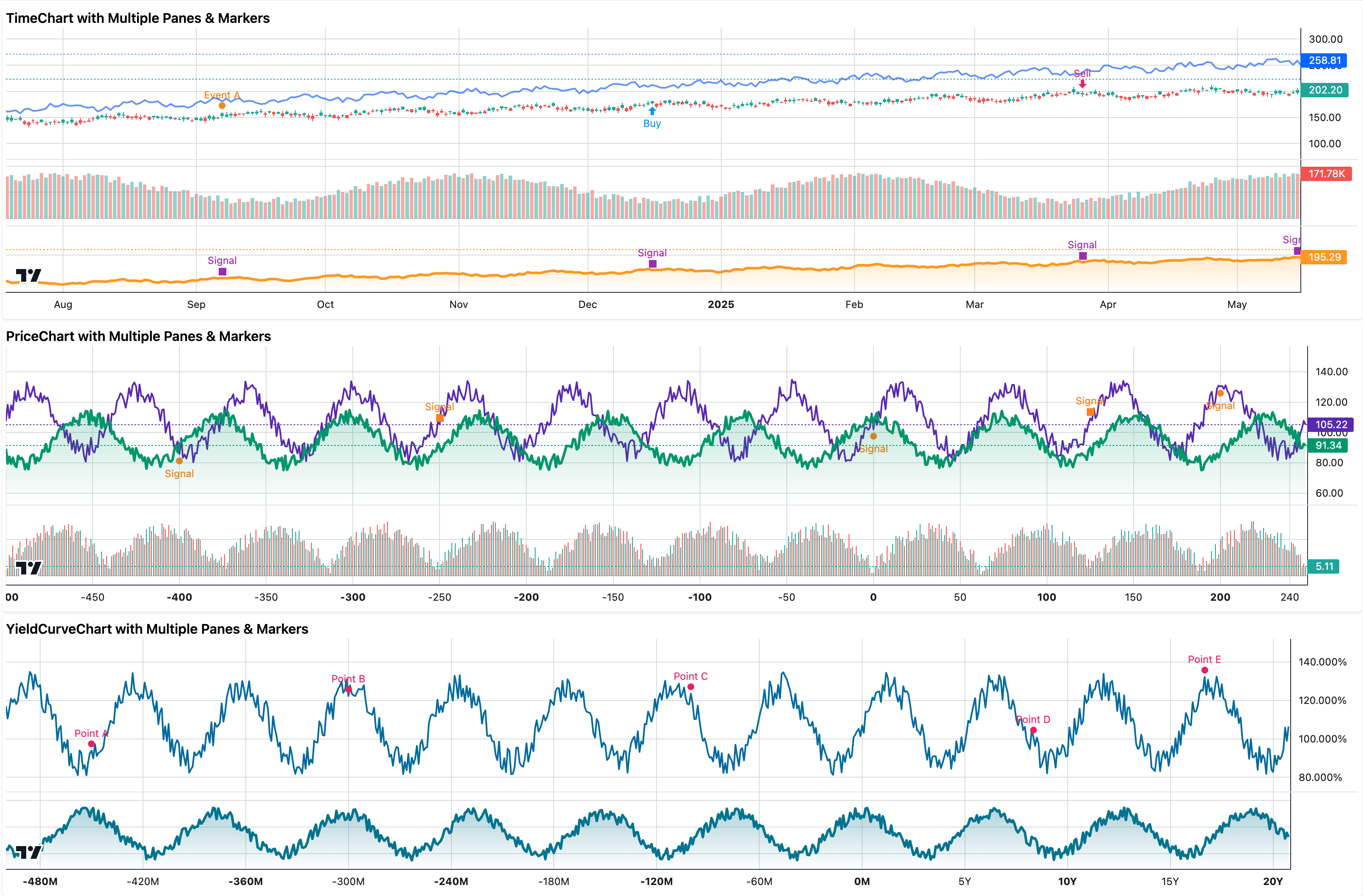
- TimeChart with multiple panes (Candlestick+Line, Volume, Area) and series markers
- PriceChart with multiple panes (Line+Area, Histogram) and series markers
- YieldCurveChart with multiple panes (Line, Area) and series markers
Advanced Features (New in v0.2.0):
- Series Primitives Example - Interactive trend lines, support/resistance levels, price alerts, and text annotations
- Pane Primitives Example - Watermarks, custom grid overlays, and corner badges with live updates
- Custom Series Integration - Complete examples with proper TypeScript interfaces
- Dynamic Management - Real-time updates, lifecycle management, and memory optimization
Run the playground locally:
git clone https://github.com/dsnchz/solid-lightweight-charts
cd solid-lightweight-charts
bun install
bun start
📚 Resources
Full documentation and advanced guides coming soon.
📄 License
MIT © Daniel Sanchez