@felixrieseberg/node-mac-notifier v0.0.14
node-mac-notifier
A native node module that lets you create OS X notifications from Node.js, without spawning a separate process.
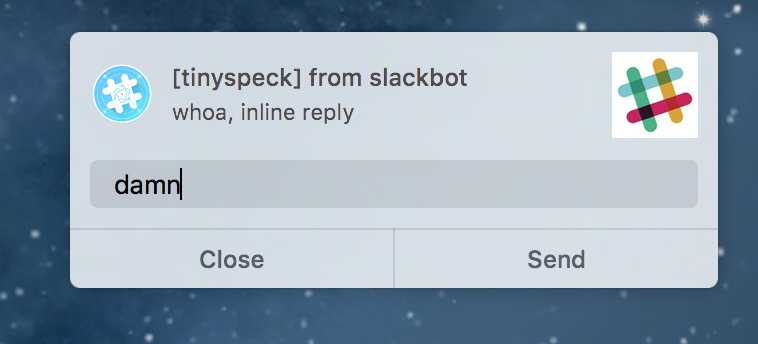
This is useful for desktop applications built with Electron (or something similar), as it adheres to the HTML5 Notification API. Unlike the Electron notification it also supports replies:
Installation
npm install node-mac-notifier
Run Tests
npm test
Usage
Ensure that this module is called from a renderer process; it will have no effect in the main process. Works with Electron >=0.37.7.
Notification = require('node-mac-notifier');
noti = new Notification('Hello from OS X', {body: 'It Works!'});
noti.addEventListener('click', () => console.log('Got a click.'));
In addition to the standard click event, these notifications also support a (non-standard) reply event. To enable the reply button, set canReply in the options argument. The user's response is included as a parameter on the event:
noti = new Notification('Wow, replies!', {canReply: true});
noti.addEventListener('reply', ({response}) => console.log(`User entered: ${response}`));
API
new Notification(title, options)
title (string) (required)
The title of the notification.
options (Object)
Additional parameters to the notification.
options.id (string)
A string identifying the notification. Maps to NSUserNotification.identifier. A notification with an id matching a previously delivered notification will not be shown. If not provided, defaults to a RFC4122 v4 string.
options.body (string)
The body text. Maps to NSUserNotification.informativeText.
options.subtitle (string)
The subtitle text. Maps to NSUserNotification.subtitle.
options.icon (string)
A URL with image content. Maps to NSUserNotification.contentImage. Should be an absolute URL.
options.soundName (string)
The name of a sound file to play once the notification is delivered. Maps to NSUserNotification.soundName. Set to default to use NSUserNotificationDefaultSoundName, or leave undefined for a silent notification.
options.canReply (bool)
If true, this notification will have a reply action button, and can emit the reply event. Maps to NSUserNotification.hasReplyButton.
options.bundleId (string)
Set this to override the NSBundle.bundleIdentifier used for the notification. This is a brute force way for your notifications to take on the appropriate app icon.
close()
Dismisses the notification immediately.