1.3.7-alpha.1 • Published 2 years ago
@gaopeng123/image-upload v1.3.7-alpha.1
image-upload
截图上传插件,支持点击上传、截图粘贴上传、拖拽上传
属性配置
| 属性 | 配置 | 说明 |
|---|---|---|
| width | string | number | 默认100% |
| height | string | number | 默认200 |
| picture-width | string | number | 默认48 |
| picture-height | string | number | 默认48 |
| action | string | 上传接口,默认为空字符串 |
| list-type | picture | picture-card | list排列或者卡片排列 |
| multiple | boolean | 是否支持多选,默认单选,配置为true后支持多选 |
| accept | 支持的图片类型 | 默认.png,.jpg,.jpeg |
| file-list | string | 上传列表{name: string, url: string} |
| max-count | number | 限制数据,默认不限制 |
| prevent-preview | boolean | 默认为false,是否阻止默认的预览方式 |
事件接口
getFileList
当前上传的list
document.querySelector('image-upload').getFileList();
// 传递进来的数据 或者 File
onPreview
预览事件
document.querySelector('image-upload').addEventListener('onPreview', ({detail})=> {});uploadChange
上传更新接口
document.querySelector('image-upload').addEventListener('uploadChange', ({detail})=> {});afterUpload
上传后服务端返回的数据
document.querySelector('image-upload').addEventListener('afterUpload', ({detail})=> {});afterDelete
document.querySelector('image-upload').addEventListener('afterDelete', ({detail})=> {});Usage
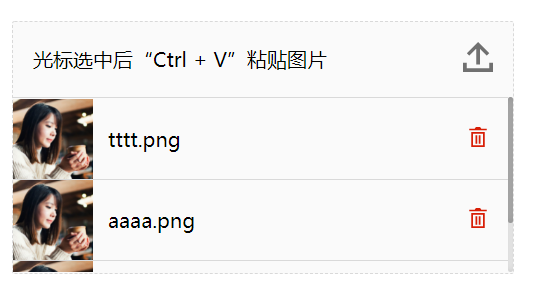
<!DOCTYPE html>
<html lang="en">
<head>
    <meta charset="UTF-8">
    <title>screenshot-upload</title>
</head>
<body style="margin: 0px;">
<div style="display: flex;align-items: center;justify-content: center;margin-top: 100px;">
    <image-upload
            id="upload"
            list-type="picture"
            picture-width="64"
            picture-height="64"
            max-count="4"
            width="400px">
    </image-upload>
</div>
<script>
    window.onload = () => {
        // 支持的数据格式
        const fileList = [{
            name: 'tttt.png',
            url: "https://zos.alipayobjects.com/rmsportal/jkjgkEfvpUPVyRjUImniVslZfWPnJuuZ.png"
        }, {
            name: 'aaaa.png',
            url: "https://zos.alipayobjects.com/rmsportal/jkjgkEfvpUPVyRjUImniVslZfWPnJuuZ.png"
        }, {
            name: '666.png',
            url: "https://zos.alipayobjects.com/rmsportal/jkjgkEfvpUPVyRjUImniVslZfWPnJuuZ.png"
        }];
        const upload = document.querySelector('#upload');
        upload.setAttribute('file-list', JSON.stringify(fileList));
        upload.addEventListener('uploadChange', ({detail}) => {
            console.log(detail);
        });
        upload.addEventListener('afterUpload', ({detail}) => {
            console.log(detail);
        });
        upload.addEventListener('afterDelete', ({detail}) => {
            console.log(detail);
        });
    }
</script>
</body>
</html>1.3.7-alpha.1
2 years ago
1.3.5
2 years ago
1.3.2
2 years ago
1.3.0
2 years ago
1.2.18-alpha.0
3 years ago
1.2.13
3 years ago
1.2.10
3 years ago
1.2.11
3 years ago
1.2.16
3 years ago
1.2.17
3 years ago
1.2.15
3 years ago
1.0.2
3 years ago
0.9.4
3 years ago
1.0.2-alpha.9
3 years ago
0.9.6
3 years ago
1.0.2-alpha.10
3 years ago
0.8.1
3 years ago
0.6.2
4 years ago
0.5.0
4 years ago
0.7.0
3 years ago
0.5.1
4 years ago
0.4.10
4 years ago
0.4.9
4 years ago
0.4.8
4 years ago
0.4.11
4 years ago
0.4.6
4 years ago
0.4.0
4 years ago
0.3.0
4 years ago
0.2.16
4 years ago
0.2.15
4 years ago
0.2.17
4 years ago
0.2.10
4 years ago
0.2.9
4 years ago
0.2.6
4 years ago
0.2.3
4 years ago
0.2.1
4 years ago
0.0.5
4 years ago
0.0.4
4 years ago
0.0.3
4 years ago
0.0.2
4 years ago
0.0.1
4 years ago