@gavant/react-mui-nested-filter v0.0.28
MUI X Tree View Filters Component
Note: 🚧 This project is a work in progress.
The Filters component is a flexible, reusable filtering system for managing hierarchical and standalone filters via MUI X Tree View. It supports customizable parent-child mappings, sorting, and label overrides. This document provides an overview of the main Filters component, its child components (NestedFilter and StandaloneFilter), and the data structure used in its implementation.
Overview
Filters Component
The Filters component serves as the topmost provider for managing filter state and logic. It uses React context to share state with child components and handles features like expanded items, checked items, and parent-child interactions.
Features
- Controlled and Uncontrolled Modes: Supports
controlledCheckedItemsfor external state management or defaults to internal state while also allowinginitialCheckedItems. - Parent-Child Relationships: Handles hierarchical relationships via
NestedFilter. - Standalone Items: Allows independent filters via
StandaloneFilter. - Sorting: Supports custom sorting for both parent and child items.
- Label Overrides: Provides customizable labels for filters.
- Dynamic Options: Offers behavior customization through the
optionsprop.
Props
Filters Props
| Prop | Type | Default | Description |
|---|---|---|---|
checkboxSize | MuiCheckboxSizes | 'medium' | Size of the checkboxes. |
initialCheckedItems | CheckedItemsType | undefined | Initial state for checked items (uncontrolled mode). |
controlledCheckedItems | CheckedItemsType | undefined | External state for checked items (controlled mode). |
onFilterChange | (updatedFilters: CheckedItemsType) => void | Required | Callback for when the filter state changes. |
options | FilterOptions | { replaceChildrenWithParentOnAllChecked: true } | Configuration options for filter behavior. |
children | ReactNode \| ReactNode[] | Required | Child components (NestedFilter, StandaloneFilter, etc.). |
NestedFilter Props
| Prop | Type | Default | Description |
|---|---|---|---|
filterKey | string | Required | Unique key to group this filter. |
items | ParentType | Required | Parent filter items. |
childItems | ChildType | Required | Child filter items. |
mapping | MappingType<ParentType, ChildType> | Required | Maps parent items to their corresponding child items. |
parentSort | Record<Value<I>, number> | undefined | Sorting order for parent items. |
childSort | Record<Value<I>, number> | undefined | Sorting order for child items. |
labelOverrides | Partial<Record<Value<I> \| Value<C>, string>> | undefined | Custom labels for parent and child items. |
options | FilterOptions | undefined | Additional options for nested filters. |
StandaloneFilter Props
| Prop | Type | Default | Description |
|---|---|---|---|
filterKey | string | Required | Unique key to group this filter. |
title | string | Required | Display title for the filter. |
value | string | Required | Value of the filter item. |
groupWithChildren | boolean | false | Whether this standalone filter should be grouped with child filters. |
Data Structure
Enums and Mappings
The following enums and mappings are used to represent the parent-child relationships, sorting order, and label overrides for filters:
PetType Enum
export enum PetType {
    Dog = 'DOG',
    Cat = 'CAT',
    Bird = 'BIRD',
    Other = 'OTHER',
}
PetBreed Enum
export enum PetBreed {
    Abyssinian = 'ABYSSINIAN',
    Bengal = 'BENGAL',
    Parrot = 'PARROT',
    Poodle = 'POODLE',
}
breedMapping
export const breedMapping: Record<Exclude<PetType, PetType.Other>, PetBreed[]> = {
    [PetType.Cat]: [PetBreed.Abyssinian, PetBreed.Bengal],
    [PetType.Dog]: [PetBreed.Poodle],
    [PetType.Bird]: [PetBreed.Parrot],
};
Sorting
export const sort = {
    [PetType.Cat]: 3,
    [PetType.Dog]: 1,
    [PetType.Bird]: 2,
};
Label Overrides
export const Overrides = {
    [PetType.Bird]: 'Feathered Friends',
};
Example Usage
Basic Implementation
<Filters
    checkboxSize="medium"
    initialCheckedItems={CheckedItems}
    onFilterChange={handleFilterChange}
>
    <NestedFilter
        filterKey="PetTypeBreed"
        items={PetType}
        childItems={PetBreed}
        mapping={breedMapping}
        labelOverrides={Overrides}
        parentSort={sort}
    />
    <StandaloneFilter filterKey="PetTypeBreed" id="other" title="Other" value="OTHER" />
</Filters>
Explanation
- Filters: Wraps the entire filter system and manages shared state and logic.
- NestedFilter: Displays parent-child relationships with sorting and label overrides.
- StandaloneFilter: Adds an independent filter option for items like "Other."
Example Output
When users interact with the filters, the resulting state is passed to onFilterChange as an object. Child filters exist in the filterKey's child property, and respectively parent filters exist in the parent property.
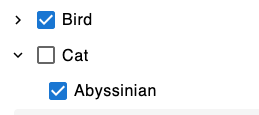
{
    PetTypeBreed: {
        parent: ["BIRD"],
        child: ["ABYSSINIAN"]
    }
}
Notes
- Parent-Child Relationship: The
NestedFilterallows seamless mapping between parent and child filters with options for sorting and label customization. - Controlled Mode: Use
controlledCheckedItemsto manage state externally. For internal state, useinitialCheckedItems. - Extensibility: Additional filters or components can be nested under
Filtersas needed.
1 year ago
1 year ago
1 year ago
1 year ago
1 year ago
1 year ago
1 year ago
1 year ago
1 year ago
1 year ago
1 year ago
1 year ago
1 year ago
1 year ago
1 year ago
1 year ago
1 year ago
1 year ago
1 year ago
1 year ago
1 year ago
1 year ago
1 year ago
1 year ago
1 year ago
1 year ago
1 year ago
1 year ago