@improntaadvance/eslint-config v0.11.0
@improntaadvance/eslint-config
An ESLint Shareable Config from ImprontaAdvance based on config-react-app.
This module is for advanced users.
Installation for projects based on create-react-app
$ npm install --save-dev @improntaadvance/eslint-config
# OR
$ yarn add --dev @improntaadvance/eslint-config
Installation for projects not based on create-react-app
$ npm install --save-dev @improntaadvance/eslint-config
# OR
$ yarn add --dev @improntaadvance/eslint-config
Then, install peerDependencies:
$ npx install-peerdeps -d eslint-config-react-app@7Usage
In your ESlint configuration file (either .eslintrc, .eslintrc.js or the eslintConfig property in your package.json) add the following fields:
{
  "extends": ["@improntaadvance"]
}
You can append the "@improntaadvance" value if you're having other configs already.
Using Prettier
Because the prettier configuration is already integrated in this configuration you can just execute eslint --fix as usual to apply prettier style to your code:
$ ./node_modules/.bin/eslint --fix
// or if you have it globally installed
$ eslint --fix
However it may be useful to have a handy script to call for that, together with other awesome fix eslint provides.
Therefore in your package.json file just add in the scripts section:
...
"scripts": {
  ...
  "eslint:fix": "eslint --fix"
}
IDE Integration
Integrating this with your editor will check your code during development together with automatically fix many issues on save. Most issues may arise from the prettier rules inside this package, that eslint --fix can easily solve for you.
VSCode
Install a eslint extension and enable the eslint --fix on save in the IDE preferences:
...

"eslint.autoFixOnSave": true,
...
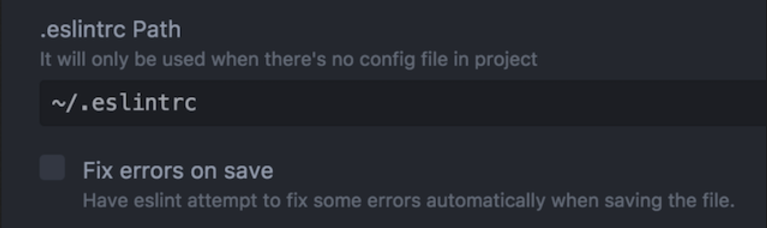
Atom
Install a eslint plugin and enable from the extension configuration the label :
Override the prettier configuration
Sometimes it is required to tweak a little bit the configuration, expecially when working with different teams one may like 2 ore 4 spaces indentation.
This request is reasonable and it is possible to tweak the configuration directly in the eslint configuration file:
{
  "extends": [
    "@improntaadvance"
  ],
  "rules": {
    "prettier/prettier": [
      "error",
      {
        "singleQuote": true,
        "trailingComma": "es5",
        "bracketSpacing": false,
        "jsxBracketSameLine": true,
        "parser": "flow",
        "tabWidth": 2
      }
    ]
  }
}
Note that the whole configuration object needs to be passed.
Integration with Third party tools
As an alternative for overriding it is possible to keep distinct the prettier configuration to better integrate with third party tools and use a .prettierrc file.
- Create a
.prettierrcfile and paste the following content inside:
{
  singleQuote: true,
  trailingComma: 'es5',
  bracketSpacing: false,
  jsxBracketSameLine: true,
  parser: 'flow',
  tabWidth: 4,
}- Now edit your
.eslintrcfile and add the following rule:
{
  "extends": [
    "@improntaadvance"
  ],
  "rules": {
    "prettier/prettier": [
      "error",
      null
    ]
  }
}
Now everything should be in sync: edit the .prettierrc file with your own custom rules.
Common issues
The IDE prettier plugin does not read this configuration
This module works using only the eslint plugin for IDEs. Additional prettier plugins may go in conflict with this configuration as they usually rely only on the .prettierrc configuration file.
It is possible to make them both work overriding the current configuration as explained in the third party tools section.
Badge
[](http://improntaadv.com/)