@invntrm/pino-tiny v2.4.3
pino-tiny
a tiny little log formatter for pino.
🚀 Enhanced Fork
This is an enhanced version of the original pino-tiny with the following improvements:
- ✅ Comprehensive test coverage with Vitest
- 🕐 Milliseconds control with
--hide-msflag - 📊 Object inspection with
--show-objectsflag - 🏷️ Smart tag filtering to eliminate redundant log level duplicates
📦 Original README
Yeah, i know, pino-colada...
...but it does some weird black box stuff, and i did not like some of the formatting, and i was generally not too happy about certain things, so...
i made pino-tiny!
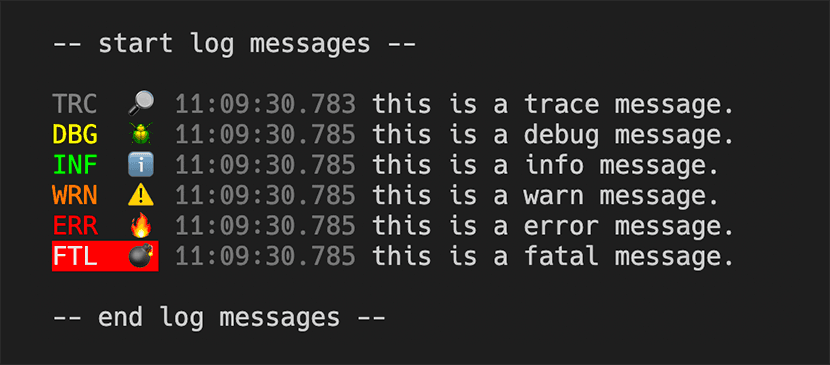
using it
pino-tiny is ran like any other pino output mangler, you run it as a process and pipe to it. first you need to install it. it's really not meant to be a production log formatter, so prolly install it in your project as a dev-dependency.
npm i -D @invntrm/pino-tiny
--or--
yarn add --dev @invntrm/pino-tiny
...run it with your application that is already using pino to log stuff...
$ node index.js | pino-tinyCLI Arguments
Now you can tweak the output a bit with command line arguments
Options:
      --help            Show help
      --version         Show version number
  -i, --hide-icons      Hide level emoji icons.
  -l, --hide-letters    Hide level letters.
  -t, --hide-timestamp  Hide the timestamp.
      --hide-ms         Hide milliseconds in timestamp.
  -c, --hide-colors     Remove ansi colors from output.
  -w, --hide-web        Hide web stats.
  -o, --show-objects    Show additional object data from logs.
  -m, --msg-key         The key to use for message from the JSON log data.
🕐 --hide-ms Flag
Controls millisecond display in timestamps for cleaner output:
# With milliseconds (default)
INF  ℹ️  11:58:59.123  MongoDB Connected

# Without milliseconds (--hide-ms)
INF  ℹ️  11:58:59  MongoDB Connected
Perfect for production logs where millisecond precision creates visual noise.
📊 --show-objects Flag
Displays additional object data from log entries, automatically filtering out standard pino fields and intelligently handling tags:
# Standard log entry
INF  ℹ️  11:58:59  User login successful

# With --show-objects (shows additional data)
INF  ℹ️  11:58:59  User login successful {"userId":"123","sessionId":"abc","ip":"192.168.1.1"}
Smart Tag Filtering:
- Automatically removes tags that duplicate log levels:
trace,debug,info,warn,warning,error,fatal - Hides empty tag arrays completely
- Preserves meaningful tags while eliminating redundant information
Examples:
# Input: {"level":30,"msg":"Test","tags":["info","custom","debug"]}
# Output: Test {"tags":["custom"]}  # "info" and "debug" filtered out

# Input: {"level":30,"msg":"Test","tags":["info","debug"]}
# Output: Test  # tags completely hidden as all were duplicates

# Input: {"level":30,"msg":"Test","tags":["production","critical"]}
# Output: Test {"tags":["production","critical"]}  # preserved as meaningful
...or put it in your package.json file...
{
  ...
  "scripts": {
    "dev": "nodemon index.js | pino-tiny --hide-ms --show-objects",
    ...
  }
}
🧪 Testing
This package includes comprehensive test coverage using Vitest:
# Run tests in watch mode
yarn test

# Run tests once
yarn test:run

# Run linting
yarn lint

# Build the project
yarn build
Test Coverage
The test suite covers:
- ✅ Log parsing and JSON handling
- ✅ Level formatting with icons and colors
- ✅ Timestamp formatting with millisecond control
- ✅ Web request/response formatting
- ✅ Object filtering and display logic
- ✅ Smart tag filtering for level duplicates
- ✅ Filter functions and data transformation
- ✅ CLI argument processing
- ✅ Error handling for malformed input
Run yarn test:run to see detailed test results and coverage information.
use it in code!
pino-tiny can be used in code too as a prettifier, if you want. Here is how you set it up:
const { PinoTinyPrettifier } = require("@invntrm/pino-tiny");
const Pino = require("pino");

const logger = new Pino({
  prettifier: PinoTinyPrettifier(/*{[options]}*/),
  prettyPrint: true,
});

logger.trace("trace message");
logger.debug("debug message");
logger.info("info message");
logger.warn("warn message");
logger.error("error message");
logger.fatal("fatal message");
Prettifier Options
The prettifier has the same options as the cli. Plus a filter function.
PinoTinyOptions {
  hideIcons?: boolean
  hideLetters?: boolean
  hideTimestamp?: boolean
  hideColors?: boolean
  hideWeb?: boolean
  hideMs?: boolean          // Hide milliseconds in timestamp
  showObjects?: boolean     // Show additional object data
  msgKey?: string
  filter?: (data: any) => any | undefined
}
The filter option allows you to filter and process the log data. So you can do something like
// remove ansi colors and remove messages that have secrets.
const logger = new Pino({
  prettifier: PinoTinyPrettifier({
    hideColor: true,
    hideMs: true, // Hide milliseconds for cleaner output
    showObjects: true, // Show additional data
    filter: (data) => {
      if (data.hasSecret) {
        return { ...data, msg: "*** secret ***" };
      } else {
        return data;
      }
    },
  }),
  prettyPrint: true,
});
extensible-ish
pino-tiny runs like a process you pipe the output of your application into and it makes nice output. it also exports a function Run that takes the filter option function as a parameter.
this allows you to control if a log entry gets printed, and you can mangle the output (in the msg property of the log). here is a ridiculous example:
const { Run } = require("@invntrm/pino-tiny");

function filter(data) {
  if (data.msg.indexOf("happy") >= 0) {
    // nothing happy gets out.
    return false;
  } else {
    // prepend msg with woah.
    return {
      ...data,
      msg: `[woah!] ${data.msg}`,
    };
  }
}
//start the logger
Run(filter);
what does pino-tiny do?
- shows log level, 3 characters (and not a emoji icon), color coded, and ??? for custom log levels.
- timestamps (no dates). you know what day it is but millisecond timestamps give you some performance output
- strips all but the msg for output
- if there is are
resandreqproperties in the log data, it will put dimmed request and response info (method, url, status code). - non-json string data that get piped in (like nodemon) get treated as info logs and outputted.
- does not swallow error messages
- non-pino JSON will be logged as dimmed stringified JSON
New in v2.0
- programmatic prettifier
- better colors
- handle non-pino json
- emojis! 🔎 🪲 ℹ️ ⚠️ 🔥 💣
- src is now in typescript
New in v2.1
- added prettifier options
- added prettifier options as cli args
- added back the filter method in options
- added back the extensibility
New in v2.2
- dep version bumps
- support for
msgandmessagein logger
New in v2.3
- added
--hide-msflag, to hide milliseconds in timestamp - added
--show-objectsflag, to show additional object data from logs - added tests
- migrated to scoped package
@invntrm/pino-tiny - improved build process and publishing
New in v2.4
- Smart tag filtering: automatically removes tags that duplicate log levels (
trace,debug,info,warn,warning,error,fatal) - Clean object display: when using
--show-objects, tags that only contain log level duplicates are completely hidden - Enhanced filtering: preserves useful tags while eliminating redundant information
- Better code quality: improved TypeScript standards compliance and safer object manipulation
Tag Filtering Examples
Before v2.4:
INF ℹ️ 11:58:59 💿 remix dev {"tags":["info"]}After v2.4:
INF ℹ️ 11:58:59 💿 remix dev # tags completely hidden as "info" duplicates levelMixed tags:
# Input: {"tags":["info","custom","debug","important"]}
# Output: {"tags":["custom","important"]}  # level duplicates filtered out
This eliminates visual noise from redundant tag information while preserving meaningful metadata.