1.0.5 • Published 9 years ago
@mrvito/tinymce-4-snippet-plugin v1.0.5
TinyMCE 4.x Snippet plugin
Plugin for simple multi level dropdown menu for inserting custom HTML or plain text into your editor.
This plugin supports TinyMCE 4.x.
Older version of the plugin for TinyMCE 3.x: https://github.com/eduardstula/tinymce-simple-snippet.
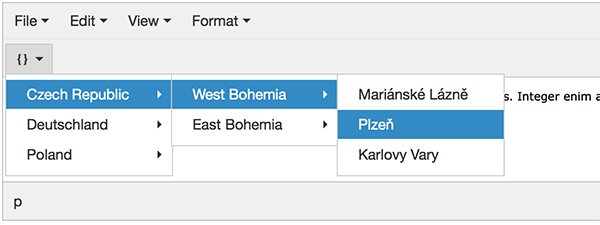
Screenshot
dropdown multilevel menu
Install
Install the package: npm i @mrvito/tinymce-4-snippet-plugin
Use:
- Require (
require('@mrvito/tinymce-4-snippet-plugin')orimport '@mrvito/tinymce-4-snippet-plugin')
OR
- Include the
plugin.jsorplugin.min.jsfile into your project
Configuration
- Add
snippetto the plugins list - Insert
snippetbutton to the toolbar - Assign snippet data to
snippet_listparameter
var snippet_data = [];

tinymce.init({
  selector: 'textarea',
  plugins: 'snippet',
  toolbar: 'snippet',
  snippet_list: snippet_data
});
Data
Snippet data to be assigned to snippet_list parameter.
title= menu item titlevalue= HTML or plain text that will be inserteditems= array of sub-menu items
...
snippet_list: [
  {
    title: "Czech Republic",
    value: "",
    items: [
      {
        title: "West Bohemia",
        value: "",
        items: [
          {
            title: "Mariánské Lázně",
            value: "City: Mariánské Lázně"
          },
          {
            title: "Plzeň",
            value: "City: Plzeň"
          },
          {
            title: "Karlovy Vary",
            value: "City: Karlovy Vary"
          }
        ]
      }
    ]
  }
]
...
Callback
You can use a callback function:
onSelect= callback function to be called when menu item is selected
...
snippet_list: [
  {
    title: "Cities",
    value: "",
    items: [
      {
        title: "Pilsen",
        value: "49.746955, 13.377288",
        onSelect: function (item) {
          //menu item name => Pilsen
          console.log(item.title);

          //menu item value => 49.746955, 13.377288
          console.log(item.value);
        }
      }
    ]
  }
]
...
Demo
See the demo.