
OpenRemote Core

Source · Documentation · Forum · Issues · Docker Images · OpenRemote Inc.
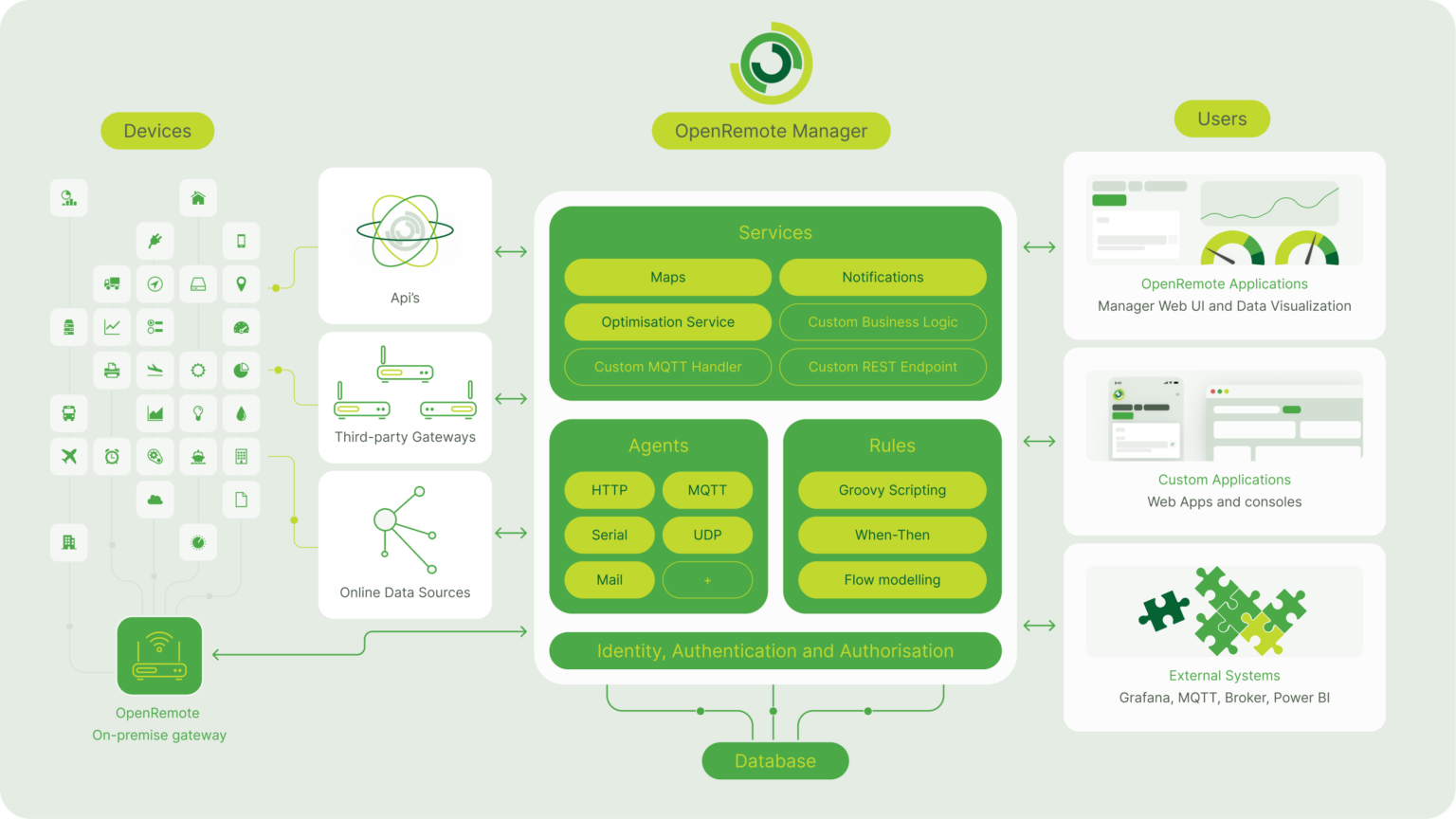
Welcome to OpenRemote; an intuitive user-friendly 100% open source IoT platform. You can build a complete IoT device management solution including: device management and auto provisioning, customisation of asset types, automation via when-then, flow, javascript and groovy rules, data analytics, connectivity via several protocol agents and manager APIs (e.g. MQTT broker, HTTP/REST, WS), Multi-tenancy (realms), Users and roles management, Edge gateway, Front-end UI web components and consoles, and an Insights dashboard builder.
As the code base is 100% open source, applications are limitless. Here's an architecture overview:
Quickstart
You can quickly try the online demo with restricted access, login credentials are smartcity:smartcity:
The quickest way to get your own environment with full access is to make use of our docker images (both amd64 and arm64 are supported).
- Make sure you have Docker Desktop installed (v18+).
- Download the docker compose file: OpenRemote Stack (Right click 'Save link as...')
- In a terminal
cdto where you just saved the compose file and then run:
docker compose pull
docker compose -p openremote up
If all goes well then you should now be able to access the OpenRemote Manager UI at https://127.0.0.1. You will need to accept the self-signed certificate, see here for details how to do this in Chrome (similar for other browsers).
Login credentials
Username: admin
Password: secret
Changing host and/or port
The URL you use to access the system is important, the default is configured as https://127.0.0.1 if you are using a VM then you will need to set the OR_HOSTNAME environment variable, so if for example you will be accessing using https://192.168.1.1 then use the following startup command:
BASH:
OR_HOSTNAME=192.168.1.1 docker-compose -p openremote up -dor
CMD:
cmd /C "set OR_HOSTNAME=192.168.1.1 && docker-compose -p openremote up -d"What next
Try creating assets, agents, rules, users, realms, etc. using the Manager UI, please refer to the documentation for more information, some things to try:
- Manager UI Guide - Learn more about the User Interface
- Creating an HTTP Agent tutorial - Connect to an online weather service
- Custom Deployment - Style the Manager to your brand
- Setting up an IDE - Set up your development environment
- Working on the UI - Create a web application compatible with OpenRemote
- Creating a custom project - Create a project with custom protocols, asset types and setup code
Where's the data stored?
Persistent data is stored in a PostgreSQL DB which is stored in the openremote_postgresql-data docker volume which is durably stored independently of the running containers (see all with docker volume ls).
Note that historical attribute data is purged daily based on value of OR_DATA_POINTS_MAX_AGE_DAYS; this value can also be overridden for individual attributes by using the dataPointsMaxAgeDays configuration item.
See the Developer Guide for details on making backups of the database.
OpenTelemetry tracing
The manager distribution and container image support OpenTelemetry tracing. See Traces for more information.
Contributing to OpenRemote
For information and how to set up a development environment, see the Developer Guide.
We work with Java, Groovy, TypeScript, Gradle, Docker, and a wide range of APIs and protocol implementations.
We follow the GitHub Flow workflow with tags and releases for published versions of our components; when working on the codebase create descriptive branch names (e.g. feature/cool_feature_x, hotfix/flux_capacitor, issue/123, etc.).
When your changes are complete then create a Pull Request ensuring that your branch is up-to-date with the source branch and that code changes are covered by tests and that the full test suite passes.
Discuss OpenRemote
Join us on the community forum.