@saveliyp/type-sql v0.2.2
TypeSQL
A fully typed SQL builder for TypeScript.
Eventually it should support all possible SQL statements while retaining type information.
Current syntax may be slightly awkward, but it is preliminary. Any suggestions and requests for extra syntax are welcome.
Currently I'm targeting PostgreSQL, because it has better documentation, but eventually it will support other SQL dialects too.
Quickstart
Install
npm i @saveliyp/type-sql
Define the models and generate a migration
import { Model, types as t, generateMigration, schema } from "@saveliyp/type-sql";

const Picture = new Model("picture", {
    id: new t.Increments().nonNullable(),
    uploader: new t.Integer(),
    width: new t.Integer(),
    height: new t.Integer(),
    time: new t.Timestamp()
}, t => {
    t.primary("id");
    t.foreign("uploader").ref(User, "id");
});

const User = new Model("user", {
    id: new t.Increments().nonNullable(),
    privilege: new t.Enum(["user", "mod"]).defaultTo("'user'"),
    username: new t.String(255),
    password: new t.Binary(16),
    email: new t.String(255),
    registration_time: new t.Timestamp(),
    profile_picture: new t.Integer().nullable()
}, t => {
    t.primary("id");
    t.unique("username");
    t.unique("email");
    t.foreign("profile_picture").ref(Picture, "id");
});

const createTablesSQL = generateMigration(schema([]), schema([Picture, User]));
console.log(createTablesSQL);
Create a connection
import { defaultTypes, db } from "@saveliyp/type-sql";

db({
    host: "localhost",
    port: 5432,
    user: "postgres",
    password: "password",
    database: "postgres"
}, defaultTypes).then(c => {
    //Do stuff
	...
    c.close();
});
Insert data
await c.into(User).insert([{
    id: 1,
    email: "testuser@example.com",
    username: "testuser",
    password: Buffer.from("p@ssw0rd"),
    privilege: "mod",
    profile_picture: null,
    registration_time: new Date(),
}, {
    id: 2,
    email: "testuser2@example.com",
    username: "testuser2",
    password: Buffer.from("p@ssw0rd"),
    privilege: "user",
    profile_picture: null,
    registration_time: new Date(),
}]).execute();

await c.into(Picture).insert([{
    id: 1,
    height: 1080,
    time: new Date("2000-01-01T12:00:00.000000Z"),
    width: 1920,
    uploader: 1
}, {
    id: 2,
    height: 768,
    time: new Date("2000-01-01T12:00:00.000000Z"),
    width: 1360,
    uploader: 1
}, {
    id: 3,
    height: 480,
    time: new Date("2000-01-01T12:00:00.000000Z"),
    width: 640,
    uploader: 2
}]).execute();
Update data
const o = c.operator;
const l = c.literal;

await c.update(User).where(t => o(t.id, '=', 1)).set(t => ({
    profile_picture: 1
})).execute();

await c.update(User).where(t => o(t.id, '=', 2)).set(t => ({
    profile_picture: 3
})).execute();


await c.with({
    a: c.select(x => ({
        a: l.integer(2),
        b: l.integer(4)
    }))
}).update(Picture).using({
    test: "a"
}).set((t, u) => ({
    width: o(t.width, '*', u.test.b)
})).execute();

await c.update(User).set(t => ({
    profile_picture: null,
})).execute();
Select data
import { $ } from '@saveliyp/type-sql';

const o = c.operator;
const l = c.literal;
const e = c.expression;

//A complex SELECT statement to show the capabilities of this library. Type checking and autocomplete works from the very beginning all the way to the .execute() call, where the provided parameters are type-checked. The results will have known types.
await c.with({
    test1: c.from({user: User}).groupBy(t => ({a: t.user.id, b: t.user.email})).select((t, g) => ({id: g.a, email: g.b})),
    test2: c.from({user: User}).groupBy(t => ({a: t.user.id, b: t.user.email, c: $.boolean("a")})).select((t, g) => ({id: g.a, email: g.b, test: $.text("b")}))
})
.from({
    u: User,
    p: Picture,
    unused: "test1",
    unused2: "test2",
    test2: c.from({user: User}).groupBy(t => ({a: t.user.id, b: t.user.email, c: $.boolean("a")})).select((t, g) => ({id: g.a, email: g.b, test: $.text("b")}))
})
.where(t => e.and(o(t.p.height, '>=', 200), o(t.p.width, '>=', 200), $.boolean("check_parameter")))
.where(t => o(t.p.id, '=', t.u.profile_picture))
.where(t => o(t.unused.id, '=', t.unused.id))
.where(() => o($.text("string_parameter"), '=', ""))
.where(() => e.between(l.text("c"), "b", $.text("asdf")))
.groupBy(t => ({
    width: t.p.width,
    asdf: $.text("string_parameter2")
}))
.having((tables, group) => e.and(o(e.avg(tables.p.height), '>=', l.integer(200)), $.boolean("check_parameter")))
.select((t, group) => ({
        picture_width: group.width,
        average_picture_height: e.avg(t.p.height),
        test: $.text("string_parameter_3")
}).execute({
    a: true,
    b: "hello",
    check_parameter: true,
    string_parameter: "",
    string_parameter2: "hello2",
    string_parameter_3: "hello_3",
    asdf: "d",
});
Deleting data
await c.deleteFrom(Picture).where(t => o(t.id, '=', 2)).returning(t => ({
    w: t.width,
    h: t.height
})).execute();

await c.deleteFrom(Picture).returning(t => ({
    w: t.width,
    h: t.height
})).execute();

await c.deleteFrom(User).returning(t => ({
    email: t.email,
    username: t.username
})).execute();
Models
Before working with queries, models need to be defined. Since managing models separately from the code can become messy, TypeSQL makes you define the models in code and gives you functions that can serialize models and generate migrations between different serialized versions.
Class: Model\<T>
The Model class represents a model of a table in a database.
new Model(modelName, columns, [keys])
modelName:string. The name of the model's table in the database. This name identifies this model.columns:{[key in keyof T]: Column<T[key]>}. The columns in this model.keys:Function. This function sets up primary and unique keys, indices, and foreign keys. It takes one argument that contains the functionsprimary,unique,indexandforeign, each of which takes a list of column names as parameters.foreignreturns another functionref, which takes another model and an equal number of its column names as parameters.
serialize(): SerializedModel[]
Returns a serialized version of this Model, which could potentially include multiple tables for custom Model classes. SerializedModel contains info about the model's name, columns and keys.
Class: Column\<T>
The Column class represents every column type.
nullable(): this, nonNullable(): this
Sets the column as nullable or non-nullable and returns this to allow chaining multiple commands.
defaultTo(defaultTo): this
Sets the default value of the column and returns this to allow chaining multiple commands.
Note: for now, the defaultTo parameter is a raw SQL expression. You can write SQL functions (such as "NOW()"), numbers or strings, but strings must be surrounded with PostgreSQL quotation marks ("'Hello world'", note the extra ').
Column types
The available column types can be accessed in the types object (import { types as t } from '@saveliyp/type-sql').
They are the following:
new Integer([length])new Increments()new BigInteger([length])new BigIncrements()new Binary()new Boolean()new Date()new Enum()new Float()new Json()new JsonB()new String([length])new Text([type: "text" | "mediumtext" | "longtext"])new Time()new Timestamp()
Managing models
It is up to you to create a system for managing models. An example of how to manage models is shown later in the README. The API provides the following functions:
schema(models): Schema
models:Model[]. The list of models to serialize.
Serializes all of the models in the array and returns a Schema object. The result can be saved to and loaded from a JSON file, or stored in a database that controls the versions of the models.
isSchema(data): data is Schema
data:any.
Checks whether the provided parameter is a valid Schema. Returns a boolean.
generateMigration(from, to): string
from:Schema. The model schema before the migration.to:Schema. The target model schema that this migration should create.
Returns a SQL query that converts a database from the from state to the to state.
Extending models
TO BE WRITTEN. You can use mixins or class X extends Model\<T extends {key: string: SQLType}>.
Database connection
To begin writing queries, a database connection is needed, which can be obtained with the following function.
db(options, types): Promise<connection>
options. The connection options to be passed to pg.options: { user?: string, // default process.env.PGUSER || process.env.USER password?: string, //default process.env.PGPASSWORD host?: string, // default process.env.PGHOST database?: string, // default process.env.PGDATABASE || process.env.USER port?: number, // default process.env.PGPORT connectionString?: string, // e.g. postgres://user:password@host:5432/database ssl?: any, // passed directly to node.TLSSocket, supports all tls.connect options types?: any, // custom type parsers statement_timeout?: number, // number of milliseconds before a statement in query will time out, default is no timeout query_timeout?: number, // number of milliseconds before a query call will timeout, default is no timeout connectionTimeoutMillis?: number, // number of milliseconds to wait for connection, default is no timeout };types:TypeParser<Types>. You can use thedefaultTypesobject (import { defaultTypes } from '@saveliyp/type-sql') for sensible defaults.An object with three functions for every SQL type:
toSQL(data: T): string,toJS(data: string): T,isT(data: any): data is T. For thebinarydata type, it must useBufferinstead ofstring. This object will determine the literal value types that queries return and the literal value types that you can pass into queries.Example of a single key in the
typesobject:smallint: { toSQL: (data: number) => data.toString(), toJS: Number.parseInt, isT: (data): data is number => typeof data === 'number' }
This function returns a Promise with the database connection.
The database connection
Once a database connection has been established, you can begin writing queries. The database connection exposes chainable functions to build queries. The functions follow the following railroad diagram:
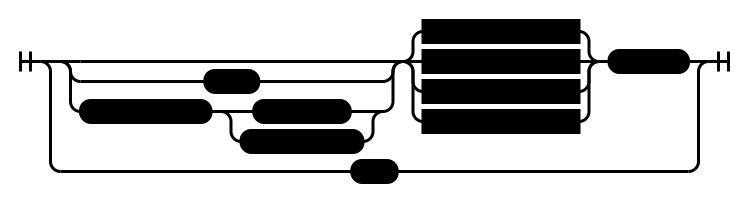
raw(query, parameters): Promise<pg.QueryResult>
This function is equivalent to a pg parametrized query. This function can be used for executing a migration.
Example:
const queryResult = await connection.raw(generateMigration(schema([]), schema([Picture, User])));const queryResult = await connection.raw("SELECT * FROM pg_type;");with(tables), withRecursive(tables)
tables:Object. An object that containsSELECTstatements or other statements with aRETURNINGclause.withRecursivemay only takeSELECTstatements.
This function allows using Common Table Expressions (CTEs) in a query. The SELECT, INSERT, UPDATE or DELETE statements in the passed tables parameter will be executed once, and their results will be available to use in the query.
withRecursive allows building recursive SQL queries to retrieve hierarchical data.
Example:
connection.with({
	exampleWith: connection.from({user: User}).select(t => ({id: t.user.id}));
});recursive(recursiveFunc), recursiveAll(recursiveFunc)
recursiveFunc:Function. This function takestas a parameter and must return an object withSELECTstatements for some of theSELECTstatements specified in thewithclause.tcontains each table in theWITHclause, with each table containing each column of that table.
This function specifies the recursive term of the recursive query. The recursive term can refer to itself or to another table in the WITH clause, but care must be taken to make sure that multiple tables don't recursively refer to each other.
Example:
db.withRecursive({
    hierarchy: db.from({p: Post}).where(t => o.eq(t.p.id, 1)).select(({p}) => ({
        id: p.id,
        author: p.author,
        parent: p.parent,
        time: p.time,
        text: p.text,
        depth: l.integer(0)
    }))
}).recursive(w => ({
    hierarchy: db.from({p: Post, h: w.hierarchy}).where(t => o.eq(t.p.parent, t.h.id)).select(t => ({
        ...t.p,
        depth: o.add(t.h.depth, 1)
    }))
})).from({p: "hierarchy"}).select(t => t.p).execute();
execute([parameters]): Promise<Result[]>
parameters:Object. An object that contains values for each parameter in the query.
This function executes a query and returns a Promise with the results. The type of Result depends on your query. A query like connection.from({user: User}).select(t => ({id: t.user.id})) would have a result of type {id: number | null}.
Select Statement
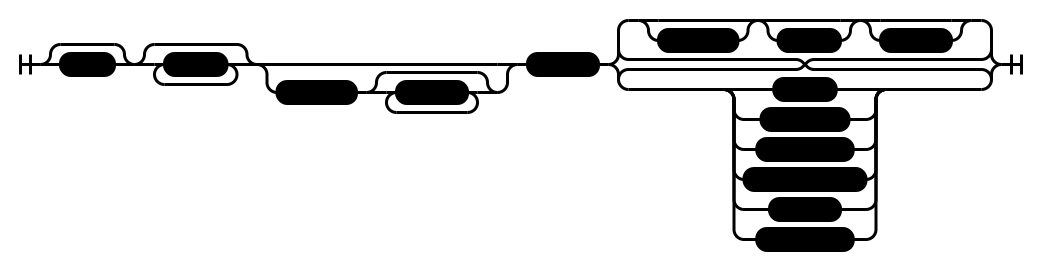
from(tables)
tables:Object. An object that contains the models, queries, and CTE names from which the select statement will select from.
The FROM clause of a query.
where(conditionFunc)
conditionFunc:Function. This function takestas a parameter and must return a booleanExpression.tcontains each table from theFROMclause, with each table containing each column of that table.
The WHERE clause of a query. Multiple calls to this function are combined with AND.
groupBy(groupFunc)
groupFunc:Function. This function takestas a parameter and must return an object where each property is someExpressionby which to group the results.
The GROUP BY clause of a query. Adding this clause to a query changes the behavior of the SELECT clause, since the values in the SELECT clause must be aggregated Expressions, such as the groups by which the query is grouped, the results of aggregate functions such as AVG, constants, or an operation or function on aggregated Expressions.
having(conditionFunc)
conditionFunc:Function. This function takestandgas parameters and must return a booleanExpression.tcontains each table from theFROMclause, with each table containing each column of that table.gcontains each grouped value.
The HAVING clause of a query. Similar to WHERE, except the returned Expressions must aggregated. Multiple calls to this function are combined with AND.
select(selectFunc)
selectFunc:Function. This function takestandgas parameters and must return an object with each property being someExpression. If the query was not grouped,gis an empty object.
The SELECT clause of a query. Similar to GROUP BY, except depending on whether the query was grouped, the selected Expressions must be aggregated.
orderBy(orderFunc)
orderFunc:Function. This function takestandgas parameters and must return an array ofExpressions by which to order the results.
The ORDER BY clause of a query.
limit(amount)
amount:number. The upper limit of the amount of results returned.
The LIMIT clause of a query.
offset(amount)
amount:number. The amount of results to skip before returning results.
The OFFSET clause of a query.
union(selectFunc), unionAll(selectFunc), intersect(selectFunc), intersectAll(selectFunc), except(selectFunc), exceptAll(selectFunc)
selectFunc:Function. This function takestas a parameter and must return anotherSELECTstatement with the same returned values and without aWITHclause.tcontains the tables in thisSELECTstatement'sWITHclause.
Allows combining the results of multiple statements.
Insert Statement
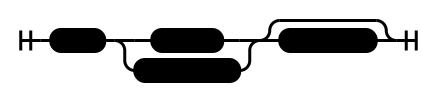
into(model)
model:Model. The table into which to insert the objects.
insert(values)
values:Data[]. A list of values to insert into the table.Datamust have a subset of the properties defined in the model, and each property must be a literal of the corresponding type. Any properties that are not inDatawill use default values.
insertFrom(selectStatementFunc)
selectStatementFunc:Function. This function takescteas a parameter and must return aSELECTquery. TheSELECTquery must not have any CTEs, but CTEs from this query can be used by referring to the properties ofcte.
returning(returningFunc)
returningFunc:Function. This function takesias a parameter and must return an object with each property being someExpression. The properties ofiare the columns of the model into which the values are being inserted.
The RETURNING clause of a query. This allows you insert values and return the inserted and any auto-generated values in one query.
Update Statement

update(model)
model:Model. The table whose rows will be updated.
using(tables)
tables:Object. An object that contains the models, queries, and CTE names from which to get additional values to use during the update query.
This function is similar to from(tables) in a SELECT statement.
where(conditionFunc)
conditionFunc:Function. This function takestanduas parameters and must return a booleanExpression. The properties oftare the columns of the model being updated and the properties ofuare the additional tables being used, with each table containing each column of that table.
set(updateFunc)
updateFunc:Function. This function takestanduas parameters similarly to the function above and must returnUpdate.Updatemust have a subset of the properties defined in the model, and each property must be anExpressionor literal of the corresponding type.
returning(returningFunc)
returningFunc:Function. This function takesuas a parameter and must return an object with each property being someExpression. The properties ofuare the columns of the model whose rows are being updated.
The RETURNING clause of a query. This allows you to return the old values of each row after updating them.
Delete Statement

deleteFrom(model)
model:Model. The table whose rows will be deleted.
where(conditionFunc)
conditionFunc:Function. This function takestas a parameter and must return a booleanExpression. The properties oftare the columns of the model whose rows are being deleted.
The WHERE clause of a query. This specifies which rows will be deleted. Multiple calls to this function are combined with AND.
returning(returningFunc)
returningFunc:Function. This function takesdas a parameter and must return an object with each property being someExpression. The properties ofdare the columns of the model whose rows are being deleted.
The RETURNING clause of a query. This allows you to return the values of the deleted rows.
Closing the database connection
close()
Closes the database connection.
Strongly typed literals
In some cases, using literals will cause an error due to ambiguous types, since, for example, JavaScript's number can be SQL's smallint, integer, float and double when using the default type parsers. In this case, the type of the literal must be explicitly stated.
This can be done with the functions in the connection's literal object.
literal
Contains the following functions: smallint, integer, bigint, float, double, numeric, boolean, bit, binary, text, enum, json, time, date, timestamp. Each function takes a literal and produces an Expression.
Expressions and operators
The connection exposes a function for operators and a collection of functions for other SQL functions.
operator(a, op, b)
a:Expression | literal.op:string. An operator.b:Expression | literal.
Represents a binary operator, such as + or <=. Returns an Expression with the type depending to the operation.
Operators are: +, -, *, /, ^, <, >, <=, >=, =, <>, !=. Additionally, the operator function has the following functions as properties, each of which represents an operator: add, sub, mult, div, pow, lt, gt, lte, gte, eq, neq. neq represents both operators <> and !=.
Note: currently operator may cause tsc to lag. The type system is complex, but a better implementation will come soon.
Note: currently operator can be annoying with the bad quality literal type disambiguation. It will be improved.
expression
A collection of functions and expressions.
Currently, they include: distinct(a, b), notDistinct(a, b), isNull(a), notNull(a), isTrue(a), notTrue(a), isFalse(a), notFalse(a), isUnknown(a), notUnknown(a), and(...), or(...), not(a), bitnot(a), avg(a), concat(a, separator).
Type casting
Not implemented yet.
Parameters
If values are not known during the time the query was made or if some values need to be repeated many times, parameters may be used.
The $ object (import { $ } from '@saveliyp/type-sql') contains the same functions as the literal object above, except every function takes a string parameter, which is the name of the parameter. When execute is called on any query, each named parameter must be supplied a value of the corresponding type.
Example of how to manage models
All models should be defined in files under the model folder. Each file in the model folder should export its models and each file should have a corresponding export * from './<model_file>.ts' in model/index.ts.
Make sure a file database.ts exists with an exported function database(): Promise<Connection> that creates the connection to the database.
Create the file migrations.ts with the following code:
import fs from 'fs';
import path from 'path';

import { Schema, schema, isSchema, generateMigration } from '@saveliyp/type-sql';
import * as models from './model';
import { database } from './database';

const migrationsDirectory = "migrations";

async function getSchemas(): Promise<Schema[]> {
    try {
        const data = await fs.promises.readFile(path.join(migrationsDirectory, "schemas.json"));
        var obj = JSON.parse(data.toString("utf8"));
        if (!(obj instanceof Array) || !obj.every(isSchema)) {
            throw Error("schemas.json is not a valid array!");
        }
        return obj;
    } catch (e) {
        if (e.code === "ENOENT") {
            return [];
        } else {
            throw e;
        }
    }
}

async function putSchemas(schemas: Schema[]) {
    return await fs.promises.writeFile(path.join(migrationsDirectory, "schemas.json"), JSON.stringify(schemas, null, 4));
}

async function makeMigration() {
    const schemas = await getSchemas();
    const prevSchema = schemas.length == 0 ? {} : schemas[schemas.length - 1];
    const currSchema = schema(Object.values(models));
    const migrationSQL = generateMigration(prevSchema, currSchema);

    const nextMigration = path.join(migrationsDirectory, "migration_" + (schemas.length + 1).toString().padStart(4, "0") + ".sql");
    await fs.promises.writeFile(nextMigration, migrationSQL);

    schemas.push(currSchema);
    await putSchemas(schemas);

    console.log("Wrote next migration to " + nextMigration);
}

async function runMigration() {
    const schemas = await getSchemas();
    const migration = path.join(migrationsDirectory, "migration_" + schemas.length.toString().padStart(4, "0") + ".sql");
    const migrationSQL = (await fs.promises.readFile(migration)).toString("utf8");

    const c = await database();
    await c.raw(migrationSQL);
    await c.close();

    console.log("Ran migration " + migration);
}

function printHelp() {
    console.log("Usage: \"" + process.argv[0] + "\" \"" + process.argv[1] + "\" <server | make:migration | migrate>");
}

if (process.argv.length < 3) {
    printHelp();
} else {
    switch (process.argv[2].toLowerCase()) {
        case "make":
            makeMigration();
            break;
        case "migrate":
            runMigration();
            break;
        default:
            printHelp();
            break;
    }
}
In package.json, add the following to values to the scripts object:
"make:migration": "node migrations.js make""migrate": "node migrations.js migrate"Now running npm run make:migration will make a migration from the previous models to the ones currently defined in the code and save it in the migrations folder. It is recommended to manually review each generated migration, since the migration generator is not smart enough to detect renamed columns or models, and will instead delete them and make new ones.
Running npm run migrate will open a connection to the database and run the latest migration.
TODO:
- Make SELECT and UNION statements be the same interface (so a variable can be automatically inferred to be either)
- Add support for NULLs
- A type should include information about whether it is nullable and whether it has a default value
- Add better .defaultTo()
- Order by relies on
returning, which hasn't been transformed into reference/accessor expressions - Add more operators and functions
- Casts
- Using aggregate functions without group by groups all rows into one, disallowing non-aggregate columns
- Improve literal support to be faster
- Error messages are very complex due to complex types
- Allow passing tables as parameters into .from()
- Refactor
- Move certain types and functions into the files where they make more sense
- Right now, only implicit inner joins work with FROM clause. Need to add explicit joins.
- Add typings to enums
- Add typings to JSON
- Subqueries need to have access to base query tables
- SELECT.where() should be (from, groups, with) => expr.
- SELECT.having() should be (from, groups, with) => expr.
- DELETE.where() should be (from, groups, with) => expr.
- UPDATE.set() should be (update, using, with) => expr.
- WITH should prefix table names with __ to prevent collisions
- Prepared queries
- SELECTs with single result as values
- Extra syntax and options for model columns to fully implement CREATE TABLE
- CURSORs
- Result streaming
- MySQL & extendable dialect support
- Continue adding precedence to reduce parentheses (probably not that important and a potential place to introduce errors)
- Allow custom column and SQL types
- Allow defining custom functions and operators
- Lots of other stuff