1.0.36 • Published 4 years ago
@yipianjingxue/scene v1.0.36
scene
A Vue component to scene
Build Setup
# install dependencies
npm install

# serve with hot reload at localhost:8080
npm run dev

# build for production with minification
npm run build

# build for production and view the bundle analyzer report
npm run build --report
使用组件
通过npm install @yipianjingxue/scene -s 安装到相应的项目下,安装成功如下图所示:

到项目中的node_modules/目录下将可以看到:
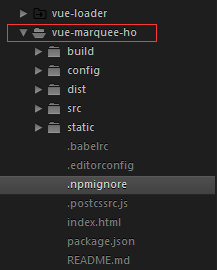
需要用到该组件时可以这样引入
import scene from '@yipianjingxuescene';
import Css from '@yipianjingxue/scene/dist/scene.min.css'
export default {
  name: 'app',
  components:{
      "scene": scene
    },
}
看一个demo:
<template>
  <div id="app">
    <div class="scene-wrap" style="width: 100px;"><scene content="33333" class="two"  :showtwo="false"></scene></div>
    <div class="scene-wrap" style="width: 100px;"><scene content="22222" class="two"  :showtwo="false"></scene></div>
    <div class="scene-wrap" style="width: 100px;"><scene content="1" class="two"  :showtwo="false"></scene></div>
    <router-view></router-view>
  </div>
</template>

<script>
import scene from '@yipianjingxue/scene';
import Css from '@yipianjingxue/scene/dist/scene.min.css'
export default {
  name: 'app',
  components:{
      "scene": scene
    },
}
</script>
效果:
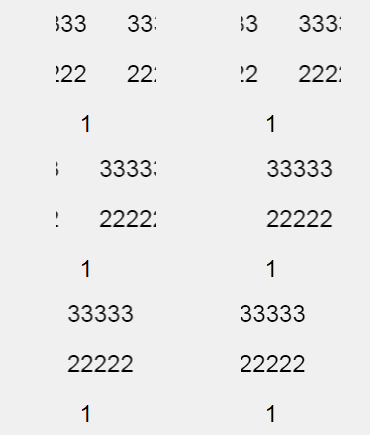
For detailed explanation on how things work, checkout the guide 构建过程,见 guide
1.0.36
4 years ago
1.0.35
4 years ago
1.0.34
4 years ago
1.0.33
4 years ago
1.0.32
4 years ago
1.0.30
4 years ago
1.0.29
4 years ago
1.0.28
4 years ago
1.0.27
4 years ago
1.0.25
4 years ago
1.0.24
4 years ago
1.0.23
4 years ago
1.0.22
4 years ago
1.0.21
4 years ago
1.0.20
4 years ago
1.0.19
4 years ago
1.0.18
4 years ago
1.0.17
4 years ago
1.0.16
4 years ago
1.0.15
4 years ago
1.0.14
4 years ago
1.0.13
4 years ago
1.0.12
4 years ago
1.0.11
4 years ago
1.0.10
4 years ago
1.0.9
4 years ago
1.0.7
4 years ago
1.0.5
4 years ago
1.0.4
4 years ago
1.0.0
4 years ago