
Licence
MIT
Version
2.0.1
Deps
5
Size
1022 kB
Vulns
0
Weekly
0

accp
Auto Create Code with Pattern files.


Define your API in .api files, then generate any language — TypeScript, Flutter, Swagger, and more — through customizable pattern files. Includes an MCP server for LLM integration.
.api / .code / .struct → accp --compile → pattern/*.js → Generated codeInstallation
npm install accp -gQuick Start
# 1. Create example project
accp --examples my-project

# 2. Compile
cd my-project && accp --compile
Project Structure
| Folder | Extension | Description |
|---|---|---|
api/ |
.api |
API endpoint definitions |
code/ |
.code |
Error codes and translations |
struct/ |
.struct |
Data structures used in API |
pattern/ |
.js |
Code generation templates |
All folders are required.
Syntax
.api — API Endpoints
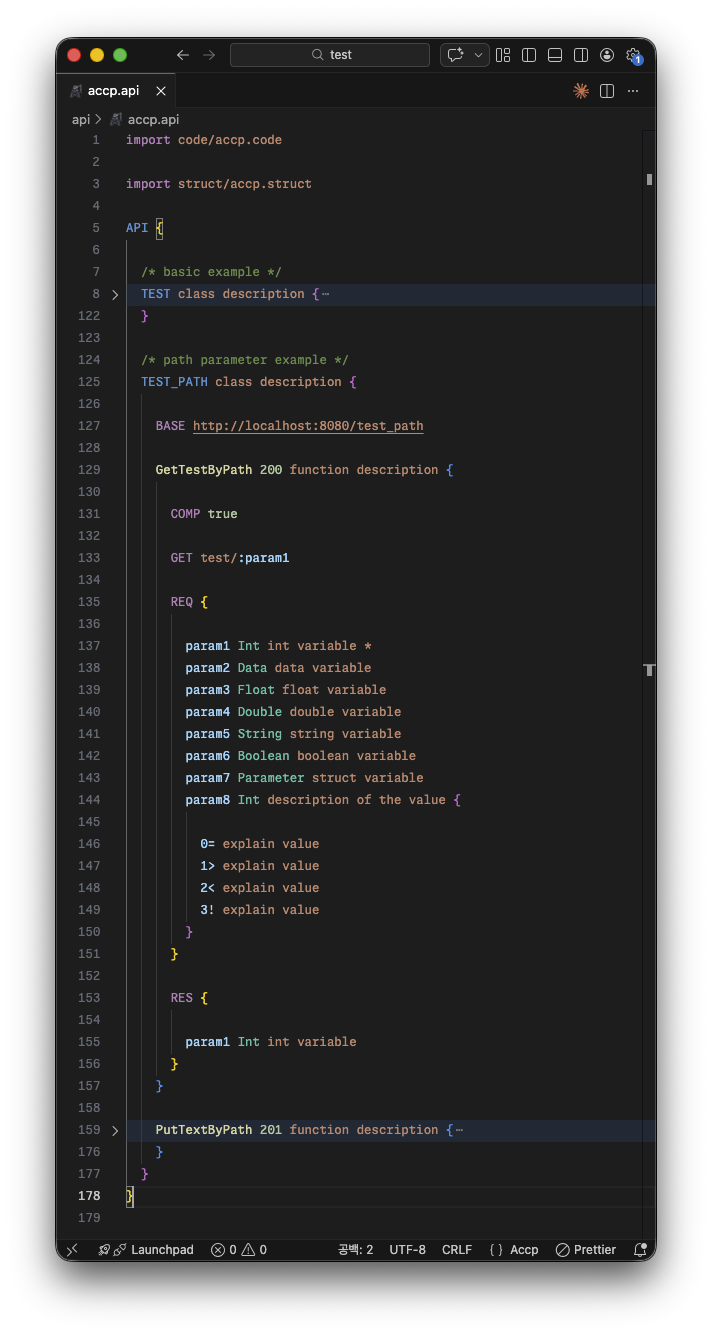
.code — Error Codes
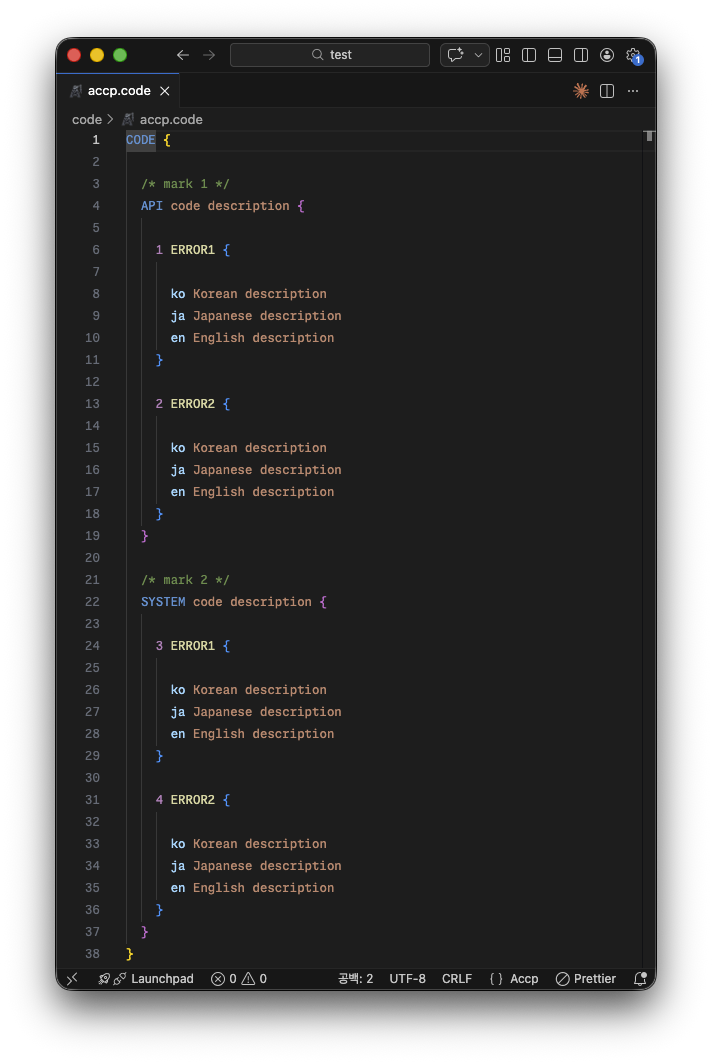
.struct — Data Structures
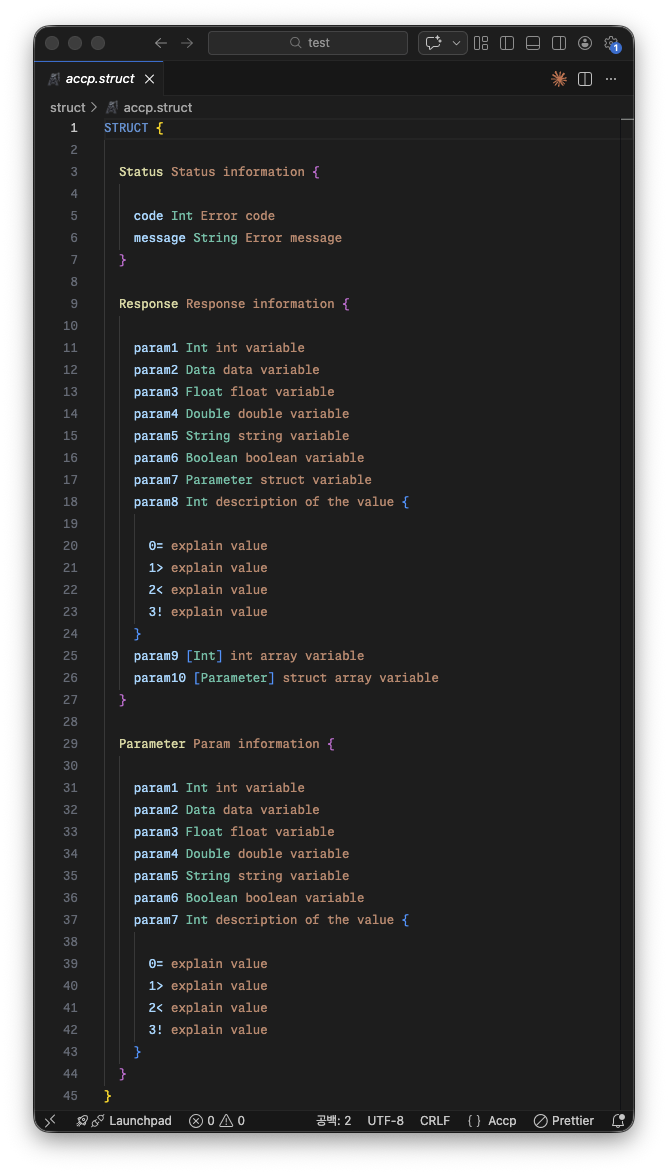
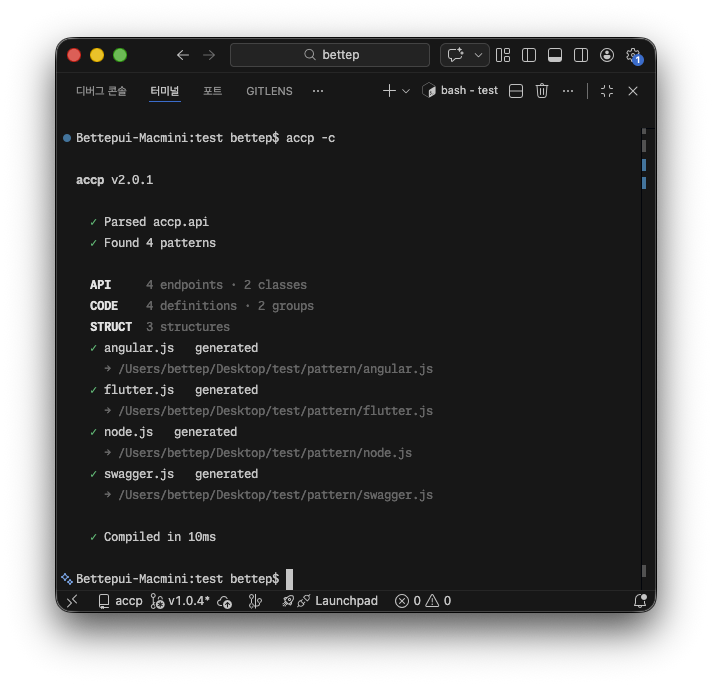
Compile
CLI
| Command | Description |
|---|---|
accp --compile |
Compile and generate code |
accp --examples <dir> |
Create example project |
Pattern Files
Pattern files receive OBJ (compiled data) and GEN (file writer) as arguments:
module.exports = function (OBJ, GEN) {
  const file = new GEN("output/api.ts");
  file.open();
  file.print("// generated code\n");
  file.close();
};
GEN Methods
| Method | Description |
|---|---|
new GEN(path) |
Create instance (auto-creates dirs) |
.open(encoding?) |
Start writing (default: utf8) |
.print(string) |
Append content |
.close() |
Flush buffer to file |
OBJ Structure
OBJ = {
  API: [{
    BASE: String,          // base path
    NAME: String,          // class name
    MARK: String,          // description
    FUNC: [{
      CODE: Int,           // endpoint code
      NAME: String,        // function name
      DESC: String,        // description
      (GET|PUT|POST|PATCH|DELETE): String,  // method: path
      PARAM: [String],     // path parameters
      COMP: Boolean,       // completion status
      PROC: [{ CODE, NAME }],              // related endpoints
      MARK: [{ NAME, MARK }],              // comments
      REQ: [{ NAME, MARK, CLASS, ARRAY, OPTION }],  // request fields
      RES: [{ ... }],      // response fields (same as REQ)
      OPT: { key: Boolean } // user-defined options
    }]
  }],

  CODE: [{
    NAME: String,
    MARK: String,
    CODE: [{ CODE: Int, NAME: String, MARK: { lang: String } }]
  }],

  STRUCT: [{
    NAME: String,
    MARK: String,
    DATA: [{ ... }]        // same as REQ fields
  }]
}
MCP Server
accp includes an MCP server (accp-mcp) for integration with LLM tools like Claude Code.
Setup
Add to your Claude Code settings (~/.claude/settings.json):
{
  "mcpServers": {
    "accp": {
      "command": "accp-mcp"
    }
  }
}
Available Tools
| Tool | Description |
|---|---|
accp_compile |
Parse .api/.code/.struct into JSON (OBJ) |
accp_generate |
Compile and run pattern files to generate code |
accp_validate |
Check syntax without generating |
accp_list_patterns |
List available pattern files |
accp_read_file |
Read an accp source file |
accp_write_file |
Write an accp source file |
accp_parse_string |
Parse accp syntax from a string |
VS Code Extension
accp language support — syntax highlighting and snippets for .api, .code, .struct files.
Snippets: API, CODE, STRUCT
Built-in Types
Int Float Double String Boolean Data
Programmatic Usage
const accp = require('accp');The core.js module exposes the compiler for use in Node.js applications.