1.0.5 • Published 10 years ago
align-to v1.0.5
align-to
Align the specified elements.

align(blue).to(yellow, ['TL', 'BL']);Synopsis
var align = require('align-to')
align(element).to(target, [from, to], options);
Usage
The code above will coincide the from point of element with the to point of the target.
element
type Element|jQueryElement, the element to be placed.
target
type Element|jQueryElement|'viewport', the target which element will be aligned to.
from, to
type String, the symbol of a specific point
There are 7 points for a single rectangle:
TL ----------- TC ----------- TR
|                              |
|                              |
|                              |
|                              |
LC             CC             RC
|                              |
|                              |
|                              |
|                              |
BL ----------- BC ----------- BR
align(blue).to(yellow, ['BC', 'BC']);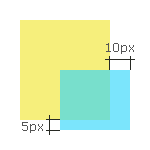
align(blue).to(yellow, ['BR', 'BR'], {
	adjust: {
		top: 5,
		left: 10
	}
});
options
- left
number=0the horizontal offset - top
number=0the vertical offset - fix
boolean=falseiftrue, the element will be fixed to the destination position.