azure-rest-adventure v0.1.1
azure-rest-adventure
go on a RESTful adventure to create a service on azure
What
A learning adventure that teaches how to write restful services and how to deploy those services to azure.
Goals
The goal of this adventure is to teach you how to build a RESTful service that runs on azure and works like a key-value store. That is, it supports storing data that matches the following format:
{
    name: "unique name",
    value: "any value"
}
It will support creating new items, listing items, querying specific items, and removing items.
Getting started
- First, make sure you have node installed.
- Then
npm install -g azure-rest-adventure - Then
azure-rest-adventureorazradvfor short
Main screen
This is what you see when you run
azradv
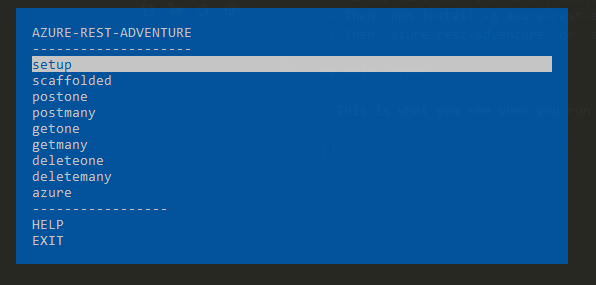
The list shows all the different segments of the lesson, listed in the order they should be completed. Selecting an entry (by hitting enter with it highlighted) outputs a description of the problem you'll need to solve for that portion of the lesson, as well as a description of how to verify that you've successfully completed it.
After a lesson is completed, run azradv again to select
the next lesson.
Lessons
Setup
The setup lesson is where we configure our nodejs project. You'll be asked to setup a directory for the project, configure the project (by creating a package.json file) and install dependencies.
To verify completion, we'll ask you to pass the directory
name (yes, you can pass . as the path) that your project
lives in, so we can check for the following things:
- package.json file exists
- package.json#main entry exists
- the file referenced by package.json#main exists
- package.json#dependencies contains express
- node_modules\express directory exists
Scaffolded
The scaffolded lesson is where we define our core logic
for the project. You'll be asked to create an entrypoint
(this is the file referenced in the above step in package.json#main)
that creates an express app and starts listening on port 3000.
To verify completion, we'll ask you to pass the entrypoint file path so we can start your application and check for the following things:
- your entrypoint loads without issue
- your entrypoint outputs "listening on ... 3000" where "..." may be anything
Todo: we should also validate that the application is actually listening
Postone
The postone lesson is where we define our first RESTful endpoint
for the project. You'll be asked to create an endpoint at
/items that's capable of receiving the following in the request body:
{
    name: "some string",
    value: "some string"
}
And responds with a 200 on success, a 400 when the request is malformed,
and a 500 when an internal error occurs.
To verify completion, we'll ask you to pass the entrypoint file path so we can start your application and check for the following things:
- your entrypoint loads without issue
- your entrypoint outputs "listening on ... 3000" where "..." may be anything
- your project supports
HTTP POST /itemswith a valid body
Postmany
The postmany lesson is where we define a new RESTful endpoint
for the project. You'll be asked to create an endpoint at
/items that's capable of receiving the following in the request body:
Where
...indicates 0-N additional objects that match that format.
[{
    name: "some string",
    value: "some string"
}, ...]
And responds with a 200 on success, a 400 when the request is malformed,
and a 500 when an internal error occurs.
To verify completion, we'll ask you to pass the entrypoint file path so we can start your application and check for the following things:
- your entrypoint loads without issue
- your entrypoint outputs "listening on ... 3000" where "..." may be anything
- your project supports
HTTP POST /itemswith a valid body
Getone
The getone lesson is where we define a new RESTful endpoint
for the project. You'll be asked to create an endpoint at
/items/:name that's capable of responding with a given
item if that item exists.
It responds with a 200 and the following body on success:
{
    name: "the passed name value",
    value: "some value"
}
a 400 when the request is malformed,
a 404 when no such item is found,
and finally a 500 when an internal error occurs.
To verify completion, we'll ask you to pass the entrypoint file path so we can start your application and check for the following things:
- your entrypoint loads without issue
- your entrypoint outputs "listening on ... 3000" where "..." may be anything
- your project supports
HTTP GET /items/item-nameand returns a valid response body - your project supports
HTTP GET /items/no-such-itemand returns a404status code
Getmany
The getmany lesson is where we define a new RESTful endpoint
for the project. You'll be asked to create an endpoint at
/items that's capable of responding with a given
item if that item exists.
It responds with a 200 and the following body on success:
Where
...indicates 0-N additional objects that match that format.
[{
    name: "the passed name value",
    value: "some value"
}, ...]
a 400 when the request is malformed,
and finally a 500 when an internal error occurs.
To verify completion, we'll ask you to pass the entrypoint file path so we can start your application and check for the following things:
- your entrypoint loads without issue
- your entrypoint outputs "listening on ... 3000" where "..." may be anything
- your project supports
HTTP GET /itemsand returns a valid response body - your project supports
HTTP POST /itemsto create an item, followed byHTTP GET /itemsto enumerate all items, including the newly created one.
Deleteone
The deleteone lesson is where we define a new RESTful endpoint
for the project. You'll be asked to create an endpoint at
/items/:name that's capable of removing that item if it exists.
It responds with a 200 on success,
a 400 when the request is malformed,
a 404 when no such item is found,
and finally a 500 when an internal error occurs.
To verify completion, we'll ask you to pass the entrypoint file path so we can start your application and check for the following things:
- your entrypoint loads without issue
- your entrypoint outputs "listening on ... 3000" where "..." may be anything
- your project supports
HTTP DELETE /items/item-nameand returns a valid response body - your project supports
HTTP POST /itemsto create an item, followed byHTTP DELETE /items/item-nameto create and then delete an item.
Deletemany
The deletemany lesson is where we define a new RESTful endpoint
for the project. You'll be asked to create an endpoint at
/items that's capable of removing all items.
It responds with a 200 when items are removed,
a 400 when the request is malformed,
a 404 when no items exists,
and finally a 500 when an internal error occurs.
To verify completion, we'll ask you to pass the entrypoint file path so we can start your application and check for the following things:
- your entrypoint loads without issue
- your entrypoint outputs "listening on ... 3000" where "..." may be anything
- your project supports
HTTP DELETE /itemsand returns a valid response - your project supports
HTTP POST /itemsto create a few items, followed byHTTP DELETE /itemsto create and then delete items.
Azure
The azure lesson is where we deploy the service to azure and validate it's functioning there. You'll be asked to deploy to azure.
To verify completion, we'll ask you to pass the url to your azure service
(including protocol, like http://) and test the following requests:
- HTTP DELETE /items
- HTTP POST /items
<one item> - HTTP POST /items
<many items> - HTTP GET /items
- HTTP GET /items/specific-item
- HTTP DELETE /items/specific-item
- HTTP DELETE /items
License
MIT