2.0.1 • Published 10 years ago
butter-proxy v2.0.1
butter-proxy

$ npm install -g butter-proxy
$ butter-proxy
Uses netstat to automatically find running servers and then passes requests
to hosts matching the folder name of the server to the correct port.
For instance, a request to www.resume.pxy would be passed to port 3000
assuming a process in ~/src/resume/www is listening on port 3000.
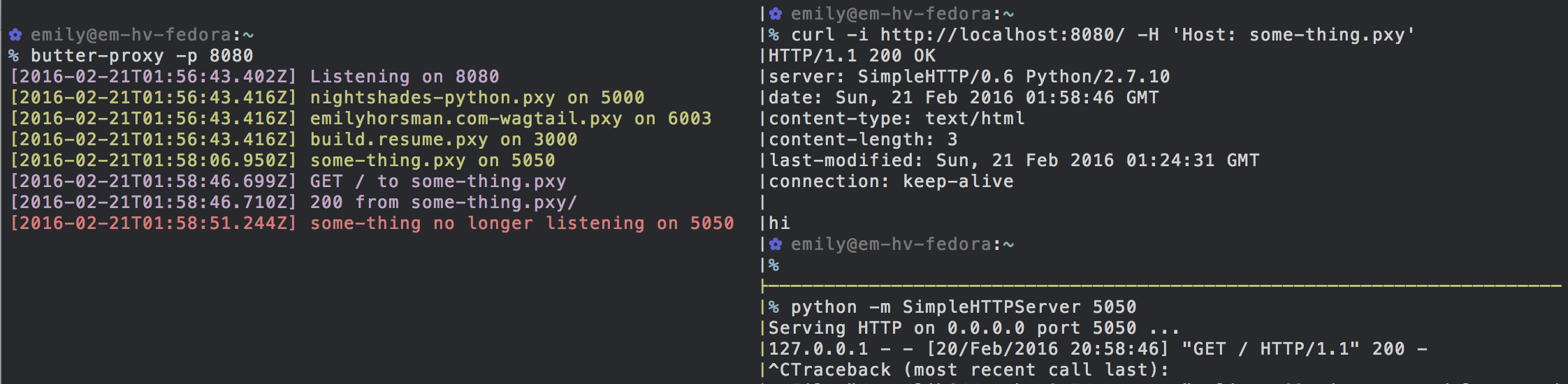
butter-proxyis installed and run on port 8080- A server is started on port 5050 in
~/src/some-thing butter-proxysees the server automatically and informs us- A request is made with a host matching the directory,
some-thing.pxy butter-proxypasses the request to port 5050- The server on port 5050 is taken offline with a handy ^C
butter-proxypromptly informs us the host name is no longer active
Options
- Change the port with
butter-proxy -p 8080 - Change the base directory (what isn't included in the domain) with
butter-proxy -b ~/code. By default this is~/src - Change the TLD with
butter-proxy -t dev. By default this ispxy