ccigraph v0.4.0
ccigraph


Create CircleCI workflow diagrams from the CLI.
The diagrams can be viewed here: https://dreampuf.github.io/GraphvizOnline.

Prerequisites
Node.js 10.x or higher.
Usage
This package is meant to be used as a command-line tool.
Usage:
  ccigraph [-f {filename}] list                      # list all workflow names
  ccigraph [-f {filename}] draw -w {workflow} [-p]   # draw a specific workflow
Options:
  -f {filename}   the circleci config file, default = .circleci/config.yml
  -w {workflow}   the workflow name to draw
  -p              print the raw graph text instead of creating a link
Long Names:
  -f        --file
  -w        --workflow
  -p        --print
Example
Imagine you are in the root of your project and
you have a .circleci/config.yml which contains
two workflows. You can list them as follows:
$ ccigraph list
non_master_branch_build
build_test_deploy
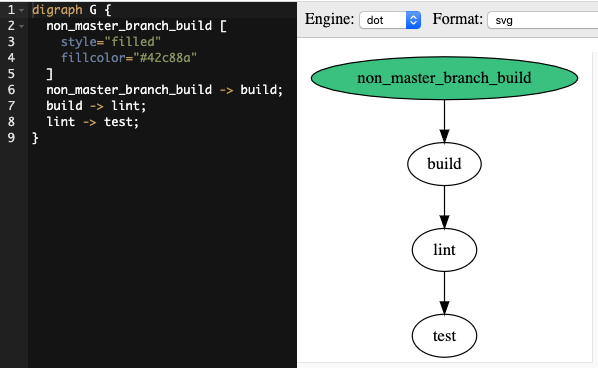
Create a diagram of the non_master_branch_build workflow as follows:
$ ccigraph draw -w non_master_branch_build
https://dreampuf.github.io/GraphvizOnline/#digraph%20G%20%7B%0A%20%20non_master_branch_build%20-%3E%20build%3B%0A%20%20build%20-%3E%20lint%3B%0A%20%20lint%20-%3E%20test%3B%0A%7D
The output is a link to the diagram.
Tip: If you are using a terminal tool which supports URL links, you can click the link to open a browser tab.
For example Cmd-click on the URL on Mac in iTerm2.
You should see something like this in a new browser tab:
Bugs / Caveats
If your CircleCI config file is invalid, don't be shocked if this tool fails. Consider validating the CircleCI config first using the CircleCI CLI
ccigraphdoesn't allow a job which appears to require itself. CircleCI allows this as long as there is only one other job with the same name (and therefore CircleCI can infer which job you intended to refer to).For example, this is allowed in CircleCI but not in
ccigraph.test test: requires: - test # looks like the job requires itself, not supported by ccigraphGood practice is to use unique name attributes whenever you repeat the same job, for example:
test: name: test1 test: name: test2 requires: - test1 # clearer now, and supported by ccigraphccigraphsupports duplicate job names by appending numerical suffixes (e.g.-1and-2). This mimics CircleCI behaviour, butccigraphdoes this more aggressively than CircleCI whereas CircleCI only renames jobs when it's necessary to make requirements work. For example, CircleCI will not rename jobs in the following case since no jobs require either job:jobs: - test - testWhereas
ccigraphwill rename all duplicates:jobs: - test-1 - test-2If you really care about the names selected for duplicate jobs, you should be using unique
nameattribute in each of your duplicated jobs. This will prevent suffixes being automatically added and will be supported by both CircleCI andccigraph.This modified behaviour is partly to make the diagrams clearer and partly because the exact way in which CircleCI selects suffixes is not documented and shouldn't be relied upon anyway.
ccigraph's only objective in this regard is to ensure that the workflow dependency structure is the same.
Moan
It shouldn't be necessary to write tools such as this. Why can't the CircleCI UI draw a decent diagram of your workflow ?